
Next-level Performance and Reliability with Simplified Management
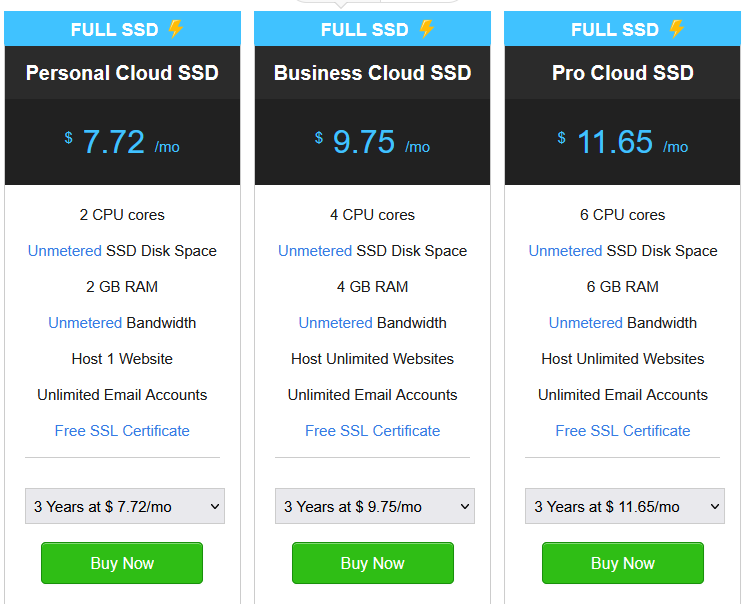 We provide the fastest full SSD Cloud Hosting:
- Blazing-Fast Load Time – With full SSD storage, highly optimized servers, and state of the art NGINX caching, host websites at best-in-class speeds.
- Instant Scaling – No need to move your hosting as your traffic grows. Ramp up your resources at the click of a button – instantly add RAM and CPU without a reboot.
- cPanel for Management- Just like Shared Hosting – manage your website and associated services like Email and sub-domains with the simplicity and ease of cPanel.
- Fully managed servers – Server management, patches and bug fixes are handled by our experts to ensure you can focus on building and running your website.
- Quick Setup – You can use your Cloud Hosting package from the moment you have completed your purchase – no delays, no elaborate setups!
- 1-click Application installer – Choose between 100+ applications and CMSes to quickly start setting up your website.
FAQs About Cloud Hosting
What is Cloud Hosting?
What is the difference between Cloud Hosting and Shared Hosting?
What is SSD, and how is it different from the existing server?
SSD (Solid State Drives) are a form of storage technology. It is a much faster storage than the existing HDD (Hard Disk Drive) storage. Faster storage means your data gets written to and read from your storage faster. This means that your websites will load much faster if they are running on SSD storage.
What is Caching?
What is the limit for additional CPU and RAM?
Is a Dedicated IP available?
How do I install an SSL certificate on my Website?
Do you provide any one click install scripts along with Cloud Hosting?
Is Upgrade/Downgrade possible?
What is your backup policy?
Is there a Money Back Guarantee?

What are the Benefits of Cloud Hosting ?
Cloud Hosting is one of the most popular hosting solutions today because it solves the limitations of shared hosting and dedicated servers. Cloud hosting gives you scalability, high uptime, cost-efficiency, performance, and security, making it ideal for businesses that need flexibility and growth without worrying about physical servers.
Here are the main benefits of cloud hosting:
🌐 Benefits of Cloud Hosting
🔹 1. Scalability (Pay for What You Use)
-
You can instantly scale resources (CPU, RAM, storage, bandwidth) up or down.
-
Great for websites or apps with fluctuating traffic (e.g., e-commerce during holidays).
🔹 2. High Reliability & Uptime
-
Your website is hosted on a network of servers (the “cloud”), not just one machine.
-
If one server fails, another takes over → near 100% uptime.
🔹 3. Cost-Efficient
-
No need to buy/maintain expensive hardware.
-
Flexible pay-as-you-go pricing → you only pay for the resources you actually use.
🔹 4. Better Performance & Speed
-
Cloud hosting uses load balancing across multiple servers.
-
This means faster response times, especially for global users.
🔹 5. Data Security & Backup
-
Cloud providers usually offer automated backups, firewalls, and disaster recovery.
-
Data is often mirrored across multiple servers/locations for extra safety.
🔹 6. Global Accessibility
-
You can access and manage your server from anywhere, using a control panel or API.
-
Ideal for remote teams and businesses with global operations.
🔹 7. Flexibility in Technology Stack
-
Supports both Linux and Windows environments.
-
Lets you run apps in PHP, Python, Node.js, Java, .NET, etc.
🔹 8. Eco-Friendly
-
More efficient use of resources compared to traditional hosting.
-
Reduced hardware waste since many users share cloud infrastructure.
Cloud Hosting vs Dedicated Hosting vs Shared Hosting

⚖️ Hosting Types Comparison
| Feature | Shared Hosting | Cloud Hosting | Dedicated Hosting |
|---|---|---|---|
| Definition | Many websites share the same server resources (CPU, RAM, storage). | Websites/apps run on a network of virtual servers that pull resources from multiple physical machines. | You rent an entire physical server dedicated only to your website/app. |
| Cost | 💲 Cheapest | 💲💲 Flexible pay-as-you-go | 💲💲💲 Most expensive |
| Performance | Low–medium (depends on how many users share the server). | High (resources scale with demand, load balanced). | Very high (all resources are yours). |
| Scalability | ❌ Limited (need to upgrade to VPS/dedicated if you grow). | ✅ Excellent (add/remove resources instantly). | ⚠️ Limited (must manually upgrade hardware or switch servers). |
| Reliability / Uptime | ⚠️ Lower (if one site crashes, it may affect others). | ✅ High (server redundancy, failover protection). | ✅ High (dedicated resources, but single hardware failure can cause downtime). |
| Security | Basic (shared environment, higher risk). | Strong (isolated virtual environments, built-in cloud security). | Very strong (fully isolated, but depends on your setup). |
| Management | Easy (good for beginners, cPanel/Plesk). | Medium (managed cloud panels available). | Advanced (requires server management skills unless fully managed). |
| Best For | Small websites, blogs, personal portfolios, startups. | Growing businesses, e-commerce, SaaS, apps with variable traffic. | Large enterprises, high-traffic websites, organizations needing full control. |
Quick Summary
- Shared Hosting → Best for beginners, small sites, personal projects.
- Cloud Hosting → Best for businesses needing scalability, uptime, and flexibility (e.g., e-commerce, SaaS, apps).
- Dedicated Hosting → Best for enterprises needing maximum performance, security, and full control.
👉 If you’re building a business website with growth in mind, cloud hosting is usually the sweet spot.
👉 If you’re running a mission-critical app with strict compliance/security, go for dedicated hosting.
👉 If you’re just starting out or have a small budget, shared hosting is enough.