
You can check our free domain suggestion tool here
Register .com From $14.8 ; .net $16.49; .org $16.99
If you want to host a domain name’s website on your server using cPanel®, you have to create an Account in WebHost Manager (WHM).
To Create an Account in cPanel/WHM
- Log in to WebHost Manager using root for your username and your server’s password at https://yourserverip:2087, where yourserverip is your server’s IP address.
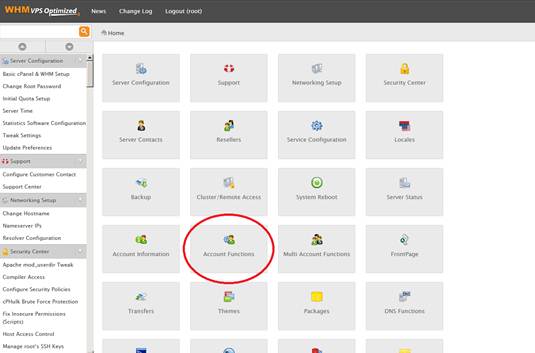
- In the Home section, click Account Functions.
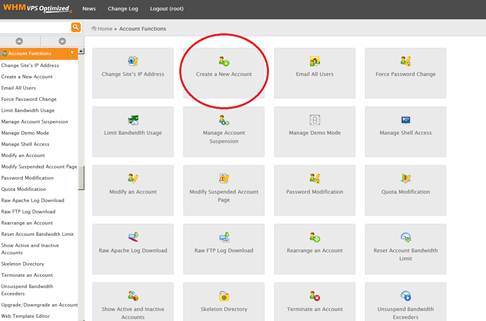
Click Create a New Account.
Complete the on-screen fields in the Domain Information section.
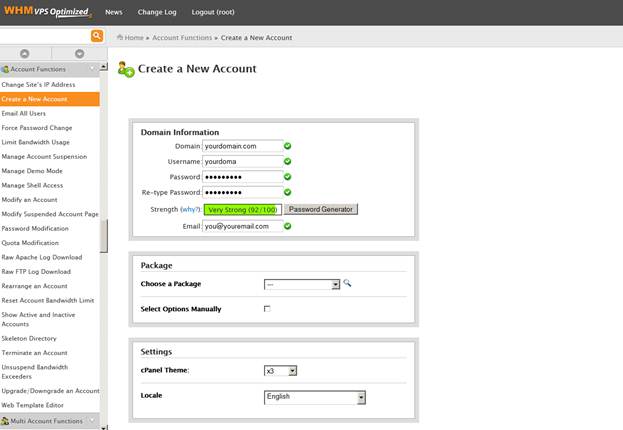
(Optional) Complete the other on-screen fields.
Click Create.
WebHost Manager displays a results page outlining your new Account. If there are no problems, WebHost Manager displays Account Creation Complete!!! at the bottom of the page.
(Visited 13 times, 1 visits today)