
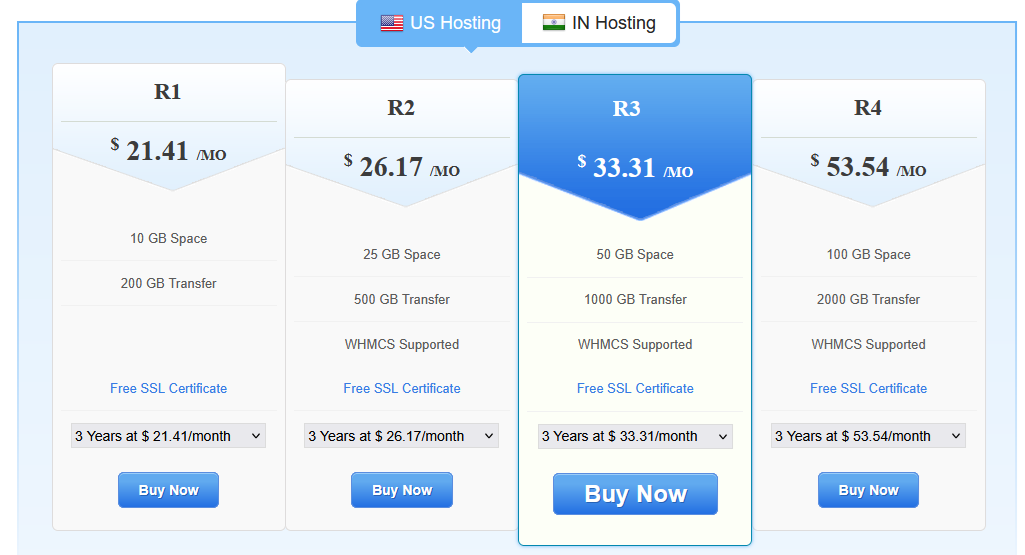
 Features of Our Reseller Window Hosting
Server Specifications
- Dual E5530 2.40GHz Xeon quad core hyperthreaded processors
- 64 GB RAM
- 250 GB RAID 1 (mirrored) OS drive
- 1 TB RAID 1 (mirrored) customer data drive cached
- Battery backed, RAID controller for all drives
- Redundant Power, HVAC & Fire-Detection Systems
Programming Support
- Windows 2022 (Standard) 64 bit
- IIS 10, ASP 10.0 , ASP.NET 3.5, 4.8
- PHP 7.4, 8.0, 8.1, 8.2 and above
- MySQL 8 and above, MSSQL 2016 and 2017
- Ruby On Rails
- GD, cURL, CGI, mcrypt
- Zend Optimizer, Zend Engine, ionCube Loader
Plesk Features
- Create Hosting Plans
- Set up and Modify Customer Accounts
- Track traffic Usage by each Customer
- Brand your plesk panel
- Add custom buttons
- Dedicated Plesk Panel for Clients
- Upload and Manage Web Pages
- View Website Statistics
- Install Over 250 Scripts with a single click
Email & Domain Name Features
- Outlook, Thunderbird and Windows Mail compatible
- Blackberry, iPhone, Android and PDA support
- Feature packed Webmail
- Advance Spam/Virus Protection
- Mail Forwards, Email Aliases, Auto Responders
- Unlimited Mailing Lists, Catch All Accounts, Mail Spam Filters
- Parked Domains
- Free DNS Management
- Domain Forwarding, Path Forwarding, URL Masking

FAQs About Our Reseller Window Hosting
If you’re a Web Designer/Developer you can host and manage all your websites/clients with one Reseller Hosting package instead of going through the hassle of managing multiple shared Hosting packages. This also lowers your Web Hosting costs significantly.
Additionally, you can resell hosting as a value added feature to your existing business or as a separate entity.

We have a fully qualified Support team at hand to assist you. You can take a look at all our contact details here.
However, we do not offer Support to your Customers directly.

More Details About Our Reseller Window Hosting
Plesk Obsidian 18.x
- Complete Administrative Control
- Monitor Server Status around the clock
- Create Hosting Packages – Limit Disk Space, Bandwidth, Email, Databases etc.
All in one Billing & Client Management Solution – WHMCS
- Easily manage all Billing, Client Management and Support functions
- Integrated Domain Management
- Customizable, Simple and Secure
Reliable Support
- 99.9% Uptime Guarantee
- 30 Day Money Back Guarantee
- 24x7x365 Support
Robust Infrastructure
- State-of-the-art Datacenters
- Dual Quad-Core Xeon powered Servers
- Redundant Scalable Servers
Advanced Email Hosting Included
- Unlimited POP3 Email Accounts with SMTP
- IMAP Support
- Easy to use Webmail Interface
Hosting Features & Addons
- Unlimited Add-On Domains
- Unlimited Sub-Domains
- Unlimited Databases
- Parked Domains
- Unlimited FTP Accounts
- Private SSL Available
- Add-on Dedicated IP
Who Needs Windows Hosting?
Windows hosting is a type of web hosting that uses a Windows Server operating system (usually Windows Server 2019/2022). You would specifically need it if your website or application requires Microsoft technologies such as:
- ASP.NET / ASP / .NET Core websites
- If you build your site or app using Microsoft’s ASP.NET framework.
- MSSQL (Microsoft SQL Server) databases
- If your backend relies on Microsoft SQL instead of MySQL/PostgreSQL.
- Microsoft Access databases
- Some legacy business apps still use Access.
- SharePoint hosting
- Businesses using SharePoint portals.
- Microsoft Exchange integration
- For advanced email and collaboration tools.
- If you’re in a corporate environment
- Many enterprise IT systems run Windows-based applications, so hosting providers align with those needs.
If you’re just running WordPress, PHP, Python, or static websites, you don’t need Windows hosting. Linux hosting will usually be faster, cheaper, and more common.
Difference Between Windows Hosting and Linux Hosting
| Feature | Windows Hosting | Linux Hosting |
|---|---|---|
| Operating System | Windows Server | Linux (Ubuntu, CentOS, Debian, etc.) |
| Best For | ASP.NET, MSSQL, .NET Core, Access | WordPress, PHP, MySQL, Python, Node.js |
| Database Support | MSSQL, Access | MySQL, MariaDB, PostgreSQL |
| Control Panel | Often Plesk | cPanel, Plesk |
| Performance & Cost | Higher cost (Windows license fees) | Usually cheaper, more efficient |
| Popularity | Less common (niche) | Most common (default choice for 70%+ of websites) |
| Open-source support | Limited | Excellent (supports open-source stacks like LAMP/LEMP) |
Rule of Thumb:
- Use Windows Hosting only if your site/app needs Microsoft tech stack.
- Use Linux Hosting for WordPress, PHP, Python, Node.js, Ruby, static sites, and most general websites.
The Decision flowchart to help you decide between Windows Hosting and Linux Hosting:
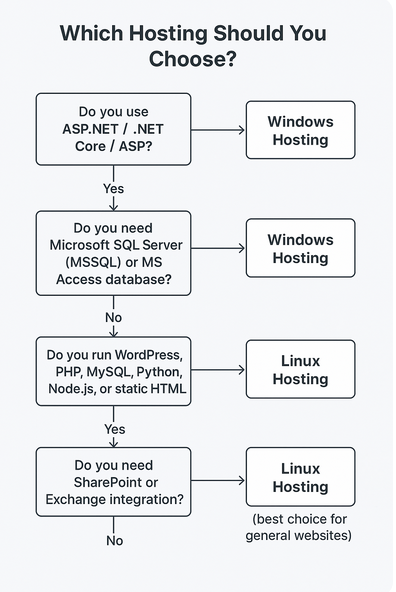
Which Hosting Should You Choose?
1. Do you use ASP.NET / .NET Core / ASP?
➡️ Yes → Windows Hosting
➡️ No → Go to 2
2. Do you need Microsoft SQL Server (MSSQL) or MS Access database?
➡️ Yes → Windows Hosting
➡️ No → Go to 3
3. Do you run WordPress, PHP, MySQL, Python, Node.js, or static HTML?
➡️ Yes → Linux Hosting
➡️ No → Go to 4
4. Do you need SharePoint or Exchange integration?
➡️ Yes → Windows Hosting
➡️ No → Linux Hosting (best choice for general websites)
✅ Quick Summary (At a Glance):
- Windows Hosting = For Microsoft tech (ASP.NET, MSSQL, SharePoint, Exchange).
- Linux Hosting = For almost everything else (WordPress, PHP, MySQL, Python, Node.js).