
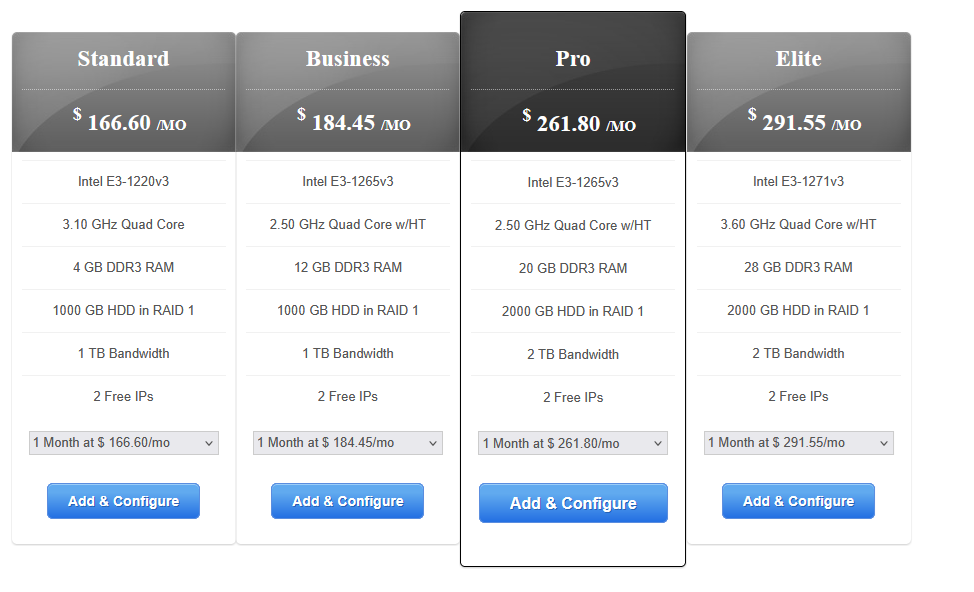
- We take great pride in the hardware we use for our dedicated servers. We only use the latest and thoroughly tested Blade servers manufactured by SuperMicro.
- To take the greatest care of your data, all our servers come with two hard disks by default with RAID1 enabled.
- Making sure, even when one hard disk completely breaks down, your data is still intact and your server will remain online.
 Who Need Window Dedicated Servers ?
Windows dedicated servers are best for businesses that run Microsoft technologies (ASP.NET, MSSQL, Exchange, SharePoint, AD), need remote desktop environments, or prefer Windows’ GUI-based management.
Here’s who needs Windows dedicated servers:
🔹 1. Businesses Running Microsoft Applications
-
Companies that rely on Microsoft SQL Server (MSSQL), Microsoft Exchange, or SharePoint.
-
Windows Server integrates seamlessly with these applications.
🔹 2. .NET & ASP.NET Developers
-
If your website or application is built with .NET, ASP.NET, or C#, you’ll need a Windows server.
-
Full compatibility with the IIS (Internet Information Services) web server.
🔹 3. Enterprises Using Active Directory
-
Organizations that use Active Directory (AD) for authentication, permissions, and user management.
-
Windows dedicated servers let them extend AD across their infrastructure.
🔹 4. Companies Needing Remote Desktop Services (RDP)
-
Businesses that want employees to log in remotely to a centralized Windows environment.
-
Ideal for call centers, accounting firms, and remote work setups.
🔹 5. Businesses Using Microsoft Licensing
-
Companies that already pay for or rely on Microsoft licenses (Office 365, MS Dynamics, etc.) often integrate them with Windows servers.
🔹 6. Game & App Hosting (Windows-Only Software)
-
Certain games and proprietary apps are only designed for Windows environments.
-
Windows servers are required for compatibility.
🔹 7. Corporate Intranets & Legacy Software
-
Some older enterprise applications are built only for Windows environments and cannot run on Linux.
🔹 8. Businesses Wanting GUI-Based Management
-
Unlike Linux (command-line heavy), Windows offers a familiar GUI, making it easier for teams without deep Linux skills to manage.
 The Difference Between Linux Servers and Window Servers
⚖️ Linux Servers vs Windows Servers
🔹 1. Operating System
- Linux Server → Runs on open-source distributions like Ubuntu, CentOS, Debian, or Red Hat.
- Windows Server → Runs on Microsoft’s Windows Server editions (e.g., 2019, 2022).
🔹 2. Cost
- Linux → Usually free or low-cost (open-source).
- Windows → Requires a paid Microsoft license, so hosting costs are higher.
🔹 3. Supported Technologies
- Linux → Best for:
- PHP, Python, Perl, Ruby, Node.js
- MySQL, MariaDB, PostgreSQL
- Apache, Nginx
- Windows → Best for:
- ASP, ASP.NET, C#
- Microsoft SQL Server (MSSQL)
- IIS (Internet Information Services)
- Microsoft Exchange, SharePoint
🔹 4. Performance & Stability
- Linux → Known for stability, speed, and uptime. Handles high-traffic websites with fewer resources.
- Windows → Heavier system, may require more resources, but optimized for Microsoft apps.
🔹 5. Security
- Linux → Open-source with strong community support. More secure if properly configured.
- Windows → Secure but often targeted by malware (because it’s more widely used in enterprises). Needs regular patching.
🔹 6. Ease of Use
- Linux → Command-line based (requires some technical skill). Control panels (like cPanel or Plesk) make it easier.
- Windows → GUI-based (like desktop Windows), easier for beginners. Supports Remote Desktop (RDP) access.
🔹 7. Customization & Control
- Linux → Highly customizable, full root access, ideal for developers.
- Windows → Customizable but limited to Microsoft ecosystem.
🔹 8. Use Cases
- Linux Servers are best for:
- Websites built with WordPress, Joomla, Drupal
- LAMP/LEMP stack apps (Linux + Apache/Nginx + MySQL + PHP/Python)
- Cloud hosting, development environments, open-source apps
- Windows Servers are best for:
- ASP.NET websites and apps
- Enterprises using Microsoft Exchange, SharePoint, MSSQL
- Remote desktop services & corporate intranets
✅ In short:
- Choose Linux servers if you want cost-effectiveness, performance, open-source flexibility, and compatibility with PHP/MySQL apps (like WordPress).
- Choose Windows servers if you need ASP.NET, MSSQL, or Microsoft enterprise applications.