
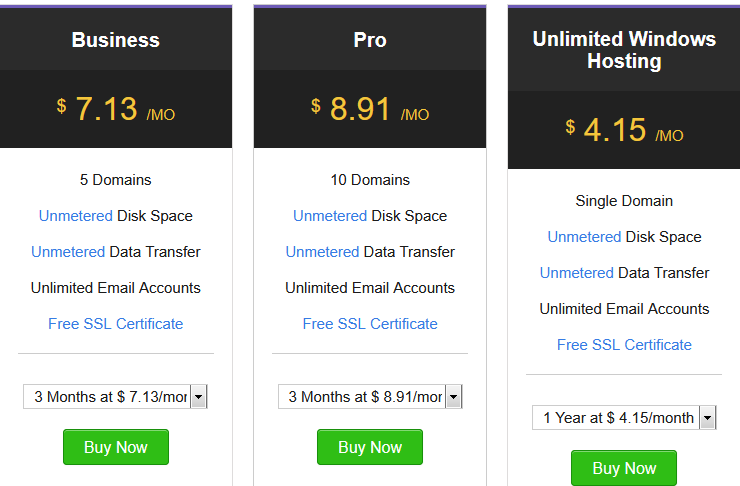
 All the Window Web Hosting Plans include:
- Plesk for Management – Parallels Plesk, a powerful control panel, lets you manage your hosting package including the files, applications easily!
- Email included – Advanced email management features in Plesk allow you manage your emails, mailing lists and more without any hassles.
- 99.99% uptime – Our cutting edge datacenters and highly redundant SAN powered devices guarantees maximum uptime for your websites.
- State-of-the-Art Servers
- Dual Intel Xeon Processor E5-2630
- 64 GB RAM
- 256 GB SSD in RAID 1
- Octa Core with 2.40 GHz
- 2 TB SATA in RAID 1
- Program in Any Language
- Windows Server 2008
- IIS 7.0, ASP 10.0 , ASP.NET 3.5, ASP.NET 4.8, PHP 7.2,7.3,7.4,8.0,8.1 and 8.2, GD, cURL, CGI, mcrypt
- MySQL 8 and above, MSSQL 2012
- Ruby On Rails
- Zend Optimizer, Zend Engine, ionCube Loader
- Top-Notch Security
- Anti Spam & Virus Protection
- Password Protect Directories
- Secure FTP Access
- IP Blocking
- phpMyAdmin Access
- Hotlink & Leech Protection
- Cron Jobs for Scheduled Tasks
- Customizable Error Page
- Advanced Website Statistics
 FAQs About Unlimited Window Web Hosting
What is Shared Web hosting?
In Shared Web Hosting, multiple clients are hosted on a single server i.e. the clients share the server’s resources. This helps reduce the cost, since the cost of the server and its resources are spread over all the clients/packages hosted on the server. Shared Hosting is perfect for personal websites, small and mid-sized businesses that do not require all the resources of a server.
Q. Can I upgrade to a higher plan?
Yes, you can easily upgrade to one of our higher plans at any time.
Q. Who do I get in touch with if I need help?
Our Support team is always at hand to assist you. You can take a look at all our contact details >here.
Q. Directory and File Structure – Windows
From among the several directories found within your Plesk account, only the following are important:
| Directory | Contents |
|---|---|
| \httpdocs | Contains all files that are part of the website. Any file and folder inside this directory is visible over the Internet unless you password protect it. |
| \error_docs | When visitors come to your site and request pages that the web server cannot find, the web server generates and displays a standard HTML page with an error message. The standard error messages may inform of problems but they do not usually say how to resolve them. You may want to create your own error pages and upload them in this directory. |
File Structure
Three E Solutions inc‘s Plesk hosting servers will check for the existence of one of the below files and based on the order specified below, display it’s content as the home page, when anyone tries to list the content of any folder/directory:
| Priority | File Name |
|---|---|
| 1 | index.html |
| 2 | index.htm |
| 3 | index.cfm |
| 4 | index.shtml |
| 5 | index.shtm |
| 6 | index.stm |
| 7 | index.php |
| 8 | index.php3 |
| 9 | index.asp |
| 10 | index.asp |
| 11 | default.htm |
| 12 | default.asp |
| 13 | default.aspx |
Who Use Window Web Hosting ?
When you see “Windows Web Hosting”, it usually means the hosting server runs on Microsoft Windows Server (rather than Linux).
People and businesses choose Windows hosting mainly when they need Microsoft technologies. Common users include:
Who Uses Windows Web Hosting
- Developers using ASP.NET or .NET Core
- If a website or web app is built with ASP.NET, VB.NET, or C#, Windows hosting is required.
- Example: Business intranet portals, enterprise-level apps.
- Users who need Microsoft SQL Server (MSSQL)
- If your database is MS SQL or MS Access, Linux hosting won’t work.
- Windows hosting supports SQL Server Management Studio and ADO.NET.
- Businesses tied to Microsoft Ecosystem
- Companies already using Microsoft Exchange, SharePoint, or Active Directory often prefer Windows hosting for easier integration.
- People needing Classic ASP
- Legacy websites that still run Active Server Pages (ASP) require Windows hosting.
- Users running applications that rely on Windows components
- Examples:
- Websites using COM objects
- Applications built for IIS (Internet Information Services)
- Examples:
Who Usually Doesn’t Need Windows Hosting
- If your site only needs WordPress, PHP, MySQL, Python, or Node.js, then Linux hosting is cheaper, faster, and more common.
In short:
- Use Windows Hosting → when you need Microsoft technologies.
- Use Linux Hosting → for most other websites (WordPress, PHP, etc.).
Do you want me to give you some real-world examples of companies or sites that actually use Windows hosting?