
WordPress is one of the most widely used platforms for building websites. It can be used to create a simple personal blog, a company website, an online store, a news site, a membership website, a portfolio, or even a large content-driven website with thousands of pages.
Click to WordPress Web Hositng from $7.47 per month
But what exactly is WordPress?
The simplest answer is that WordPress is a Content Management System, or CMS. A CMS is software that helps you create, organize, edit, and publish website content without having to manually write every web page in HTML.
Instead of creating individual files and uploading them to a server every time you want to change something, WordPress gives you an administrative dashboard where you can manage your website through a web browser.
WordPress started in 2003 as a blogging platform, but it has grown far beyond blogging. Today, WordPress is used for everything from small personal websites to large commercial and publishing websites.
According to WordPress.org, WordPress now powers more than 43 percent of websites on the web.
What Is a Content Management System?
To understand WordPress, it helps to first understand what a Content Management System does.
In the early days of the web, many websites consisted of individual HTML files. If a website owner wanted to add a page, change a menu, or update some text, someone often had to edit the HTML code directly and upload the new files to the web server.
A CMS changes that process.
Instead of manually editing website files, you log in to an administration area and work with your content through an interface.
For example, with WordPress you can create a new page by clicking Pages → Add New, enter a title, add text and images, and click Publish.
WordPress then handles much of the technical work required to store the content and display it correctly to visitors.
This separation between content management and website presentation is one of the main reasons WordPress became so popular.
How Does WordPress Work?
When someone visits a WordPress website, the server does more than simply send a static HTML file.
WordPress is primarily a server-side application written in PHP.
PHP is a programming language commonly used to create dynamic websites. A dynamic website can generate pages based on information stored in a database instead of keeping every page as a separate fixed HTML file.
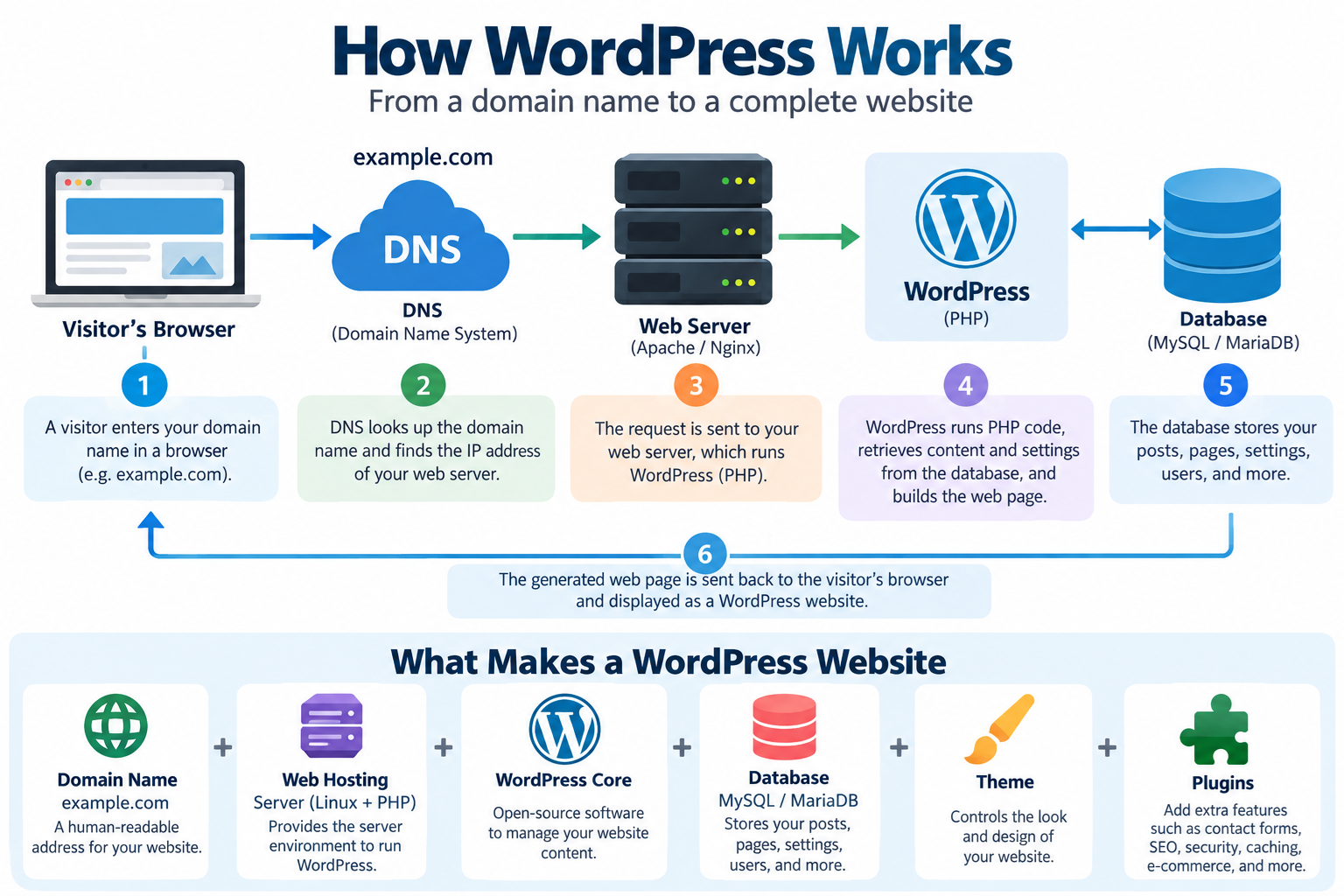
A simplified WordPress request looks like this:
Visitor → Web Server → WordPress/PHP → Database → Generated Web Page → Visitor
Suppose someone visits an article on your WordPress website.
The web server receives the request. WordPress runs the necessary PHP code, retrieves the article and related information from the database, combines that information with the website theme, and generates the page that is sent to the visitor’s browser.
This entire process normally happens in a fraction of a second.
Caching systems can make the process even faster by storing previously generated versions of pages so that WordPress does not have to rebuild the same page for every visitor.
What Does the WordPress Database Store?
A database is an organized system for storing information.
WordPress commonly uses MySQL or MariaDB as its database system.
The database can store information such as:
- Posts
- Pages
- Comments
- User accounts
- Website settings
- Categories
- Tags
- Menu information
- Plugin settings
- Theme configuration
- Custom content created by plugins
The images and other uploaded files themselves are normally stored in directories on the web server, while information about those files is also recorded in the database.
This distinction is important when backing up a WordPress site.
A complete WordPress backup normally needs both the website files and the database.
What Is the WordPress Dashboard?
The WordPress Dashboard is the private administration area of your website.
After logging in, website owners and authorized users can manage most parts of the site from this dashboard.
Depending on the website and installed plugins, the dashboard may contain areas such as:
Posts
Pages
Media
Comments
Appearance
Plugins
Users
Tools
Settings
For a beginner, this means you usually do not need to work directly with server files every time you publish an article.
You can write, edit, upload images, manage menus, install themes, and configure many website features from your browser.
What Are WordPress Posts and Pages?
WordPress has several types of content, but two of the most important are posts and pages.
A post is usually used for content that is published over time.
Examples include:
News articles
Blog entries
Tutorials
Product updates
Company announcements
Posts can normally be organized using categories and tags and displayed in chronological order.
A page is generally used for more permanent content.
Examples include:
About Us
Contact
Services
Privacy Policy
Web Hosting
Company Information
The technical distinction may seem small, but it helps WordPress organize different types of content properly.
What Is a WordPress Theme?
A WordPress theme controls much of the visual presentation of a website.
The theme can determine things such as:
Page layout
Typography
Colours
Header design
Footer design
Navigation
Spacing
Blog layout
Archive pages
Different themes can make the same WordPress content look completely different.
This is another important feature of a CMS: the content and the design are largely separated.
You can therefore redesign a WordPress website without having to rewrite every article.
Modern WordPress also supports block themes, which allow many areas of the website—including headers, footers, navigation, and page templates—to be edited using blocks through the Site Editor.
What Are WordPress Blocks?
Modern WordPress uses a block-based editing system.
Instead of treating a page as one large text box, WordPress treats different pieces of content as individual blocks.
For example, a page can contain:
Paragraph blocks
Heading blocks
Image blocks
Video blocks
Button blocks
Gallery blocks
Column blocks
List blocks
Quote blocks
Each block can be moved, edited, duplicated, or styled separately.
This makes page building more visual and allows beginners to create fairly sophisticated layouts without manually writing HTML.
WordPress describes blocks as the visual foundation of the modern editing experience and uses them not only for article content but also, with compatible themes, for other parts of the site.
What Is a WordPress Plugin?
A plugin is software that adds additional functionality to WordPress.
Think of WordPress itself as the basic operating platform for your website and plugins as optional modules that add new capabilities.
Plugins can add features such as:
Contact forms
Search engine optimization tools
Security scanning
Caching
Backups
Image optimization
Membership systems
Analytics
E-commerce
Payment processing
Spam protection
Two-factor authentication
Page builders
Email marketing integrations
The plugin system is one of WordPress’s greatest strengths.
Instead of building every feature yourself, you can often add the required functionality by installing an existing plugin.
However, plugins should not be installed carelessly.
Every plugin adds code to your website, and poorly maintained plugins can create performance problems, compatibility issues, or security vulnerabilities.
A good WordPress site usually uses only the plugins that are genuinely needed.
WordPress.org vs WordPress.com
This distinction confuses many beginners.
WordPress.org is the home of the open-source WordPress software.
You can download WordPress and install it on your own web hosting account. This is commonly called self-hosted WordPress.
With self-hosted WordPress, you normally choose your own hosting company, domain name, themes, plugins, server resources, backups, and security configuration.
WordPress.com, on the other hand, is a commercial hosted service based on WordPress technology.
With WordPress.com, much of the server infrastructure is managed for you, although features and customization options depend on the service plan being used.
Therefore, when hosting companies talk about “WordPress hosting,” they are usually referring to the self-hosted WordPress software available from WordPress.org.
Is WordPress Free?
The WordPress software itself is open-source software and is distributed under the GNU General Public License.
That means the core software can be downloaded, used, modified, and redistributed under the terms of the license.
There is no software license fee simply for using WordPress itself.
However, operating a website is not necessarily free.
A typical WordPress site may still require:
A domain name
Web hosting
Premium themes
Premium plugins
Professional development
Maintenance
Backup services
Security services
Email services
CDN services
The total cost depends on the size and requirements of the website.
What Do You Need to Run WordPress?
A self-hosted WordPress website needs a server environment capable of running WordPress.
As of 2026, WordPress officially recommends a hosting environment with:
PHP 8.3 or newer
MariaDB 10.11 or newer, or MySQL 8.0 or newer
HTTPS support
Apache and Nginx are both commonly used as web servers for WordPress installations.
You will also usually need a domain name.
For example:
example.com
The domain name gives visitors an easy-to-remember address for the website, while web hosting provides the server resources where WordPress runs.
What Is WordPress Hosting?
WordPress hosting is web hosting configured to run WordPress websites.
Technically, WordPress can run on many standard Linux hosting environments as long as the required PHP, database, and web server components are available.
However, hosting designed specifically for WordPress may simplify tasks such as:
WordPress installation
SSL configuration
Backups
Updates
Caching
Security
Staging environments
Performance optimization
The exact features depend on the hosting provider.
For a small WordPress site, shared hosting may be sufficient.
As traffic and resource usage grow, a website may eventually move to more powerful hosting such as a VPS, cloud server, or dedicated server.
What Is a Domain Name, and How Does It Connect to WordPress?
A domain name is the human-readable address people use to reach a website.
For example:
example.com
Behind the scenes, DNS connects that domain name to the server hosting the WordPress website.
DNS stands for Domain Name System.
You can think of DNS as part of the Internet’s addressing system. It helps direct requests for a domain name to the appropriate server.
Therefore, WordPress itself is only one part of a complete website infrastructure.
A simplified structure might look like this:
Domain Name → DNS → Web Server → WordPress → Database
Understanding this chain makes it much easier to troubleshoot website problems.
Can WordPress Be Used for More Than Blogs?
Absolutely.
Although WordPress began as a blogging system, modern WordPress is a general-purpose CMS.
It can be used for:
Personal websites
Business websites
Corporate websites
Technology blogs
News websites
Online magazines
Portfolio websites
Educational websites
Membership websites
Community websites
Documentation websites
Product websites
Landing pages
Online stores
WooCommerce, one of the best-known WordPress e-commerce platforms, can turn a WordPress site into an online store with products, shopping carts, checkout systems, payment integrations, and order management.
WordPress can also be extended with custom themes, custom plugins, and custom application code.
Do You Need to Know Programming to Use WordPress?
Not necessarily.
A beginner can build a basic WordPress website without knowing how to program.
The dashboard, block editor, themes, and plugins provide graphical tools for many common tasks.
However, technical knowledge becomes increasingly useful as a website becomes more complex.
WordPress developers may work with technologies including:
HTML
CSS
JavaScript
PHP
SQL
REST APIs
Server administration
Knowing these technologies allows developers to create custom themes, develop plugins, troubleshoot problems, improve performance, and integrate WordPress with other systems.
Therefore, WordPress works for both nontechnical users and experienced developers.
Is WordPress Good for SEO?
WordPress provides a solid technical foundation for search-engine-friendly websites, but installing WordPress does not automatically guarantee high search rankings.
SEO stands for Search Engine Optimization.
It refers to techniques used to help search engines understand and appropriately index website content.
Important SEO factors still include:
Useful content
Clear page structure
Descriptive titles
Internal linking
Fast page loading
Mobile-friendly design
HTTPS
Good URLs
Proper headings
Image optimization
Structured data where appropriate
Quality backlinks
WordPress can make many of these tasks easier, and SEO plugins can provide additional tools.
But no plugin can replace useful content and a well-maintained website.
Is WordPress Secure?
WordPress itself is actively developed and receives security updates, but the security of a WordPress website depends on the entire environment.
A typical WordPress site includes:
WordPress core
A web server
PHP
A database server
Themes
Plugins
User accounts
Hosting configuration
Each component can affect security.
Website owners should therefore keep WordPress, themes, and plugins updated.
Other important security practices include:
Using strong passwords
Enabling two-factor authentication where practical
Removing unused plugins and themes
Using HTTPS
Maintaining regular backups
Limiting administrator accounts
Keeping PHP and server software updated
Protecting login pages from automated attacks
Using reputable plugins and themes
Monitoring the website for suspicious changes
One of the most common WordPress security mistakes is installing many unnecessary plugins and then failing to keep them updated.
Why Does WordPress Need Regular Updates?
Web software constantly interacts with browsers, servers, databases, plugins, themes, and Internet standards.
These systems change over time.
WordPress updates may contain:
Security fixes
Bug fixes
Performance improvements
Compatibility improvements
New features
Editor improvements
API changes
The same is true for themes and plugins.
A website that worked perfectly several years ago should not simply be left untouched indefinitely.
This is particularly important when upgrading an older WordPress site.
If your website has been running since 2016, it may contain outdated PHP code, unsupported plugins, old themes, or database configurations that should be reviewed before major upgrades.
What Is WordPress Caching?
WordPress dynamically generates pages, which can require PHP processing and database queries.
Caching reduces the amount of repeated work.
A cache stores previously generated information so it can be reused.
For example, instead of generating the same home page from scratch for every visitor, a caching system may temporarily store a finished version and serve it directly.
WordPress caching can occur at several levels:
Browser caching
Page caching
Object caching
Database-related caching
Server caching
CDN caching
A CDN, or Content Delivery Network, can also store copies of static content such as images, CSS, and JavaScript on servers located closer to visitors.
Good caching can significantly improve the performance of busy WordPress websites.
What Are WordPress Backups?
A backup is a separate copy of website data that can be restored if something goes wrong.
Backups are essential because problems can result from:
Server failure
Human error
Plugin conflicts
Website hacking
Accidental deletion
Database corruption
Failed updates
A WordPress backup should normally protect both the database and important website files.
Ideally, at least one backup copy should be stored somewhere other than the same server that hosts the live website.
A backup stored only on the server is less useful if the entire server becomes inaccessible.
Shared Hosting, VPS, or Dedicated Server for WordPress?
There is no single correct type of hosting for every WordPress site.
A small website with modest traffic may work perfectly well on shared hosting.
Shared hosting means multiple customers share the resources of the same physical server.
A growing website may need a VPS.
VPS stands for Virtual Private Server. It provides an isolated virtual server environment with allocated computing resources and more administrative control.
Larger or resource-intensive websites may use cloud infrastructure or dedicated servers.
A dedicated server gives one customer control over an entire physical server.
The best option depends on factors such as:
Traffic
Database activity
Storage requirements
Memory usage
CPU usage
Number of websites
Security requirements
Technical expertise
Budget
In many cases, a well-optimized WordPress site on appropriate shared hosting will perform better than a badly configured site on a much more powerful server.
Why Is WordPress So Popular?
WordPress became popular because it combines several important advantages.
It is relatively easy for beginners to start using.
It is open source.
It supports thousands of themes and plugins.
It can be extended by developers.
It works for both small and large websites.
It has a large global community.
It allows website owners to control their own content and hosting environment.
And because WordPress has existed since 2003, a very large ecosystem of developers, designers, hosting companies, security providers, and software vendors has grown around it.
What Are the Disadvantages of WordPress?
WordPress is powerful, but it is not automatically the best platform for every website.
There are several trade-offs.
A WordPress website requires maintenance.
Themes and plugins must be kept updated.
Installing too many plugins can create performance and compatibility problems.
Poor-quality plugins can introduce security risks.
Highly customized sites may require experienced developers.
Busy websites may require caching and server optimization.
Because WordPress is so widely used, poorly maintained WordPress websites are also common targets for automated attacks.
These are not necessarily reasons to avoid WordPress.
They simply mean that a WordPress website should be treated as maintained software rather than as a collection of pages that can be uploaded once and forgotten forever.
WordPress in 2026
WordPress today is very different from the WordPress of the mid-2010s.
The platform has evolved from a traditional blog-oriented CMS into a much broader website publishing and site-building platform.
The block editor now plays a major role in creating content and layouts.
Block themes can allow users to edit headers, footers, templates, navigation, and other site elements visually.
Developers can still build custom themes and plugins, while nontechnical users can create increasingly sophisticated layouts without writing code.
At the same time, the underlying concepts remain familiar: WordPress still combines server-side application code, a database, themes, plugins, media files, and a web server to produce a website.
That combination of usability and extensibility remains one of WordPress’s most important strengths.
Frequently Asked Questions About WordPress
Is WordPress a website builder?
WordPress can function as a website-building platform, but technically it is better described as a Content Management System.
Modern blocks, themes, and page-building tools give it many features people associate with website builders.
Is WordPress only for blogs?
No.
WordPress started as a blogging platform, but it can now be used for business sites, online stores, news sites, portfolios, documentation sites, membership sites, and many other kinds of websites.
Is WordPress free?
The open-source WordPress software is free to use under its license.
However, domain registration, hosting, premium plugins, premium themes, and professional services may cost money.
Do I need hosting for WordPress?
If you use self-hosted WordPress from WordPress.org, yes.
WordPress needs to run on a web server.
Does WordPress need a database?
Yes.
WordPress uses a database such as MySQL or MariaDB to store content, settings, users, and other information.
Do I need to know PHP?
No, not for normal content management.
However, PHP knowledge becomes useful when developing custom themes, plugins, or advanced WordPress functionality.
Is WordPress good for beginners?
Yes.
A beginner can create posts, pages, menus, and layouts without programming knowledge.
However, server administration, security, performance tuning, and custom development require more technical knowledge.
Is WordPress still relevant?
Yes.
WordPress remains one of the dominant website publishing platforms on the Internet and continues to receive major releases and new features.
Conclusion
WordPress is much more than a blogging program.
It is an open-source Content Management System that provides a layer between website owners and the underlying technical infrastructure of the web.
Instead of manually creating every page with HTML, WordPress allows users to create and manage content through a browser-based dashboard.
Behind that dashboard, WordPress works with PHP, a database such as MySQL or MariaDB, a web server, themes, plugins, media files, DNS, and web hosting to deliver pages to visitors.
Its greatest strength is flexibility.
A beginner can use WordPress to publish a simple website without learning programming, while experienced developers can modify almost every part of the platform and build much more complex systems.
That flexibility is why WordPress has grown from a small blogging project launched in 2003 into a platform used by a significant portion of the modern web.
For anyone learning about web hosting, website development, DNS, servers, PHP, or content management systems, understanding WordPress is an excellent place to start.