
The same eight bits can represent the number 65 or the letter A:
01000001Some bit patterns can also form part of a machine instruction.
So how does a computer know what its bits mean? The answer depends on where those bits are used, which instructions process them, and which rules the software follows.
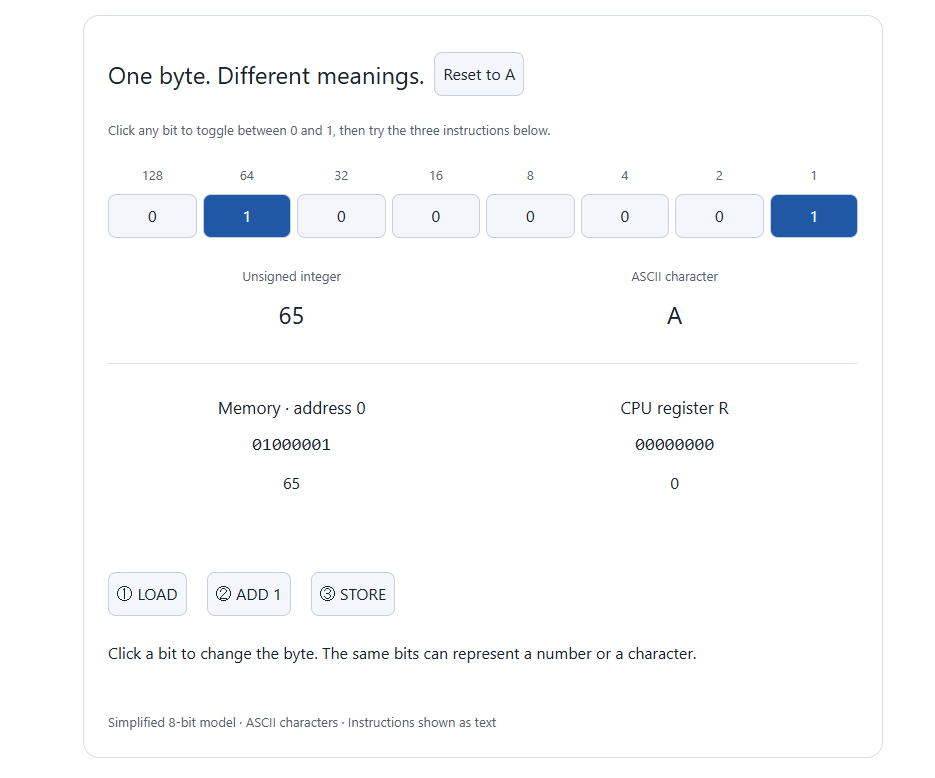
One Byte, Differ
Binary Represnts Number or Text
ent Meanings
A bit is a single 0 or 1. Eight bits make one byte.
If we read 01000001 as an unsigned binary number, its value is 65. The two bits set to 1 have the values 64 and 1:
64 + 1 = 65If we read that same byte using ASCII, a character encoding, it represents the uppercase letter A.
The bits have not changed. The rule used to interpret them has changed.
A byte does not carry a label that says “I am a number” or “I am a letter.” Software provides that context.
Memory: Bytes at Addresses
Memory holds data and instructions while a program runs. In a simplified model, we can imagine it as a row of storage locations, each with an address.
An address tells the computer where to read or write.
| Memory address | Stored byte |
|---|---|
| 0 | 01000001 |
| 1 | 01000010 |
| 2 | 01000011 |
Read as unsigned numbers, these bytes represent 65, 66, and 67. Read as ASCII text, they spell ABC.
These are example addresses. Real programs work with much larger address spaces.
Registers: Working Storage Inside the CPU
A register is a small storage location inside the CPU. Registers hold values that instructions can work with directly.
For example, a program might:
- Copy a value from memory into a register.
- Add one to the value in the register.
- Copy the result back to memory.
Changing the register does not automatically change the original value in memory. Writing the result back is a separate step.
Our interactive example uses a single 8-bit register called R. This keeps the demonstration simple; real processors have multiple registers, often much wider than eight bits.
Instructions: What the CPU Does
A machine instruction tells the CPU to perform an operation.
In our simplified demonstration, we use three readable instruction names:
| Instruction | Action |
|---|---|
| LOAD | Copy the byte from memory into register R. |
| ADD 1 | Increase the value in register R by one. |
| STORE | Copy the value in register R back to memory. |
These labels describe the actions in our model. Actual machine instructions are encoded as bits, and their formats depend on the processor.
The CPU interprets instruction bytes according to its instruction set. Software determines how other bytes should be used—for example, as numbers or text.
From A to B, One Step at a Time
Start with 01000001 in memory. This is 65 as an unsigned number, or A in ASCII.
After LOAD, register R also contains 65.
After ADD 1, the register contains 66:
01000010Memory still contains 65 at this point.
After STORE, memory contains 66 too. Interpreted as ASCII, its new value is B.
The CPU has performed an arithmetic operation. We see a letter change because we interpret the result as text.
A Tiny File Uses the Same Idea
A plain-text file containing only the letter A, saved as UTF-8 without a byte-order mark or a trailing newline, contains one byte:
01000001A byte viewer may show this as 41, its hexadecimal representation. That is the same value as decimal 65.
For this character, ASCII and UTF-8 use the same byte. Other characters can require multiple bytes in UTF-8.
Try It Yourself
Use the interactive demo below to explore these ideas.
Click any bit to switch between 0 and 1. Watch the number and ASCII character change together.
Then click Reset to A and follow this sequence:
- LOAD — watch 65 appear in the register.
- ADD 1 — watch the register change to 66 while memory stays at 65.
- STORE — watch memory update and A become B.
Notice which value changes after each instruction. The bits store the values; the instructions and software rules give those values meaning.