
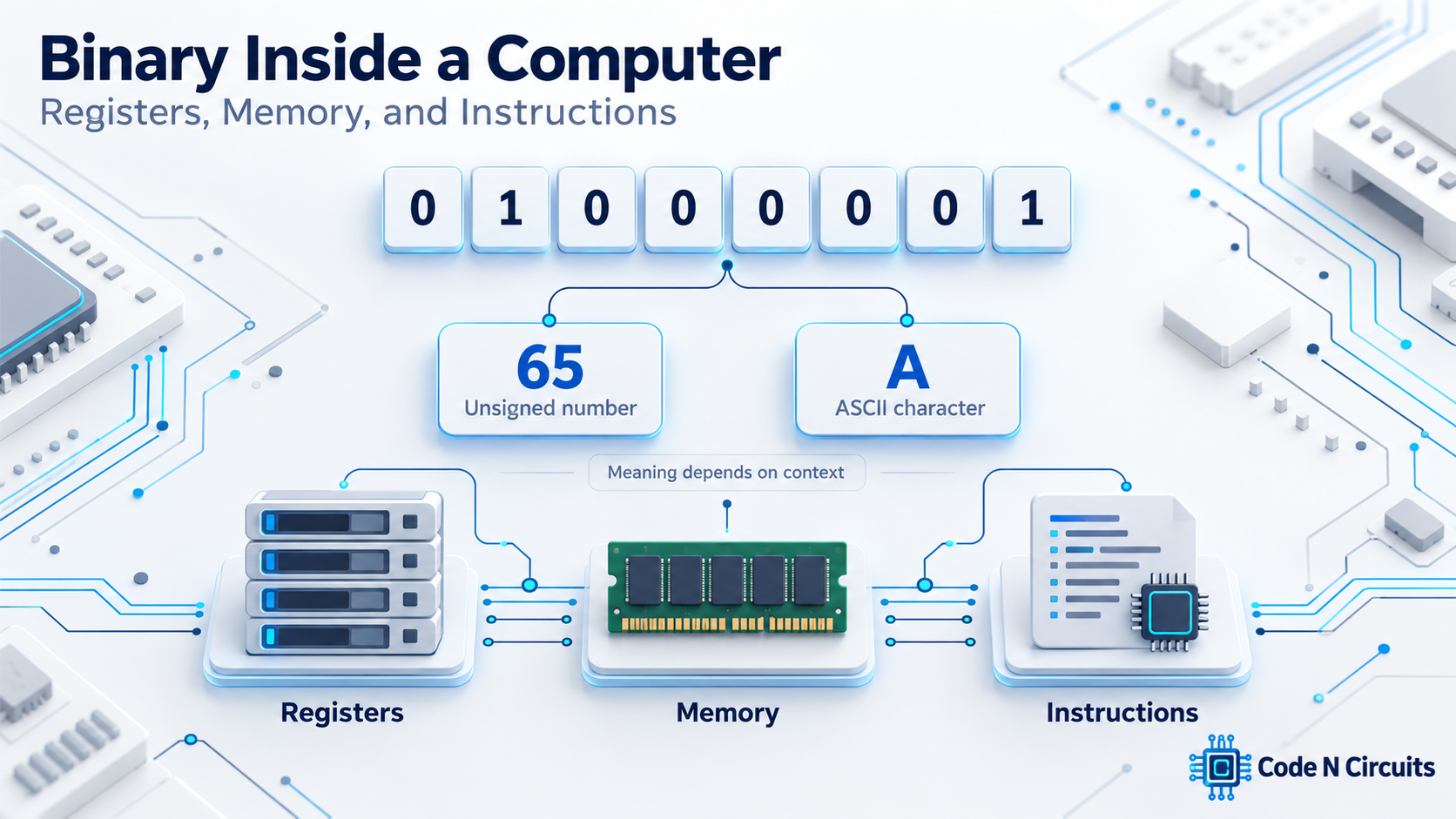
The same eight bits can represent the number 65 or the letter A:
01000001Some bit patterns can also form part of a machine instruction. So how does a computer know what its bits mean?
The answer depends on where those bits are used, which instructions process them, and which rules the software follows.
Binary counting is the starting point. To understand what happens inside a computer, we also need to understand registers, memory addresses, and instructions.
We can then connect those ideas to something familiar: the bytes in a small text file.
Click to WordPress Web Hositng from $7.47 per month
Bits Need an Interpretation
A bit is a binary digit: 0 or 1. Eight bits form a byte.
A byte does not carry a universal label explaining its meaning. Consider this pattern:
01000001As an unsigned binary number, it represents 65. Under the ASCII character encoding, it represents uppercase A.
An encoding is a rule that connects a stored pattern to a meaning. ASCII provides such a rule for a set of characters.
| Bit pattern | Interpretation | Result |
|---|---|---|
01000001 |
Unsigned integer | 65 |
01000001 |
ASCII character | A |
There is no contradiction. The pattern stays the same; the interpretation changes.
A text viewer displays a character because it treats the bytes as encoded text. A numeric tool may display their values instead.
This difference between a pattern and its interpretation is central to understanding memory.
Registers: Working Storage Inside the CPU
Registers are small storage locations inside the processor. They hold values that instructions can work with directly.
A general-purpose register might contain a number used in a calculation or an address used to locate data. Special-purpose registers support other aspects of execution.
For example, the program counter, called an instruction pointer on some architectures, tracks an instruction location.
When a program adds two values, those values may be placed in registers. Arithmetic circuitry calculates the result, which can then be written to a register.
Real processors perform this work using sophisticated internal mechanisms. From the software’s point of view, however, registers provide defined locations for inputs and results.
What Does “64-Bit” Mean?
A 64-bit general-purpose register can hold a pattern containing 64 bits—eight bytes of information.
But a “64-bit processor” does not make every number, instruction, or transfer 64 bits wide. It may work with 8-bit character values, 32-bit integers, and wider groups of data.
Different kinds of registers can also have different widths.
Instruction length is a separate property. For example, Arm’s A64 instruction set uses fixed-length 32-bit instructions, while supporting 64-bit general-purpose operations. Arm’s A64 overview
Addressing has its own limits too. A system does not necessarily implement every address that could mathematically fit into a 64-bit value.
When you see a width such as “64-bit,” ask what it describes: a register, a data type, an instruction, or an address.
Memory Addresses Locate Bytes
Main memory provides much more working space than the CPU’s registers.
On common general-purpose systems, memory is byte-addressable. Consecutive addresses identify consecutive bytes, even when the hardware transfers larger groups of bytes at once.
Think of a row of numbered mailboxes. The address is the mailbox number; the stored value is what is inside.
| Example address | Stored byte | Unsigned decimal value |
|---|---|---|
| 1000 | 01000001 |
65 |
| 1001 | 01000010 |
66 |
| 1002 | 01000011 |
67 |
The address is not the value. It tells the program where to find the value.
A larger object can occupy several consecutive bytes. A 32-bit integer occupies four eight-bit bytes, so software needs both a location and a rule for interpreting those bytes.
A Program’s Addresses Are Usually Virtual
On a typical desktop or server operating system, programs use virtual addresses. Hardware translates them using mapping information managed by the operating system.
A virtual address is therefore not simply a label on a physical memory chip.
Virtual memory helps isolate programs and lets the operating system manage memory. Two programs can use the same numerical virtual address while referring to different physical memory locations.
An address belongs to an address space with rules and permissions. Having an address does not automatically grant a program access to every byte installed in the computer.
Loading, Computing, and Storing
Values move between memory and registers through operations such as loads and stores.
- A load reads data from a memory location into a register.
- A store writes a value from a register to a memory location.
To increase a number by one, a simple sequence is:
LOAD → ADD 1 → STOREFirst, load the number into a register. Next, add one. Finally, store the result back in memory.
Changing the register does not automatically change the original memory location. The store performs that update.
Different instruction sets can express this task differently. Some instructions combine memory access with arithmetic.
The underlying work still involves obtaining data, calculating a result, and making that result available.
Also, a load does not always require a trip to main memory. Caches keep copies of information close to the processor and can satisfy many requests.
Why We Use Hexadecimal
Long strings of zeros and ones are difficult to inspect. Hexadecimal, or base 16, gives us a more compact way to write the same values.
Its digits are 0 through 9, followed by A through F for the values 10 through 15.
One hexadecimal digit represents four bits. Two hexadecimal digits can therefore represent one byte.
Split our example into two groups:
Binary:       0100 0001
Hexadecimal:     4    1
Hexadecimal 41 represents decimal 65. A prefix such as 0x often makes the number base explicit: 0x41.
| Binary | Hexadecimal | Decimal | ASCII |
|---|---|---|---|
01000001 |
0x41 |
65 | A |
01000010 |
0x42 |
66 | B |
01000011 |
0x43 |
67 | C |
Changing from binary to hexadecimal changes the display, not the stored information.
Look at the Bytes in a Tiny File
A small text file makes these ideas easier to see.
Imagine a file containing only these three letters:
ABCWhen saved using ASCII, without a newline or an extra encoding marker, it contains exactly three bytes.
You can try this in Windows PowerShell. The following commands create a uniquely named example file in your temporary folder, display its text, and show its bytes:
$demoPath = Join-Path ([IO.Path]::GetTempPath()) (
    "binary-demo-" + [guid]::NewGuid().ToString("N") + ".txt"
)

[IO.File]::WriteAllBytes(
    $demoPath,
    [byte[]](0x41, 0x42, 0x43)
)

Get-Content -LiteralPath $demoPath
Format-Hex -LiteralPath $demoPath
The text view shows ABC. In the hexadecimal view, look for:
41 42 43PowerShell’s Format-Hex displays file content as hexadecimal byte values. Microsoft’s Format-Hex documentation
The number at the left of the hex display is a file offset. It tells you how far a byte is from the beginning of the file. It is not a live physical memory address.
Both views show the same file. Inspecting it differently does not change its contents.
Several Bytes Can Form One Value
A value can occupy more than one byte. Consider the 16-bit hexadecimal value:
0x1234Its two bytes are 0x12 and 0x34. A system needs a rule for arranging them in memory. That rule is called byte order, or endianness.
| Byte order | Byte at the lower address | Byte at the next address |
|---|---|---|
| Little-endian | 0x34 |
0x12 |
| Big-endian | 0x12 |
0x34 |
Little-endian order puts the less significant byte first. Big-endian order puts the more significant byte first.
This does not reverse the individual bits inside each byte. It also does not change the value when the bytes are interpreted correctly.
To interpret a multibyte value, you need to know its size, its meaning, and its byte order.
Instructions Are Encoded Information Too
Machine instructions are also represented by bits.
An instruction encoding identifies an operation, commonly through an opcode. Other fields may identify registers, a constant value, or a way to locate an operand.
An operand is an input or destination involved in an operation. An immediate value is a constant included in the instruction itself.
The CPU decodes these fields according to its instruction set architecture, or ISA.
An assembly statement such as ADD is a readable notation for an operation. The processor executes the machine encoding; it does not read the letters A, D, and D as source text.
The exact encoding and instruction length depend on the architecture.
Why Ordinary Data Does Not Automatically Become a Program
A computer can store both instructions and ordinary data in memory, but it does not execute every byte it encounters.
The execution path determines which locations supply instructions. Memory permissions can also prevent particular regions from being executed.
A text file remains data for a text-reading program. It does not become a running program merely because some bytes resemble an instruction encoding.
Likewise, the CPU does not universally know whether a number represents a temperature, a price, or a character code.
Hardware defines operations and enforces certain rules; software supplies much of the higher-level meaning.
Follow One Character Through the System
Consider the letter A in our file.
The file stores an encoded byte in persistent storage. When software reads it, operating-system and storage services make the content available, typically through memory buffers.
A buffer is an area that holds data while it is being transferred or processed.
The CPU executes instructions that access the information. Registers may hold the byte’s value or addresses used to reach it.
A text viewer interprets the byte according to a character encoding and asks the display system to draw A.
Storage, memory, registers, and software each play different roles. Binary representations connect them.
Try It: Turn A into B
Use Following link to find a binary to represent a number or text
Use the interactive demo below to follow a value through memory and a register.
The demo uses a simplified 8-bit register and one memory location. Its instruction names describe the actions; they are not the machine encodings of a particular CPU.
Click any bit to toggle between 0 and 1. Watch its unsigned number and ASCII interpretation update together. Values above 127 are outside the ASCII range.
Then click Reset to A and try:
- LOAD: Copy 65 from memory into register R.
- ADD 1: Increase the register to 66. Memory still contains 65.
- STORE: Copy 66 back to memory. Its ASCII interpretation becomes B.
The arithmetic changes the stored value. The character encoding explains why we see a different letter.
Registers provide working storage, addresses locate bytes, and instructions specify operations. To understand a binary pattern, ask not only what its bits are, but how those bits are being used.
The next topic is another interpretation of fixed-width bit patterns: how two’s complement represents negative numbers.