
The CGI-BIN directory has traditionally been the designated location for executable CGI scripts on Apache web servers.
However, what if you want to run a CGI script from another directory on your website?
For example, you might want to place a Perl CGI script in a custom application directory, run a simple Python CGI program from a testing directory, or organize several CGI applications without storing everything inside CGI-BIN.
Fortunately, the Apache HTTP Server supports running CGI scripts outside the traditional CGI-BIN directory.
In suitable hosting environments, you can enable this functionality using the .htaccess file without editing Apache’s main configuration.
In this tutorial, we will explain what CGI is, why CGI scripts traditionally run from CGI-BIN, how to enable CGI execution in another directory using .htaccess, and how to troubleshoot common problems.
We will also discuss important security considerations and explain when traditional CGI is appropriate for modern websites.
What Is CGI?
CGI stands for Common Gateway Interface.
It is a standard that defines how a web server communicates with external programs to generate dynamic responses.
When a visitor requests a static HTML page, Apache normally reads the file and sends its contents to the browser.
CGI works differently because Apache executes a program and returns the output produced by that program.
For example, a CGI script might generate an HTML page, process submitted form data, or return information calculated by an application.
CGI programs can be written in several programming languages, including Perl, Python, C, and shell scripting languages.
A CGI program receives request-related information through environment variables and, when appropriate, standard input. It generates a response through standard output.
The program must produce valid CGI response headers followed by a blank line and the response body.
For example, a simple CGI response could contain:
Content-Type: text/html
Followed by a blank line and an HTML document.
Apache reads the program’s output and delivers the resulting HTTP response to the client.
CGI was widely used during the early development of dynamic websites.
Although modern technologies such as PHP-FPM, application servers, and web frameworks are more common today, CGI remains supported in appropriate Apache environments.
What Is the CGI-BIN Directory?
CGI-BIN is a conventional directory name used to identify where CGI programs are stored and executed.
A traditional website might have the following directory structure:
public_html/
index.html
about.html
images/
cgi-bin/
contact.cgi
search.cgi
The CGI scripts are stored inside the cgi-bin directory, while ordinary HTML pages and other website resources are stored elsewhere.
Apache commonly uses the ScriptAlias directive in its main server configuration to associate a URL path such as /cgi-bin/ with a directory containing executable CGI programs.
For example, a server administrator might configure a ScriptAlias mapping so that requests to /cgi-bin/example.cgi execute a program rather than return its source code.
This separation helps administrators control where executable scripts are permitted.
However, CGI execution is not inherently limited to a directory named cgi-bin.
Apache can execute CGI programs in other directories when the server configuration explicitly permits it.
Why Run CGI Scripts Outside CGI-BIN?
There are several reasons why a website administrator might want to run CGI scripts outside the default CGI-BIN directory.
One reason is better organization. A website containing several CGI applications may be easier to maintain when each application has its own directory.
For example, a reporting application could use /reports/, while a testing application could use /tools/.
Another reason is compatibility with older applications.
Some legacy CGI programs expect to run from a particular directory structure and may not work properly when moved into a shared CGI-BIN directory.
Developers may also want to test CGI functionality inside a dedicated development directory without changing the main server configuration.
Shared hosting environments sometimes provide different CGI arrangements depending on the hosting plan and server configuration.
However, enabling CGI execution outside CGI-BIN should never be done merely for convenience without considering the security consequences.
An executable CGI directory has different security requirements from an ordinary directory containing static web files.
Requirements for Running CGI Scripts Outside CGI-BIN
Before modifying your .htaccess file, verify that your hosting environment supports CGI execution.
First, your website must run on Apache or a compatible configuration supporting traditional CGI programs.
Apache typically uses mod_cgi or mod_cgid to provide CGI execution functionality.
Which module is appropriate depends on the Apache processing model and operating system.
Second, the server must permit CGI execution in the directory where you want to run scripts.
Third, your hosting provider must allow the required .htaccess directives.
The Options directive requires appropriate directory override permissions, while AddHandler requires permission to use FileInfo directives.
For example, a server administrator may permit the required settings through AllowOverride Options FileInfo or equivalent approved configuration.
Fourth, your script must use a supported interpreter or executable format and have appropriate filesystem permissions.
On Linux hosting, executable scripts commonly use a shebang line identifying the interpreter.
Finally, your hosting provider must permit the operating-system processes required to execute the script.
Important: Adding CGI directives to .htaccess cannot override restrictions imposed by the server administrator.
If CGI execution is disabled at the server level, you may need assistance from your hosting provider.
Step 1: Create a Directory for Your CGI Scripts
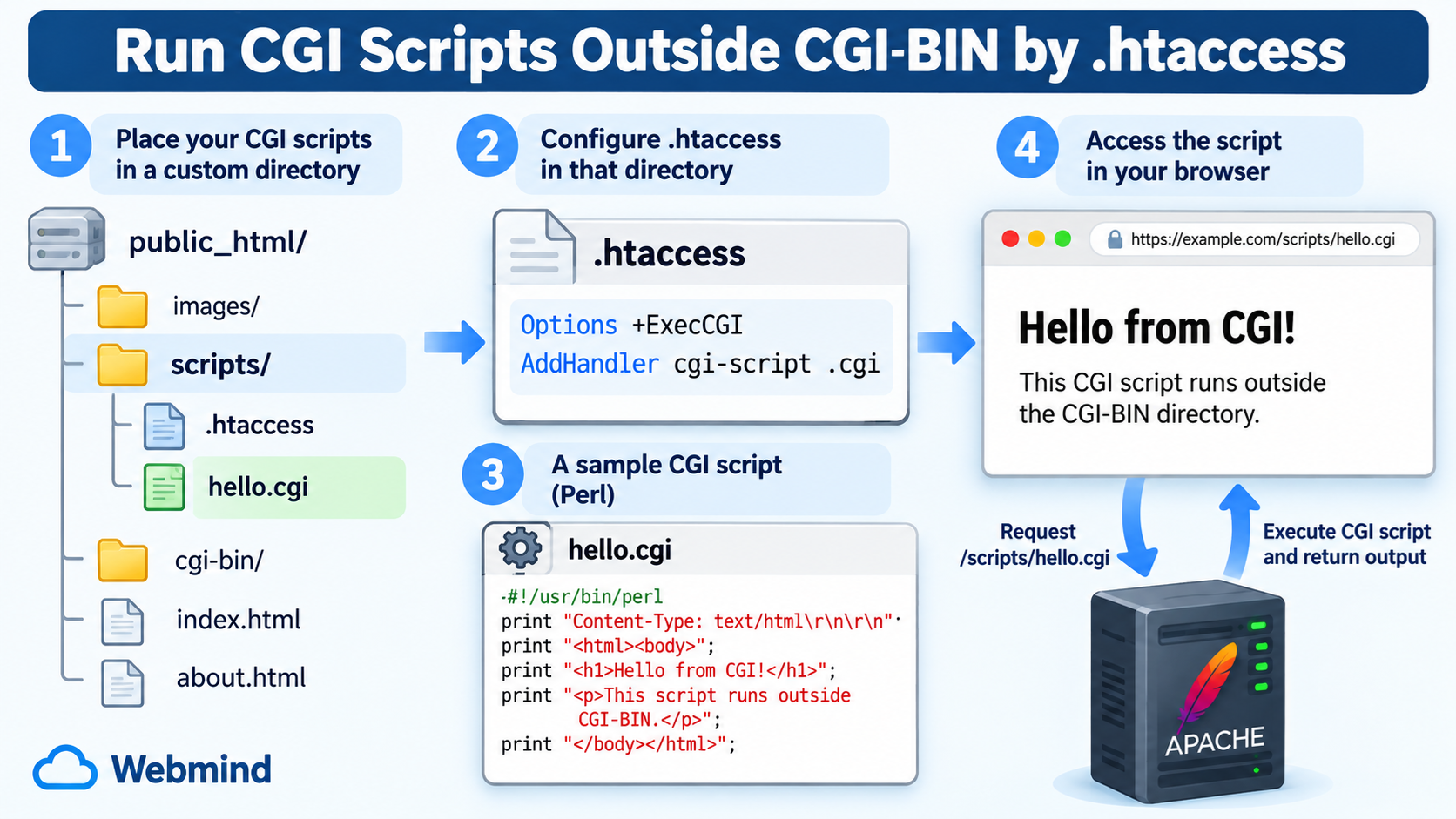
Suppose you want to run CGI scripts from a directory named scripts rather than the traditional cgi-bin directory.
Create the following directory inside your website’s document root:
public_html/scripts/
You can create this directory through cPanel File Manager, an SFTP client, or SSH.
For example, your website structure might look like this:
public_html/
index.html
about.html
scripts/
The scripts directory will contain the CGI programs you intend to execute.
Keeping CGI scripts in a dedicated directory is preferable to enabling CGI execution throughout your entire website.
This approach makes it easier to control permissions, manage executable files, and reduce security risks.
Step 2: Create or Edit the .htaccess File
Inside the scripts directory, create a file named:
.htaccess
If the file already exists, make a backup before making any changes.
Open the file in a plain-text editor and add the following directives:
Options +ExecCGI
AddHandler cgi-script .cgi
These two directives provide the basic configuration for running CGI scripts outside CGI-BIN.
The first directive enables CGI execution in the applicable directory.
The second tells Apache that files associated with the .cgi extension should be processed by the CGI script handler.
For this configuration to work, the relevant Apache CGI module must be enabled and the hosting provider must permit these settings.
Save the .htaccess file when you are finished.
Understanding the Options +ExecCGI Directive
The first configuration directive is:
Options +ExecCGI
The ExecCGI option permits CGI script execution in the configured directory.
Without this option, Apache may refuse to execute scripts even when their file extensions have been associated with the CGI handler.
The plus sign means that the option is added to the applicable directory options rather than replacing the complete set of existing options.
This distinction is important because Apache’s Options directive can control several directory behaviors.
For example, unrelated options may affect directory indexing, symbolic links, or other server features.
Using +ExecCGI is generally preferable to replacing the directory’s entire Options configuration when you only need to enable CGI execution.
However, the directive works only when Apache permits it in the relevant .htaccess context.
If your hosting provider restricts ExecCGI, the server may return a configuration error or refuse CGI execution.
Understanding the AddHandler Directive
The second directive is:
AddHandler cgi-script .cgi
Apache uses handlers to determine how certain files should be processed.
The cgi-script handler tells Apache to execute the selected file as a CGI program rather than serve its contents as an ordinary static file.
The .cgi extension identifies which filenames should use this handler.
For example, a file named hello.cgi inside your scripts directory can be executed as a CGI program when all other requirements are satisfied.
Apache also supports associating more than one extension with the same handler.
For example:
AddHandler cgi-script .cgi .pl
This associates both .cgi and .pl extensions with the CGI handler.
Perl CGI programs frequently use the .pl extension, although a Perl script can also use .cgi.
You should only associate extensions that are actually intended to contain executable CGI programs.
Avoid applying the CGI handler to every file in the directory unless there is a specific operational reason.
Step 3: Create Your First CGI Test Script
Once the directory and .htaccess configuration are ready, you can create a simple CGI program to verify that everything works.
For this example, we will use Perl, which has traditionally been one of the most widely used languages for CGI development.
Create a new file named:
hello.cgi
Add the following Perl program:
#!/usr/bin/perl
print "Content-Type: text/html\r\n\r\n";
print "<html><body>";
print "<h1>Hello from CGI!</h1>";
print "<p>This CGI script runs outside the CGI-BIN directory.</p>";
print "</body></html>";
The first line identifies the Perl interpreter.
On many Linux systems, Perl is installed at /usr/bin/perl.
However, the actual interpreter path may differ, so you should verify it on your server.
The Content-Type output tells the web server that the program is generating HTML content.
The two CRLF sequences produce the required blank line between the CGI response headers and the response body.
The remaining statements generate a simple HTML page.
Save the file using plain text with appropriate Unix line endings.
This program is intentionally simple so you can confirm that Apache is executing CGI scripts correctly.
Step 4: Set the Correct File Permissions
On Linux hosting, CGI scripts commonly need executable filesystem permissions.
For example, a script owned by your hosting account may use permission mode 755.
This mode gives the owner read, write, and execute permissions, while the group and others receive read and execute permissions.
If you have SSH access, you can set the permissions with:
chmod 755 hello.cgi
You should also ensure that the directory has the appropriate permissions to allow the web server to access it.
A directory permission mode of 755 is common in shared hosting environments, although the correct settings depend on the server’s execution model and ownership configuration.
Avoid setting scripts or directories to 777. World-writable permissions can create serious security risks, and some hosting environments reject overly permissive files.
Also verify that the script’s interpreter is available and executable.
File permissions alone do not guarantee successful CGI execution.
Server configuration, filesystem ownership, security policies, and interpreter availability must also be correct.
Step 5: Test Your CGI Script in a Browser
After uploading hello.cgi to your scripts directory, open the following URL:
https://example.com/scripts/hello.cgi
Replace example.com with your own domain name.
If CGI execution is configured correctly, the browser should display:
Hello from CGI!
This CGI script runs outside the CGI-BIN directory.
The key point is that your script is executing from /scripts/ rather than /cgi-bin/.
Apache recognizes the file through its CGI handler, executes the program, reads its output, and delivers the resulting HTML response.
If the browser downloads the script instead of executing it, the CGI handler may not be active.
If the browser displays the source code, stop testing the public endpoint immediately and correct the server configuration.
Exposing script source code can reveal sensitive application details.
If the server returns an error, review the troubleshooting section later in this article.
Step 6: Running Perl CGI Scripts Outside CGI-BIN
Perl was widely used for traditional CGI applications, and many older websites still contain Perl scripts.
If you want to execute both .cgi and .pl files, you can configure your .htaccess file as follows:
Options +ExecCGI
AddHandler cgi-script .cgi .pl
This tells Apache to treat both filename extensions as CGI programs.
For example, the following files could be processed as CGI scripts:
contact.cgi
search.pl
report.cgi
Remember that the filename extension does not identify the actual interpreter.
Apache starts the executable program according to the operating-system execution mechanism, which commonly relies on a valid shebang line.
A Perl CGI script might begin with:
#!/usr/bin/perl
Before deploying a Perl script, check the interpreter path and make sure all required Perl modules are available.
Also confirm that the program generates valid CGI response headers.
Step 7: Running Python CGI Scripts Outside CGI-BIN
Traditional CGI is not limited to Perl.
Python programs can also be executed using the CGI mechanism when the hosting environment supports it.
For example, you can associate the .py extension with the CGI handler:
Options +ExecCGI
AddHandler cgi-script .cgi .py
Then create a file named hello.py containing:
#!/usr/bin/env python3
print("Content-Type: text/html")
print()
print("<h1>Hello from Python CGI!</h1>")
The shebang line requests Python 3 through the system’s environment lookup.
The first print statement sends the Content-Type header.
The empty print statement separates the CGI headers from the response body.
The final statement produces the HTML content.
If the script is executable and properly configured, Apache can run it through the CGI interface.
However, not every Python hosting environment supports traditional CGI execution.
Many providers support Python applications through WSGI, ASGI, application servers, or other mechanisms instead.
For new Python web applications, modern application deployment methods are generally preferable to traditional CGI.
Also, if you use CGI to execute Python programs, avoid enabling .py execution in directories containing ordinary Python source files that were not designed as CGI entry points.
Step 8: Enable CGI Execution Only in a Specific Directory
Security is one of the most important considerations when enabling CGI.
Instead of adding CGI directives to the .htaccess file in your website’s document root, place them inside a dedicated scripts directory.
For example:
public_html/
index.html
images/
scripts/
.htaccess
hello.cgi
report.cgi
In this configuration, the .htaccess file inside scripts enables the required CGI settings for that directory and applicable descendants.
The rest of your website does not need the same execution configuration.
This is generally safer than enabling CGI execution throughout public_html.
You should also avoid placing user-uploaded files inside the CGI execution directory.
If an attacker can upload an executable program to a directory where CGI execution is permitted, that attacker may be able to execute commands with the privileges available to the CGI process.
Keep the directory under strict administrative control and allow only trusted, reviewed CGI programs.
Step 9: Avoid Executing Every File in the Directory
Apache also provides the SetHandler directive, which can force all matching files in a directory to use a particular handler.
For example, the following configuration can cause every file in the applicable directory to be treated as a CGI program:
Options +ExecCGI
SetHandler cgi-script
Although Apache supports this configuration, it is usually unnecessary and can be risky.
A directory may contain configuration files, documentation, templates, or data files that should not be executed.
For most websites, using AddHandler with specific filename extensions is a better choice.
For example:
AddHandler cgi-script .cgi
This provides a clearer distinction between executable CGI programs and ordinary files.
Even with extension-based handling, you should still ensure that sensitive configuration files and application data cannot be downloaded by visitors.
A filename extension is not a complete security boundary.
Common Problems When Running CGI Scripts Outside CGI-BIN
1. The Server Returns a 500 Internal Server Error
A 500 Internal Server Error is one of the most common CGI troubleshooting symptoms.
Several conditions can cause this problem, including incorrect .htaccess directives, invalid script syntax, missing interpreters, inappropriate permissions, or a failure to produce valid CGI headers.
Start by checking the Apache error log.
If the error began immediately after editing .htaccess, temporarily restore the previous configuration to determine whether the directives are responsible.
If the configuration is valid, check whether the script runs successfully from an authorized shell session.
Make sure the interpreter path is correct and the script uses suitable line endings.
2. The Server Returns a 403 Forbidden Error
A 403 error can occur when Apache does not permit CGI execution in the requested directory.
Verify that Options +ExecCGI is allowed by your hosting provider.
Also inspect file and directory permissions, access control rules, and any applicable security policies.
Remember that a valid AddHandler directive does not automatically authorize CGI execution.
Both the handler association and the appropriate execution permission are required.
3. The Browser Displays the CGI Source Code
If the browser displays Perl or Python source code instead of the generated HTML, Apache is not handling the file as the intended CGI program.
This is potentially dangerous because application source code may contain internal implementation details or secrets.
Remove public access to the affected script until the handler configuration is fixed.
Check that Apache’s CGI module is available, AddHandler is permitted, and the script is in the correct directory.
Do not deploy scripts containing database passwords, API keys, or other secrets inside publicly retrievable files.
4. The Browser Downloads the CGI File
A browser download can indicate that Apache is serving the script as a regular file instead of executing it.
Check that the expected extension is associated with the CGI handler and that the required server modules are active.
Also make sure the request is actually reaching the Apache server where the .htaccess configuration applies.
If your website uses a reverse proxy or another web server, the request might be handled before reaching Apache.
5. The Script Produces a Premature End of Script Headers Error
This error commonly means that the CGI program terminated or failed before producing valid response headers.
Check for script syntax errors, missing dependencies, incorrect interpreter paths, and runtime exceptions.
Also ensure that the script outputs an appropriate Content-Type header followed by a blank line before generating HTML content.
Check the error log for details rather than assuming the problem is caused by .htaccess.
6. The Script Works in CGI-BIN but Not in Another Directory
This situation often means that your hosting provider has explicitly enabled CGI execution only in the configured CGI-BIN location.
The CGI-BIN directory may be controlled by Apache’s ScriptAlias configuration.
Other directories do not necessarily inherit the same execution permissions.
If your hosting provider does not allow ExecCGI outside CGI-BIN, you may not be able to change this restriction through .htaccess.
Contact the hosting provider before attempting further configuration changes.
Security Risks of Running CGI Scripts Outside CGI-BIN
Allowing executable programs inside a publicly accessible website directory introduces additional security responsibilities.
A CGI script may run with the permissions of a specific server account, hosting user, or configured execution identity.
The exact security model depends on the hosting environment.
If a vulnerable CGI program accepts untrusted input and passes that input into a shell command, attackers may exploit it to execute unintended commands.
Other vulnerabilities may expose files, application data, or server resources.
To reduce these risks, keep CGI execution confined to dedicated directories, restrict write access, and avoid executing untrusted uploaded content.
Never use CGI execution permissions in general-purpose upload directories.
Validate all user input, avoid unsafe shell command construction, and keep interpreters and application dependencies updated.
For scripts that process sensitive information, store secrets outside publicly accessible directories and apply appropriate filesystem permissions.
CGI programs should also be reviewed for authentication, authorization, input validation, and output encoding issues.
The .htaccess directives that enable CGI execution do not secure the CGI applications themselves. Security must be addressed at both the server configuration and application levels.
CGI-BIN vs. Custom CGI Directories
The CGI-BIN directory and a custom CGI execution directory can both run traditional CGI programs, but the way Apache enables execution may differ.
A traditional CGI-BIN directory is often established through a ScriptAlias directive in the main Apache configuration.
With a custom directory, the server may use the ExecCGI option and the cgi-script handler to permit execution.
Both arrangements can work correctly.
The most important difference is not the directory name but how the server identifies executable programs and controls access to them.
Using a custom CGI directory can improve application organization, but it does not automatically provide better performance or security.
For shared hosting customers, CGI-BIN may remain the simplest and most reliable choice because it is already configured by the hosting provider.
Can You Run CGI Scripts from the Website Root Directory?
Technically, Apache can be configured to execute CGI scripts from the website’s document root if the server permits the required directives.
For example, placing CGI configuration in public_html/.htaccess could enable matching CGI extensions within that directory and applicable subdirectories.
However, this configuration creates a broader execution scope than most websites need.
For security and maintenance reasons, a dedicated CGI directory is generally preferable.
If you need only a small number of CGI scripts, keeping them together inside a restricted application directory makes the configuration easier to understand.
Avoid enabling executable handlers across an entire website without a clear need.
Can You Run CGI Scripts on WordPress Hosting?
Whether CGI scripts work on WordPress hosting depends on the underlying server configuration.
WordPress itself primarily runs through PHP and does not require traditional CGI programs for ordinary website functionality.
However, some Apache-based WordPress hosting environments may also permit standalone CGI scripts.
If supported, you could place a custom CGI application in a separate directory and configure it independently from WordPress.
Be careful not to interfere with existing WordPress .htaccess rewrite rules.
On managed WordPress hosting, providers may intentionally disable traditional CGI execution for security or platform management reasons.
Adding ExecCGI or AddHandler directives will not bypass those restrictions.
For WordPress-specific functionality, developing a WordPress plugin or using an appropriate server-side application interface is generally more suitable than introducing a separate CGI program.
Is Traditional CGI Still Recommended Today?
Traditional CGI remains useful for certain legacy applications, educational demonstrations, and small administrative tools.
However, it is no longer the usual choice for building modern, high-traffic web applications.
Traditional CGI typically starts a separate operating-system process for each request. This can introduce substantial overhead compared with application servers and long-running worker processes.
Modern alternatives include PHP-FPM, FastCGI, WSGI or ASGI application servers for Python, and other application-specific execution systems.
These approaches can provide better process management, scalability, and integration with modern frameworks.
For a new web application, consider whether an application server or supported modern hosting platform would be more appropriate.
For an existing CGI application that must continue running, Apache’s CGI support and carefully controlled .htaccess configuration remain practical options.
Frequently Asked Questions
Can CGI scripts run outside the CGI-BIN directory?
Yes. Apache supports CGI execution outside CGI-BIN when the required modules, handler configuration, directory options, and server permissions are available.
A common configuration uses Options +ExecCGI and AddHandler cgi-script for designated filename extensions.
Do I need root access to enable CGI through .htaccess?
Not necessarily. If your hosting provider already allows CGI execution and permits the relevant .htaccess directives, you may be able to configure a custom CGI directory without root access.
However, enabling disabled Apache modules or changing restricted server-level settings generally requires administrator access.
What file extensions can CGI scripts use?
Common extensions include .cgi and .pl, although Apache can associate other extensions with the CGI handler.
The actual programming language depends on the executable program and interpreter configuration, not simply the filename extension.
Does Apache support Python CGI scripts?
Yes, provided the server environment supports traditional CGI execution and the required Python interpreter is available.
For new Python web applications, WSGI or ASGI-based deployment methods are usually more appropriate.
Do CGI scripts need executable permissions?
On typical Unix-like hosting environments, CGI programs need executable permissions and an appropriate execution mechanism.
Permission mode 755 is common, but the correct setting depends on the server’s ownership and execution model.
Can I enable CGI using only one .htaccess directive?
Usually, two separate configuration requirements must be satisfied: CGI execution must be permitted, and files must be associated with a CGI handler.
The commonly used configuration is:
Options +ExecCGI
AddHandler cgi-script .cgi
A server’s existing configuration may already satisfy one of these requirements, but you should not assume that CGI execution is enabled everywhere.
Does this method work with Nginx?
No. Nginx does not interpret Apache .htaccess files and does not provide Apache’s CGI configuration mechanism.
An Nginx-based environment requires an appropriate application execution service or gateway configuration.
Is it safe to execute CGI scripts from any directory?
No. CGI execution should be enabled only where necessary.
Using a dedicated directory with restricted write permissions and trusted scripts helps reduce security risks.
Never enable CGI execution for untrusted file uploads.
Conclusion
Running CGI scripts outside the traditional CGI-BIN directory is possible with Apache, provided your hosting environment permits it.
The essential .htaccess configuration is straightforward:
Options +ExecCGI
AddHandler cgi-script .cgi
These directives enable CGI execution and associate the .cgi extension with Apache’s CGI handler in the applicable directory.
You can also associate additional extensions, such as .pl, when necessary.
However, enabling CGI functionality is only part of the configuration process.
Your scripts must have the correct interpreter, filesystem permissions, response headers, and security controls.
For most websites, the safest approach is to enable CGI execution only inside a dedicated directory containing trusted programs.
Although traditional CGI has largely been replaced by more modern application technologies, understanding how CGI works remains valuable for maintaining legacy applications and learning how web servers execute programs.