
How Does Linux Work? What Is the Linux Kernel?
Introduction
When you use Linux, you might open a browser, write a document, or enter a command in a terminal.
These actions look different, but they depend on the same foundation: programs using services provided by the operating system.
At the center of this system is the Linux kernel. It manages resources and helps software work with hardware.
But the kernel is only one part of the picture. Applications, system tools, and other software work with it to create a complete operating system.
Let’s see how these parts fit together, then follow a simple command through the system.
Chapter 1: Linux and the Linux Kernel
In everyday conversation, “Linux” usually means a complete operating system, such as Ubuntu, Debian, Fedora, or Linux Mint.
These are Linux distributions. Each distribution combines the Linux kernel with tools, libraries, system utilities, and applications. Many also include a graphical desktop.
Strictly speaking, Linux is the name of the kernel.
The kernel is the central component that manages resources and provides essential services. The other components make those services useful to people.
Many distributions include software from the GNU project, which is why you may also see the name GNU/Linux. More about Linux and GNU
A useful distinction is:
Linux kernel + system tools and other software = a usable Linux operating system.
This explains why distributions can have different desktops and applications while sharing the same kernel technology.
Chapter 2: How Does Linux Work?
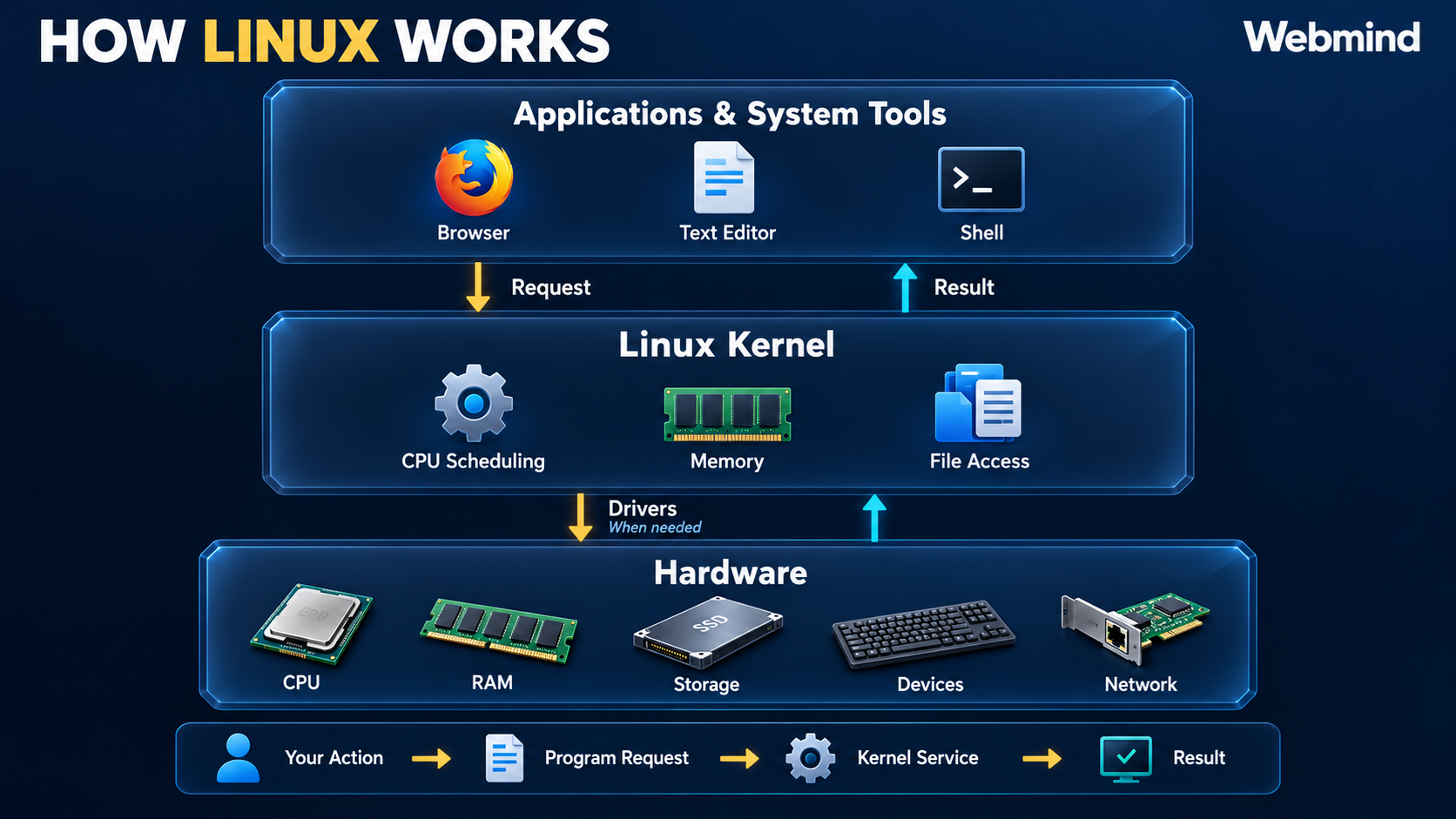
To understand Linux, start with three layers:
| Layer | What it does | Examples |
|---|---|---|
| Applications and system tools | Carry out tasks and request system services | Browser, text editor, shell |
| Linux kernel | Manages resources and handles requests for kernel services | CPU scheduling, memory management, file access |
| Hardware | Executes instructions, stores data, and handles input and output | CPU, RAM, storage, keyboard, network adapter |
The kernel acts as a bridge between programs and the underlying hardware.
For example, a text editor does not need to know the detailed instructions for every storage device. It requests a file operation, and the kernel’s filesystem and device software help carry it out.
The basic flow looks like this:
You perform an action → A program requests a service → The kernel handles the request → The program receives a result.
When hardware access is needed, the kernel coordinates that work through the appropriate components, including device drivers.
Not every action requires a hardware operation. Data may already be available in memory. Programs also perform ordinary calculations on the CPU without requesting a kernel service for each calculation.
Still, this flow gives us the central idea: programs do their own work while relying on the kernel for shared system services.
A Simple Example: Reading a File
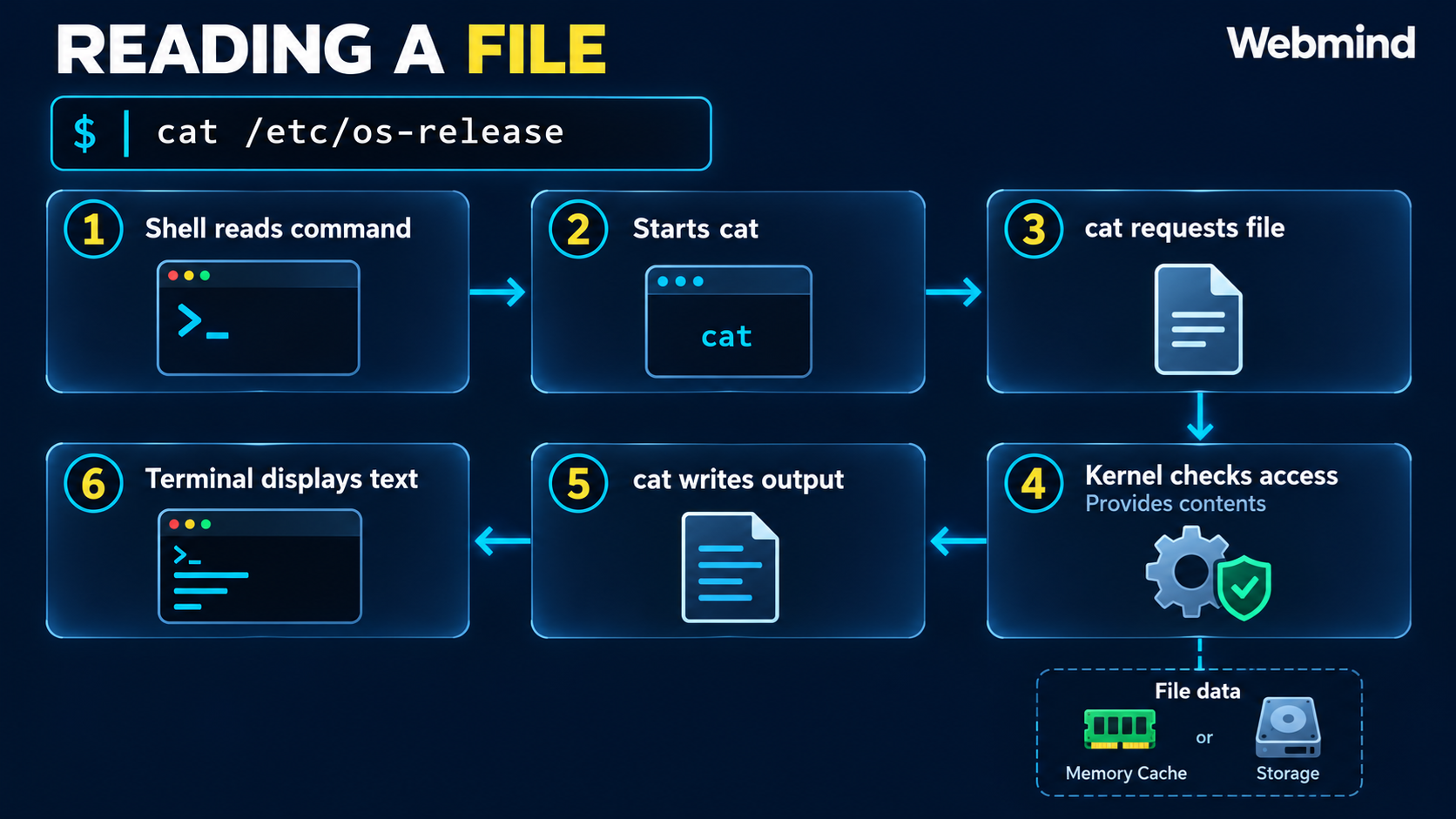
Suppose you enter:
cat /etc/os-releaseHere is what happens:
- The shell reads your command.
- It starts the
catprogram. catrequests access to/etc/os-release.- The kernel checks access and provides the file’s contents.
catsends the text to its output.- Your terminal displays that text.
The file data may come from storage or from a copy already cached in memory.
One short command brings together the shell, an application, kernel services, and the terminal.
Chapter 3: What Does the Kernel Manage?
The kernel has several important responsibilities.
Memory Management
Programs need memory while they run. A browser uses memory for web pages, while an editor uses memory for your document.
The kernel tracks and manages memory use. It also helps keep programs from interfering with one another’s memory.
Linux uses some RAM to cache file data so it can be accessed again quickly. Memory used for caching can often be reclaimed when needed. Linux memory documentation
Process Management
A process is a running instance of a program.
When you open an editor or run a command, you create activity that the kernel must manage.
The kernel keeps track of processes and schedules their threads to use the available CPU cores. Some work runs simultaneously; other work takes turns.
If a task is waiting for data, another task can use the CPU.
This coordination helps multiple programs run together. It does not guarantee that programs can never freeze or contain errors. Linux scheduling documentation
Device Management
Computers have many kinds of hardware: keyboards, storage drives, graphics devices, and network adapters.
These devices work differently.
A driver is software that helps the kernel communicate with a particular type of device. Drivers allow the system to work with hardware without each application needing to understand that hardware’s details. Linux device documentation
File Management
Applications need to open, read, and write files.
The kernel provides file services and works with filesystems to access the requested information. A filesystem is the structure used to organize and access files and folders. Linux filesystem documentation
When you save a document, the editor supplies the content. The kernel’s file and storage services help carry out the write.
System Calls and Security
A program requests kernel services through interfaces called system calls.
Think of a system call as a controlled request: “Open this file,” “Read this data,” or “Start this operation.”
Applications commonly make these requests through software libraries. Linux system-call documentation
The kernel also enforces access controls. A request can fail if the program does not have permission to perform the operation.
For example, being able to see a file’s name does not necessarily mean you have permission to read or change it.
Chapter 4: How the Other Parts Work Together
The kernel provides essential services, but you need other software to use them conveniently.
A Linux system commonly includes:
- Libraries, which provide functions that programs use.
- System utilities, which perform tasks such as managing files.
- Background services, which handle ongoing work.
- A shell, which interprets commands.
- Applications, which perform your everyday tasks.
- An optional desktop, which provides windows, menus, and icons.
Imagine saving a document in a graphical editor.
You click Save. The editor processes that action and requests a file operation. The kernel checks access and coordinates the required file services. The editor receives the result and can show that the document was saved.
The editor handles your document and its interface. The kernel handles the underlying resources and services.
Linux works because these components cooperate, with each performing its own part of the task.
Chapter 5: What Is the Linux Command Line?
The command line is a text-based interface where you enter instructions.
You usually access it through a terminal or terminal emulator, such as GNOME Terminal, Konsole, or xterm.
Three terms help explain what you are using:
- The terminal provides the place to type and see output.
- The shell interprets your commands.
- The command tells the shell what work you want to perform.
For example:
lsThe shell normally starts a program called ls, which lists files and folders in your current location.
The program uses operating-system services to obtain the information, then sends its output to the terminal.
The command line is especially useful for administering servers, including systems without a graphical desktop. It also makes repeated tasks easier to automate.
On a desktop computer, you can use both graphical applications and the command line. They provide different ways to interact with the same system.
Chapter 6: See Linux Working on Your Computer
These three demonstrations connect the explanation to a running Linux system.
1. Check the Kernel
Open a terminal and enter:
uname -rThis displays the version of the Linux kernel currently running.
You do not need to memorize the result. Simply recognize that the kernel is a specific component with its own version.
2. Check the Distribution
Enter:
cat /etc/os-releaseLook for your distribution’s name and version.
Compare the two commands:
uname -r identifies the running kernel. /etc/os-release describes the distribution.
You have also just observed the file-reading example from Chapter 2: the shell starts cat, the program requests file data, and the terminal displays the result.
3. Observe Running Tasks
Enter:
topYou will see a changing display of running tasks and resource use.
Focus on the program names and the CPU and memory information. You do not need to understand every column.
On a desktop, open another application and return to the terminal. Watch for changes.
This gives you a small window into the work happening behind the desktop.
Press q to exit.
Your output will differ depending on your distribution, installed software, and current activity.
Conclusion
Linux works through cooperation between programs, system tools, the kernel, and hardware.
You interact with an application or enter a command. The program performs its task and requests kernel services when needed. The kernel manages resources, checks access, and coordinates the necessary operations. The program then receives the result.
The complete operating system includes more than the kernel, but the kernel provides its essential foundation.
Remember this idea:
The Linux kernel manages the computer’s resources and provides controlled services that programs use to get their work done.
Once you understand that relationship, opening an application, reading a file, and running a command become practical examples of how Linux works.