
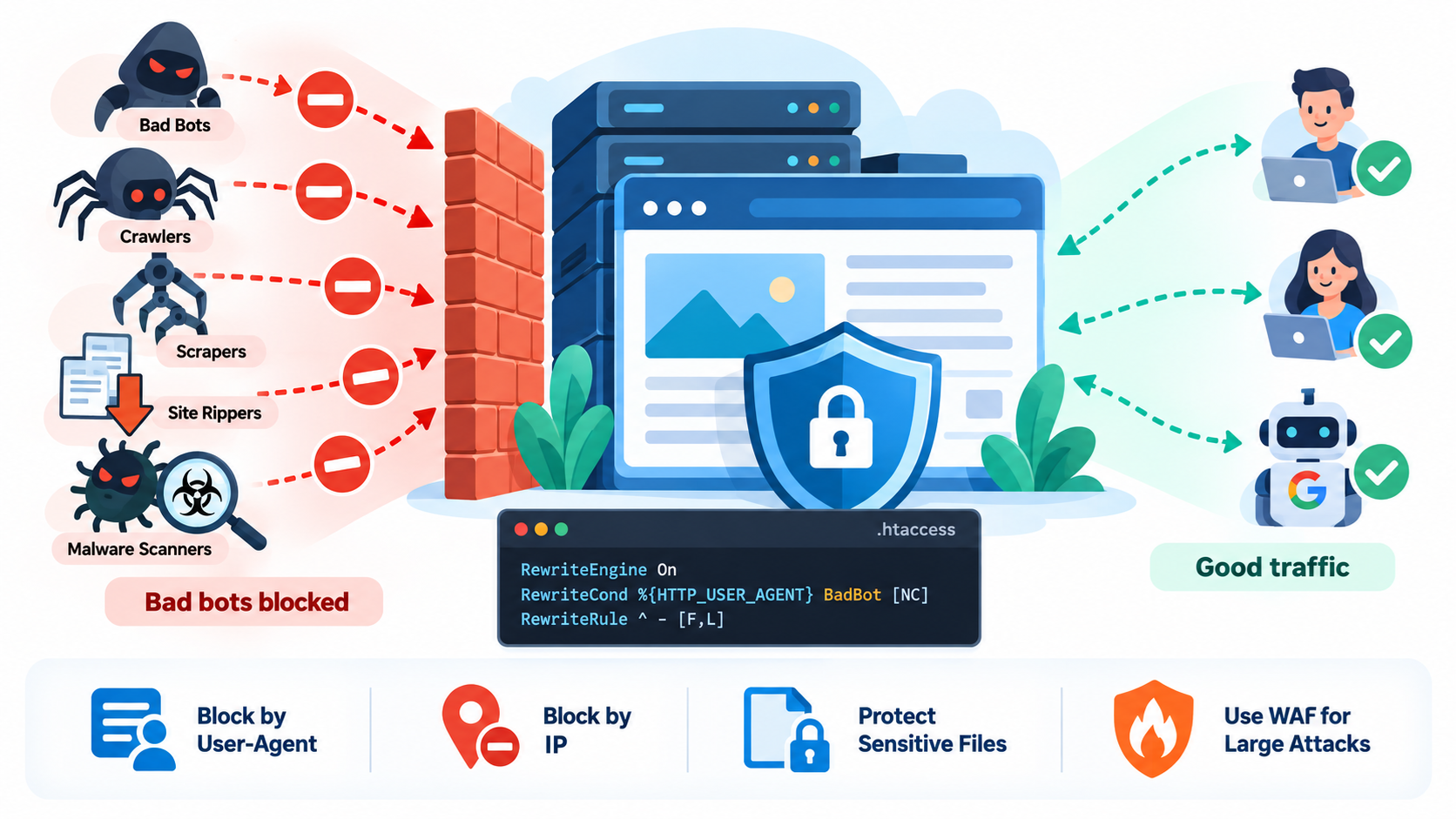
Every public website receives automated traffic. Some automated traffic is useful.
Search engines use crawlers to discover and index pages.
Monitoring services check whether websites are online.
Security services may scan for vulnerabilities.
Social networks fetch pages to generate previews.
But not every bot is welcome.
Some automated programs repeatedly download pages, scrape content, scan for vulnerable files, probe WordPress installations, attempt to discover backups, or consume large amounts of bandwidth.
These may be described as:
Bad bots
Site rippers
Scrapers
Aggressive crawlers
Vulnerability scanners
Malware scanners
Automated attack tools
On Apache-based hosting, .htaccess can help block some of this unwanted traffic.
However, .htaccess should be viewed as one security layer, not a complete protection system.
What Is a Bad Bot?
A bot is simply software that sends automated requests.
Bots are not automatically bad.
Useful bots include:
Googlebot
Bingbot
Search engine crawlers
Monitoring systems
Accessibility tools
Security services
Social-media preview crawlers
A bad bot is an automated client that behaves in a way you do not want.
For example, it may:
Scrape your entire website
Download images repeatedly
Probe vulnerable WordPress files
Try many login attempts
Search for configuration files
Look for backup archives
Copy product catalogs
Consume excessive bandwidth
Ignore crawl restrictions
Attempt common exploits
The important issue is behavior, not simply whether the visitor is automated.
What Is a Site Ripper?
A site ripper is a program designed to download large parts of a website.
It may attempt to copy:
HTML pages
Images
CSS
JavaScript
Documents
Videos
Downloadable files
A legitimate user might download a page.
A site ripper may attempt to download hundreds or thousands of pages automatically.
This can consume bandwidth and server resources.
What Is a Scraper?
A scraper extracts information from websites automatically.
A scraper may collect:
Articles
Product information
Prices
Email addresses
Images
Contact information
Search results
Technical data
Some scraping has legitimate uses.
Other scraping may copy content without permission or place excessive load on your server.
What Is a Crawler?
A crawler follows links automatically.
Search engines use crawlers to discover pages.
This is normal.
However, an aggressive crawler may:
Request pages too quickly
Ignore robots.txt
Follow endless parameterized URLs
Generate heavy server load
Download unnecessary resources
A crawler can therefore be useful or abusive depending on its behavior.
What Is a Malware Scanner?
The phrase malware scanner can mean different things.
A legitimate security scanner may inspect websites for known vulnerabilities or malicious files.
An attacker may also use automated software to search the Internet for vulnerable sites.
For example, a scanner may request paths such as:
/wp-admin/
/wp-login.php
/.env
/.git/
/backup.zip
/phpmyadmin/
/old-admin/
/config.php
If your site does not use these files, repeated scanning may simply generate 404 responses.
If vulnerable files exist, the scanner may attempt to exploit them.
Important: .htaccess Does Not Remove Malware
.htaccess can block certain requests.
It cannot automatically detect and remove malware already installed on your website.
If your website is infected, you may need:
Malware scanning
File inspection
Database scanning
Credential resets
Software updates
Backdoor removal
Backup restoration
Security monitoring
A Web Application Firewall
Use .htaccess to filter traffic, not as a replacement for malware cleanup.
What Is .htaccess?
.htaccess is an Apache configuration file.
It can control behavior such as:
URL rewriting
Redirects
Access control
Custom error responses
File protection
Bot blocking
Hotlink protection
Security rules
The file usually applies to the directory where it is located and, depending on configuration, its subdirectories.
Where Is .htaccess?
On many cPanel hosting accounts, .htaccess is located inside:
public_html
For example:
/home/username/public_html/.htaccess
Additional domains may have separate document roots.
If you do not see the file in cPanel File Manager, enable:
Show Hidden Files
or:
Show Dotfiles
because files beginning with a period are hidden on Linux systems.
Back Up .htaccess Before Editing
Always back up the existing .htaccess file.
A syntax mistake may cause:
500 Internal Server Error
Broken WordPress permalinks
Redirect loops
Blocked legitimate visitors
Website downtime
Download a copy before making changes.
If something breaks, restore the backup.
Block a Bot by User-Agent
One of the simplest methods is checking the HTTP User-Agent header.
For example, suppose an unwanted crawler identifies itself as:
BadBot
You can use:
RewriteEngine On
RewriteCond %{HTTP_USER_AGENT} BadBot [NC]
RewriteRule ^ – [F,L]
This returns:
403 Forbidden
when the User-Agent contains BadBot.
Apache’s RewriteCond can inspect request information including HTTP_USER_AGENT, and these rules are allowed in .htaccess when the server permits the relevant overrides.
What Is a User-Agent?
A User-Agent is an HTTP request header that identifies the software making the request.
A browser might send information identifying:
Chrome
Firefox
Safari
Edge
A search crawler may identify itself as:
Googlebot
Bingbot
A scraping tool may identify itself with its own name.
Apache can inspect this value.
User-Agent Blocking Is Easy to Bypass
User-Agent blocking has an important weakness.
The client controls the header.
A bad bot can pretend to be:
Googlebot
Chrome
Safari
Mozilla
Therefore, User-Agent blocking is useful against obvious or unsophisticated bots, but it is not strong authentication.
Block Multiple Bad Bots
You can block several bot names with one regular expression.
For example:
RewriteEngine On
RewriteCond %{HTTP_USER_AGENT} (BadBot|SiteRipper|WebScraper|DownloadBot) [NC]
RewriteRule ^ – [F,L]
If any listed string appears in the User-Agent, Apache denies the request.
Be Careful With Generic Names
Do not block overly broad terms.
For example:
bot
would also match legitimate crawlers such as:
Googlebot
Bingbot
Applebot
Blocking every User-Agent containing bot could harm search indexing.
Use specific patterns.
Example Blocklist
A practical example might look like:
RewriteEngine On
RewriteCond %{HTTP_USER_AGENT} (SiteRipper|WebStripper|WebCopier|OfflineExplorer|HTTrack) [NC]
RewriteRule ^ – [F,L]
This is only an example.
Do not copy huge old bot lists from random tutorials without reviewing them.
Software names change.
Some tools may also have legitimate uses.
Block Site-Ripping Tools
Some website-copying tools identify themselves honestly.
You may block known strings such as:
HTTrack
WebCopier
Offline Explorer
SiteSnagger
WebStripper
Again, User-Agent detection only works if the program does not disguise itself.
Block a Specific IP Address
If abusive traffic consistently comes from one IP address, you can block it.
For Apache 2.4:
<RequireAll> Require all granted Require not ip 192.0.2.25 </RequireAll>
This allows normal visitors while denying that address.
Apache 2.4 uses the modern Require authorization system.
Block Several IP Addresses
For example:
<RequireAll> Require all granted Require not ip 192.0.2.25 Require not ip 198.51.100.44 Require not ip 203.0.113.17 </RequireAll>
This can be effective if the attacker uses stable IP addresses.
Block an Entire Network
You can use CIDR notation.
For example:
<RequireAll> Require all granted Require not ip 198.51.100.0/24 </RequireAll>
This blocks an entire IPv4 network.
Use network-level blocks carefully.
You may block legitimate visitors.
IP Blocking Is Also Easy to Evade
Attackers can change IP addresses using:
VPNs
Proxy servers
Cloud providers
Botnets
Compromised devices
Mobile networks
IPv6
Therefore, IP blocking works best for targeted abuse rather than large bot networks.
Block Requests for Dangerous Files
Many scanners repeatedly request files that should never be publicly exposed.
Examples include:
.env
.git
.htpasswd
Configuration backups
Temporary archives
Apache recommends protecting sensitive dotfiles and shows Require all denied as a defensive pattern for such files.
A useful rule is:
<FilesMatch “^.(?!well-known)”>
Require all denied
</FilesMatch>
This blocks many files beginning with a period while allowing .well-known.
Why Allow .well-known?
The .well-known directory is used by legitimate Internet standards.
For example, certificate validation systems may use:
/.well-known/acme-challenge/
Blocking .well-known blindly can interfere with SSL certificate issuance or renewal.
Protect .env
A .env file may contain:
Database passwords
API keys
Application secrets
Mail credentials
Other configuration values
You should never intentionally expose it publicly.
A direct rule can be:
<Files “.env”>
Require all denied
</Files>
Protect Backup Files
Attackers often search for backup files such as:
backup.zip
site-backup.zip
database.sql
old-site.tar.gz
wp-config.php.bak
The best practice is not to keep sensitive backups inside the public document root.
If a backup does not need to be public, move it outside:
public_html
Access control is useful, but storing sensitive backups outside the web root is stronger.
Block Requests to Specific Suspicious Paths
Suppose your site does not use phpMyAdmin publicly but scanners constantly request:
/phpmyadmin/
You can deny that path using rewrite logic.
For example:
RewriteRule ^phpmyadmin(?:/|$) – [F,L,NC]
Use path blocking only when you are certain the resource should never be accessed.
Block Common Scanner Paths Carefully
You may see repeated requests for:
/.env
/.git/config
/wp-config.php.bak
/backup.zip
/shell.php
Do not build an enormous list unless it is actually useful.
A request for a nonexistent file already receives 404.
The scan may be annoying, but the main security goal is ensuring the sensitive resource does not exist or is not publicly accessible.
404 Can Be the Correct Response
If a bot requests:
/old-vulnerable-plugin.php
and the file does not exist, a 404 response is normal.
You do not necessarily need to add a special .htaccess rule for every random request.
Focus on actual threats and resource usage.
Block Empty or Strange User-Agents?
Some bots send no User-Agent.
You could detect an empty User-Agent.
For example:
RewriteCond %{HTTP_USER_AGENT} ^$
RewriteRule ^ – [F,L]
But this may block legitimate clients.
Some:
Monitoring tools
API clients
Scripts
Privacy tools
may use unusual or empty User-Agent headers.
Use this only if your site does not need those clients.
Block Requests by Referer
If a particular abusive website repeatedly sends traffic, you may inspect:
HTTP_REFERER
For example:
RewriteCond %{HTTP_REFERER} spam-example.com [NC]
RewriteRule ^ – [F,L]
However, the Referer header is also easy to spoof.
Do not rely on it as strong security.
Block by Request Method
Some bots send unexpected HTTP methods.
For example, if your static site only needs GET and HEAD, you might consider restricting methods.
However, dynamic websites often require:
POST
OPTIONS
Other methods
WordPress forms and APIs may break if you restrict methods carelessly.
Do not add method restrictions unless you understand your application.
WordPress Needs POST Requests
WordPress login, comments, forms, WooCommerce, APIs, and plugins frequently use POST.
Blocking POST globally would break the site.
Security rules must match the actual application.
Protect wp-login.php
WordPress login pages receive frequent brute-force attacks.
You could restrict access by IP if only a fixed location needs access.
For example:
<Files “wp-login.php”>
<RequireAll>
Require all granted
Require not ip 192.0.2.25
</RequireAll>
</Files>
But this example only blocks one IP.
For strong login security, use:
Multi-factor authentication
Rate limiting
Strong passwords
WAF protection
Login monitoring
IP blocking alone is not enough.
Allow Only Trusted IPs to wp-login.php
If administrators always connect from fixed IP addresses, you can allow only those.
For example:
<Files “wp-login.php”>
Require ip 203.0.113.50
</Files>
But if your IP changes, you can lock yourself out.
This approach does not work well for mobile users or dynamic residential IP addresses.
Protect xmlrpc.php If You Do Not Need It
WordPress xmlrpc.php has legitimate uses, but it has also been targeted for abuse.
If you know your site does not need XML-RPC, you may block access.
For example:
<Files “xmlrpc.php”>
Require all denied
</Files>
However, some applications or plugins may rely on it.
Test before blocking.
robots.txt Does Not Block Bad Bots
Many website owners assume that:
robots.txt
provides security.
It does not.
robots.txt is a voluntary crawling instruction.
Well-behaved search engines normally respect it.
Malicious bots can ignore it completely.
Do not use robots.txt to protect private information.
robots.txt Is Still Useful
You can use robots.txt to guide legitimate crawlers away from unnecessary paths.
For example:
Disallow: /private-temp/
But if the path contains sensitive data, use real access control.
Do Not Block Googlebot Without Verification
If a bot claims to be Googlebot, do not trust the User-Agent alone.
A malicious crawler can copy the name.
Likewise, do not block Googlebot simply because it generates many requests.
Legitimate search crawling helps pages appear in Google Search.
If crawler behavior seems suspicious, verify it using Google’s recommended methods before blocking.
Search Engine Crawlers May Use Many IP Addresses
You cannot safely block or allow a major search engine based on one IP address.
Crawler infrastructure changes.
Use official verification methods rather than random allowlists found online.
What Is Rate Limiting?
Rate limiting restricts how many requests a client can make in a certain period.
This is often more effective than permanently blocking one User-Agent.
For example:
A normal user requests a few pages.
A scraper requests 500 pages per minute.
Rate limiting can slow or block the scraper.
.htaccess alone is not always the best tool for advanced rate limiting.
Use a WAF for Serious Bot Problems
A Web Application Firewall can inspect traffic before the request reaches your application.
A WAF may provide:
Bot detection
IP reputation
Rate limiting
Challenge pages
Country filtering
Attack signature detection
SQL injection protection
Cross-site scripting protection
For large-scale bot traffic, a WAF is usually more effective than a large .htaccess blocklist.
Cloudflare Can Block Bots Earlier
If you use Cloudflare or another CDN, firewall rules at the edge can stop traffic before it reaches your server.
This can reduce:
CPU usage
Bandwidth
Apache connections
PHP execution
Origin-server load
Blocking earlier in the request path is generally more efficient.
Server Firewall vs. .htaccess
A server firewall blocks traffic at the network level.
.htaccess operates later, after the request has already reached Apache.
If you manage a VPS or dedicated server, tools such as:
nftables
firewalld
CSF
Cloud firewalls
may be more appropriate for network-level blocking.
.htaccess Is Useful on Shared Hosting
Shared hosting customers may not have firewall access.
But they often can edit .htaccess.
This makes .htaccess useful for:
Small targeted blocklists
File protection
Simple bot filtering
WordPress access rules
Basic request filtering
Apache Must Allow .htaccess
Apache only processes .htaccess directives if the server configuration allows them.
AllowOverride and related settings determine what may be used in per-directory configuration.
If a rule appears to do nothing, your hosting provider may restrict that directive.
Nginx Does Not Use .htaccess
.htaccess is an Apache feature.
Pure Nginx servers do not read .htaccess.
If your website uses Nginx, configure blocking in:
Nginx configuration
Hosting panel
CDN
WAF
Reverse proxy
LiteSpeed Often Supports Apache Rules
LiteSpeed Web Server supports many Apache-compatible .htaccess rules.
This is common in cPanel hosting.
However, exact behavior depends on the host.
Test all rules.
Use SetEnvIfNoCase as Another Method
Apache can also set environment variables based on request properties.
For example, SetEnvIfNoCase can examine User-Agent strings without case sensitivity. Apache documents SetEnvIf and SetEnvIfNoCase as request-based environment-variable directives.
A configuration might look like:
SetEnvIfNoCase User-Agent “BadBot” bad_bot
SetEnvIfNoCase User-Agent “SiteRipper” bad_bot
<RequireAll> Require all granted Require not env bad_bot </RequireAll>
This is another way to organize bot filtering.
RewriteRule Is Often Easier for Beginners
For small bot lists, mod_rewrite rules are usually easier to understand.
For example:
RewriteEngine On
RewriteCond %{HTTP_USER_AGENT} (BadBot|SiteRipper|WebScraper) [NC]
RewriteRule ^ – [F,L]
Use whichever method fits your configuration.
Keep the Blocklist Short
A huge list of hundreds of bot names creates problems.
It can become:
Outdated
Slow to manage
Hard to audit
Easy to break
Full of false positives
Many online “ultimate bot blocklists” were written years ago and include software that no longer exists.
Block what you actually observe.
Use Logs First
Before blocking anything, inspect server logs.
Look for:
High request rates
Repeated scanning
Large downloads
Suspicious paths
Repeated 404 requests
Unusual User-Agents
Repeated login attempts
Large bandwidth use
cPanel may provide:
Raw Access
Awstats
Resource Usage
Security logs
A decision based on real logs is better than copying random rules.
User-Agent Strings Can Help Identify Patterns
A log may reveal a repeated User-Agent such as:
SomeScraper/1.0
If it generates thousands of requests, blocking it may reduce load.
But always verify that it is not a legitimate tool used by your own systems.
Do Not Block Browsers by Generic Words
Avoid rules matching generic strings such as:
Mozilla
Chrome
Safari
Almost every normal browser may contain those words.
You would block real users.
Do Not Block curl or wget Without a Reason
Some administrators block:
curl
wget
because attackers use them.
But legitimate systems use them too.
For example:
Monitoring
APIs
Deployment systems
Health checks
Developers
Blocking the tool name does not stop attackers because they can simply change the User-Agent.
Protect Sensitive Files Instead of Chasing Every Scanner
This is a stronger security principle.
Rather than trying to block every person who requests:
.env
make sure .env cannot be served.
Rather than trying to identify every scanner requesting backup files, keep backups outside the public directory.
Focus on removing the vulnerability.
Use Least Exposure
If a service does not need to be public, do not expose it.
Examples include:
Database administration tools
Development panels
Old scripts
Test applications
Backup folders
Temporary files
Reducing exposed services reduces what bots can attack.
Delete Old Software
Bots frequently search for outdated software.
If you no longer use:
Old WordPress installations
Old plugins
Test scripts
Abandoned applications
Delete them.
Do not leave vulnerable software online simply because no link points to it.
Attackers scan URLs directly.
Keep WordPress Updated
Bot blocking does not replace updates.
Keep:
WordPress core
Plugins
Themes
PHP
Server software
updated.
A bot only needs one vulnerable component to succeed.
Remove Unused Plugins
An inactive plugin may still leave vulnerable files on disk.
If you no longer need it, remove it.
Reducing installed software reduces the attack surface.
Use Strong Authentication
Bot traffic often targets logins.
Use:
Strong unique passwords
Multi-factor authentication
Limited administrator accounts
Login rate limiting
Do not rely on hidden URLs or User-Agent blocking to protect administrator access.
Monitor for Successful Attacks
A request log showing:
404
for a vulnerability probe may be harmless.
A request returning:
200
for a sensitive file can be much more serious.
For example, if:
/.env
returns 200, investigate immediately.
Apache’s security guidance specifically recommends preventing access to sensitive server files.
A 403 Response Means the Rule Worked
When .htaccess blocks a request using:
[F]
or:
Require all denied
the server normally returns:
403 Forbidden
That means access was intentionally denied.
Use a Custom 403 Page
You can define:
ErrorDocument 403 /errors/403.html
Then blocked requests can receive a branded error page.
However, bots usually do not care what the page looks like.
A simple response is sufficient.
Do Not Redirect Bad Bots
Avoid redirecting unwanted bots to:
Their own domain
Another website
Random destinations
A direct 403 response is simpler and cleaner.
Malware Scanners Are Not Always Malicious
Be careful with terminology.
Some legitimate security companies scan websites to identify vulnerabilities.
A hosting provider may also run security checks.
Before blocking a scanner, determine whether it belongs to:
Your hosting provider
Your security service
A monitoring service
A penetration test you requested
Do not block your own security tools accidentally.
Vulnerability Scanning Can Be Legitimate or Abusive
The difference is authorization.
A security scan performed with your permission may be valuable.
Random Internet scanning is outside your control.
If unauthorized scanning causes load or repeatedly probes sensitive endpoints, you may choose to filter it.
Block Specific Query Patterns Carefully
Some bots repeatedly request suspicious query strings.
mod_rewrite can inspect:
QUERY_STRING
But query-based security rules can create false positives.
For sophisticated attack filtering, use ModSecurity or another WAF rather than trying to manually reproduce attack signatures in .htaccess.
What Is ModSecurity?
ModSecurity is a Web Application Firewall engine commonly used with Apache and other web servers.
It can inspect:
URLs
Headers
Request bodies
Parameters
Attack patterns
Hosting providers often combine it with rule sets designed to detect web attacks.
This is more powerful than simple User-Agent blocking.
Bad Bots Often Rotate Identity
Modern bad bots may rotate:
IP addresses
User-Agents
Cookies
Request timing
Countries
Cloud providers
One-line .htaccess rules cannot reliably identify every sophisticated bot.
Use behavior-based protection when necessary.
Browser Challenges Can Help
CDN and WAF platforms may challenge suspicious traffic using:
JavaScript
CAPTCHA
Managed challenges
A simple scraper may fail the challenge while a normal browser continues.
This can be more effective than permanent IP blocks.
Protect API Endpoints Separately
APIs may receive automated traffic by design.
Do not apply normal browser-bot assumptions to API traffic.
APIs should use:
Authentication
Rate limits
Tokens
Quotas
Authorization
Logging
Separate security policies are usually better.
Block by Country Only When There Is a Real Reason
Country blocking can prevent legitimate customers.
It is usually better handled by a CDN or firewall with accurate IP geolocation rather than manual .htaccess IP lists.
Avoid large country-IP lists in .htaccess.
Do Not Try to Block the Whole Internet
The goal is not to eliminate every automated request.
That is impossible for a public website.
The goal is to:
Reduce abusive traffic
Protect sensitive resources
Prevent known attacks
Keep the server responsive
Allow legitimate crawlers
Maintain normal user access
Example: Simple Bad-Bot Rule
A basic configuration might be:
RewriteEngine On
RewriteCond %{HTTP_USER_AGENT} (BadBot|SiteRipper|WebScraper|OfflineExplorer) [NC]
RewriteRule ^ – [F,L]
This is useful when those User-Agent strings appear repeatedly in your logs.
Example: Block Bots and Protect Sensitive Files
You could combine:
RewriteEngine On
RewriteCond %{HTTP_USER_AGENT} (BadBot|SiteRipper|WebScraper) [NC]
RewriteRule ^ – [F,L]
<FilesMatch “^.(?!well-known)”>
Require all denied
</FilesMatch>
The first part blocks selected User-Agents.
The second protects sensitive dotfiles.
Example: Block a Known Attacker IP
Add:
<RequireAll> Require all granted Require not ip 192.0.2.25 </RequireAll>
Use actual evidence from your logs before blocking.
Example: Protect .env Explicitly
Use:
<Files “.env”>
Require all denied
</Files>
This is more important than simply trying to block scanners requesting .env.
Example: Protect Git Metadata
If .git accidentally exists under the web root, it should not be publicly accessible.
A broader dotfile protection rule helps:
<FilesMatch “^.(?!well-known)”>
Require all denied
</FilesMatch>
But the better solution is also to avoid deploying sensitive repository metadata into public web directories.
WordPress Example
For a WordPress site:
RewriteEngine On
Block selected abusive User-Agents
RewriteCond %{HTTP_USER_AGENT} (BadBot|SiteRipper|WebScraper) [NC]
RewriteRule ^ – [F,L]
Protect dotfiles
<FilesMatch “^.(?!well-known)”>
Require all denied
</FilesMatch>
BEGIN WordPress
…
END WordPress
Keep custom rules outside the WordPress-managed section.
Do Not Edit Inside BEGIN WordPress Unless Necessary
WordPress may rewrite configuration between:
BEGIN WordPress
and:
END WordPress
when permalink settings change.
Put custom security rules before or after the managed section.
Test the Website After Every Change
Test:
Homepage
Posts
Pages
Images
WordPress admin
Login
Contact forms
Downloads
APIs
Search
Do not add twenty rules at once and then try to discover which one broke the site.
Add and test gradually.
Test User-Agent Blocking With curl
You can simulate a bot.
For example:
curl -I -A “BadBot” https://example.com/
If the rule works, the response may be:
403 Forbidden
Then test a normal request.
Test a Normal User-Agent
For example:
curl -I -A “Mozilla/5.0” https://example.com/
You should receive the normal expected response.
Testing both sides reduces accidental lockouts.
Monitor After Blocking
After deploying rules, check logs again.
Did requests decrease?
Did the bot change User-Agent?
Did server load improve?
Were legitimate users affected?
Security configuration should be monitored, not simply installed and forgotten.
Remove Rules That No Longer Help
If a bot disappeared months ago, an old rule may no longer be useful.
Review .htaccess periodically.
A smaller, understandable configuration is safer than an enormous forgotten blocklist.
When .htaccess Is Enough
.htaccess may be enough when:
A few identifiable bots are causing trouble.
One or two IPs are abusive.
You need to protect sensitive files.
You are on shared Apache hosting.
Traffic volume is moderate.
The blocking rules are simple.
When You Need Something Stronger
Use a WAF, CDN firewall, or server firewall when:
Bot traffic is large.
IP addresses constantly change.
User-Agents are spoofed.
You need rate limiting.
You are under a denial-of-service attack.
You need geographic controls.
You need advanced bot detection.
You need attack-signature filtering.
You manage multiple websites.
Final Thoughts
.htaccess can help block bad bots, site rippers, scrapers, aggressive crawlers, and some automated scanners on Apache-based websites.
You can filter traffic using:
User-Agent
IP address
Request path
Referrer
File access rules
A simple bot block might look like:
RewriteEngine On
RewriteCond %{HTTP_USER_AGENT} (BadBot|SiteRipper|WebScraper) [NC]
RewriteRule ^ – [F,L]
And sensitive dotfiles can be protected with:
<FilesMatch “^.(?!well-known)”>
Require all denied
</FilesMatch>
However, do not confuse blocking with complete security.
User-Agents can be forged.
IP addresses can change.
Bad bots can rotate through networks.
.htaccess cannot remove malware already installed on your website.
The strongest approach is layered.
Keep software updated.
Remove unused applications.
Protect sensitive files.
Use strong authentication.
Enable multi-factor authentication.
Monitor logs.
Use rate limiting.
Use a Web Application Firewall when appropriate.
And use .htaccess for targeted filtering where it makes sense.
The goal is not to block every bot on the Internet.
The goal is to block abusive behavior while keeping your website accessible to legitimate visitors and useful search engines.