
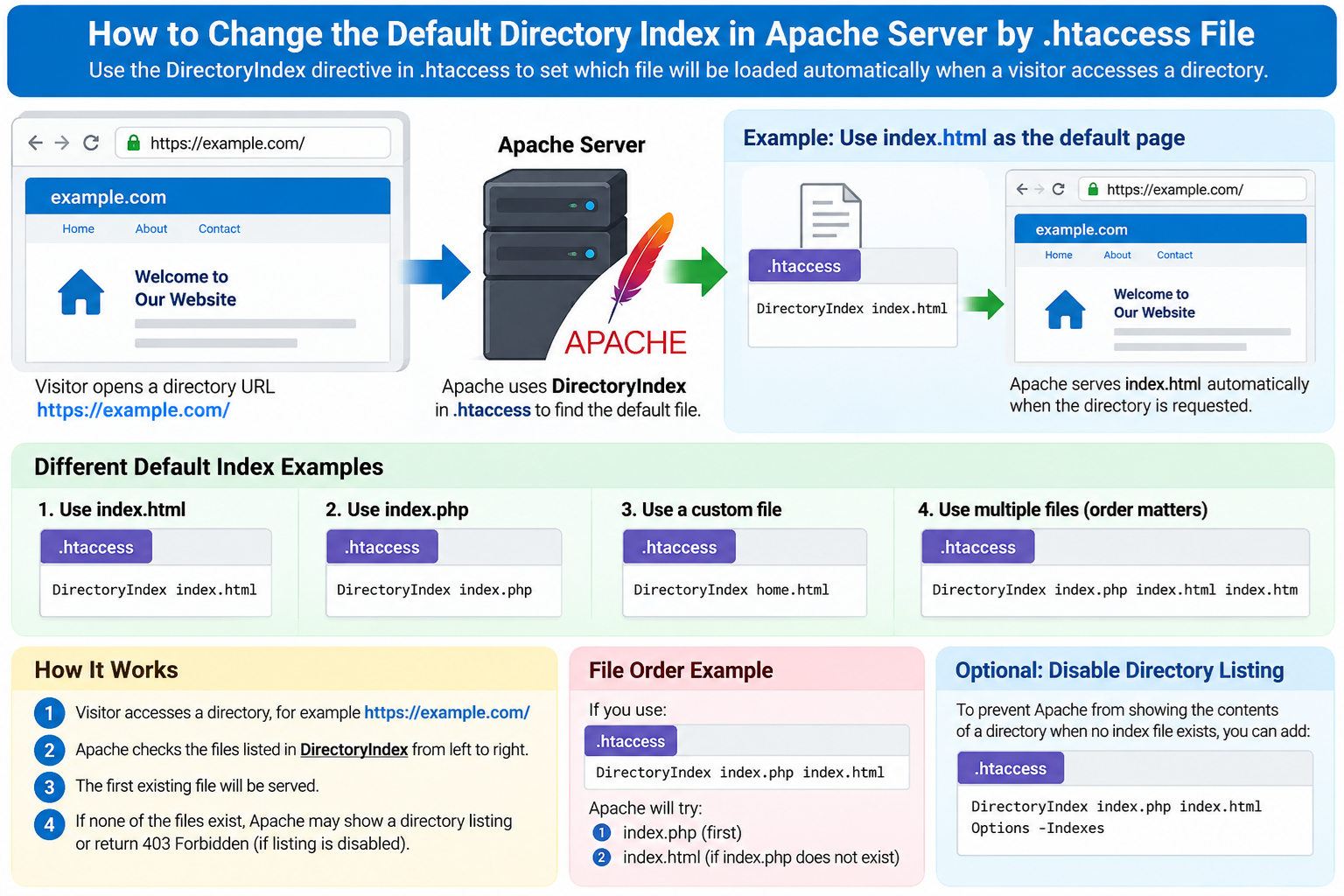
When someone visits a website directory without specifying a filename, the web server needs to decide which file should be displayed automatically.
For example, a visitor may open:
instead of:
https://example.com/index.html
or:
Apache uses a directive called:
DirectoryIndex
to determine which file should be treated as the default page for a directory.
On many Apache-based hosting accounts, you can change this behavior by editing the .htaccess file.
What Is a Directory Index?
A directory index is the default file Apache serves when a visitor requests a directory rather than a specific file.
For example, suppose your document root contains:
index.html
about.html
contact.html
If the server is configured to use:
index.html
as the default index file, a visitor opening:
will automatically receive:
https://example.com/index.html
The browser does not necessarily need to show index.html in the address bar.
Apache serves it automatically.
Common Default Index Files
Apache hosting environments commonly use file names such as:
index.html
index.htm
index.php
default.html
home.html
Different hosting systems may use different default orders.
For example, a server might be configured to look for:
index.php
first, then:
index.html
and then:
index.htm
If the first file exists, Apache uses it.
If it does not exist, Apache checks the next one.
What Is DirectoryIndex?
DirectoryIndex is an Apache directive that defines one or more files that should be used as default index files.
For example:
DirectoryIndex index.html
means:
When someone requests a directory, serve index.html if it exists.
You can also specify several files:
DirectoryIndex index.php index.html index.htm
Apache checks them from left to right.
Why Would You Change the Default Index?
There are several reasons you may want to change the default directory index.
For example:
You want home.html instead of index.html.
Your application starts from start.php.
You are migrating from an older website.
You want a temporary landing page to load first.
You want PHP to take priority over HTML.
You want a custom file to act as the homepage.
You have several index files and need to control which one loads.
Changing DirectoryIndex can solve these situations.
Where Is the .htaccess File?
On many cPanel hosting accounts, the .htaccess file is located in:
public_html
For example:
/home/username/public_html/.htaccess
If the website uses an additional domain, the file may be inside that domain’s own document root.
Because .htaccess begins with a period, it may be hidden.
In cPanel File Manager, enable:
Show Hidden Files
or:
Show Dotfiles
if you cannot see it.
Back Up .htaccess Before Editing
Always make a backup before changing .htaccess.
A small syntax mistake can cause:
500 Internal Server Error
Broken WordPress permalinks
Redirect problems
Unexpected access behavior
Website downtime
Download a copy of the current file before editing it.
Set index.html as the Default Page
To make:
index.html
the default directory page, add:
DirectoryIndex index.html
Then save .htaccess.
When someone visits:
Apache will try to serve:
index.html
Set index.php as the Default Page
If your website uses PHP, you may want:
index.php
to load automatically.
Use:
DirectoryIndex index.php
This is common for PHP applications and content management systems.
Set home.html as the Default Page
Suppose your main page is named:
home.html
You can use:
DirectoryIndex home.html
Then a request for:
can load:
home.html
without requiring the visitor to type the filename.
Set Multiple Default Files
You can specify several filenames.
For example:
DirectoryIndex index.php index.html index.htm
Apache checks:
index.php
first.
If it does not exist, Apache checks:
index.html
If that does not exist, it checks:
index.htm
The order matters.
Why Order Matters
Suppose your directory contains both:
index.html
and:
index.php
If you use:
DirectoryIndex index.php index.html
Apache prefers:
index.php
But if you use:
DirectoryIndex index.html index.php
Apache prefers:
index.html
The first matching file wins.
Example: Prefer PHP Over HTML
Suppose you are replacing an old static homepage with a new PHP application.
You still have:
index.html
on the server.
You also have:
index.php
To make PHP load first, use:
DirectoryIndex index.php index.html
This allows index.html to remain as a fallback.
Example: Prefer HTML Over PHP
If you want the static page to load first, use:
DirectoryIndex index.html index.php
Now Apache tries index.html before index.php.
Use a Custom Landing Page
Suppose you create:
welcome.html
and want it to become the default homepage.
Use:
DirectoryIndex welcome.html index.php index.html
Apache first checks for:
welcome.html
If it exists, that page loads.
If you later remove it, Apache falls back to:
index.php
or:
index.html
depending on what exists.
Temporary Maintenance Page
You can temporarily make:
maintenance.html
the default page.
For example:
DirectoryIndex maintenance.html index.php index.html
This can be useful during maintenance.
However, this does not automatically prevent visitors from directly accessing:
index.php
If you need real maintenance mode, use appropriate redirects, access controls, or application-level maintenance features.
DirectoryIndex Is Not a Redirect
This is an important distinction.
Suppose you use:
DirectoryIndex home.html
and a visitor opens:
Apache internally serves:
home.html
The browser may still display:
This is not the same as redirecting the visitor to:
If you want the browser address bar to change, use a redirect instead.
DirectoryIndex vs. Redirect
DirectoryIndex means:
Use this file automatically when a directory is requested.
Redirect means:
Tell the browser to request another URL.
For example:
DirectoryIndex home.html
keeps the browser on:
while serving:
home.html
A redirect would change the visible URL.
DirectoryIndex vs. RewriteRule
DirectoryIndex handles directory default files.
RewriteRule can transform or route URLs according to patterns.
For a simple default homepage, use DirectoryIndex.
Do not create complicated rewrite rules if all you need is to change the default file.
Change the Index for One Directory Only
.htaccess rules usually apply to the directory where the file is located and, depending on configuration, its child directories.
Suppose you want:
public_html/docs/
to use:
start.html
as its default page.
Create or edit:
public_html/docs/.htaccess
and add:
DirectoryIndex start.html
Then:
loads:
start.html
without changing the main site’s default index.
Different Directories Can Use Different Index Files
For example:
Main site:
DirectoryIndex index.php
Documentation folder:
DirectoryIndex docs.html
Download area:
DirectoryIndex download.html
Each directory can have its own .htaccess file if the server allows it.
What Happens If the Index File Does Not Exist?
Suppose you configure:
DirectoryIndex start.html
but:
start.html
does not exist.
Apache then cannot use that file.
What happens next depends on the rest of the configuration.
If directory listing is enabled, Apache may display a directory listing.
If directory listing is disabled, Apache may return:
403 Forbidden
This is why you should verify that the configured index file actually exists.
Directory Listing
If no index file exists, Apache may show the contents of the directory if directory indexes are enabled.
A visitor might see:
file1.html
image.jpg
downloads/
script.php
This is called directory listing.
For many production websites, you may not want this.
Disable Directory Listing
You can commonly disable directory browsing with:
Options -Indexes
Then if no index file exists, Apache generally returns:
403 Forbidden
instead of listing the directory contents.
A simple configuration might be:
DirectoryIndex index.php index.html
Options -Indexes
This defines default files and prevents directory listing when none are available.
Why Disable Directory Listing?
Directory listings may expose:
File names
Backup files
Old scripts
Documents
Temporary files
Directory structure
Even if the files are not sensitive, exposing them may reveal unnecessary information.
For many websites, disabling directory listing is a sensible default.
Be Careful With Options
Some shared hosting providers restrict the Options directive.
If:
Options -Indexes
causes a server error, restore your backup and check with your hosting provider.
DirectoryIndex may be allowed even when some other directives are restricted.
Apache Must Allow DirectoryIndex in .htaccess
Whether you can use DirectoryIndex in .htaccess depends on the server configuration.
Apache administrators control which directives are permitted in .htaccess.
On normal shared hosting, DirectoryIndex is commonly supported.
If the rule has no effect, your host may restrict it or another layer may be controlling the website.
WordPress and DirectoryIndex
WordPress usually uses:
index.php
as its main entry point.
A typical WordPress environment may therefore rely on:
index.php
being accessible.
If you change the default index incorrectly, you can interfere with how the site loads.
For a normal WordPress site, you usually do not need to change DirectoryIndex.
WordPress Usually Uses Rewrite Rules
WordPress handles most page requests through:
index.php
and Apache rewrite rules.
For example, a visitor may open:
but WordPress internally routes that request through:
index.php
This is separate from the basic DirectoryIndex setting.
Do Not Rename WordPress index.php Randomly
Renaming:
index.php
to:
home.php
without changing WordPress configuration can break the site.
If you simply want another static page to load before WordPress, changing DirectoryIndex may work temporarily, but test carefully.
cPanel and DirectoryIndex
Some cPanel-based hosting environments may have their own default index behavior.
However, .htaccess often allows you to override it locally.
For example:
DirectoryIndex landing.html index.php index.html
can control the order for your site.
LiteSpeed and DirectoryIndex
LiteSpeed Web Server supports many Apache-compatible .htaccess directives.
Therefore, DirectoryIndex generally works in many LiteSpeed hosting environments.
However, exact behavior may depend on the hosting configuration.
Nginx Does Not Use .htaccess
Pure Nginx servers do not read .htaccess.
Nginx uses its own:
index
directive.
For example, Nginx configuration may use:
index index.php index.html;
If your site runs directly on Nginx, .htaccess changes will have no effect.
Apache Behind Nginx
Some hosting platforms use Nginx in front of Apache.
In those environments, Apache may still process .htaccess.
However, request behavior can depend on the platform.
If DirectoryIndex does not work as expected, ask the hosting provider which server is handling the directory request.
CDN Does Not Usually Control DirectoryIndex
A CDN generally caches and serves content but does not decide which local file Apache treats as the directory index.
That happens at the origin server or application layer.
However, cached pages can make testing confusing.
If you change the default index and still see the old page, clear the relevant CDN cache.
Browser Cache Can Also Confuse Testing
Browsers may cache the previous homepage.
After changing DirectoryIndex, you may still see the old content.
Try:
Private browsing
Hard refresh
Browser cache clearing
CDN cache purge
Server cache purge
before assuming the rule failed.
Example: index.php First, Then index.html
A common configuration is:
DirectoryIndex index.php index.html
This is useful when a PHP application should take priority but a static HTML page can serve as a fallback.
Example: Custom Homepage First
You could use:
DirectoryIndex homepage.html index.php index.html
If:
homepage.html
exists, it loads first.
If not, Apache tries:
index.php
then:
index.html
Example: Multiple Legacy Index Names
Older sites may contain:
default.htm
home.htm
index.htm
You can support several:
DirectoryIndex index.php index.html index.htm default.htm home.htm
Apache checks each in order.
Keep the List Short
You do not need to list every possible filename.
A long DirectoryIndex list makes configuration harder to understand.
Use only the files your website actually needs.
Case Sensitivity Matters
On Linux servers:
Index.html
and:
index.html
may be different files.
If you configure:
DirectoryIndex index.html
but the real file is:
Index.html
Apache may not find it.
Use consistent lowercase filenames whenever possible.
File Extensions Matter
If your file is:
index.htm
but you configure:
index.html
Apache will not automatically guess the extension.
Add the correct filename.
For example:
DirectoryIndex index.htm
DirectoryIndex Can Include Paths?
DirectoryIndex normally expects filenames or local URL paths relative to the directory context.
For simple usage, use file names such as:
index.php
home.html
start.htm
Avoid trying to point DirectoryIndex at a completely different external domain.
Use redirects for that.
Do Not Use an External URL as DirectoryIndex
For example, do not try to use:
DirectoryIndex https://otherexample.com/
That is not the intended purpose.
If you want visitors to go to another site, create a redirect.
Redirect to Another Homepage Instead
If you need:
example.com/
to redirect to:
example.net/
use redirect or rewrite logic.
For example:
Redirect 301 / https://example.net/
However, whole-site redirect rules need to be written carefully so that they do not unintentionally redirect more than intended.
How to Test DirectoryIndex
After changing .htaccess, visit:
Do not type the file name.
Check which page loads.
Then temporarily rename the preferred file and test again to confirm the fallback order.
For example:
DirectoryIndex index.php index.html
If you rename index.php, Apache should then use index.html if it exists.
Test a Subdirectory
If you changed the index inside:
/docs/
visit:
and confirm that the intended file loads.
Check the HTTP Status
Normally, a valid directory index returns:
200 OK
You can test with:
curl -I https://example.com/
The response should normally be successful.
If you get:
403
the index file may be missing and directory listing may be disabled.
If you get:
500
there may be an .htaccess syntax or permissions problem.
403 After Changing DirectoryIndex
If you see:
403 Forbidden
check:
Does the index file exist?
Is the filename spelled correctly?
Are uppercase and lowercase correct?
Are file permissions appropriate?
Is directory listing disabled?
Is the document root correct?
A 403 does not necessarily mean DirectoryIndex itself is wrong.
500 After Changing .htaccess
If the website immediately returns:
500 Internal Server Error
restore your .htaccess backup.
Possible causes include:
Unsupported directive
Syntax error
Hosting restrictions
Broken surrounding configuration
Once the site is restored, check the server or hosting error log.
File Permissions
The web server must be able to read the index file.
On typical Linux hosting, file and directory permissions must allow Apache or the hosting user to access the file.
Do not solve permission problems by blindly setting everything to:
777
That can create serious security risks.
Use the permissions recommended by your hosting provider.
Document Root Matters
Changing DirectoryIndex does not change the document root.
Suppose your domain points to:
/home/user/public_html/example/
and you place:
index.html
inside:
/home/user/public_html/
The domain may not see it.
Make sure the index file exists in the actual document root.
Additional Domains Can Have Different Roots
In cPanel, different domains may use different directories.
For example:
example.com → public_html/
example.net → public_html/example.net/
Each directory can have a different DirectoryIndex.
Subdomains Can Also Use Different Index Files
A subdomain such as:
docs.example.com
may use its own document root.
You can place a separate .htaccess there.
For example:
DirectoryIndex documentation.html
Then the subdomain loads that file by default.
DirectoryIndex and PHP Applications
Some applications depend on a specific front controller.
For example:
index.php
may be the entry point for:
Laravel
WordPress
Other PHP frameworks
Do not replace that default casually.
The application may expect all requests to route through index.php.
DirectoryIndex and Static Websites
For a simple static website, changing the index is straightforward.
For example:
DirectoryIndex home.html
can make:
home.html
the homepage.
This is often useful for older HTML sites.
Should You Rename home.html to index.html Instead?
Sometimes the simplest solution is just to rename:
home.html
to:
index.html
This follows common web conventions.
However, renaming may affect:
Existing links
Bookmarks
Scripts
Applications
Backlinks
If the file is already used elsewhere, DirectoryIndex lets you avoid renaming it.
Use Common Conventions When Possible
Even though Apache allows custom names, standard names such as:
index.html
index.php
are easier for administrators to understand.
Use a custom index only when you have a clear reason.
A Simple Recommended Configuration
For a typical PHP website:
DirectoryIndex index.php index.html
This tells Apache:
Use index.php if available.
Otherwise use index.html.
A Static Website Example
For an HTML-only site:
DirectoryIndex index.html index.htm
This provides a simple fallback.
A Custom Landing Page Example
For a temporary landing page:
DirectoryIndex landing.html index.php index.html
When you no longer need the landing page, remove:
landing.html
from the directive.
Example With Directory Listing Disabled
You might use:
DirectoryIndex index.php index.html
Options -Indexes
This defines preferred index files and prevents Apache from listing directory contents when no index file exists.
Only use Options -Indexes if your host allows it.
Comments in .htaccess
You can add comments beginning with:
For example:
Use PHP as the default index
DirectoryIndex index.php index.html
Comments make future maintenance easier.
Keep .htaccess Organized
If your .htaccess also contains:
Redirects
WordPress rules
Security rules
Hotlink protection
Bot blocking
organize each section with comments.
For example:
Default directory index
Redirect rules
Security rules
WordPress rules
A clean file is easier to troubleshoot.
Do Not Add Duplicate DirectoryIndex Rules
If the file contains several DirectoryIndex directives, the resulting behavior can become confusing.
Use one clear rule for each relevant directory context.
Check Parent and Child .htaccess Files
A subdirectory may contain its own .htaccess.
That file can override or modify behavior inherited from a parent directory.
If one directory behaves differently, check for nested .htaccess files.
When Should You Change DirectoryIndex?
Change it when:
Your main file has a nonstandard name.
You want to control index priority.
You need a fallback order.
A subdirectory needs a different default page.
You are migrating an old website.
You temporarily need a landing page.
When Should You Use a Redirect Instead?
Use a redirect when:
The visitor should see a different URL.
The page permanently moved.
You changed domain names.
You want HTTP to HTTPS.
You want www to non-www.
DirectoryIndex is not intended for these cases.
When Should You Use Rewrite Rules Instead?
Use rewrite rules when:
URLs need pattern-based routing.
The application uses clean URLs.
You need conditional behavior.
The requested path must map internally to another script.
Do not use rewrite rules just to choose a simple default file.
When Should You Contact Your Hosting Provider?
Contact your host if:
DirectoryIndex has no effect.
The site returns 500.
You are unsure which web server is used.
You cannot locate the correct document root.
The host restricts .htaccess.
A control panel or application appears to override the setting.
The provider can confirm whether DirectoryIndex is permitted in .htaccess.
Final Thoughts
Apache uses the DirectoryIndex directive to decide which file should load when a visitor requests a directory without specifying a filename.
A simple example is:
DirectoryIndex index.html
For a PHP website, you might use:
DirectoryIndex index.php index.html
Apache checks the files from left to right and loads the first one that exists.
This makes it easy to:
Change the default homepage.
Prioritize PHP over HTML.
Use a custom landing page.
Configure different index files for different directories.
Remember that DirectoryIndex is not a redirect.
It changes which file Apache serves internally while the visitor can remain on the directory URL.
Always back up .htaccess before editing it.
Make sure the selected index file exists.
Test the site after every change.
And if you do not have a specific reason to customize the default index, using standard filenames such as index.php or index.html is usually the simplest and most maintainable approach.