
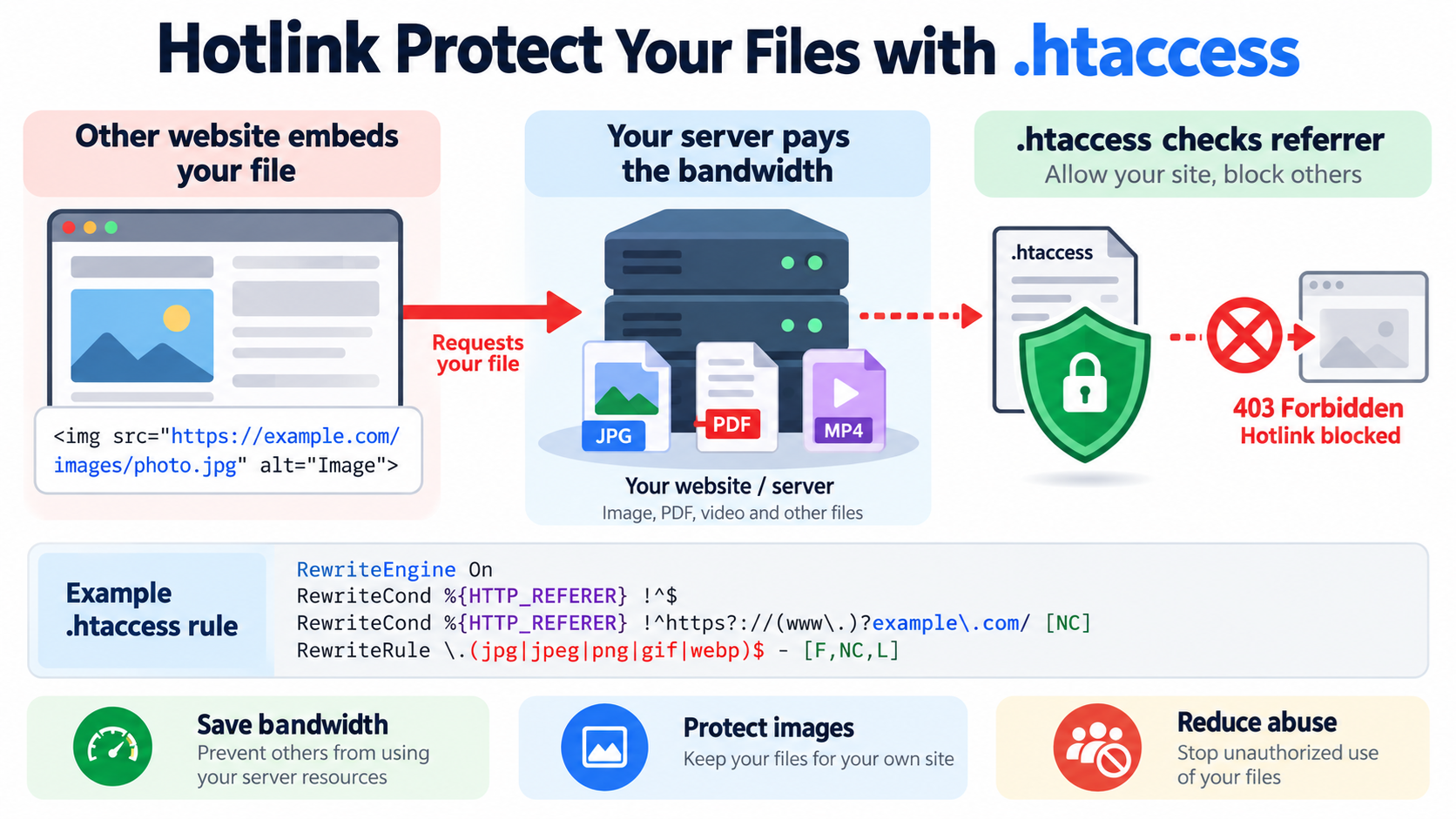
Hotlinking happens when another website directly uses files hosted on your server instead of storing its own copy.
The most common example is an image.
Suppose your website contains:
https://example.com/images/photo.jpg

Another website can place this HTML in its own page:
<img src=”https://example.com/images/photo.jpg“>
When visitors open that other website, the image is downloaded from your server.
The other website gets the visual content.
You pay for the bandwidth and server resources.
This is called hotlinking.
Hotlink protection is a way to reduce or block this behavior.
On Apache-based hosting, one common method is to use .htaccess.
What Is Hotlinking?
Hotlinking is the direct use of a file hosted on another website.
It is also sometimes called:
Inline linking
Remote image linking
Direct linking
Bandwidth theft
Leeching
The file remains physically stored on your server, but another website embeds or requests it directly.
Typical hotlinked files include:
Images
Videos
Audio
PDF files
ZIP files
Documents
JavaScript files
CSS files
Downloads
In practice, hotlink protection is most commonly used for images and downloadable media.
Why Can Hotlinking Be a Problem?
Hotlinking can increase resource usage.
Every time someone views the other website, their browser may request the file from your server.
That can consume:
Bandwidth
Web server connections
CPU
Disk I/O
CDN traffic
Depending on your hosting plan, excessive hotlinking can increase costs or slow down your website.
A Simple Example
Imagine you publish a large infographic.
The file is:
https://example.com/images/network-guide.jpg

The image is 3 MB.
A popular website embeds that image directly from your server.
If 100,000 people view their page, your server may deliver approximately:
300 GB
of image data.
The other website receives the traffic.
Your hosting account serves the file.
That is why hotlink protection can be useful.
Does Hotlinking Copy the File?
Not necessarily.
The other website may not copy the file at all.
Instead, it references your original URL.
For example:
Their page → Your image URL → Your server
This means if you delete or change the original file, the image on their website may also disappear or change.
Is Every External Image Request Hotlinking?
No.
You need to distinguish hotlinking from normal sharing.
For example, someone may:
Share a link to your image page.
Link to your article.
Show a preview in a social network.
Use an image search engine.
Load the image through a CDN.
Use a legitimate feed reader.
These situations may be normal.
Hotlink protection should not block useful services accidentally.
How Does .htaccess Hotlink Protection Work?
Apache can inspect the HTTP Referer header.
When a browser requests an image, the request may include the page that referred the request.
For example:
Referer: https://otherwebsite.com/article
Apache can check that value.
If the referrer belongs to your own website, allow the request.
If the referrer belongs to an unauthorized external website, deny it.
This is usually implemented using mod_rewrite.
Important Limitation: Referer Can Be Missing or Forged
Hotlink protection based on the Referer header is useful, but not perfect.
The header may be:
Missing
Reduced by browser privacy settings
Removed by security software
Modified by a proxy
Forged by a bot
Therefore, .htaccess hotlink protection is a practical filter, not a strong authentication system.
Find the .htaccess File
On many cPanel hosting accounts, the main .htaccess file is located inside:
public_html
For example:
/home/username/public_html/.htaccess
If you cannot see it in cPanel File Manager, enable:
Show Hidden Files
or:
Show Dotfiles
because files beginning with a period are hidden on Linux systems.
Back Up .htaccess First
Always back up .htaccess before making changes.
A syntax mistake can cause:
500 Internal Server Error
Broken WordPress permalinks
Redirect loops
Access problems
Website downtime
Download a copy before editing.
Basic Hotlink Protection Rule
Suppose your domain is:
example.com
and you want to protect common image formats.
You can use:
RewriteEngine On
RewriteCond %{HTTP_REFERER} !^$
RewriteCond %{HTTP_REFERER} !^https?://(www.)?example.com/ [NC]
RewriteRule .(jpg|jpeg|png|gif|webp)$ – [F,NC,L]
This blocks image requests when the referrer is not your own website.
What Does This Rule Mean?
The first line:
RewriteEngine On
enables Apache rewrite processing.
The next line:
RewriteCond %{HTTP_REFERER} !^$
means:
Do not apply the blocking rule when the referrer is empty.
The next condition:
RewriteCond %{HTTP_REFERER} !^https?://(www.)?example.com/ [NC]
means:
The referrer is not your own domain.
The final rule:
RewriteRule .(jpg|jpeg|png|gif|webp)$ – [F,NC,L]
means:
If the request is for one of those image formats, deny access.
Why Allow Empty Referers?
A request with no referrer does not automatically mean abuse.
Legitimate examples include:
Direct image URLs
Bookmarks
Privacy-focused browsers
Mobile apps
Email clients
Some search engines
Some proxies
If you block every empty referrer, you may block legitimate visitors.
For that reason, many hotlink protection rules allow empty referrers.
What Does F Mean?
The flag:
F
means:
Forbidden
Apache normally returns:
403 Forbidden
The unauthorized website will not receive the protected image.
What Does NC Mean?
The flag:
NC
means:
No Case
It makes the match case-insensitive.
For example:
PHOTO.JPG
photo.jpg
Photo.Jpg
can all match.
What Does L Mean?
The flag:
L
means:
Last
It tells Apache to stop processing additional rewrite rules for that request after the rule matches.
Protect More File Types
You can expand the file list.
For example:
RewriteRule .(jpg|jpeg|png|gif|webp|svg|mp4|mp3|pdf|zip)$ – [F,NC,L]
This can protect:
Images
Video files
Audio files
PDFs
ZIP downloads
Be careful when blocking files such as CSS, JavaScript, or fonts.
External services may legitimately need them.
Protect Images Only
For most websites, protecting image files is the simplest approach.
For example:
RewriteRule .(jpg|jpeg|png|gif|webp)$ – [F,NC,L]
This reduces the chance of breaking unrelated website functionality.
Allow Both www and Non-www
If visitors use both:
example.com
and:
your condition should allow both.
For example:
RewriteCond %{HTTP_REFERER} !^https?://(www.)?example.com/ [NC]
The (www\.)? means the www. part is optional.
Allow Another Domain You Own
Suppose you own:
example.com
and:
example.net
and both should be allowed to load the same files.
You can use:
RewriteCond %{HTTP_REFERER} !^https?://(www.)?example.com/ [NC]
RewriteCond %{HTTP_REFERER} !^https?://(www.)?example.net/ [NC]
Then block the requested file types.
Example With Multiple Allowed Domains
A complete example might look like:
RewriteEngine On
RewriteCond %{HTTP_REFERER} !^$
RewriteCond %{HTTP_REFERER} !^https?://(www.)?example.com/ [NC]
RewriteCond %{HTTP_REFERER} !^https?://(www.)?example.net/ [NC]
RewriteRule .(jpg|jpeg|png|gif|webp)$ – [F,NC,L]
This allows both of your websites to use the images.
Allow a CDN Domain
Suppose your website uses:
cdn.example.com
You may need to allow it.
For example:
RewriteCond %{HTTP_REFERER} !^https?://cdn.example.com/ [NC]
However, depending on how your CDN works, the origin request may not include the same referrer you expect.
Always test before enabling strict rules.
Hotlink Protection With Cloudflare
If your website uses Cloudflare, .htaccess may not be the best place to implement hotlink protection.
Cloudflare can offer hotlink protection or firewall-based controls at the edge.
Blocking at Cloudflare has advantages:
The unwanted request may be stopped before reaching your server.
Your origin bandwidth is reduced.
Server load is reduced.
Rules can be managed centrally.
If a CDN already provides hotlink protection, using both CDN protection and .htaccess rules may be unnecessary.
cPanel Hotlink Protection
Many cPanel environments include a graphical feature called:
Hotlink Protection
This may be located under:
Security
or another cPanel section depending on the version.
The tool can help you:
Enable protection
Specify allowed URLs
Select protected file extensions
Choose redirect behavior
cPanel may write the necessary .htaccess rules automatically.
For beginners, this can be easier than editing the file manually.
Manual Rules Give More Control
The cPanel tool is convenient, but manual .htaccess rules give you more flexibility.
You can:
Allow specific domains
Protect specific directories
Protect selected extensions
Return 403
Redirect unauthorized requests
Add custom logic
However, manual rules require more careful testing.
Block Hotlinking From One Specific Domain
Suppose only one website is abusing your images:
badsite.example
You can block only that referrer.
For example:
RewriteEngine On
RewriteCond %{HTTP_REFERER} ^https?://([^.]+.)?badsite.example/ [NC]
RewriteRule .(jpg|jpeg|png|gif|webp)$ – [F,NC,L]
This is less aggressive than blocking all external sites.
Block Several Known Hotlinkers
You can use multiple conditions.
For example:
RewriteEngine On
RewriteCond %{HTTP_REFERER} badsite-one.example [NC,OR]
RewriteCond %{HTTP_REFERER} badsite-two.example [NC,OR]
RewriteCond %{HTTP_REFERER} badsite-three.example [NC]
RewriteRule .(jpg|jpeg|png|gif|webp)$ – [F,NC,L]
This denies image requests from those referrers.
Deny All External Hotlinking
If you want only your own domain to load the images, use the allow-your-domain pattern.
For example:
RewriteEngine On
RewriteCond %{HTTP_REFERER} !^$
RewriteCond %{HTTP_REFERER} !^https?://(www.)?example.com/ [NC]
RewriteRule .(jpg|jpeg|png|gif|webp)$ – [F,NC,L]
This is the most common configuration.
Redirect Hotlinked Images to Another Image
Some older tutorials suggest replacing hotlinked images with a warning image.
For example:
RewriteRule .(jpg|jpeg|png|gif)$ https://example.com/no-hotlink.png [R,L]

This can work, but it has a major risk.
If the replacement image itself matches the same rule, you can create a redirect loop.
You must explicitly exclude it.
Safer Replacement Image Example
For example:
RewriteEngine On
RewriteCond %{HTTP_REFERER} !^$
RewriteCond %{HTTP_REFERER} !^https?://(www.)?example.com/ [NC]
RewriteCond %{REQUEST_URI} !^/images/no-hotlink.png$ [NC]
RewriteRule .(jpg|jpeg|png|gif|webp)$ /images/no-hotlink.png [R=302,L]
This redirects unauthorized image requests to:
/images/no-hotlink.png
However, returning 403 is often simpler.
Why 403 Is Usually Better
A 403 response is simple.
It saves bandwidth compared with serving another large image.
It clearly means:
Access denied.
It also avoids redirect loops.
For most websites, this is a better hotlink-protection response.
Protect Only One Directory
Suppose your images are stored in:
/images/
You can place a separate .htaccess file inside that directory.
For example:
public_html/images/.htaccess
Then place the hotlink rules there.
This limits the effect to that directory.
It can be safer than placing broad rules in the root .htaccess.
Protect a Downloads Directory
Suppose you store downloadable files in:
/downloads/
You can add rules specifically for:
zip
mp4
mp3
For example:
RewriteRule .(pdf|zip|mp4|mp3)$ – [F,NC,L]
This can reduce direct embedding or remote downloading through known referrers.
Hotlink Protection Does Not Prevent Normal Downloads
If someone visits your website directly and downloads the file, hotlink protection usually allows it.
The goal is not to stop legitimate users.
The goal is to stop unauthorized external websites from embedding your files.
Hotlink Protection Is Not Digital Rights Management
Hotlink protection does not prevent someone from downloading a file and uploading their own copy elsewhere.
It only controls direct requests to your server.
For example, someone can still:
Save your image
Copy your video
Take a screenshot
Upload the file elsewhere
Therefore, hotlink protection is primarily a bandwidth and access-control technique.
Hotlink Protection Does Not Protect Copyright by Itself
If someone copies your content, that is a separate copyright issue.
Hotlink protection may reduce direct embedding, but it does not replace:
Copyright notices
Licensing
DMCA procedures
Legal enforcement
Watermarking
Content monitoring
Use the appropriate tool for the actual problem.
Consider Watermarking Images
If image theft is a concern, watermarking can help identify ownership.
For example, you might place:
Your logo
Your domain
Your brand name
inside the image.
Even if someone downloads and reposts it, the source remains visible.
Watermarking and hotlink protection solve different problems.
Search Engines May Need Image Access
If you want your images to appear in image search results, do not accidentally block legitimate search engine access.
Many image crawlers do not behave exactly like normal browsers.
Strict referrer rules can sometimes interfere with indexing.
Test search visibility after enabling hotlink protection.
Social Media Previews May Need Access
Social networks may fetch your images to generate previews.
Examples include:
X
Discord
Slack
Messaging apps
If your hotlink rules block their crawlers, link previews may stop showing images.
This is another reason not to make the rules more restrictive than necessary.
Open Graph Images
Many websites use:
og
metadata.
Social networks fetch that image directly from your server.
If hotlink protection blocks those requests, shared posts may lose their preview image.
Test social sharing after enabling protection.
Email Clients Can Load Images Externally
Newsletters or transactional emails may contain images hosted on your website.
Recipients’ email clients load those images remotely.
If your hotlink rules deny those requests, email images may fail.
If you host email assets on the same domain, test carefully.
APIs and Apps May Need Direct File Access
Mobile applications or APIs may request files without a traditional browser referrer.
If you block empty referrers, those applications may break.
This is another reason many examples allow:
RewriteCond %{HTTP_REFERER} !^$
before blocking.
Static Assets Used by Other Domains
Some businesses intentionally host images or assets centrally for multiple domains.
For example:
company.com
store.com
support.com
may all use:
cdn.company.com
In that case, allow all authorized domains explicitly.
Hotlink Protection and WordPress
WordPress stores uploaded media under paths such as:
/wp-content/uploads/
You can apply hotlink protection to those files.
However, WordPress sites often use:
CDNs
Caching plugins
Image optimization services
Social previews
External applications
Make sure your security rules do not interfere with those systems.
Place Rules Outside the WordPress Managed Block
WordPress usually manages lines between:
BEGIN WordPress
and:
END WordPress
Custom hotlink rules should generally be placed outside that managed section.
For example:
RewriteEngine On
Hotlink protection
RewriteCond %{HTTP_REFERER} !^$
RewriteCond %{HTTP_REFERER} !^https?://(www.)?example.com/ [NC]
RewriteRule .(jpg|jpeg|png|gif|webp)$ – [F,NC,L]
BEGIN WordPress
…
END WordPress
This helps prevent WordPress from overwriting your custom rules.
LiteSpeed and Hotlink Protection
LiteSpeed Web Server supports many Apache-compatible .htaccess directives.
Therefore, common mod_rewrite hotlink rules often work on LiteSpeed hosting.
However, server behavior can vary.
Test after enabling the rule.
Nginx Does Not Use .htaccess
Nginx does not read .htaccess.
If your site runs directly on Nginx, hotlink protection must be configured in:
Nginx configuration
CDN rules
Hosting control panel
Reverse proxy
Do not expect .htaccess rules to work on a pure Nginx server.
How to Test Hotlink Protection
One easy way is to create a temporary HTML page on another domain.
For example:
<img src=”https://example.com/images/test.jpg“>

Open the external page.
If protection works, the image should fail or return 403.
Then test the image directly on your own website.
It should still load.
Test With curl
You can also test using curl.
For example:
curl -I -e “https://badsite.example/” https://example.com/images/test.jpg
If the hotlink rule works, you may see:
403 Forbidden
Then test an allowed referrer:
curl -I -e “https://example.com/” https://example.com/images/test.jpg
You should receive the normal response.
Test With No Referer
Also test:
curl -I https://example.com/images/test.jpg
If your rules allow empty referrers, the file should normally load.
This helps confirm the behavior you intended.
Browser Caching Can Confuse Testing
Images may be cached.
If you change hotlink rules and still see the image, clear the browser cache or use a private window.
A CDN cache may also continue serving the file.
Purge the relevant cache if necessary.
CDN Cache Can Bypass Origin Testing
If a CDN already cached the image, the request may not reach Apache.
That means .htaccess will not see the request.
To test origin behavior, you may need to:
Purge the CDN cache
Temporarily bypass the CDN
Use the origin hostname
Follow your hosting provider’s testing method
Hotlink Protection Can Reduce Bandwidth Abuse
The main benefit is reducing unauthorized use of your server resources.
It can help with:
Image-heavy websites
Photography sites
Tutorial websites
Infographic sites
Download libraries
Video or audio hosting
Product catalogs
Sites with popular visual content
If your assets are frequently embedded elsewhere, the bandwidth savings can be significant.
Hotlink Protection Can Also Break Legitimate Use
The downside is false positives.
You may accidentally block:
Social media previews
Search engines
Email images
Mobile apps
Authorized partner websites
CDNs
Proxy services
Therefore, enable hotlink protection gradually.
Start With Logs
Before enabling strict protection, check your access logs.
Look for:
High-volume image requests
Unusual external referrers
Repeated requests from the same domains
Large bandwidth use
This helps determine whether hotlinking is actually a problem.
cPanel Bandwidth Reports
If your hosting account provides bandwidth reporting, check which files consume the most traffic.
Large image or video files may stand out.
If they are frequently requested from external websites, hotlink protection may help.
Hotlinking vs. Bot Traffic
Not all heavy image traffic is hotlinking.
Bots may request images directly.
In that case, referrer-based rules may not stop them.
A WAF, rate limiting, or bot-management system may be more appropriate.
Hotlinking vs. Scraping
A scraper may download your files and store its own copies.
Hotlink protection cannot stop future access after the scraper has copied them.
It may only stop direct embedding.
Scraping requires different controls, such as:
Rate limiting
Bot detection
WAF rules
Authentication
Content monitoring
Avoid Blocking CSS and JavaScript Without a Reason
Some administrators try to protect every file extension.
This can cause unexpected problems.
External services or subdomains may need:
CSS
JavaScript
Fonts
SVG
JSON
Protect only the file types that are actually being abused.
Fonts Can Have Their Own Cross-Origin Rules
Web fonts often rely on CORS headers.
If fonts are used across subdomains or other websites, simple hotlink rules may break them.
Font security is better handled with proper:
CORS
Access-Control-Allow-Origin
configuration.
Do not treat every static asset exactly the same.
Do Not Use Hotlink Protection as Authentication
If a file is truly private, do not rely on referrer checks.
Use:
Password protection
Session authentication
Signed URLs
Private storage
Access tokens
Server authorization
A private document should not become public merely because the requester spoofs your domain as the referrer.
Signed URLs for Sensitive Downloads
Cloud storage and CDN platforms often support signed URLs.
These links expire after a period of time and may contain cryptographic signatures.
Signed URLs are much stronger than referrer-based hotlink protection.
They are better for:
Paid downloads
Private videos
Customer files
Protected documents
A Simple Recommended Rule
For a typical Apache website that only wants to protect common image formats, a reasonable starting point is:
RewriteEngine On
RewriteCond %{HTTP_REFERER} !^$
RewriteCond %{HTTP_REFERER} !^https?://(www.)?example.com/ [NC]
RewriteRule .(jpg|jpeg|png|gif|webp)$ – [F,NC,L]
Replace:
example.com
with your actual domain.
Example With a Second Allowed Domain
If you also use:
example.net
you can use:
RewriteEngine On
RewriteCond %{HTTP_REFERER} !^$
RewriteCond %{HTTP_REFERER} !^https?://(www.)?example.com/ [NC]
RewriteCond %{HTTP_REFERER} !^https?://(www.)?example.net/ [NC]
RewriteRule .(jpg|jpeg|png|gif|webp)$ – [F,NC,L]
Example for a Media Directory
If you want to protect only:
/media/
place a separate .htaccess file in:
public_html/media/
Then use:
RewriteEngine On
RewriteCond %{HTTP_REFERER} !^$
RewriteCond %{HTTP_REFERER} !^https?://(www.)?example.com/ [NC]
RewriteRule .(jpg|jpeg|png|gif|webp|mp4|mp3)$ – [F,NC,L]
This limits the rule to the media directory.
What Happens to the Hotlinking Website?
If Apache returns 403, the image or file may appear broken on the other website.
Its visitors may see:
A broken image icon
An empty area
A failed media player
A download error
This is expected.
Should You Show a Warning Image?
You can, but it costs bandwidth.
A small warning image might say:
Hotlinking Not Allowed
However, serving that image still uses your server resources.
Returning 403 is more efficient.
Monitor After Enabling Protection
After enabling hotlink protection, monitor:
Access logs
Bandwidth use
Website images
Social previews
Search indexing
Email images
Partner websites
If legitimate services break, add exceptions.
A Custom 403 Page
If unauthorized requests return 403, you can also use:
ErrorDocument 403 /errors/403.html
However, for image requests, browsers may not display the custom HTML page visibly.
The image simply fails to load.
The custom 403 page is more useful when users directly open a protected URL.
Do Not Block Your Own Subdomains Accidentally
If your website uses:
cdn.example.com
images.example.com
store.example.com
you may need to allow each one.
A rule that only allows:
example.com
may block your own services.
Consider Allowing the Entire Domain Family
If appropriate, you can design a condition that allows subdomains of your own domain.
For example:
RewriteCond %{HTTP_REFERER} !^https?://([^.]+.)?example.com/ [NC]
This can allow:
cdn.example.com
shop.example.com
But test carefully.
Hotlink Protection and HTTPS
Your conditions should usually support both:
http://
and:
https://
The pattern:
https?
means:
http or https
This prevents old HTTP requests from being handled differently.
Hotlink Protection and Query Strings
The requested file may contain query parameters.
For example:
image.jpg?size=large
The file extension matching still generally works on the URL path.
However, CDN and rewrite behavior can vary.
Test optimized image systems carefully.
WordPress Image Optimization Plugins
Some plugins rewrite image URLs.
They may use:
WebP versions
CDN domains
Dynamic image endpoints
Query strings
Different file paths
After enabling hotlink protection, test all responsive images and optimized formats.
Hotlink Protection Is Best for Clear Abuse
Do not enable aggressive blocking simply because the feature exists.
It is most useful when:
Bandwidth is being consumed by external embedding.
You can identify repeated hotlinking.
Your assets are valuable and frequently reused.
Your hosting resources are limited.
If hotlinking is not causing a real problem, the extra complexity may not be necessary.
Final Thoughts
Hotlinking occurs when another website directly embeds files hosted on your server.
The most common example is an image.
The other website displays the content, while your hosting account supplies the bandwidth.
On Apache-based hosting, .htaccess can help reduce this behavior by checking the HTTP Referer header and denying requests from unauthorized websites.
A common rule looks like:
RewriteEngine On
RewriteCond %{HTTP_REFERER} !^$
RewriteCond %{HTTP_REFERER} !^https?://(www.)?example.com/ [NC]
RewriteRule .(jpg|jpeg|png|gif|webp)$ – [F,NC,L]
This allows normal requests from your own domain and blocks many external hotlink requests with:
403 Forbidden
However, remember that referrer-based protection is not perfect.
Referrers can be missing or forged.
Social networks, search engines, email clients, CDNs, and mobile applications may need direct access to your files.
For simple Apache hosting, .htaccess hotlink protection can be useful.
For larger websites, CDN-level hotlink protection, WAF rules, signed URLs, or storage access controls may be more reliable.
Use the simplest protection that solves the real problem.
Protect your bandwidth without accidentally blocking legitimate visitors and services.