
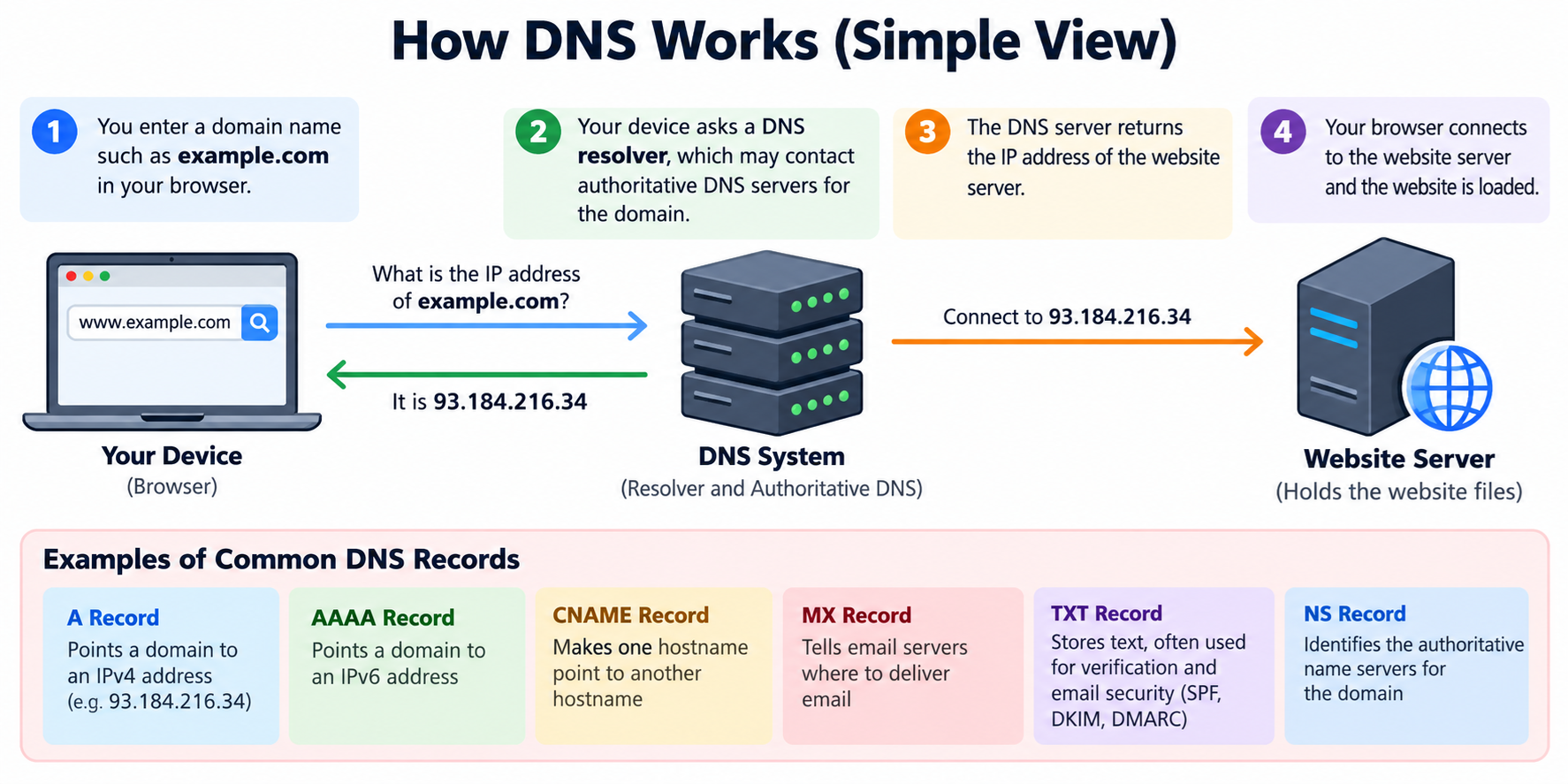
DNS, or Domain Name System, is one of the basic systems that makes the internet usable.
It translates human-friendly domain names such as example.com into technical information that computers use to find websites, email servers, and other online services.
Without DNS, people would have to remember numerical IP addresses instead of simple names.
DNS allows you to type a domain name into a browser and reach the correct website.
For website owners, DNS is important because it controls how a domain name connects to different services.
If DNS records are incorrect, your website may stop loading, email may stop working, or visitors may be sent to the wrong server.
What Does DNS Actually Do?
When you enter a domain name into a web browser, your computer needs to discover where that website is located.
The domain name itself does not contain the website files. Instead, DNS provides information that helps the browser locate the server responsible for the website.
For example, a DNS record may tell the internet that example.com should connect to a particular IPv4 address.
Another record may tell email systems which server should receive messages sent to addresses such as user@example.com.
DNS acts like a directory that connects names with destinations.
Why Do We Need DNS?
Computers communicate using network addresses, while people prefer meaningful names.
It is much easier to remember example.com than an address such as 192.0.2.10. DNS provides the connection between these two different ways of identifying resources.
DNS also gives website owners flexibility. If you move your website to another server, you can update the DNS record instead of asking every visitor to use a new domain name.
The domain can remain the same even when the server behind it changes.
What Happens When You Open a Website?
Suppose you type www.example.com into your browser.
Your browser first needs to determine where that domain points. It asks a DNS resolver for information about the domain.
If the resolver already has a valid cached answer, it may return that answer immediately.
If not, it may contact other DNS servers until it reaches the authoritative DNS servers responsible for the domain.
The authoritative DNS service returns the appropriate DNS record. The browser can then connect to the destination server and request the website.
DNS helps locate the server, but it does not normally deliver the website content itself.
What Are DNS Records?
DNS information is stored in records. Different record types have different purposes.
An A record connects a hostname to an IPv4 address.
An AAAA record connects a hostname to an IPv6 address.
A CNAME record makes one hostname point to another hostname.
An MX record identifies the servers that receive email for a domain.
A TXT record stores text information and is commonly used for verification and email security settings.
An NS record identifies the authoritative name servers responsible for the domain’s DNS zone.
Other DNS record types also exist, but these are among the ones website owners most commonly manage.
Why Do I Need to Manage DNS?
You need to manage DNS whenever you want to change how your domain connects to a service.
For example, if you move your website to a new hosting provider, you may need to update an A record or CNAME record.
If you start using a new email provider, you may need to change MX records.
If a service asks you to verify ownership of your domain, you may need to add a TXT record.
If you use a content delivery network, security service, website builder, or cloud application, that service may also ask you to create or modify DNS records.
DNS management is therefore an important part of domain and website administration.
DNS Is Different from Domain Registration
DNS and domain registration are related, but they are not the same thing.
Domain registration gives you the right to use a domain name for a specific registration period.
DNS tells the internet how that domain name should connect to websites, email systems, and other services.
Your domain registrar may also provide DNS management, but the two functions are separate.
In some cases, your domain is registered with one company while DNS is managed by another company.
DNS Is Also Different from Web Hosting
Web hosting stores and serves your website files.
DNS tells visitors where the hosting server is located.
You can think of DNS as providing directions and web hosting as providing the actual destination.
If the directions are wrong, visitors cannot reach the correct destination even if the website server itself is working perfectly.
This is why DNS problems can make a healthy website appear to be offline.
Who Manages My DNS?
Your DNS may be managed by your domain registrar, your web hosting provider, or a specialized DNS provider.
The easiest way to determine where your DNS is managed is to check the authoritative name servers assigned to your domain.
These name servers indicate which DNS provider is responsible for publishing the official DNS records.
If your domain uses name servers belonging to your registrar, DNS is probably managed there.
If the name servers belong to another provider, DNS changes normally need to be made at that provider instead.
Why Do DNS Changes Sometimes Take Time?
DNS information is often cached.
When a DNS resolver receives a record, it may keep that record for a period of time instead of requesting it again every time someone visits the domain.
Each DNS record has a value called TTL, or Time To Live. TTL helps determine how long a resolver may keep the cached information.
When you change a DNS record, some resolvers may still have the old information cached until its TTL expires.
This is why some users may see the new destination while others temporarily continue reaching the old one.
This delay is commonly called DNS propagation.
What Can Go Wrong with DNS?
Incorrect DNS settings can cause many different problems.
A wrong A record can send website traffic to the wrong server.
A missing or incorrect MX record can interrupt email delivery.
A deleted TXT record may break domain verification or email authentication.
Changing name servers without copying the existing DNS records can cause multiple services to stop working at the same time.
Even a small DNS mistake can have a noticeable effect because DNS is used before many internet connections begin.
Why You Should Be Careful Before Deleting DNS Records
Website owners sometimes see DNS records they do not recognize and assume they are unnecessary.
This can be dangerous.
Some records may belong to email providers, website verification services, security systems, subdomains, cloud applications, or older services that are still being used.
Before deleting a DNS record, identify what the record does and which service depends on it.
If you are moving only your website, you may need to change only the website-related record instead of replacing the entire DNS configuration.
DNS and Email
DNS is essential for email.
MX records identify the servers responsible for receiving email for your domain.
Other DNS records may help verify that email sent from your domain is legitimate.
SPF commonly uses a TXT record to identify systems authorized to send email for the domain.
DKIM uses DNS to publish public key information that can be used to verify signed email messages.
DMARC uses DNS to publish policies related to email authentication and reporting.
If these records are changed incorrectly, your email may fail to arrive or may be treated as suspicious by receiving mail systems.
DNS and Website Security
DNS is an important part of your website infrastructure, so access to DNS management should be protected carefully.
If someone gains control of your DNS account, they may be able to redirect your domain to another server.
For this reason, use a strong password and enable multi-factor authentication when your DNS provider supports it.
You should also limit unnecessary account access and review important DNS changes carefully.
DNS security does not replace website security, but protecting DNS is an important part of protecting your online presence.
What Is DNSSEC?
DNSSEC stands for Domain Name System Security Extensions.
DNSSEC adds cryptographic signatures to DNS information so that compatible DNS resolvers can verify that certain DNS responses are authentic and have not been modified unexpectedly.
DNSSEC does not encrypt your website traffic and does not replace HTTPS.
Its purpose is to improve trust in DNS responses.
Because DNSSEC normally requires coordination between the DNS provider and the domain registrar, it should be configured carefully.
When Do I Normally Need to Change DNS?
You may need to update DNS when you move a website to a new server, change hosting providers, configure email, create a subdomain, connect a third-party service, verify domain ownership, configure a content delivery network, or enable certain security services.
You may also need to update DNS if a hosting provider gives you a new IP address or asks you to point your domain to a new hostname.
DNS does not need constant changes, but when infrastructure changes, DNS is often one of the places that must be updated.
How Often Should I Check My DNS?
You do not need to edit DNS regularly just for the sake of making changes.
However, it is useful to understand your current DNS configuration and review it whenever you change your hosting, email, security, or other internet services.
You should also know which company manages your authoritative DNS and how to access that account.
Keeping a simple record of important DNS settings can make future migrations and troubleshooting much easier.
What Should I Check Before Changing DNS?
Before making changes, confirm which provider currently hosts your authoritative DNS.
Check which records are used by your website and which records are used by email.
If you are moving a website, confirm the new server address or hostname provided by your hosting company.
If you are changing name servers, make sure the new DNS provider already contains all required records before switching.
Do not assume that changing DNS for a website will affect only the website. DNS may also control email, verification services, and other applications connected to the same domain.
DNS in Simple Terms
The simplest way to understand DNS is to think of it as the internet’s address directory.
Your domain name is the name people remember.
DNS records provide the technical information needed to locate the services connected to that name.
Your web hosting server stores the website itself.
Because these systems work together, correct DNS management is essential for keeping a domain, website, and email service working properly.
Conclusion
DNS translates domain names into information that computers can use to locate internet services.
It allows visitors to reach websites using simple names, tells email systems where messages should be delivered, and connects domains to many other online services.
You need to manage DNS because websites and services sometimes move, change providers, or require new records.
You do not need to modify DNS frequently, but you should know where your DNS is hosted, understand the purpose of important records, and make changes carefully.
A correctly configured DNS system works quietly in the background, but when something goes wrong, understanding DNS can make troubleshooting much faster and easier.