
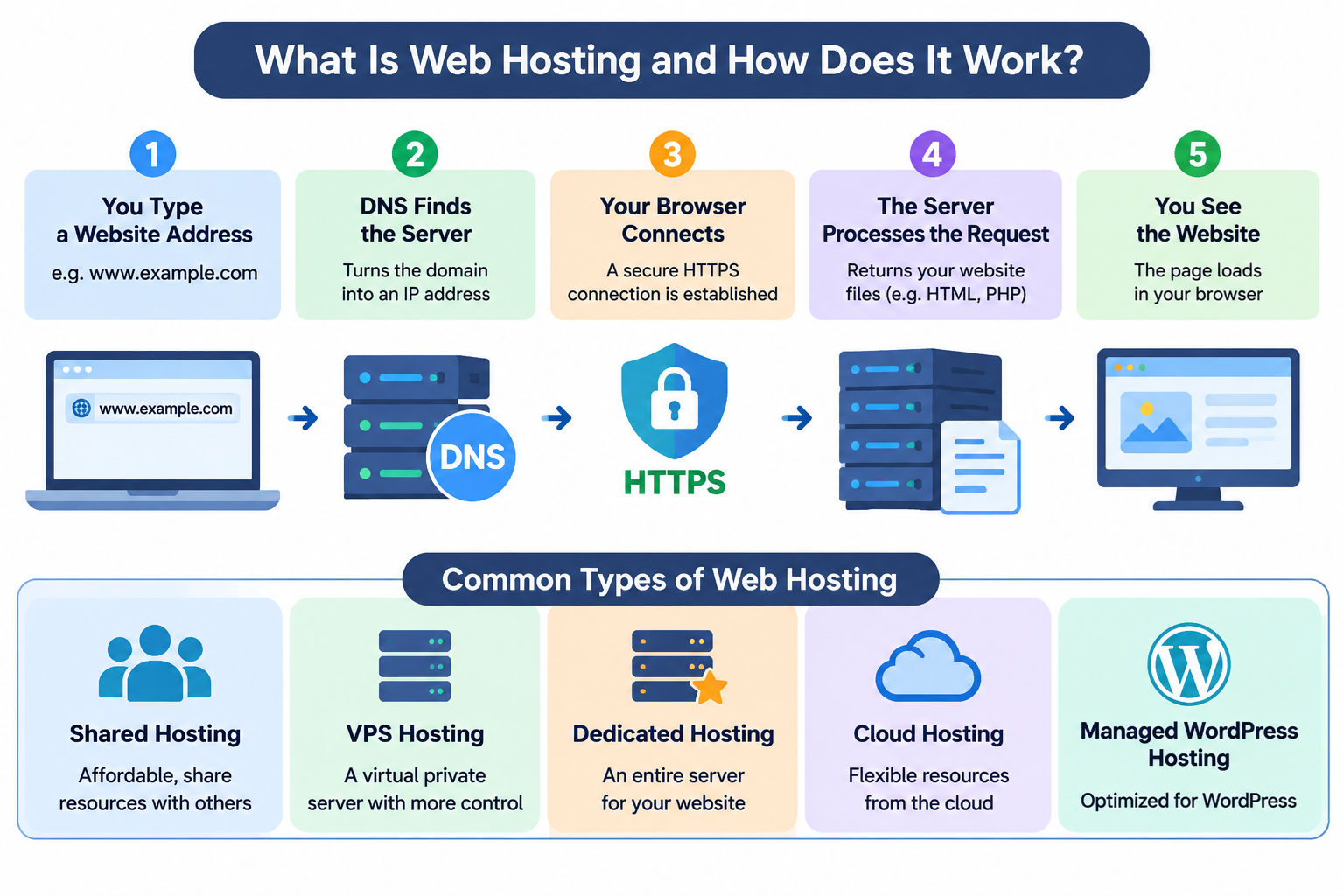
Every website you visit, whether it is a personal blog, an online store, or a large business website, needs somewhere to store its files and make them accessible over the Internet.
This is where web hosting comes in.
Web hosting is one of the fundamental services that makes the World Wide Web possible.
Without it, your website might exist as a collection of files on your computer, but people around the world would not be able to access it through their web browsers.
In this beginner-friendly guide, we will explain what web hosting is, how it works, the different types of hosting services, and what you should consider when choosing a hosting provider.
1. What Is Web Hosting?
Web hosting is a service that provides the computing resources, storage space, and network connectivity required to make a website available on the Internet.
When you create a website, you typically produce files such as HTML documents, CSS stylesheets, JavaScript programs, images, and other content.
Many websites also require databases and server-side applications to generate dynamic pages.
These files and applications must run or be stored on a computer that can respond to requests from Internet users.
That computer, or the computing environment providing this functionality, is commonly called a web server.
A web hosting company operates and maintains the infrastructure needed to keep websites accessible.
Depending on the hosting service, the provider may manage physical servers, operating systems, network connections, storage devices, security systems, and supporting software.
Instead of purchasing and maintaining your own physical server, you can rent hosting resources from a provider and use them to publish your website.
For example, if you create a WordPress website, your hosting account stores the WordPress application files, uploaded images, themes, plugins, and related database content.
When someone visits your website, the hosting environment processes the request and delivers the appropriate response.
In simple terms, web hosting provides the online environment where your website lives and operates.
2. How Does Web Hosting Work?
To understand how web hosting works, imagine that someone enters your website address into a browser.
For example, a visitor types https://www.example.com into the address bar.
Several technical processes take place before the website appears on the screen.
Step 1: The Browser Finds the Server
The browser needs to determine where the website is hosted. It uses the Domain Name System, commonly called DNS, to find the IP address associated with the domain name.
DNS works like a distributed Internet directory. It helps translate human-readable domain names into IP addresses that computers use for network communication.
A domain might resolve to the address of a web server, a reverse proxy, or a content delivery network rather than directly to the physical server storing the website.
Step 2: The Browser Establishes a Connection
After obtaining the appropriate network address, the browser establishes a connection to the destination service.
Modern websites normally use HTTPS, which protects communication through TLS encryption. The browser and server establish a secure connection before exchanging most application data.
This helps protect information transmitted between the visitor and the website.
Step 3: The Browser Sends an HTTP Request
The browser sends an HTTP request asking for a particular resource, such as the website’s homepage.
The request includes information identifying the requested hostname and resource. The server or an intermediary service uses that information to determine how to handle the request.
Step 4: The Server Processes the Request
The web server receives the request and determines what content should be returned.
For a static website, the response may simply contain an existing HTML file.
For a dynamic website, such as WordPress, the server may execute PHP code, retrieve information from a database, and generate HTML content.
Some requests may also be handled by a caching system, which can deliver previously generated content without executing the full application again.
Step 5: The Browser Displays the Website
The server returns an HTTP response containing the requested content or an appropriate status code.
The browser interprets the HTML, downloads additional resources such as CSS and JavaScript files, and renders the webpage.
This entire process usually takes place in a fraction of a second, although the actual loading time depends on the network, hosting resources, application performance, and website design.
Every time someone visits your website, a similar process occurs.
3. What Is a Web Server?
A web server can refer to both the computer infrastructure that hosts website content and the software that handles HTTP requests.
A physical server is a computer designed to provide services to other computers over a network. It typically includes processors, memory, storage devices, network interfaces, and an operating system.
Web hosting servers often use Linux, although Windows Server is also used for certain applications.
Common web server software includes Apache HTTP Server, Nginx, LiteSpeed, and Microsoft Internet Information Services, commonly known as IIS.
These applications receive requests from browsers and deliver website content.
For example, a Linux hosting environment might use Apache or LiteSpeed to handle HTTP requests, PHP to execute WordPress code, and MySQL or MariaDB to manage website data.
A single physical server can host many websites. Virtualization and container technologies also allow hosting providers to divide physical resources into multiple isolated computing environments.
This is why hosting services can vary greatly in price, performance, resource allocation, and administrative control.
4. Domain Names and Web Hosting: What Is the Difference?
Beginners frequently confuse domain registration with web hosting, but they are two different services.
A domain name is the human-readable address visitors use to find a website. Examples include example.com and example.org.
Web hosting provides the computing resources and software environment needed to store, process, and deliver the website’s content.
You can think of the domain name as the address people use to reach your website, while web hosting provides the infrastructure that serves it.
Domain names are registered through domain registrars, while hosting services are purchased from hosting providers. Some companies offer both services together.
When you connect a domain to a hosting service, you normally configure DNS records or delegate DNS management to the appropriate name servers.
For example, an A record can associate a hostname with an IPv4 address, while an AAAA record can associate it with an IPv6 address.
A website can be moved to a different hosting provider without changing its domain name. You only need to update the appropriate DNS configuration and complete the website migration.
You can also register a domain name before purchasing hosting, although a functioning public website generally needs a hosting or publishing service.
5. Different Types of Web Hosting
Not all websites need the same amount of computing power, storage, or administrative control. Hosting providers offer several types of services to meet different requirements.
Shared Web Hosting
Shared hosting is one of the most common choices for beginners and small websites.
In shared hosting, multiple customers use the resources of the same server environment. Each customer normally receives a separate hosting account, but resources such as CPU capacity, memory, disk performance, and network connectivity are shared.
Shared hosting is generally affordable and relatively easy to manage. Many packages include a control panel, email services, SSL support, database management, and one-click application installation.
However, resource limits can affect websites that experience high traffic or run demanding applications.
Shared hosting is often suitable for personal blogs, small business websites, portfolios, and low-traffic WordPress sites.
Virtual Private Server (VPS) Hosting
A Virtual Private Server, or VPS, is a virtualized computing environment that behaves much like an independent server.
A physical machine runs virtualization software that divides its resources into multiple virtual servers. Each VPS typically has its own operating system, allocated resources, and administrative environment.
VPS hosting offers greater flexibility than traditional shared hosting. Customers can often install custom software, configure server services, and control operating system settings.
However, a VPS may require knowledge of Linux or Windows server administration, especially when the service is unmanaged.
VPS hosting is suitable for growing websites, development environments, custom applications, and businesses that need more control over their server configuration.
Dedicated Server Hosting
Dedicated hosting provides an entire physical server for one customer or organization.
Unlike shared hosting or a typical VPS, the customer does not share the physical machine with unrelated hosting accounts.
Dedicated servers can provide substantial computing resources, consistent hardware access, and extensive configuration flexibility.
Customers may choose specific processors, memory capacities, storage configurations, and operating systems, depending on the provider.
Dedicated hosting is commonly used for resource-intensive applications, large websites, specialized software, and workloads that benefit from dedicated hardware.
It generally costs more than shared hosting and may require significant server administration experience.
Cloud Hosting
Cloud hosting runs websites or applications using resources supplied by a cloud infrastructure platform.
Cloud environments commonly use virtualization, software-defined networking, distributed storage, and automated resource management.
Depending on the architecture, cloud hosting can make it easier to provision additional computing resources, deploy redundant application instances, and automate infrastructure operations.
However, cloud hosting does not automatically guarantee unlimited resources, zero downtime, or better performance.
Availability and scalability depend on the actual system design, redundancy, resource limits, and services purchased.
Cloud hosting is useful for applications with changing resource requirements, scalable services, and businesses that need flexible deployment options.
Managed WordPress Hosting
Managed WordPress hosting is designed specifically for WordPress websites.
The provider may handle selected maintenance tasks such as WordPress updates, backups, caching, security monitoring, and performance optimization.
The exact responsibilities vary between hosting companies. Some managed services maintain only the hosting infrastructure, while others also support parts of the WordPress application.
Managed WordPress hosting can reduce administration work, particularly for customers who prefer to focus on creating content rather than maintaining servers.
6. What Resources Does Web Hosting Provide?
Web hosting packages usually include several important resources that determine how a website operates.
Disk Storage: Storage space holds website files, images, databases, application code, and sometimes email messages. Modern hosting services commonly use SSD or NVMe storage, although actual performance depends on the complete storage system.
CPU: The processor executes server-side programs, handles application requests, and performs calculations. Dynamic websites often require CPU time to generate pages and execute scripts.
RAM: Random Access Memory temporarily stores data used by operating systems, web applications, and database services. Applications with insufficient available memory may experience slow performance or failed requests.
Bandwidth and Data Transfer: Bandwidth refers to the capacity of a network connection, while data transfer describes the amount of information transmitted over a period. Hosting plans may impose limits on network speed, transferred data, or both.
Databases: Many websites use databases to store structured information. WordPress commonly uses MySQL or MariaDB to store posts, pages, settings, and other application data.
Email Services: Some hosting packages include email accounts associated with the customer’s domain. Other providers offer website hosting and email hosting as separate services.
SSL/TLS Certificates: Certificates allow browsers to authenticate a website’s hostname and establish encrypted HTTPS connections. Many hosting providers support automated certificate issuance and renewal.
Backups: Backups provide copies of website files and databases that can be used during recovery. Backup frequency, retention periods, and restoration options vary by provider.
When comparing hosting plans, consider the actual limits and service conditions rather than relying only on advertised storage or bandwidth numbers.
7. What Is cPanel and How Does It Help?
Many web hosting companies provide a graphical control panel that allows customers to manage hosting accounts without using Linux commands.
One widely used control panel is cPanel.
Through cPanel, customers can commonly manage domain-related settings, website files, databases, email accounts, SSL certificates, and other hosting functions.
For example, a customer may use File Manager to upload website files, phpMyAdmin to inspect a MySQL database, or a supported application installer to install WordPress.
Some hosting providers also use WebHost Manager, commonly called WHM, for server-level administration and the management of multiple cPanel accounts.
cPanel and WHM are related but serve different administrative purposes.
It is important to understand that cPanel is not the web server itself. It is management software that helps configure and administer services running within the hosting environment.
A website can operate perfectly well without cPanel, provided the necessary server software and configurations are available.
8. How Does WordPress Work with Web Hosting?
WordPress is a popular content management system used to create websites, blogs, and online stores.
WordPress does not replace web hosting. It is software that runs in a suitable hosting environment.
A conventional WordPress installation requires a compatible web server, PHP runtime, and database system.
When a visitor requests a WordPress page, the web server may pass the request to PHP. WordPress executes application code, retrieves the required data, and generates the page.
WordPress themes control much of the website’s presentation, while plugins can add functionality such as contact forms, caching, and e-commerce features.
Images and other uploaded files are generally stored in the site’s filesystem, while posts, pages, and many configuration settings are stored in the database.
This relationship is important when troubleshooting WordPress performance problems.
A slow WordPress website may be caused by insufficient hosting resources, inefficient plugins, database queries, external services, or poorly optimized content.
Upgrading hosting resources can help in some situations, but it will not automatically fix inefficient application code or oversized images.
9. What Makes a Good Web Hosting Service?
Choosing a hosting provider involves more than comparing prices.
Several technical and operational factors affect the reliability and performance of a website.
Reliability and Uptime
Uptime describes the percentage of time a service remains available.
A reliable hosting environment should use appropriate monitoring, maintenance practices, and fault-recovery procedures.
Some providers advertise uptime guarantees, but customers should review exactly what those guarantees cover, including exclusions and compensation terms.
Website Performance
Hosting performance depends on processor capacity, memory availability, storage performance, network connectivity, server configuration, and application efficiency.
Fast storage and modern processors can help, but they are only parts of the overall system.
Caching, database optimization, efficient application code, and appropriate use of a content delivery network can also improve website responsiveness.
Security
A good hosting service should provide a foundation for secure website operation.
Relevant protections may include firewalls, malware monitoring, TLS support, account isolation, software updates, access controls, and backup services.
However, security responsibilities are shared between the hosting provider and website owner.
Customers still need to maintain their applications, use strong authentication, limit unnecessary access, and keep WordPress themes and plugins updated.
Technical Support
Technical support is particularly important when a website becomes unavailable or encounters a configuration problem.
Consider the provider’s support channels, working hours, scope of assistance, and experience with the technologies used by your website.
A provider that supports basic hosting infrastructure may not necessarily troubleshoot custom application code.
Backup and Recovery
Backups are essential for recovering from accidental deletion, software failures, security incidents, and corrupted data.
Before selecting a hosting service, determine how often backups are created, where they are stored, how long they are retained, and whether customers can restore them independently.
For important websites, maintaining additional independent backups is a sensible precaution.
Scalability
Your website may require additional resources as traffic increases.
Before purchasing hosting, investigate whether you can move to a larger shared hosting package, upgrade to a VPS, or migrate to a different server environment.
A practical upgrade path can reduce future disruption.
10. How Much Does Web Hosting Cost?
Web hosting prices vary considerably depending on the type of service, resources included, management level, and provider.
Shared hosting is generally the least expensive traditional hosting option for small websites. VPS hosting usually costs more because it provides a greater degree of resource allocation and control.
Dedicated servers commonly have higher costs because customers rent an entire physical machine.
Cloud hosting pricing depends on the provider and service model. Some cloud services charge fixed monthly fees, while others calculate costs based on provisioned resources, usage, storage, or network traffic.
Managed services may include additional charges for administration, monitoring, backups, or application support.
When comparing hosting prices, pay attention to introductory discounts, renewal prices, domain registration fees, backup charges, email services, migration fees, and resource restrictions.
A low advertised monthly price is not always the lowest long-term cost.
For a beginner creating a small website, a basic shared hosting package is often sufficient. More expensive hosting should be considered when the website’s actual technical requirements justify it.
11. How to Set Up Your First Website with Web Hosting
Publishing a basic website generally involves a straightforward process.
First, choose and register a domain name. Select a name that is easy to remember and appropriate for your website or business.
Next, choose a hosting plan based on the type of website you want to build, expected traffic, software requirements, and available budget.
After purchasing hosting, connect your domain name to the hosting service by configuring the appropriate DNS settings.
You can then install a website application such as WordPress or upload static website files using the provider’s file manager, SFTP service, or supported deployment tools.
If your website requires a database, create or configure the database and connect it to your application.
Enable HTTPS using a valid SSL/TLS certificate, verify that your website loads correctly, and test important functions such as navigation, forms, and login pages.
Finally, configure backups, apply application updates, and monitor your website for errors or security issues.
Once these steps are complete, your website can become publicly accessible through its domain name.
12. Common Web Hosting Problems
Even well-maintained websites can occasionally encounter hosting-related problems.
A website that does not load may have incorrect DNS settings, an unavailable server, a network problem, or an application error.
A 500 Internal Server Error usually indicates that the server encountered a condition that prevented it from completing the request. Possible causes include application failures, incorrect server configuration, and resource exhaustion.
A 503 Service Unavailable response may indicate temporary overload, maintenance, or an unavailable application service.
Slow website performance can result from excessive database queries, limited CPU resources, insufficient memory, slow external services, or inefficient website content.
Email delivery problems may involve DNS authentication records, mail server configuration, sender reputation, or recipient-side filtering.
Diagnosing these problems requires identifying which part of the system is failing. DNS tools, web server logs, application logs, resource monitoring, and browser developer tools can provide valuable information.
Understanding basic web hosting concepts makes troubleshooting easier because you can separate domain, network, server, and application problems.
13. Do You Need Technical Knowledge to Use Web Hosting?
Not necessarily.
Many shared hosting services are designed for beginners and provide graphical interfaces that simplify routine website management.
With a control panel and an application installer, someone with limited technical experience can often publish a basic WordPress website.
However, understanding a few technical concepts can be extremely helpful.
Knowing the difference between a domain name and an IP address, understanding what DNS does, and recognizing how HTTPS works will make website maintenance much easier.
For VPS and dedicated server hosting, additional knowledge may be necessary, especially when managing an operating system, firewall, web server, or database directly.
Linux server administration, networking, file permissions, system services, and basic security practices become increasingly important as you take greater control of the infrastructure.
The best starting point is to choose a hosting service that matches your current experience and the actual needs of your website.
14. Frequently Asked Questions About Web Hosting
Can I Have a Website Without Buying Web Hosting?
Yes. Some website-building platforms offer free publishing services, and static websites can sometimes be hosted on free service tiers.
However, the website still runs on computing and network infrastructure supplied by someone.
Free services may impose restrictions on storage, bandwidth, custom domains, advertisements, or application functionality.
Can I Host a Website on My Own Computer?
Yes. You can install web server software on your own computer and make it accessible over a network.
For public Internet access, you may need appropriate router configuration, firewall rules, DNS records, and Internet connectivity.
You must also consider ISP restrictions, network address translation, security, uptime, and power reliability.
For most public business websites, using a professional hosting provider is more practical than maintaining a server at home.
Can One Hosting Account Support Multiple Websites?
Some hosting packages allow multiple websites or domains under one account, while others permit only one primary website.
The exact capabilities depend on the provider, control panel, and plan limitations.
Even when multiple websites are allowed, they may share the same account resources and security boundaries.
Do I Need Web Hosting If I Already Own a Domain?
Usually, yes, if you want to publish a conventional website.
Registering a domain gives you control over the domain registration, but it does not automatically provide the computing resources needed to serve your website.
You must connect the domain to a website hosting or publishing platform.
Can I Change My Hosting Provider Later?
Yes. You can migrate website files, databases, and relevant configurations to another hosting provider.
After preparing the new environment, you update the necessary DNS records and verify that the website functions correctly.
A carefully planned migration, including backups and compatibility checks, can minimize disruption.
Conclusion
Web hosting is the infrastructure service that makes websites accessible over the Internet.
It provides the computing resources, storage, network connectivity, and supporting software needed to receive requests and deliver website content.
When someone enters a domain name into a browser, DNS helps locate the appropriate destination, the browser establishes a connection, and the web hosting environment processes the request and returns the website content.
Shared hosting, VPS hosting, dedicated servers, cloud hosting, and managed WordPress hosting offer different combinations of cost, performance, flexibility, and management responsibility.
For most beginners, shared hosting provides a practical starting point. As a website grows, more advanced hosting solutions may become appropriate.
The most important principle is to choose hosting based on your website’s actual requirements rather than simply purchasing the largest or most expensive package.
We believe that understanding the technology behind your website helps you make better hosting decisions.
Whether you are building your first WordPress website or managing a Linux server, learning the fundamentals of web hosting is an important first step toward creating a reliable and secure online presence.