
Choosing the right web hosting service is one of the most important decisions when building or managing a website.
Whether you are launching a personal blog, operating a small business website, running an online store, or deploying a resource-intensive application, your hosting environment affects performance, reliability, security, and operating costs.
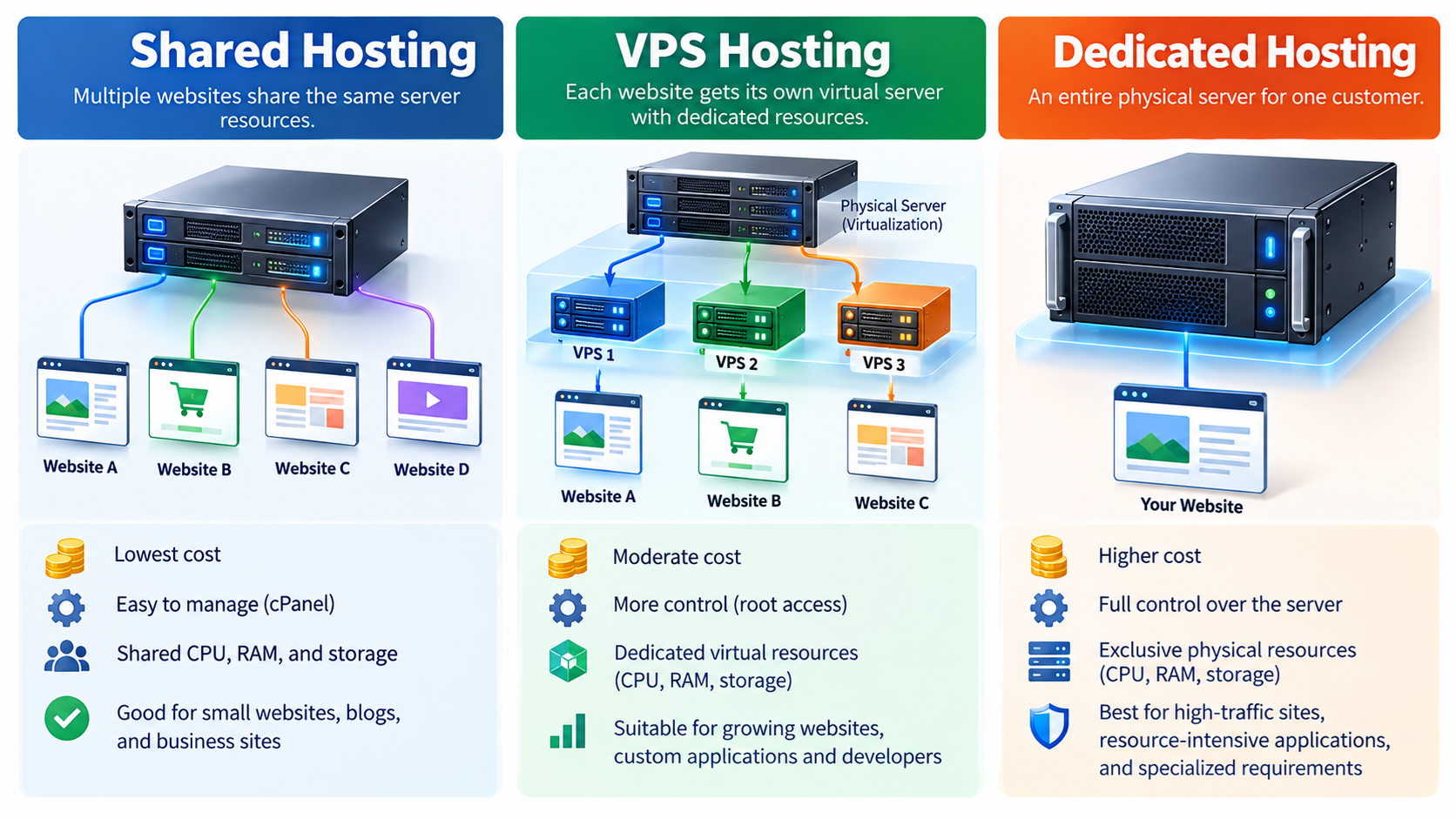
Three of the most common web hosting options are Shared Hosting, Virtual Private Server (VPS) Hosting, and Dedicated Server Hosting.
Although all three provide the infrastructure needed to make websites accessible over the Internet, they differ significantly in how computing resources are allocated, how much control customers receive, and who is responsible for server administration.
Understanding these differences can help you avoid paying for resources you do not need while ensuring your website has sufficient capacity to operate reliably.
In this guide, we will explain how each hosting type works, compare their advantages and limitations, and help you determine which solution is best suited to your website.
1. What Is Shared Hosting?
Shared hosting is a web hosting service in which multiple websites or customer accounts operate within the same server environment and share its computing resources.
A physical server contains processors, memory, storage devices, and network connections.
Instead of assigning the entire machine to one customer, a hosting provider uses the server to accommodate multiple hosting accounts.
Each account typically has its own website files, databases, email settings, and management interface. However, customers share the underlying server infrastructure.
For example, a shared hosting server might host dozens or hundreds of websites, depending on the server’s hardware, customer workloads, and the hosting provider’s resource allocation policies.
When a visitor accesses one of these websites, the server processes the request using available resources.
If several websites become busy simultaneously, they may compete for processor time, memory, storage performance, or other shared resources.
Modern shared hosting platforms frequently use account-level resource controls to reduce interference between customers.
Nevertheless, resource sharing remains the defining characteristic of this hosting model.
Advantages of Shared Hosting
Affordable Cost: Shared hosting is generally the least expensive traditional hosting option because the infrastructure costs are distributed among multiple customers.
Easy Administration: Most shared hosting plans provide graphical management tools such as cPanel, allowing customers to manage files, databases, email accounts, and domains without advanced server administration skills.
Provider-Managed Infrastructure: The hosting company normally maintains the underlying operating system, web server software, physical hardware, and network connectivity.
Suitable for Beginners: Shared hosting is a practical starting point for personal websites, small business sites, portfolios, and basic WordPress installations.
Convenient Website Tools: Many shared hosting packages include website installers, SSL certificate support, database tools, and other commonly needed services.
Limitations of Shared Hosting
The primary limitation of shared hosting is that computing resources are shared.
A busy website may encounter restrictions on CPU usage, memory consumption, concurrent processes, or disk input/output operations.
Customers typically cannot modify system-wide settings, install arbitrary operating system components, or obtain unrestricted root access.
Shared hosting is also less flexible for applications requiring specialized server software or unusual network configurations.
Although reputable providers implement account isolation and security controls, vulnerabilities in shared infrastructure or incorrect configuration can potentially affect multiple accounts.
Who Should Choose Shared Hosting?
Shared hosting is usually a good choice for individuals and small businesses that want an affordable, easy-to-manage website without maintaining their own server.
It is especially suitable for blogs, company information websites, small WordPress websites, landing pages, and projects with modest resource requirements.
For these workloads, purchasing an entire virtual or physical server may provide little practical benefit.
2. What Is VPS Hosting?
VPS stands for Virtual Private Server.
VPS hosting uses virtualization technology to divide a physical server into multiple virtual machines.
Each virtual machine operates as an independent server environment with its own operating system and allocated computing resources.
A virtualization platform, often called a hypervisor, manages the physical hardware and provides virtual CPUs, memory, storage, and network interfaces to individual virtual machines.
For example, a physical server with substantial processor capacity and memory might run several Linux VPS instances.
Each instance can host websites, databases, development tools, or other applications independently.
Unlike traditional shared hosting, VPS customers usually have much greater control over their server environment.
A VPS running Linux may provide root access, allowing administrators to install software packages, configure system services, manage firewall rules, and modify operating system settings.
However, the underlying physical hardware remains shared among virtual machines.
Advantages of VPS Hosting
Greater Administrative Control: VPS hosting commonly provides root or administrator access, allowing customers to configure their operating systems and install custom applications.
Allocated Resources: VPS plans usually specify virtual CPU capacity, memory, and storage allocations. These provide more predictable resource boundaries than many shared hosting plans, although actual CPU and disk performance can still depend on the provider’s allocation policies.
Better Application Flexibility: Customers can install web servers, databases, programming runtimes, development frameworks, and supporting software according to their requirements.
Improved Environment Isolation: Virtual machines provide stronger separation between operating system environments than conventional shared hosting accounts, although isolation is not absolute.
Scalability: Many VPS providers allow customers to increase memory, virtual CPU capacity, or storage without migrating to an entirely different hosting platform.
Limitations of VPS Hosting
VPS hosting generally costs more than entry-level shared hosting.
An unmanaged VPS also requires technical knowledge. Customers may be responsible for operating system updates, software installation, firewall configuration, monitoring, backup management, and security maintenance.
A poorly configured VPS can become vulnerable to attacks or performance problems even when the underlying virtualization infrastructure is properly maintained.
Another consideration is that a VPS does not automatically deliver better website performance than shared hosting.
A low-cost VPS with limited resources or heavily contended virtual CPUs may perform worse than a well-managed shared hosting account on modern hardware.
Managed vs. Unmanaged VPS
VPS hosting is commonly offered in managed and unmanaged configurations.
With unmanaged VPS hosting, the provider usually maintains the physical infrastructure and virtualization platform, while the customer administers the operating system and applications.
With managed VPS hosting, the provider may also perform selected system administration tasks, such as operating system updates, monitoring, security maintenance, and software troubleshooting.
The exact scope varies by provider and should be reviewed before purchasing.
Who Should Choose VPS Hosting?
VPS hosting is appropriate for growing websites, custom web applications, development environments, and businesses that need greater control over server software.
It is also useful for customers who want to learn Linux server administration or deploy services that cannot run within the restrictions of shared hosting.
For example, a developer may use a Linux VPS to install Nginx, configure a database, deploy a Python or Node.js application, and manage services using SSH.
3. What Is Dedicated Server Hosting?
Dedicated server hosting provides an entire physical server for the exclusive use of one customer or organization.
Unlike shared hosting or VPS hosting, a dedicated server does not normally divide its physical computing resources among unrelated hosting customers.
The customer receives access to the machine’s processor capacity, physical memory, storage devices, and network interfaces, subject to the purchased configuration and provider policies.
Dedicated servers are commonly installed in professional data centers equipped with network infrastructure, cooling systems, power distribution equipment, and physical security controls.
Depending on the service, customers may have extensive control over the operating system, installed applications, storage configuration, and server administration.
For example, a business could rent a dedicated Linux server equipped with a modern multi-core processor, substantial RAM, and NVMe storage to operate several demanding applications.
Dedicated hosting is not limited to large public websites. It can also support databases, virtualization platforms, development environments, and specialized business workloads.
Advantages of Dedicated Hosting
Exclusive Physical Resources: The processor, memory, and storage hardware are assigned to one customer rather than divided among unrelated tenants.
Consistent Resource Access: Dedicated hosting removes the performance interference associated with other customers sharing the same physical machine, although applications running on that machine still compete with one another.
Extensive Configuration Control: Customers can often select operating systems, configure storage arrangements, manage network services, and install specialized software.
Suitable for Demanding Workloads: Dedicated servers can support applications requiring substantial computing power, memory, storage throughput, or predictable resource availability.
Customizable Security Configuration: Administrators can implement security policies, firewall configurations, access controls, and monitoring systems tailored to their applications.
Limitations of Dedicated Hosting
Dedicated servers generally have higher monthly costs than shared hosting or small VPS plans.
Customers may also need more technical expertise to configure and maintain the server, particularly when the service is unmanaged.
Increasing resources may require hardware upgrades, maintenance windows, or migration to another server.
Unlike cloud environments that can sometimes provision additional virtual resources quickly, physical server capacity is constrained by the installed hardware.
A dedicated server also does not guarantee uninterrupted service. Hardware failures, network outages, software problems, and security incidents can still cause downtime.
For critical applications, redundancy, monitoring, backups, and disaster recovery planning remain essential.
Who Should Choose Dedicated Hosting?
Dedicated hosting is suitable for resource-intensive applications, high-traffic websites, large databases, specialized software, and organizations requiring extensive infrastructure control.
It may also be appropriate when predictable access to physical hardware is more important than rapid scaling or minimizing costs.
Businesses using dedicated servers should consider whether they have the technical resources to maintain them or whether a managed service would be more appropriate.
4. Shared Hosting vs. VPS vs. Dedicated Hosting: Resource Allocation
One of the biggest differences between these hosting types is how hardware resources are allocated.
With shared hosting, multiple customer accounts operate within the same server environment. CPU time, memory, storage performance, and network capacity are shared.
The provider manages the system and may impose account-level limits to prevent individual websites from consuming excessive resources.
With VPS hosting, each virtual machine receives an allocation of virtual computing resources.
Memory allocations are commonly more clearly defined, while virtual CPU performance may still be affected by contention with other virtual machines on the physical server.
Some providers offer dedicated virtual CPU allocations or reserved performance levels, while others use shared CPU scheduling.
With dedicated hosting, the customer receives the entire physical machine.
This provides direct access to its installed hardware capacity, although the operating system and applications must still manage those resources efficiently.
The important distinction is that VPS hosting provides virtual machine isolation, while dedicated hosting provides exclusive use of the physical server.
Neither model guarantees superior performance without considering the actual hardware specifications, storage architecture, workload, and service configuration.
5. Performance Differences
Website performance depends on more than the hosting category.
A server’s processor architecture, memory capacity, storage system, network connectivity, operating system, and application configuration all influence response times.
Shared hosting can deliver excellent performance for lightweight websites, especially when the provider uses modern hardware and appropriate caching technologies.
However, shared resource limits may become restrictive when a website experiences sustained traffic or runs demanding server-side applications.
VPS hosting provides more control over performance optimization.
Administrators can configure web server workers, application processes, database settings, and caching systems to match their workloads.
Dedicated hosting offers exclusive use of physical hardware resources and can be advantageous for applications requiring sustained computing capacity or intensive database and storage operations.
Still, a dedicated server running inefficient software may perform poorly.
For example, a badly optimized WordPress website with expensive database queries can remain slow even after moving to a powerful dedicated server.
Before upgrading hosting, website owners should investigate application bottlenecks, database performance, caching configuration, and actual resource utilization.
A hosting upgrade is most beneficial when the current hosting environment is genuinely limiting performance.
6. Security and Isolation
Security is another important consideration when comparing hosting options.
Shared hosting providers are responsible for maintaining a secure multi-user environment.
They may use account isolation, restricted file permissions, security monitoring, malware detection, and other protective measures.
However, customers have limited control over system-level security settings.
VPS hosting provides a separate operating system environment for each virtual machine.
This allows administrators to configure firewalls, control system access, install monitoring tools, and apply custom security policies.
Virtualization introduces an additional isolation boundary, but vulnerabilities in hypervisors, shared infrastructure, or network configurations can still create security risks.
Dedicated servers provide physical hardware separation from unrelated customers and support extensive security customization.
Nevertheless, dedicated hardware does not make a server automatically secure.
Security depends heavily on operating system maintenance, application updates, authentication controls, network configuration, monitoring, and incident response procedures.
For example, an unmanaged dedicated server running outdated software may be substantially less secure than a professionally maintained shared hosting environment.
Regardless of hosting type, website owners should use strong passwords, enable multi-factor authentication where available, maintain backups, update applications, and restrict unnecessary administrative access.
7. Server Management and Technical Skills
Shared hosting is generally the easiest environment to manage.
The provider handles most operating system and infrastructure administration, while customers manage website content, application settings, and account-level services.
A control panel such as cPanel may provide tools for file uploads, database creation, SSL management, email configuration, and WordPress installation.
VPS hosting offers considerably more freedom, but unmanaged VPS customers must typically maintain their own server software.
For a Linux VPS, routine administrative tasks may include updating packages, configuring SSH, managing system services, examining logs, configuring firewalls, and monitoring memory and disk usage.
Dedicated servers often require similar administration skills, with additional responsibilities potentially involving storage layouts, hardware monitoring, RAID configuration, or operating system installation.
However, both VPS and dedicated hosting may be sold as managed services.
The management model can matter as much as the hosting architecture itself.
A managed dedicated server may require less daily administration from the customer than an unmanaged VPS.
Before choosing a plan, determine which tasks the provider handles and which remain your responsibility.
8. Scalability and Future Growth
A website’s resource requirements may increase as its audience grows or new functionality is added.
Shared hosting plans often provide upgrade paths to larger packages. However, moving beyond shared hosting may require migrating to another environment.
VPS hosting generally offers more flexible resource upgrades.
Depending on the virtualization platform, providers may allow customers to increase CPU allocations, memory, or storage.
Some changes can be performed with minimal interruption, while others require a server reboot or migration.
Dedicated hosting is constrained by the physical hardware configuration.
Adding memory, changing processors, or expanding local storage may require maintenance or migration to another machine.
However, dedicated infrastructure can also scale horizontally by deploying multiple servers and distributing applications across them.
For example, a growing website might use separate dedicated machines for web applications, database services, and background processing.
Scaling is therefore not limited to purchasing a larger individual server.
For business-critical applications, the overall architecture often matters more than the size of any single machine.
9. Cost Comparison
Cost is one of the main reasons customers choose different hosting types.
Shared hosting is usually the most affordable because multiple customers share the operating costs of the underlying infrastructure.
It is a practical option for small websites that do not need extensive computing resources or custom system configurations.
VPS hosting normally occupies the middle range between basic shared hosting and dedicated servers, although premium VPS configurations can cost more than some entry-level dedicated machines.
Dedicated hosting generally has higher costs because an entire physical server is reserved for one customer.
Pricing also depends on hardware specifications, storage capacity, bandwidth allowances, geographic location, service management, and support levels.
For example, a managed VPS may cost considerably more than an unmanaged VPS with similar virtual hardware specifications.
Customers should also consider costs beyond the advertised hosting fee, including control panel licenses, automated backups, additional IP addresses, software licenses, and administrative services.
When evaluating hosting costs, focus on the total resources and services needed rather than selecting a plan based solely on its monthly price.
The most economical solution is the one that reliably supports your application without unnecessary spending.
10. Which Hosting Type Is Best for WordPress?
WordPress can operate on shared hosting, VPS hosting, or dedicated servers, provided the environment meets its software requirements.
For a small WordPress website with modest traffic, shared hosting is often sufficient.
Most common WordPress features, including themes, plugins, image uploads, and database-backed pages, can operate within a properly configured shared hosting environment.
A growing WordPress website may benefit from VPS hosting when it requires additional resources, specialized software, or more advanced server configuration.
For example, a VPS administrator can configure PHP-FPM, Nginx, database caching, and other performance-related components according to the application’s needs.
Large WordPress installations, busy WooCommerce stores, or applications with substantial background processing may benefit from dedicated hardware or a more advanced hosting architecture.
However, visitor counts alone do not determine the required hosting type.
A well-cached website serving mostly static content may handle substantial traffic using relatively modest resources.
Conversely, a website with expensive database operations or resource-intensive plugins may encounter performance problems with comparatively few simultaneous visitors.
The best approach is to monitor actual CPU usage, memory consumption, database activity, response times, and concurrent request levels before deciding whether an upgrade is necessary.
11. When Should You Upgrade from Shared Hosting to VPS?
Moving from shared hosting to VPS should be based on measurable requirements rather than the age or popularity of a website.
One indication is that your website regularly reaches CPU, memory, input/output, or process limits imposed by the hosting provider.
Another reason is the need for software that cannot be installed or configured in a shared hosting account.
For example, an application may require a particular Linux service, customized web server configuration, or a background process that traditional shared hosting does not support.
You may also need more predictable resource allocation or greater control over security policies and application deployment.
However, upgrading to a VPS introduces additional responsibilities if you choose an unmanaged service.
Before migrating, verify that you can administer the server securely or that the provider offers the management assistance you require.
Also confirm that the new VPS actually supplies sufficient resources. Moving from a generously provisioned shared hosting plan to a very small VPS may not improve performance.
12. When Should You Upgrade from VPS to Dedicated Hosting?
A dedicated server becomes attractive when a VPS no longer provides the required computing capacity, performance consistency, or hardware control.
Applications with sustained CPU-intensive processing, substantial memory requirements, or high storage input/output demands may benefit from dedicated hardware.
Dedicated hosting is also useful when software requires particular processor features, storage configurations, or direct hardware access.
For example, an organization operating a large database may prefer dedicated storage resources to reduce performance interference from other tenants.
However, upgrading to dedicated hosting is not always the most effective solution.
Some applications benefit more from adding caching, optimizing database queries, distributing workloads, or deploying additional application instances.
A larger VPS, multiple VPS instances, or a managed cloud platform may also be more appropriate.
The decision should be based on workload measurements, operational requirements, and total costs.
13. Does Dedicated Hosting Always Mean Better Performance?
No. Dedicated hosting provides exclusive use of a physical server, but performance depends on the machine’s actual capabilities and how effectively the application uses them.
A modern VPS running on high-performance processors and NVMe storage may outperform an older dedicated server with slower hardware.
Likewise, a well-optimized shared hosting environment may load a small WordPress website faster than a poorly configured dedicated server.
Dedicated hosting becomes valuable when exclusive hardware access, sustained resource availability, extensive customization, or specialized requirements justify the additional cost.
The hosting category describes the infrastructure arrangement. It does not provide a complete measurement of performance.
For meaningful comparisons, consider processor specifications, available RAM, storage latency, network conditions, software configuration, and real application benchmarks.
14. How to Choose the Right Hosting Solution
Selecting a hosting service should begin with an assessment of your website’s actual requirements.
Consider the type of website you operate, the software it uses, its expected traffic patterns, the amount of data it stores, and whether it needs custom server configurations.
Also consider your administrative experience.
If you are building a small business website and prefer not to manage Linux services, shared hosting or managed hosting may be the most practical choice.
If you operate a growing application that requires custom software, scheduled background services, or greater control over the operating system, VPS hosting may offer a suitable balance between flexibility and cost.
If your application requires substantial physical resources, specialized configurations, or sustained performance without unrelated virtual machine workloads, a dedicated server may be appropriate.
Your budget should include both infrastructure costs and the cost of administration.
Finally, evaluate the hosting provider’s technical support, security practices, backup options, service limitations, and migration policies.
A reliable and well-managed hosting service often provides greater long-term value than an inexpensive plan with inadequate resources or support.
15. Frequently Asked Questions
Is VPS Hosting Better Than Shared Hosting?
VPS hosting provides greater operating system control and clearer resource allocation, making it suitable for custom applications and more demanding workloads.
However, shared hosting may be a better choice for beginners who want simple administration and do not require server-level access.
The better option depends on the website’s requirements.
Is a VPS the Same as a Dedicated Server?
No. A VPS is a virtual machine operating on shared physical infrastructure, while a dedicated server generally provides exclusive use of an entire physical machine.
A VPS has its own operating system environment, but its physical processor and storage hardware may still be shared with other virtual machines.
Can I Install My Own Software on Shared Hosting?
Shared hosting providers normally restrict system-level software installation and operating system modifications.
Customers can usually install supported website applications such as WordPress, but custom server services may require VPS or dedicated hosting.
Does a VPS Require Linux Knowledge?
An unmanaged Linux VPS generally requires knowledge of operating system administration, software updates, security configuration, and troubleshooting.
Managed VPS services may reduce these requirements, depending on the provider’s support scope.
Is Dedicated Hosting More Secure Than VPS Hosting?
Dedicated hosting provides exclusive physical hardware, which removes certain risks associated with sharing a machine.
However, security depends on system configuration, updates, access controls, monitoring, and operational practices.
A poorly maintained dedicated server can be less secure than a properly managed VPS.
Can I Move My Website Between Hosting Types?
Yes. Websites can generally be migrated between shared hosting, VPS hosting, and dedicated servers.
The migration process may involve transferring website files, exporting and importing databases, configuring applications, installing certificates, and updating DNS records.
Compatibility testing and backups are important before changing environments.
Conclusion
Shared hosting, VPS hosting, and dedicated hosting all provide the infrastructure needed to operate websites, but they serve different technical and business requirements.
Shared Hosting is usually the most affordable and beginner-friendly option. It works well for small websites, blogs, and businesses that do not need extensive server customization.
VPS Hosting provides a separate virtual server environment, greater administrative control, and defined resource allocations. It is a practical choice for growing websites, developers, and applications requiring customized server configurations.
Dedicated Hosting provides exclusive access to an entire physical server. It is suitable for demanding applications, specialized workloads, and organizations requiring substantial computing resources or hardware-level flexibility.
No single hosting type is best for every website.
A small WordPress site does not automatically need a VPS, and a growing business does not necessarily require a dedicated server.
Likewise, more expensive hosting does not guarantee faster loading times or better security.
The most effective choice is to match your hosting infrastructure to your real workload, technical requirements, administrative capabilities, and budget.
We believe that understanding the differences between hosting technologies is essential for making informed infrastructure decisions.
Whether you are starting with shared hosting, considering a Linux VPS, or evaluating dedicated servers, the goal is the same: building a reliable, secure, and efficient environment for your website.