
A modern CPU can execute billions of instructions per second, but its performance depends on how quickly it can access the data and instructions it needs.
Even powerful processors may spend time waiting for information to arrive from system memory.
To reduce this delay, processors use a small amount of extremely fast memory called CPU cache.
Cache stores frequently accessed data and instructions close to the processor’s execution units, allowing the CPU to retrieve them much faster than it could from regular RAM.
Most modern CPUs use several levels of cache, commonly known as L1, L2, and L3 cache. Each level has a different size, speed, and purpose.
What Is CPU Cache?
CPU cache is a small, high-speed memory system located on the processor chip. Its primary purpose is to reduce the time required to access instructions and data.
When a program runs, the CPU repeatedly reads instructions, performs calculations, and accesses memory.
Without cache, many of these operations would require accessing system RAM, which is considerably slower than the CPU’s internal processing capabilities.
Cache helps solve this problem by keeping copies of recently used or likely-to-be-needed information near the processing cores.
For example, when a program repeatedly performs calculations on the same data, the CPU may retrieve that data from cache instead of requesting it from RAM every time.
This reduces memory access delays and improves overall processor performance.
Why Does a CPU Need Cache?
Modern processors operate at very high clock speeds.
A CPU running at 4 GHz has approximately four billion clock cycles per second, but accessing system RAM may take many CPU cycles.
This difference creates a performance problem known as the memory bottleneck.
CPU cache helps bridge the speed gap between the processor and main memory.
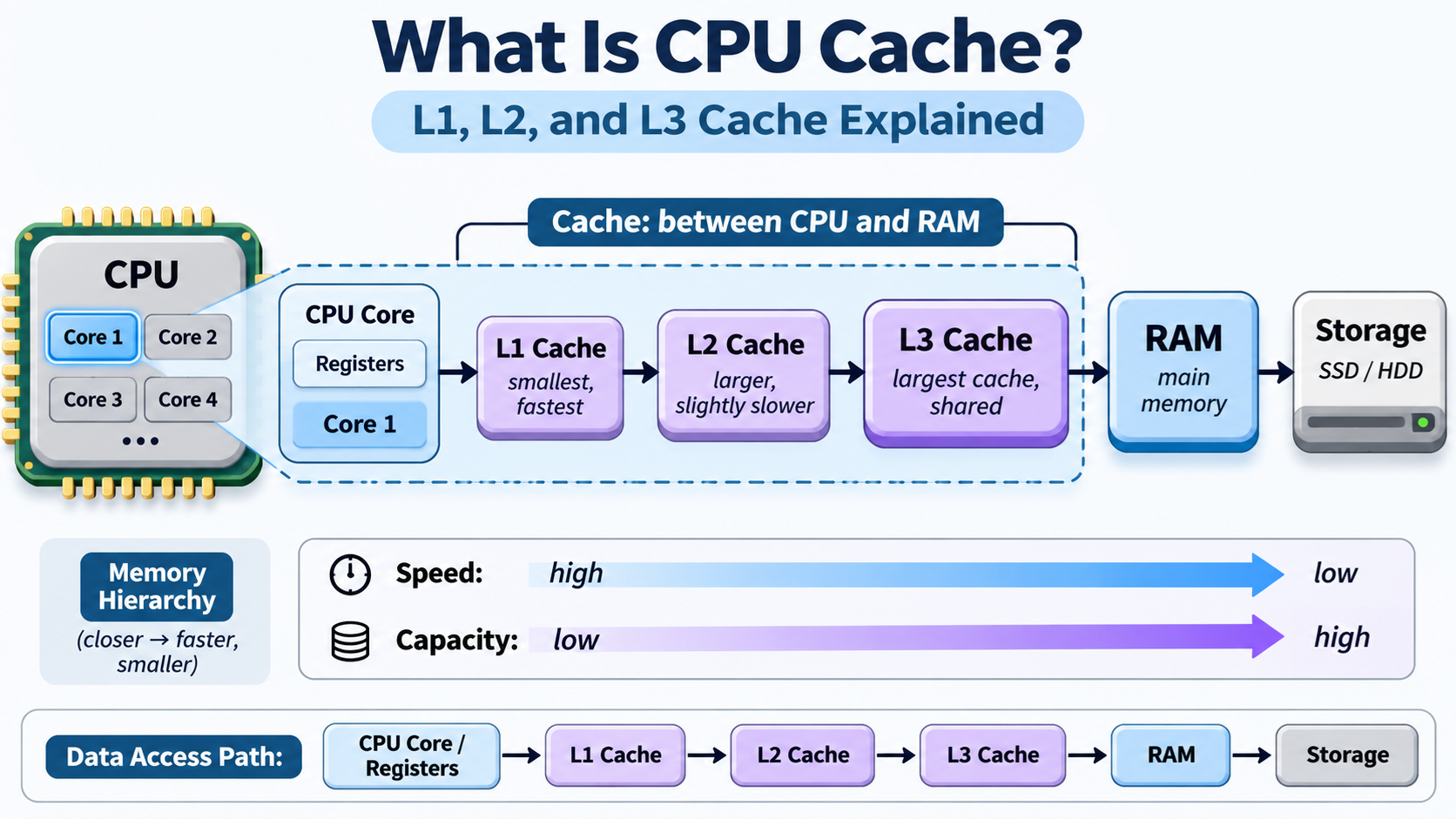
The basic memory hierarchy looks like this:
CPU Registers → L1 Cache → L2 Cache → L3 Cache → RAM → Storage
Registers are the smallest and fastest storage locations used directly by CPU instructions.
Cache provides additional high-speed storage, while RAM offers much larger capacity at higher access latency.
SSDs and HDDs provide persistent storage but are much slower than RAM for ordinary CPU memory access.
As we move farther from the CPU’s execution units, storage capacity generally increases while access speed decreases.
What Is L1 Cache?
L1 cache, or Level 1 cache, is the smallest and fastest cache level in a typical modern CPU.
It is located very close to the processor’s execution units and is usually dedicated to an individual CPU core.
L1 cache is commonly divided into two sections:
- L1 Instruction Cache (L1I): Stores recently used or likely-to-be-needed machine instructions.
- L1 Data Cache (L1D): Stores data that CPU instructions read or modify.
Separating instructions and data allows the processor to access both efficiently.
A typical CPU core might have 32 KB or 64 KB of L1 instruction cache and a similar amount of L1 data cache, although exact capacities vary across processor architectures.
L1 cache can often deliver data in only a few CPU cycles, making it extremely important for processor performance.
However, because L1 cache is relatively expensive in terms of chip area and power, its capacity remains limited.
What Is L2 Cache?
L2 cache, or Level 2 cache, is generally larger than L1 cache but has higher access latency.
L2 acts as a second layer of high-speed memory. When the CPU cannot find the required data in L1 cache, it may check L2 cache before accessing lower levels of the memory hierarchy.
In many modern processors, each CPU core has a private L2 cache. However, some architectures allow multiple cores to share an L2 cache.
L2 cache capacities commonly range from hundreds of kilobytes to several megabytes, depending on the processor design.
For example, a processor core might contain 64 KB of L1 data cache and 1 MB of L2 cache.
L2 cache provides additional storage for instructions and data that cannot fit in L1, reducing the number of requests that must travel farther through the memory system.
What Is L3 Cache?
L3 cache, or Level 3 cache, is usually much larger than L1 and L2 cache but has higher access latency.
In many desktop and server processors, L3 cache is shared by multiple CPU cores. This allows those cores to benefit from a larger pool of cached data.
For example, an eight-core processor might contain private L1 and L2 caches for each core while providing a shared L3 cache of 16 MB or 32 MB.
Some processors have substantially larger L3 caches, while others use different sharing arrangements or omit L3 entirely.
L3 cache helps reduce expensive accesses to system RAM, especially when applications repeatedly work with large amounts of data.
It can be particularly valuable for gaming, databases, simulations, and other workloads that benefit from keeping frequently accessed information close to the CPU.
L1 vs. L2 vs. L3 Cache: What Is the Difference?
The main differences between L1, L2, and L3 cache are their capacities, access latencies, and relationships with processor cores.
L1 Cache: Usually the smallest and fastest level. It is typically private to each CPU core and often separated into instruction and data caches.
L2 Cache: Larger than L1 but generally slower. It provides additional space for cached instructions and data and is often private to each core.
L3 Cache: Usually the largest and slowest of the three levels. It is commonly shared among multiple cores and reduces the need to access system RAM.
A simplified example of a modern eight-core CPU might include:
- L1: 32 KB instruction cache and 48 KB data cache per core.
- L2: 1 MB per core.
- L3: 32 MB shared across all eight cores.
In this hypothetical configuration, the total L1 capacity is 640 KB, the total L2 capacity is 8 MB, and the shared L3 capacity is 32 MB.
These values are only examples. Actual cache sizes and sharing arrangements depend on the CPU manufacturer and architecture.
How Does CPU Cache Work?
When the processor needs an instruction or piece of data, the memory hierarchy attempts to provide it from a nearby cache.
If the requested information is already available in the relevant cache, the operation is called a cache hit.
If the information is not present, a cache miss occurs, and the processor must obtain the data from another cache level or from main memory.
A simplified data-access example works as follows:
- The CPU needs a value stored in memory.
- It checks the L1 data cache.
- If the value is unavailable, the request proceeds toward L2 cache.
- If necessary, the request continues toward L3 cache.
- If the data is not available in the cache hierarchy, it is retrieved from RAM.
- The retrieved information may be placed into appropriate caches for future access.
Actual CPU cache systems are more complex and may perform overlapping lookups, prefetching, and other optimizations.
Caches generally transfer information in fixed-size units called cache lines, commonly 64 bytes on modern desktop processors.
Instead of retrieving only a single byte, the CPU may load an entire cache line containing nearby data.
This takes advantage of the fact that programs often access neighboring memory locations.
What Is Cache Locality?
CPU caches work effectively because most programs exhibit two important access patterns.
Temporal Locality: Data or instructions accessed recently are likely to be accessed again soon. For example, a loop may execute the same instructions thousands of times.
Spatial Locality: When a program accesses one memory location, it may soon access nearby locations. For example, processing an array often involves reading consecutive elements.
CPU cache is designed to take advantage of both patterns.
A program that repeatedly accesses nearby data can achieve a high cache hit rate, allowing the processor to perform more work without waiting for RAM.
Programs that frequently access unrelated memory locations may experience more cache misses and lower performance.
What Technology Does CPU Cache Use?
Most modern CPU caches are built using SRAM (Static Random Access Memory), while system RAM generally uses DRAM (Dynamic Random Access Memory).
SRAM stores information using circuits that retain their state while powered, without requiring the periodic refresh used by conventional DRAM.
SRAM is fast, making it suitable for CPU caches. However, SRAM cells occupy considerably more chip area per stored bit and are more expensive to implement at high capacities.
DRAM provides much greater storage density, making it more practical for system memory.
This difference explains why a processor may contain tens of megabytes of cache while a computer has 16 GB, 32 GB, or more of RAM.
Does More CPU Cache Mean Better Performance?
A larger cache can improve performance, but more cache does not automatically mean a faster CPU.
Performance depends on several factors, including cache latency, bandwidth, organization, CPU architecture, clock speed, and the application’s memory access patterns.
For example, a game that repeatedly accesses a large working set of data may benefit significantly from additional L3 cache.
Some AMD Ryzen processors use 3D V-Cache technology to provide substantially larger L3 cache capacities.
However, an application whose working data already fits comfortably in L1 or L2 cache may gain little from additional L3 capacity.
Similarly, programs that primarily perform calculations without frequent memory access may depend more heavily on execution throughput, instruction-level parallelism, or processor frequency.
Therefore, CPU cache should be considered alongside other specifications rather than used as the only measure of processor performance.
Conclusion
CPU cache is one of the most important components of modern processor architecture.
It reduces the delay between CPU execution and memory access by keeping frequently needed instructions and data close to the processor.
L1 cache provides extremely fast access to a small amount of information.
L2 cache offers additional capacity with somewhat higher latency.
L3 cache provides a larger caching layer, often shared among multiple CPU cores.
Together, these cache levels form a memory hierarchy that helps modern processors operate efficiently.
Understanding L1, L2, and L3 cache also explains why two CPUs with similar clock speeds and core counts can deliver very different performance.
Processor speed depends not only on how quickly instructions execute, but also on how efficiently the CPU obtains the data required to execute them.