
A computer contains many components, including the CPU, RAM, storage devices, and input/output controllers.
These components must communicate constantly to execute programs, transfer information, and control hardware.
But how does information travel between different parts of a computer?
The answer involves a fundamental concept called a computer bus.
A computer bus is a communication system that transfers data, addresses, and control information between hardware components.
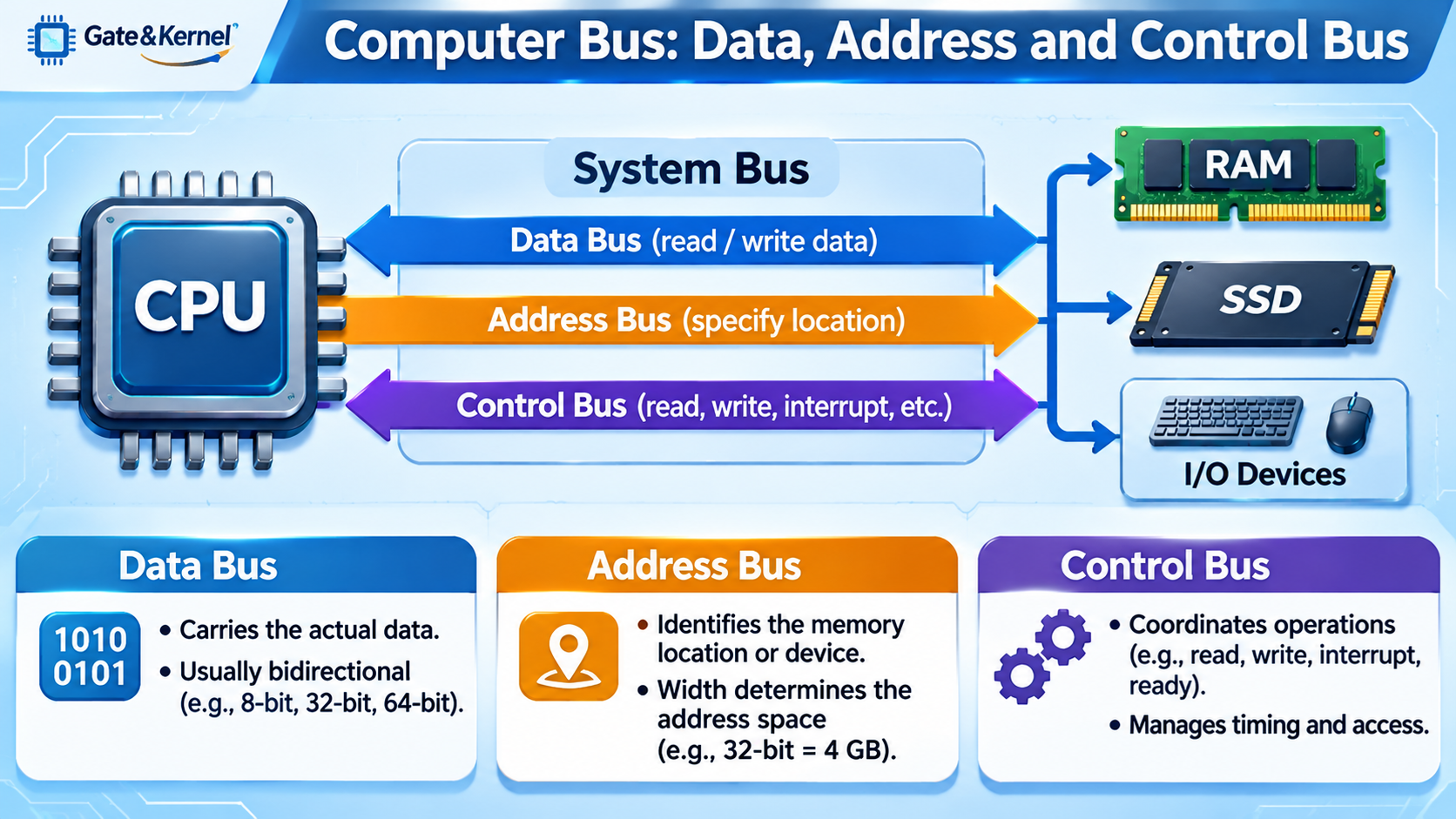
Traditionally, computer buses are explained using three categories: the data bus, address bus, and control bus.
Understanding these three types of signals helps explain how a CPU communicates with memory and other devices.
What Is a Computer Bus?
A computer bus is a set of communication pathways used to transfer information between computer components.
In traditional computer architectures, a bus consists of electrical connections that carry binary signals represented by zeros and ones.
These connections may be implemented through wires, printed circuit board traces, or internal chip interconnections.
For example, when a CPU needs information stored in RAM, it must identify the memory location, request the data, and receive the result.
Communication between the CPU and memory requires several kinds of information:
- Data: The actual information being transferred.
- Address: The location or destination associated with the transfer.
- Control: Signals that coordinate and manage the operation.
These three categories form the basis of the traditional system bus model.
Modern computers use more sophisticated communication technologies, but the fundamental principles remain important.
What Is a Data Bus?
The data bus carries the actual data transferred between computer components.
For example, when the CPU reads information from RAM, the requested data travels through a data communication path to the processor.
When the CPU writes information into memory, data travels in the opposite direction.
In a traditional shared-bus architecture, the data bus is typically bidirectional because information must move both to and from the CPU.
Data bus width determines how many bits can be transferred simultaneously in one bus transfer.
For example:
- An 8-bit data bus can transfer 8 bits at a time.
- A 16-bit data bus can transfer 16 bits at a time.
- A 32-bit data bus can transfer 32 bits at a time.
- A 64-bit data bus can transfer 64 bits at a time.
A wider data bus can transfer more information per transfer, although actual performance also depends on clock frequency, signaling methods, and bus efficiency.
For example, a conventional 64-bit-wide DDR memory channel transfers 64 data bits per data transfer, excluding additional error-correction bits when present.
However, a 64-bit CPU does not necessarily use a single 64-bit data bus throughout the computer.
CPU register width, memory channel width, and communication interface width are different architectural characteristics.
What Is an Address Bus?
The address bus identifies the memory location or hardware destination involved in a communication operation.
When a CPU needs data from memory, it must specify where the information is located.
For example, the processor may request the value stored at a particular memory address.
The address information tells the memory system which location is being accessed.
In a traditional CPU-to-memory bus, address signals generally travel from the processor toward the memory system.
The number of address bits determines how many distinct addresses can be represented.
For example:
- A 16-bit address bus can represent 65,536 addresses.
- A 20-bit address bus can represent 1,048,576 addresses.
- A 32-bit address bus can represent 4,294,967,296 addresses.
If each address identifies one byte of memory, a 32-bit address space represents 4 GB of addressable space.
However, this does not mean every computer with a 32-bit address bus has 4 GB of installed RAM.
The address space may include memory-mapped devices and reserved regions.
Modern CPUs often use virtual memory and physical address widths that differ from their general-purpose register sizes.
For example, a processor with 64-bit registers does not necessarily implement 64 physical address bits.
What Is a Control Bus?
The control bus carries signals that coordinate communication between hardware components.
While the data bus carries information and the address bus identifies locations, control signals determine how and when a transfer occurs.
Traditional control signals may include:
Memory Read: Indicates that the processor wants to retrieve information from memory.
Memory Write: Indicates that the processor wants to store information in memory.
Interrupt Request: Notifies the processor that a device or another hardware component requires attention.
Ready or Wait: Coordinates timing when a device cannot immediately complete an operation.
Bus Request and Bus Grant: Help manage access when multiple devices may need to use a shared communication bus.
Clock and reset signals may also be associated with a system’s control and coordination functions.
Control signals are not necessarily all carried in one direction. Their direction depends on their purpose and the architecture of the system.
Modern interfaces often replace traditional dedicated control wires with encoded commands, packets, and protocol messages.
How Do the Data Bus, Address Bus, and Control Bus Work Together?
Consider a simple example: the CPU needs to read a value from RAM.
In a traditional bus model, the operation can be described in several steps.
Step 1: The CPU Selects an Address
The processor places the desired memory address on the address bus. This identifies the memory location containing the requested information.
Step 2: The CPU Sends a Read Command
The processor activates the appropriate control signal to indicate that it wants to read information.
Step 3: Memory Returns the Data
The memory system retrieves the requested information and places it on the data bus.
Step 4: The CPU Receives the Information
The CPU accepts the returned data and continues executing the program.
A memory write operation follows a similar process, except that the CPU sends data to memory and requests a write operation.
This simplified explanation illustrates how the three bus functions cooperate.
In modern processors, memory controllers, caches, request queues, and complex signaling protocols make the actual process more sophisticated.
What Is Bus Width?
Bus width refers to the number of bits that a particular bus can transfer or represent simultaneously.
The meaning of width depends on the bus type.
For a data bus, width generally describes the number of data bits transferred in parallel.
For an address bus, width describes the number of address bits available to identify locations.
For example, a system with a 32-bit data bus and a 24-bit address bus can transfer 32 data bits in one bus operation while representing up to 16,777,216 distinct addresses.
If the memory is byte-addressable, those addresses correspond to a 16 MB address space.
A larger data bus does not automatically increase the number of memory locations that can be addressed. Data bus width and address bus width serve different purposes.
What Is Bus Speed and Bandwidth?
Bus performance depends on more than its width.
Clock frequency, transfer rate, signaling technology, and protocol overhead all affect how quickly information moves between components.
A simplified theoretical bandwidth formula for a parallel data bus is:
Bandwidth = Bus Width in Bytes × Transfers per Second
For example, suppose a 64-bit data bus performs 3.2 billion data transfers per second.
Because 64 bits equals 8 bytes, its theoretical bandwidth is:
8 × 3.2 billion = 25.6 GB/s.
This is the theoretical peak data bandwidth of one such channel before accounting for practical overhead and efficiency losses.
It is important to distinguish clock frequency from transfer rate.
DDR memory transfers data on both edges of the clock signal, so its effective transfer rate is greater than the underlying clock frequency.
This is why DDR memory performance is commonly described in MT/s, or millions of transfers per second, rather than simply MHz.
What Is the System Bus?
In traditional computer architecture, the system bus describes the communication connection between the CPU, memory, and other major components.
It is often represented as a combination of the data bus, address bus, and control bus.
Older PCs also used a Front-Side Bus, or FSB, to connect the CPU with a chipset component responsible for memory and other system communication.
Modern processors generally integrate memory controllers directly into the CPU.
They also use specialized internal interconnects and high-speed interfaces rather than relying on one simple shared system bus.
Therefore, the classic three-bus model is best understood as a foundational explanation of communication functions, not an exact wiring diagram of every modern computer.
What Buses Do Modern Computers Use?
Modern computers contain several communication technologies designed for different purposes.
Memory Bus: Connects the processor’s memory controller to RAM. Modern DDR memory systems use carefully timed electrical signals to transfer commands, addresses, and data.
PCI Express (PCIe): Connects high-speed devices such as graphics cards, network adapters, and NVMe SSDs. PCIe uses high-speed serial links rather than a traditional wide parallel bus.
USB (Universal Serial Bus): Connects external devices such as keyboards, mice, storage devices, and cameras.
SATA (Serial ATA): Provides a communication interface for compatible storage devices, including SATA SSDs and HDDs.
I²C and SPI: Common communication interfaces in embedded systems, microcontrollers, sensors, and electronic equipment.
Modern serial interfaces may transmit addresses, data, and control information as structured messages rather than carrying each category on separate physical wires.
Despite these differences, they still perform the fundamental tasks of identifying destinations, transferring information, and coordinating communication.
Why Are Computer Buses Important?
Computer buses are essential because processor performance depends not only on how quickly the CPU performs calculations, but also on how efficiently information moves throughout the system.
A fast processor may be limited if data cannot arrive quickly enough from memory or other devices.
This is one reason modern computer architecture emphasizes memory bandwidth, low-latency communication, cache design, and high-speed interconnects.
In embedded systems, understanding buses is particularly important.
For example, a microcontroller may communicate with a temperature sensor through I²C, exchange data with an external memory chip through SPI, and access internal peripherals through an on-chip bus.
In FPGA designs, bus interfaces are also widely used to connect processors, memory blocks, control registers, and custom logic circuits.
Understanding bus communication provides a foundation for studying CPU architecture, digital electronics, microcontrollers, and system-on-chip design.
Conclusion
A computer bus is a communication system that allows hardware components to exchange information.
The traditional bus model divides communication into three major functions.
The data bus carries the actual information being transferred.
The address bus identifies the memory location or destination.
The control bus coordinates operations such as reading, writing, and responding to hardware events.
These three functions work together whenever a processor communicates with memory or another hardware component.
Although modern computers use advanced technologies such as DDR memory interfaces, PCI Express, USB, and on-chip interconnects, the underlying principles remain closely related.
Understanding data, address, and control communication is an important step toward understanding how computers move information, execute programs, and connect their internal components.