
A modern CPU can perform billions of calculations every second.
It adds numbers, compares values, processes binary data, and makes decisions that allow software to run. But how does a processor actually perform these operations?
One of the most important components responsible for these tasks is the Arithmetic Logic Unit (ALU).
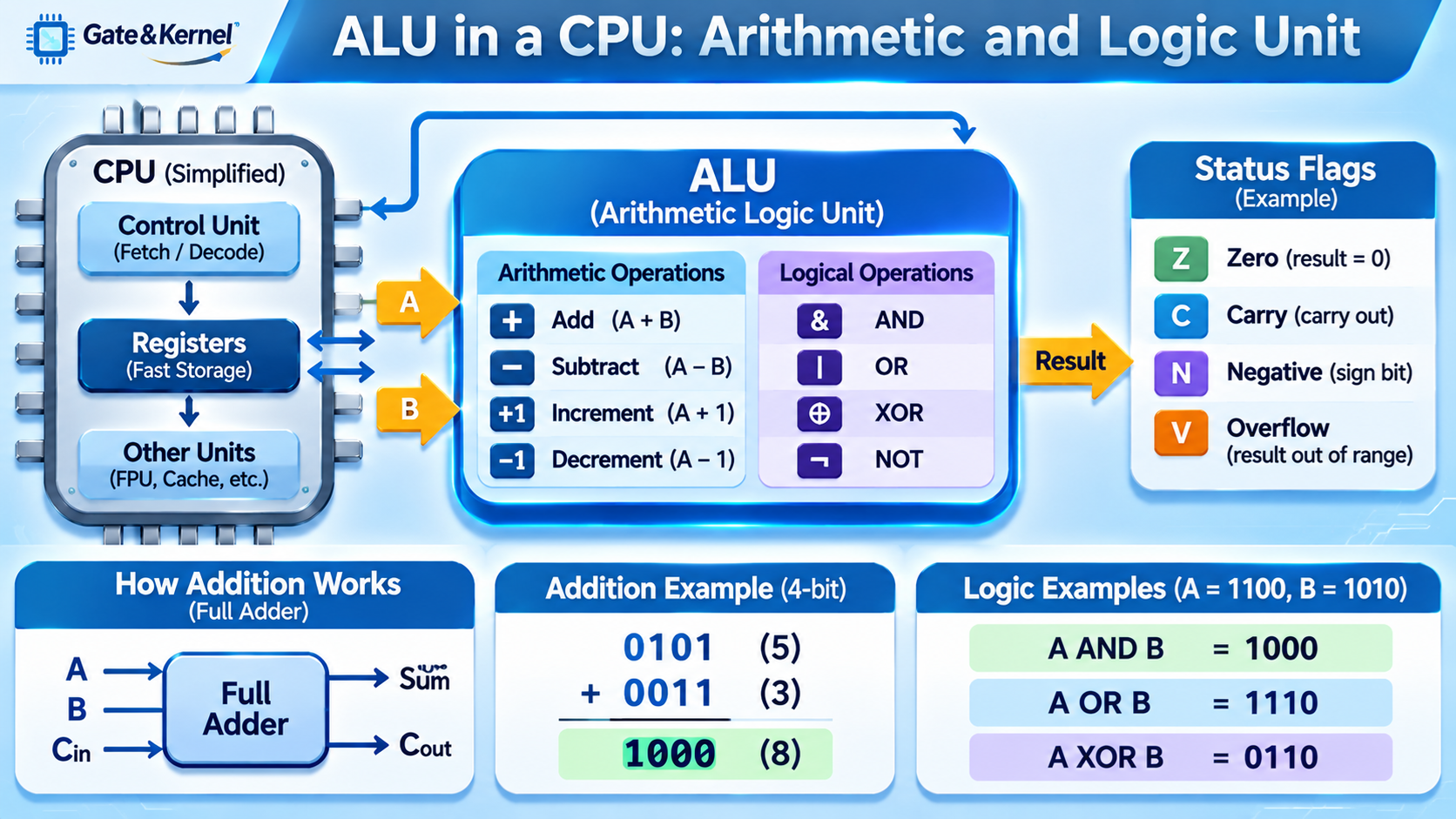
The ALU is a digital circuit inside a processor that performs arithmetic and logical operations on binary values.
It is one of the fundamental building blocks of CPU architecture and helps explain how computers turn electrical signals into useful calculations.
What Is an ALU?
ALU stands for Arithmetic Logic Unit. It is a hardware component that performs mathematical and logical operations on binary data.
The ALU typically receives input values from CPU registers, performs a specified operation, and produces a result that can be stored in a register or used by another part of the processor.
For example, when a program asks the CPU to add two numbers, an integer ALU may perform the addition using digital logic circuits.
An ALU commonly supports operations such as addition, subtraction, AND, OR, XOR, and comparisons.
Modern CPUs often contain multiple ALUs and other specialized execution units, allowing different instructions to execute simultaneously.
Why Does an ALU Use Binary Numbers?
Computers represent information using binary digits, called bits. Each bit has one of two values: zero or one.
Digital circuits use different voltage levels to represent these logical states.
Binary representation is especially useful because electronic circuits can reliably distinguish between two states.
For example, decimal number 5 is represented as 0101 in four-bit binary, while decimal number 3 is represented as 0011.
When the ALU adds these two numbers, it processes their binary representations:
0101 + 0011 = 1000
The binary result 1000 represents decimal number 8.
The ALU does not need to understand decimal numbers in the way humans do. It operates on bit patterns using electronic logic circuits.
What Arithmetic Operations Can an ALU Perform?
An ALU commonly performs several basic arithmetic operations.
Addition: Combines two binary numbers to produce their sum. For example, 5 + 3 = 8.
Subtraction: Calculates the difference between two numbers. For example, 9 − 4 = 5.
Increment: Increases a value by one. This operation is useful for counters and address calculations.
Decrement: Decreases a value by one.
Some ALUs also support shifts and other arithmetic-related operations.
Multiplication and division may be performed by specialized execution units rather than the main integer ALU, depending on the processor architecture.
Similarly, floating-point calculations are generally handled by a Floating-Point Unit (FPU) or other specialized hardware.
How Does an ALU Perform Addition?
Binary addition follows rules similar to decimal addition, but it uses only zero and one.
The basic binary addition rules are:
- 0 + 0 = 0
- 0 + 1 = 1
- 1 + 0 = 1
- 1 + 1 = 10
The last example produces a sum bit of zero and a carry bit of one.
A digital circuit called a half adder can add two individual bits and produce a sum and carry output.
However, when adding multi-bit numbers, the circuit must also handle carry information from the previous bit position.
A full adder adds three input bits: two operand bits and a carry-in bit. It produces a sum bit and a carry-out bit.
Multiple full adders can be connected to create a multi-bit adder.
For example, a 32-bit adder can perform arithmetic on two 32-bit values.
Simple adders may propagate carries from one bit position to the next. More advanced designs use techniques such as carry-lookahead or parallel-prefix addition to reduce delays.
These circuits are built from logic gates implemented using transistors.
How Does an ALU Perform Subtraction?
Subtraction can be implemented using addition and a binary representation called two’s complement.
Two’s complement is widely used to represent signed integers in modern processors.
To subtract B from A, the processor can calculate:
A − B = A + Two’s Complement of B
For a fixed-width binary number, the two’s complement is obtained by inverting all bits and adding one.
For example, consider 7 − 3 using four-bit binary numbers.
7 = 0111
3 = 0011
Invert the bits of 3:
1100
Add one:
1101
Now add the result to 7:
0111 + 1101 = 1 0100
In four-bit arithmetic, the carry-out beyond the four-bit result is discarded, leaving 0100, which represents decimal 4.
This technique allows addition and subtraction to share much of the same hardware.
What Logical Operations Does an ALU Perform?
In addition to arithmetic, an ALU performs operations based on Boolean logic.
These operations work on individual bits and are fundamental to digital computing.
AND: Produces one only when both corresponding input bits are one.
OR: Produces one when at least one corresponding input bit is one.
XOR: Produces one when the corresponding input bits are different.
NOT: Inverts a bit, changing zero to one and one to zero. It may be implemented within the ALU or another simple logic circuit.
For example, consider two four-bit values:
A = 1100
B = 1010
Their logical results are:
AND = 1000
OR = 1110
XOR = 0110
These operations are used for bit manipulation, masking, comparisons, and many other computing tasks.
For example, software can use AND to test individual bits in a hardware status register.
How Does an ALU Compare Numbers?
An ALU can also help determine whether two values are equal or whether one is greater than another.
For example, a processor may need to evaluate:
Is A equal to B?
Is A greater than B?
Is A less than B?
One common way to compare numbers is to use subtraction or related logic to evaluate the relationship between two operands.
The resulting information can be used by conditional instructions.
For example, a program may contain a condition such as:
If temperature is greater than 80, turn on the cooling fan.
The processor compares the temperature value against the threshold and uses the comparison result to determine the next operation.
Different CPU architectures handle these results differently. Some use dedicated condition flags, while others write comparison results directly into general-purpose registers.
What Are ALU Status Flags?
Many CPU architectures use status flags to describe the results of arithmetic or logical operations.
Common flags include:
Zero Flag (Z): Indicates that an operation produced a result of zero.
Carry Flag (C): Indicates a carry-out or a related condition, depending on the operation and architecture.
Negative or Sign Flag (N): Reflects the sign of a result, typically through its most significant bit.
Overflow Flag (V): Indicates signed arithmetic overflow, meaning the mathematical result cannot be represented in the available signed bit width.
For example, adding two positive signed integers may produce a negative bit pattern if the result exceeds the supported range. An overflow flag can indicate this condition.
Not every processor architecture uses the same flags.
For example, many ARM instructions can update condition flags, while RISC-V generally uses register-based comparisons and branches instead of a conventional arithmetic status-flag register.
How Does the ALU Work with CPU Registers?
The ALU does not normally operate directly on data stored in an SSD or HDD.
Instead, it works with operands made available through the CPU’s internal execution system, commonly using registers.
Registers are small, extremely fast storage locations inside the processor.
A simplified calculation follows these steps:
- The CPU obtains the required data from registers or loads it from memory.
- The instruction specifies the operation to perform.
- The execution hardware supplies the operands and operation control to the ALU.
- The ALU performs the calculation.
- The result becomes available for storage in a destination register or further processing.
For example, a processor instruction might request that two register values be added together and the result placed in another register.
In RISC-V assembly language, the instruction:
add x5, x6, x7
adds the values stored in registers x6 and x7 and writes the result into register x5.
This demonstrates how a software instruction controls physical arithmetic hardware inside a CPU.
Is the ALU the Same as the CPU?
No. The ALU is only one component of a CPU.
A modern processor contains many other structures, including registers, instruction decoders, caches, execution units, branch prediction hardware, and control logic.
The ALU performs arithmetic and logic operations, but it does not independently fetch and decode an entire program or manage the complete instruction execution process.
Modern CPUs may have several integer ALUs, load/store units, floating-point units, and vector execution units.
Multiple execution units allow processors to perform several operations concurrently when instructions and hardware resources permit.
This is one reason modern CPUs can execute substantially more work per clock cycle than early processors.
ALU vs. FPU: What Is the Difference?
The ALU and FPU perform different types of calculations.
An ALU primarily performs integer arithmetic and logical operations. These include addition, subtraction, bitwise AND, OR, XOR, and comparisons.
An FPU, or Floating-Point Unit, performs calculations using floating-point numbers, which can represent fractional values and very large or very small magnitudes.
For example, adding two integers such as 12 and 25 is typically handled by an integer execution unit.
Calculating values such as 3.14159 × 2.71828 is normally handled by floating-point hardware.
Modern processors may also use SIMD and vector units to perform calculations on multiple data elements in parallel.
These specialized components complement the ALU and help processors handle different workloads efficiently.
Why Is the ALU Important?
The ALU is essential because nearly every computer program depends on arithmetic or logical operations.
Operating systems use arithmetic and bitwise operations to manage memory, scheduling, and hardware resources.
Applications use ALU operations for counting, indexing, comparisons, and decision-making.
Embedded systems use arithmetic and logical operations to process sensor readings, control equipment, and evaluate input signals.
Digital signal processing, graphics, and scientific computing also rely on arithmetic hardware, often using specialized execution units for more demanding calculations.
In FPGA development, designers can implement their own ALU circuits using Verilog or VHDL.
A simple FPGA-based ALU might accept two binary inputs and an operation selector, then generate a result for addition, subtraction, AND, OR, or XOR.
Designing such a circuit is a useful introduction to digital logic and processor architecture.
Conclusion
The Arithmetic Logic Unit is one of the fundamental building blocks of a CPU.
It performs integer arithmetic, logical operations, and comparisons using digital circuits built from transistors and logic gates.
Binary adders allow the ALU to perform addition, while two’s complement arithmetic makes subtraction possible using much of the same hardware.
Boolean logic circuits provide operations such as AND, OR, and XOR.
The ALU works with registers and other CPU components to execute machine instructions generated by software.
Although modern processors contain many specialized execution units, the basic principles of an ALU remain central to computer architecture.
Understanding the ALU provides a direct connection between software instructions, binary arithmetic, logic gates, and the physical transistors that make modern computing possible.