
When comparing processors, one of the first specifications you will notice is clock speed.
A CPU might be advertised as running at 3.0 GHz, 4.0 GHz, or even 5.0 GHz. But what do these numbers actually mean?
Many people assume that a higher GHz rating always means a faster computer. In reality, CPU performance depends on much more than clock frequency.
To understand why, we need to examine how a CPU clock works, what happens during a clock cycle, and how clock speed affects processor performance.
What Is a CPU Clock?
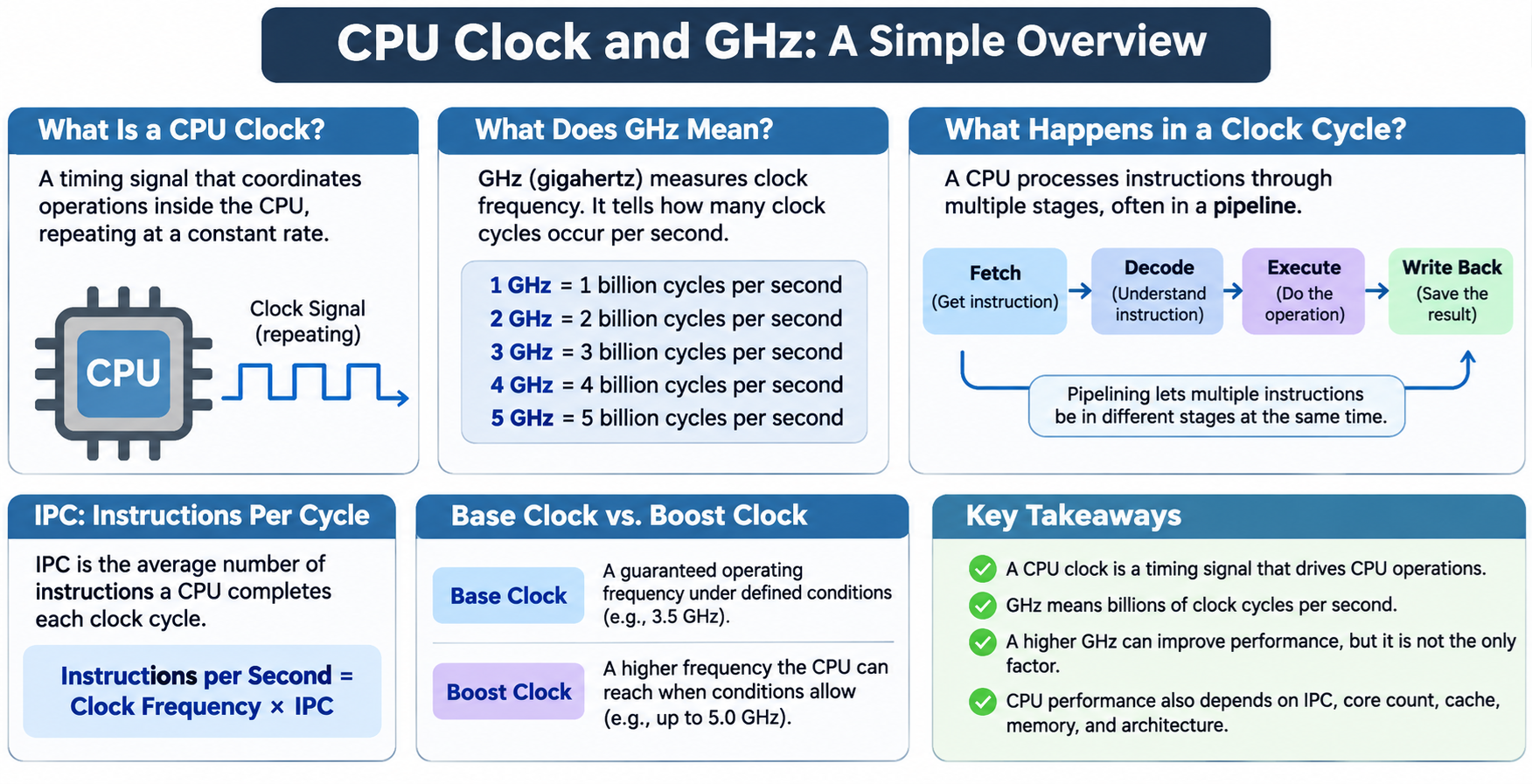
A CPU clock is a timing system that helps coordinate operations inside a processor.
It provides a repeating electrical timing signal that allows synchronous circuits to perform their operations in an organized sequence.
Modern CPUs contain billions of transistors working together to execute instructions, perform calculations, move data, and control other components.
Many of these operations must occur in a carefully coordinated manner.
The clock provides timing references that allow internal circuits to update their state at specific moments.
A simplified clock signal alternates between two electrical states, commonly represented as high and low. This repeating pattern forms a digital waveform.
Each complete repetition of the waveform is called a clock cycle.
However, not every operation inside a modern CPU is directly controlled by one global clock. Processors contain multiple clock domains, and some circuits operate asynchronously.
What Does GHz Mean?
GHz stands for gigahertz, a unit used to measure frequency. One gigahertz represents one billion cycles per second.
For example:
- 1 GHz = 1 billion clock cycles per second.
- 2 GHz = 2 billion clock cycles per second.
- 3 GHz = 3 billion clock cycles per second.
- 4 GHz = 4 billion clock cycles per second.
- 5 GHz = 5 billion clock cycles per second.
A processor operating at 4 GHz has a clock period of approximately 0.25 nanoseconds, or 250 picoseconds.
This means a clock cycle occurs every 0.25 nanoseconds.
However, 4 GHz does not mean the CPU executes four billion instructions per second.
Some instructions require multiple cycles, while modern processors can execute multiple instructions during a single cycle.
Clock frequency describes the timing rate, not the exact number of instructions completed.
What Happens During a CPU Clock Cycle?
A CPU executes machine instructions using hardware components such as registers, arithmetic logic units, execution units, caches, and control circuits.
A simplified instruction-processing sequence includes fetching an instruction, decoding it, executing the required operation, and making the result available.
Older processors often used relatively simple instruction execution designs. Modern processors use pipelines that divide instruction processing into multiple stages.
Different instructions can occupy different pipeline stages simultaneously.
For example, while one instruction is being executed, another may be decoded, and additional instructions may be fetched.
This technique, called instruction pipelining, improves processor throughput.
Modern CPUs may also contain multiple execution units, allowing several operations to proceed simultaneously.
As a result, one clock cycle does not correspond to exactly one completed instruction.
The number of instructions completed depends on the CPU architecture, instruction dependencies, available execution resources, and the program being executed.
What Is IPC?
IPC stands for Instructions Per Cycle. It describes how many instructions a CPU completes, on average, during each clock cycle.
IPC is an important factor in CPU performance.
A simplified relationship is:
Instructions per Second = Clock Frequency × IPC
Suppose two processors operate at different frequencies.
CPU A runs at 4 GHz and achieves an average IPC of 2. CPU B runs at 3 GHz and achieves an average IPC of 3.
Under these simplified conditions, CPU A completes approximately 8 billion instructions per second, while CPU B completes approximately 9 billion instructions per second.
Even though CPU B has a lower clock frequency, it achieves higher instruction throughput.
This illustrates why a lower-GHz processor can outperform a higher-GHz processor.
In practice, IPC varies with the workload, compiler, instruction set, memory behavior, and processor design.
Comparing raw instruction counts across different CPU architectures can also be misleading because instructions may perform different amounts of work.
What Determines CPU Clock Speed?
A CPU’s operating frequency depends on its architecture, circuit design, voltage, power consumption, temperature, and manufacturing technology.
Modern processors generally derive internal clock signals from a reference clock using specialized clock-generation circuits.
A component called a Phase-Locked Loop (PLL) can generate a higher-frequency clock from a lower-frequency reference signal.
For example, a processor may use a 100 MHz reference clock and generate an internal clock of 4 GHz through a multiplication factor of 40.
This is a simplified example. Actual processors may use multiple clock generators, dividers, and independently controlled clock domains.
The maximum reliable clock frequency also depends on how quickly electrical signals can propagate through the processor’s circuits.
Increasing frequency gives circuits less time to complete their required operations between clock transitions.
Base Clock vs. Boost Clock
Modern CPUs often advertise two different clock speeds: base frequency and maximum boost frequency.
Base Clock: A specified operating frequency associated with the processor’s defined power and operating conditions. Its exact meaning depends on the CPU manufacturer and model.
Boost Clock: A higher frequency that the processor may reach temporarily or sustain under suitable conditions.
For example, a processor might have a base frequency of 3.5 GHz and a maximum boost frequency of 5.0 GHz.
This does not mean every CPU core runs at 5.0 GHz all the time.
Boost frequency depends on factors such as workload, temperature, power limits, current consumption, and the number of active cores.
During a lightly threaded workload, one or a few cores may reach high boost frequencies.
During heavy workloads involving many cores, the operating frequency may be lower.
Technologies such as Intel Turbo Boost and AMD Precision Boost automatically adjust processor frequencies according to operating conditions.
Why Can’t CPUs Keep Increasing GHz?
Increasing clock speed can improve performance, but it also creates engineering challenges.
One major problem is power consumption.
A simplified relationship for dynamic power consumption in CMOS circuits is:
Power ∝ Capacitance × Voltage² × Frequency
Increasing frequency generally increases dynamic power consumption when other factors remain unchanged.
Furthermore, achieving a higher frequency may require increasing the operating voltage.
Because voltage has a squared relationship with dynamic power consumption, voltage increases can significantly increase power use.
Higher power consumption generates more heat, requiring better cooling and power delivery.
Another limitation is the time required for signals to travel through logic circuits.
At higher frequencies, each clock cycle becomes shorter, making timing constraints more difficult to satisfy.
For these reasons, processor designers often improve performance through architectural changes rather than relying only on higher clock frequencies.
Why Do Modern CPUs Have Multiple Cores?
Instead of continually increasing clock frequency, CPU manufacturers have invested heavily in multicore architectures.
A multicore CPU contains multiple processing cores that can execute different instruction streams simultaneously.
For example, an eight-core processor may be able to run several independent threads in parallel.
This can improve performance for workloads such as video rendering, software compilation, scientific simulations, and multitasking.
However, adding more cores does not automatically make every application faster.
Programs must contain enough parallel work to benefit from multiple cores.
A single-threaded application may depend primarily on the performance of one core, including its clock frequency, IPC, cache performance, and memory access latency.
Modern processors therefore balance clock speed, core count, power efficiency, and architectural improvements.
Does Higher GHz Mean Better Gaming Performance?
Clock speed matters in gaming, but it is only one part of the performance equation.
Games often depend on strong single-threaded performance, low memory latency, efficient cache access, and fast communication between CPU components.
A processor operating at 4.5 GHz may outperform another running at 5.0 GHz if it has a more efficient architecture or a larger effective cache for the gaming workload.
CPU cache can be particularly important because it reduces the need to retrieve data from slower system RAM.
Graphics performance also depends heavily on the GPU, especially at higher resolutions or demanding graphics settings.
When comparing gaming processors, real-world benchmarks are generally more useful than clock frequency alone.
What Is CPU Overclocking?
Overclocking means operating a processor at a frequency higher than its manufacturer-specified standard settings or supported operating limits.
For example, a user might configure a processor to run at 5.2 GHz instead of a lower default frequency.
Overclocking can increase performance in workloads that benefit from additional clock speed.
However, it can also increase power consumption, heat generation, and system instability.
Higher frequencies may require voltage adjustments and stronger cooling systems.
Excessive voltage or temperature can reduce component reliability and may damage hardware.
Modern processors already use sophisticated automatic boosting systems, so manual overclocking does not always provide a large practical improvement.
Is Clock Speed the Same as CPU Performance?
Clock speed is an important specification, but it should never be treated as the only measure of CPU performance.
Several factors determine how quickly a processor completes work, including:
- Clock Frequency: The number of clock cycles per second.
- IPC: The average number of instructions completed per cycle.
- Core Count: The number of processing cores available for parallel workloads.
- Cache Architecture: The speed, size, and organization of L1, L2, and L3 caches.
- Memory Performance: The bandwidth and latency of the memory subsystem.
- Instruction Set and Execution Units: The operations and hardware capabilities available to software.
- Power and Thermal Limits: The processor’s ability to maintain high performance over time.
A CPU with lower clock frequency may perform better if its architecture can accomplish more useful work during each cycle.
This is why comparing CPUs from different generations or manufacturers based only on GHz can produce misleading conclusions.
Conclusion
A CPU clock provides the timing signals that coordinate many operations inside a processor.
Clock frequency, measured in gigahertz, indicates how many clock cycles occur per second.
A 4 GHz processor operates at approximately four billion clock cycles per second, but this does not mean it executes exactly four billion instructions.
Modern CPU performance depends on clock speed, instructions per cycle, core count, cache efficiency, memory performance, and processor architecture.
Higher GHz can improve performance, especially when comparing otherwise similar processors, but it does not guarantee that one CPU will be faster than another.
The most important question is not simply how many clock cycles a processor produces, but how much useful work it can accomplish during those cycles.