
Internal linking is considered as the most overlooked and ignored feature of an on-page search engine optimization .
Here we will explain everything about internal link creation, plus how you can perform right internal link building for ranking higher on search engine result pages.
Among all existing SEO methods, internal linking is considered an effective way to easily boost your SEO results to the first page of Google’s search results (SERP).
What do you know about Internal Linking?
Web developers from different areas may have various terms for this.
However, we believe this is a term that is widely recognized in the SEO community and beyond.
In short, an internal link is any link on a web page within a particular website that points to another page on the same website.
There is tactical internal linking which is considered as an SEO power method, particularly for content promotion.
An internal link of an article connects one web page of a site to another web page on the similar site.
In case of internal linking, the target domain and source domain are the same.
There are 3 major purposes of internal linking and they are described below-
- Internal linking helps user in website navigation
- Internal linking describes the hierarchy plus architecture of a site.
- Internal linking divides web page ranking power and authority all through the website.
Internal linking is one of the most critical strategies in search engine optimization (SEO).
By linking one article or blog post to another, it enhances the user experience for readers and provides them with more relevant content to explore.
In short, internal linking, or internal link building, refers to the practice of using hyperlinks to connect a blog post or web page on a website to another blog post or web page that contains related information.
In this process, both the target url and source url are the same.
These kinds of links are helpful for various reasons.
They enable readers to navigate a site.
Also, they aid to create information hierarchy for the certain site.
They also assist to spread ranking power or link juice around sites.
Reasons behind the significance of Internal Linking
One biggest reason is that internal linking is one of many techniques that website owners can utilize for telling visitors and Google that a specific webpage of article or post is vital.
As a result, website owners can leverage links in a timeless, popular article—the kind that captures the attention of regular readers—to promote a recent live stream or certain paid content they wish to raise awareness for.
Some other reasons are described below –
- Internal linking provides you viewers with more reading choices: for instance, in case you are writing something regarding a service or product from Twitter, and we have already written a wonderful blog post on Twitter, you can link to it. It gives background for the audience and advertises older content.
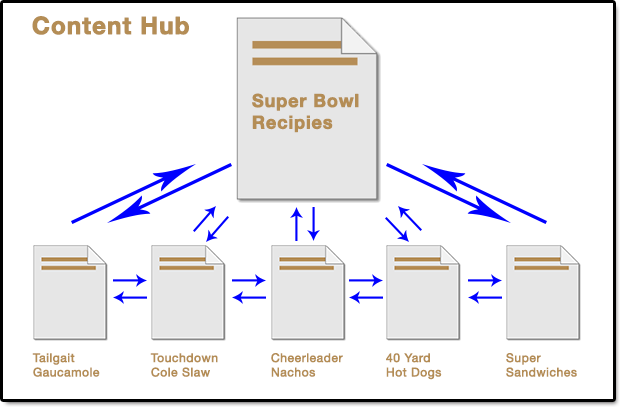
- Internal linking assists to develop your rank for definite keywords: for instance, if you need a webpage to rank for ‘search-marketing-statistics’ plus you have a webpage having these, they you can simply point viewers the page with the use of relevant keyword or anchor text. This gives a clear sign to search engine that this web page is related to search audience entering that keyword.
- Internal linking can assist you to advertise many paid services and events: if you are talking about some particular topic or theme, and you have an amazing speaker for covering that theme at an event then internal linking is a great medium to advertise them.
- It aids search engine to crawl the website: Internal links within blog posts or articles, and also in tag pages and category, aid search engines to list web pages more professionally.
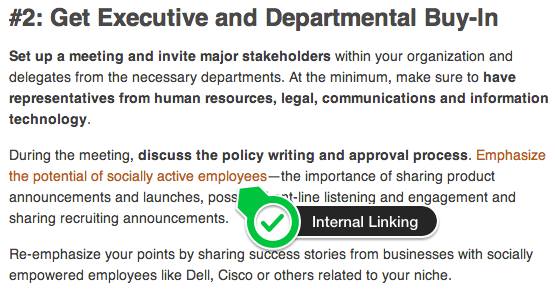
How to Interlink Your Articles the Right Way- WordPress
Click to WordPress Web Hositng from $7.47 per month
Maybe you have observed that Wikipedia seems on front position in every Google SERP for a particular keyword.
If you read out the post in Wikipedia, you can notice lots of interlinks redirecting to other articles or blogs.
Interlinking is the leading On-page SEO method of Wikipedia.
At what time, readers come from referral website or search engine they basically don’t know anything regarding your website.
But if you elegantly interlinked your contents it will incite the readers to explore more pages which may possibly turn them into your subscriber.
Internal link building not just provides you a reference link from one webpage to other however it also assists Google to jump one webpage from another and to list them.
Interlinking assist Google crawlers to crawl pages efficiently and perk up the internal web page ranking. Some most common perks of interlinking are –
- Reduces bounce rate
- Boost pageviews
- Aids search engine crawlers to crawl your entire website
- Perks up the ranking of your website
Interlinking your latest article in WordPress with the older ones and a few of your weak traffic web pages gives the following benefits –
- Improved SEO performance: internal will count as extra links which redirect to your articles, and therefore providing an increase in PageRank.
- More reader engagement: if you give links to other related articles on your website, possibilities are that the viewers will continue reading those articles, and therefore providing you more time to connect them and propose any soft sell notifications that you may have.
- Promoting your rate of indexing: connecting your weak performing web pages to your recent articles cannot just assist them to get listed however also perks up their search engine performance.
- More Backlinks: you can receive extra backlinks to your website if scrapers insert content that consist of a link to one of your other web pages or posts.
Tips and suggestion to interlink your Posts in WordPress
Interlinking your articles is not only about including a backlinks to one of the anchor texts, for utmost SEO perk you have to follow 3 best steps mentioned below –
- Provide more than one link at the starting of the post: backlinks in the primary segment of your article tend to perk up your search visibility to higher level compared to the links provided towards the end part of the article. For utmost SEO advantage, it’s great to provide links above the crease. This simply implies that it’s good to concentrate on your interlinking efforts on the articles of your webpage that is noticeable to viewers without scrolling.
- Don’t link the same article many times in every post: This is considered as the supposed first-link regulation. Search-engine algorithms give extra credit to the very first keyword if there are two links referring to the same domain. From a user perspective, you will not be doing any favor to your articles. Being redirected to the similar post frequently will probably put your viewers off, rather than connecting them.
- Don’t move Overboard With interlinking: loads of links in one article are not just disturbing from the viewers viewpoint, but also it makes your article look quite spammy. In addition, if your webpage contain over five links, then none of them will give you pretty good outcome.
- Only link to related articles: do not interlinking unrelated content in your every post just as they all come under your WordPress website. In the end, it’s all about receiving enough distribution and when you include lots of irrelevant links in your every post, and then this is just going to take your viewers away and have a negative effect on your web page traffic. When you interlink your articles, you need to ensure that the background of your content is kept and that your interlinking attempts make enough sense. The outcome is that your attempts to boost your website visibility shouldn’t influence the content quality of your articles. Search engine optimization simply drive you visibility, unless your website have high-quality articles, the visibility will not work for you.
Tips to Interlink Articles with Insights Plugin
As we have already told you that Interlinking is very simple task, especially when you do the same with the use of some plugins.
If your website have loads of articles then you will require an auto Interlinking plugin same as to SEO Smart Link.
Well, it’s a premium plugin. But, if you want free plugin, then WordPress Insights plugin is a great option.
Insights plugin is extremely useful for fast interlinking.
A brief introduction of Insights Plugin
WordPress Insights Plugin is the perfect Plugin for labor-intensive interlinking of your content.
It helps to boost the productivity and simultaneously the demand of your content.
It locates relevant articles of your selected key terms almost quickly.
Here are some basic features of Insights Plugin –
- Add a Google Map
- Google Blog Search
- Search News
- Search Google
- Search and interlink to Wikipedia
- Add YouTube videos
- Add Flickr Images
- Search your website for content, modify them or add links to them
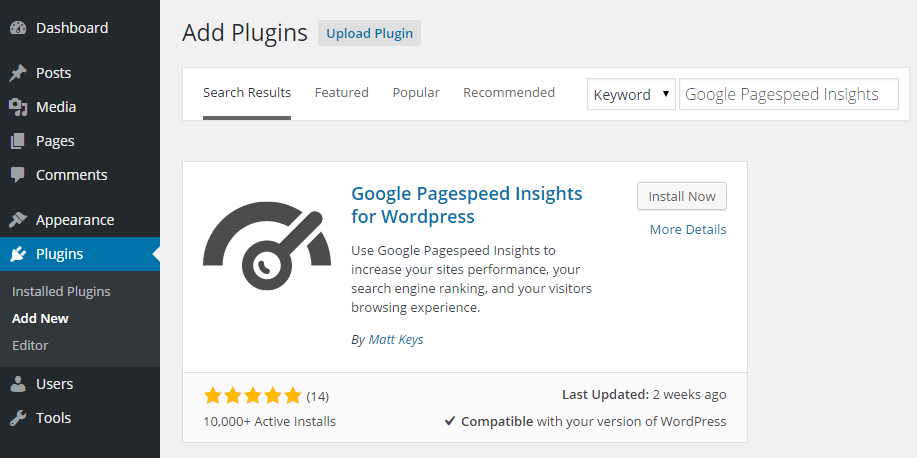
Steps to install Insights Plugin
- You can download and set up this plugin online. As soon as you open the plugin, you’ll discover the Insights menu next to your post editor.
- You can seek relevant content for the particular terms in search box. Ultimately, it’ll give related posts as per your entered terms. However default search option will not work. As soon as you have located the related content, just choose the terms or anchor text from your post-editor and then click on the option ‘Insert-link to-selection’ next to the results.
- It also assists you for external linking from Google results or Wikipedia. It’s a fact that internal linking is one of the greatest on-page SEO methods. However, if you perform it with irrelevant keywords or extremely then Google crawlers can think of it as spam.
- Hence, do it smartly. That’s everything about Insights plugin of WordPress for internal linking. There are many other plugins available on the web for the same job. You can try them also.
Know the benefits of Blog Post Interlinking
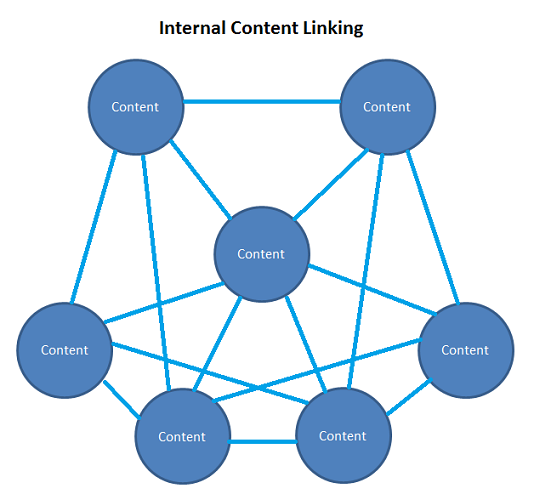
When many people first start blogging, they don’t include internal links to older posts when publishing new content; it isn’t until their blog becomes their primary source of income that they realize how important this is.
What people do generally is to post content and endorse it on Facebook, forums etc.
Such people get users for that particular blog only.
Many a times, these viewers see just 3-4 blog post and then leave the site.
These viewers have a tendency to visit the site and read the latest blog content and then leave the site after exploring 1 or 2 older posts.
For this reason internal linking is required for keeping viewers engaged.
So, here we are going to tell you some great advantages of using internal linking to your website.
Additional Resources
This is the perfect advantage of blog or article interlinking from a viewer’s point of view.
This provides your viewer some additional resources for reading plus receiving utmost perks from your high-quality content.
Although this functionality can also be achieved using related posts plugins or widgets, we’ve found that internal links are more effective than the “Related Posts” section.
For example, suppose you’re writing an article titled “How to Choose the Best Article Template” and have already written some content, such as “Highly Profitable Blog Niche Areas” and “Reducing Blog Load Times.”
After that, all you need to do is add internal links to your latest post in your earlier articles.
That way, when readers are reading your latest post and come across the topic “Tips for Reducing Page Load Times,” they can check out the detailed article on that related topic.
Google favors articles with insightful analysis and high-quality content;
therefore, if you consistently use internal links to connect high-quality content with unique insights, your website is likely to achieve a higher ranking on Google.
Search engine optimization
You cannot overlook search engine optimization when it comes to advantages of blog posts interlinking.
When you include links to older web pages or posts in your latest web pages or posts, the relevance of those older posts increases, and Google will also consider these older pages to still be relevant, thereby keeping them in the search engine rankings.
That’s why it is said always that you should advertise older blog posts ever and ever again so that some ranking power stays on the earlier posts.
In addition, the keywords through which you’re interlinking your blog post your previous blog post matters a lot.
You can employ some specific keywords in your anchor-tag when including your previous post for receiving highest advantages from interlinking.
Some important Tips:
- At the time of internal linking, use some relevant key phrases to the post you are internal linking to.
- Don’t begin interlinking each and every post to your latest post, because it will aggravate readers. Just link the relevant pages.
- Include a link to earlier post in first two para of your content and a link to the concluding paragraph.
- Don’t ever think that viewers are fool and do not act over-smart, otherwise you will lose your honest visitors.
- You can simply use SEO Smart-links into your previous posts depend on the keywords.
Boost Pageviews
This reason is very clear. If you give additional reference resource to readers, then they’ll see it and will remain on your website for longer period and therefore boosting the amount of page views.
Reduce Bounce Rate
This is one more important benefit of interlinking website interlinking and article.
Since the bounce rate is said to be the major aspect of search engine optimization among many other aspects and so, you just cannot avoid it.
Bounce-rate is the ratio of readers to a specific site who leave the website after seeing only one web page.
Bloggers must avoid this situation at any cost.
They must give something which will entice readers and keep them remain on the site for long time.
Pass Link-Juice
Once you create internal links between several internal articles or web pages and older web pages or articles, ranking authority is passed from one web page to another; therefore, internal linking is strongly recommended.
Further Engagement
Surely, if you’ve further high-quality resource to offer, there’ll be further engagement definitely.
Simply imagine two stores, first one is having some limited products, and the other has more.
Now think which store will have more consumers?Same thing applied here too.
Not precisely via the amount of blog posts but how you are going to use those posts.
Thus, keep including as many interlinking as you can but remember that the links should be relevant to the topic.
Through this manner, you’re not about to have just customer engagement on your site but also on your interlinked posts.
Wrap up
So, that was all about article/blog interlinking.
We hope, now you get the exact idea of what is blog post/ article interlinking, and how to interlink articles in WordPress plus their major advantages.