
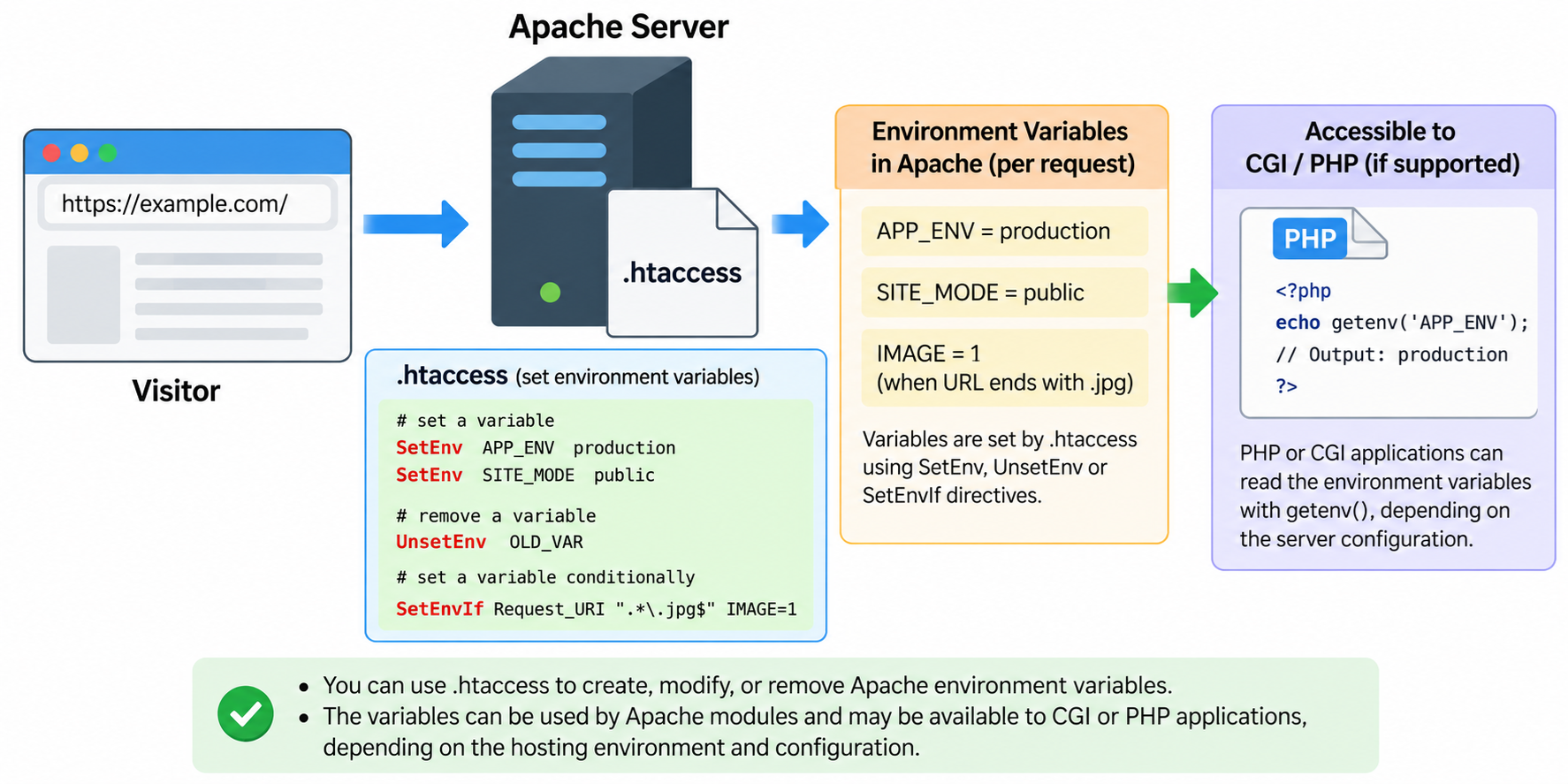
Environment variables are commonly used in web server administration and application development.
They allow administrators and developers to define configuration values that can influence how a web server or application behaves.
For example, environment variables can identify whether an application is running in a development or production environment, enable specific application features, or provide configuration information to server-side scripts.
If your website runs on Apache, you can create, modify, and remove certain Apache environment variables using an .htaccess file.
We will explain what environment variables are, how Apache manages them, how to use SetEnv, UnsetEnv, PassEnv, and SetEnvIf directives, and how to test your configuration.
We will also explain an important limitation: environment variables configured through Apache are not necessarily the same as operating system environment variables or variables available to PHP applications.
What Are Environment Variables?
An environment variable is a named value that software can use to obtain configuration information.
For example, a web application might use variables such as APP_ENV, APP_DEBUG, or SITE_MODE to determine which configuration settings should be active.
Instead of changing application source code every time the environment changes, developers can configure these values separately.
For example:
APP_ENV=production
APP_DEBUG=0
SITE_MODE=public
These values are examples of application configuration settings.
The APP_ENV variable might indicate that an application is running in production.
The APP_DEBUG variable might indicate whether debugging is enabled.
However, these names do not have any universal meaning to Apache.
They affect application behavior only if the application or another server component is specifically designed to read and interpret them.
Apache also maintains its own internal environment variables for processing HTTP requests.
These variables can be used by Apache modules and may be passed to CGI scripts and Server Side Includes (SSI).
Importantly, Apache’s internal environment variables are not identical to operating system environment variables. Setting a variable in .htaccess does not change the global environment of Linux, the Apache service process, or other applications running on the server.
Why Modify Environment Variables Using .htaccess?
Environment variables can be useful when you need to adjust certain aspects of website behavior without modifying your application’s source code.
For example, you might want to identify a particular deployment environment, activate an application feature, distinguish requests from different clients, or provide information to a CGI script.
Apache also allows environment variables to be created conditionally based on request characteristics, such as the requested URL or User-Agent header.
For website owners using shared hosting, .htaccess may be one of the few available ways to customize Apache’s request-level configuration.
However, this functionality depends on the hosting provider’s Apache configuration and the modules enabled on the server.
It is also important to understand that not every application can read variables configured through .htaccess.
Step 1: Locate Your .htaccess File
Before modifying Apache environment variables, locate the .htaccess file associated with your website.
If your hosting account uses cPanel, log in and open File Manager.
Navigate to the website’s document root, which is often named public_html for the primary domain.
Look for a file named .htaccess.
Because the filename begins with a dot, it may be hidden. Enable the option to display hidden files if necessary.
If the file already exists, download a backup before making changes.
WordPress and other content management systems frequently use .htaccess for URL rewriting, redirects, and other server configuration settings.
Do not remove these existing directives.
If no .htaccess file exists, you can create a new plain-text file named .htaccess, provided your hosting environment supports Apache per-directory configuration.
The examples in this tutorial use Apache HTTP Server 2.4.
Method 1: Set an Environment Variable Using SetEnv
The simplest way to create an Apache environment variable is to use the SetEnv directive.
For example, add the following line to your .htaccess file:
SetEnv APP_ENV productionThis directive creates an internal Apache environment variable named APP_ENV and assigns it the value production.
You can also define another variable:
SetEnv SITE_MODE publicApache processes these directives through its mod_env module.
The variables become available to Apache components that can access the relevant request environment.
They are also passed to CGI scripts and SSI pages where applicable.
For example, a CGI application designed to read APP_ENV could use the value to select a production configuration.
However, setting APP_ENV does not automatically change the behavior of WordPress, PHP, or another application.
The application must support the variable and be able to receive it.
You can define multiple variables by using separate SetEnv directives.
For example:
SetEnv APP_ENV production
SetEnv APP_DEBUG 0
SetEnv SITE_MODE public
Each directive defines a separate variable.
The values are strings. A value of 0 does not automatically become a Boolean false unless the receiving application interprets it that way.
Method 2: Change the Value of an Existing Variable
You can modify a variable by changing its assigned value in the .htaccess file.
For example, suppose your original configuration contains:
SetEnv SITE_MODE maintenanceTo change the value, edit the directive:
SetEnv SITE_MODE publicAfter saving the file, Apache will use the revised configuration for applicable subsequent requests.
You can also modify a debugging-related variable.
For example:
SetEnv APP_DEBUG 0This might tell a custom CGI application to disable application debugging, provided the application explicitly supports that convention.
However, this directive does not automatically disable PHP error reporting or control PHP’s display_errors setting.
PHP configuration must be managed using the appropriate PHP configuration mechanism for your hosting environment.
Do not assume that changing an Apache environment variable will change an unrelated server or application setting.
Method 3: Remove an Environment Variable Using UnsetEnv
Apache provides the UnsetEnv directive to remove selected variables from the request environment made available to supported components.
For example:
UnsetEnv APP_DEBUGThis tells Apache to remove the APP_DEBUG variable from the applicable internal environment.
You can also specify multiple variables:
UnsetEnv APP_DEBUG SITE_MODEThis is useful when you want to prevent certain Apache environment values from being passed to CGI scripts or SSI pages.
However, UnsetEnv does not delete an operating system environment variable globally.
It also does not remove values that an application obtains independently from its configuration files, process environment, or other sources.
Be aware that applications may depend on particular environment variables. Removing a required variable could cause unexpected behavior.
Before applying UnsetEnv, confirm that the variable is not needed by your application or another Apache module.
Method 4: Pass Existing Environment Variables Using PassEnv
The PassEnv directive allows Apache to make selected native environment variables available within its internal request environment.
For example:
PassEnv SITE_REGIONThis instructs Apache to pass the SITE_REGION variable from the native environment inherited when the Apache process started, provided that variable exists.
PassEnv does not create a new value by itself.
The variable must already be available to the Apache server process.
This distinction is particularly important on Linux servers managed by systemd or another service manager.
Setting a variable in your interactive SSH session does not necessarily make it available to the Apache service.
For example, exporting a variable in your shell does not automatically modify the environment of an already running Apache process.
If you administer your own VPS or dedicated server, service-level environment settings should be configured through the appropriate operating system or service management mechanism.
Shared hosting providers may restrict or control the variables that are available to Apache.
In most simple website configurations, SetEnv is easier to understand and use than PassEnv.
Method 5: Set Environment Variables Conditionally with SetEnvIf
Sometimes you only want to create an environment variable when a request matches certain conditions.
Apache provides the SetEnvIf directive for this purpose.
For example, suppose you want to mark requests for image files.
You can add:
SetEnvIf Request_URI "\.(jpg|jpeg|png|gif)$" IMAGE_REQUEST=1This configuration sets IMAGE_REQUEST to 1 when the request URI matches the specified pattern.
The regular expression checks whether the requested URI ends with one of the listed image extensions.
Other Apache modules or compatible CGI applications may then use the variable to make decisions.
You can also create a variable based on a User-Agent header.
For example:
SetEnvIfNoCase User-Agent "ExampleBot" BOT_REQUEST=1This sets BOT_REQUEST when the incoming User-Agent header contains ExampleBot, regardless of capitalization.
However, User-Agent headers are supplied by clients and can be changed or forged.
Therefore, this technique should not be used as a reliable authentication or security mechanism.
Conditional environment variables are useful for request classification, logging, and other server administration tasks, but they should not be treated as trusted evidence of a visitor’s identity.
Method 6: Set Environment Variables Using mod_rewrite
Apache’s mod_rewrite module also supports environment variable manipulation.
The RewriteRule directive provides an E flag that can set request environment variables during rewrite processing.
For example:
RewriteEngine On
RewriteRule ^products/ - [E=PRODUCT_SECTION:1]
When used in an appropriate .htaccess file, this example marks requests matching the products/ URL path with an environment variable named PRODUCT_SECTION.
The dash indicates that the rule does not substitute a different URL.
The E flag assigns the environment variable.
This technique may be useful when another Apache directive needs to inspect a variable created during rewrite processing.
However, mod_rewrite has its own processing rules.
Environment variables can be renamed with a REDIRECT_ prefix during internal redirects, and certain combinations of rewrite substitutions and environment flags have additional limitations.
For straightforward environment configuration, SetEnv or SetEnvIf is usually easier to maintain.
Use mod_rewrite environment flags when the variable must be associated with URL rewriting behavior.
Understanding SetEnv vs. SetEnvIf
Although both directives create Apache environment variables, they operate at different stages of request processing.
SetEnv is generally used to define an unconditional value. However, Apache processes SetEnv relatively late in the request lifecycle.
As a result, variables created by SetEnv are not necessarily available to directives that run earlier.
For example, a RewriteCond directive may not be able to read a variable created using SetEnv during the same request-processing sequence.
SetEnvIf operates earlier and can assign values based on request characteristics.
Therefore, if an environment variable must be inspected during early request processing, SetEnvIf may be more appropriate.
Understanding the order of Apache request processing can help prevent confusing configuration problems.
Apache’s environment variable behavior can also differ during internal redirects and subrequests.
These details become particularly important when combining environment variables with URL rewriting, custom error pages, or advanced access control rules.
Can PHP Read Environment Variables Set in .htaccess?
PHP provides a function named getenv() that applications can use to retrieve environment variables available to the PHP runtime.
For example, a PHP script might contain:
<?php
$environment = getenv('APP_ENV');
echo $environment !== false ? $environment : 'Not available';
If Apache makes APP_ENV available to the PHP runtime, this code may display:
productionHowever, the result depends on how PHP is connected to Apache.
Some hosting environments run PHP as an Apache module, while others use CGI, FastCGI, PHP-FPM, or another execution mechanism.
These environments do not necessarily handle Apache request variables in exactly the same way.
In particular, when PHP is executed through PHP-FPM, variables defined through Apache’s SetEnv directive may not automatically become available through PHP’s getenv() function.
PHP-FPM also has its own environment configuration and restrictions.
Therefore, if your application requires environment variables, verify that the hosting environment actually passes them to PHP.
For PHP-FPM applications, configuration through the PHP-FPM pool, operating system service settings, or an application-supported configuration system may be more reliable.
Do not assume that adding a variable to .htaccess guarantees that PHP can read it.
How to Test Your Environment Variable Configuration
After modifying the .htaccess file, you should verify that the website continues to function normally.
Start by loading the homepage and several important application pages.
If you have a suitable testing environment, you can create a temporary PHP script to inspect an ordinary, nonsensitive test variable.
For example, add this line to .htaccess:
SetEnv DEMO_VALUE helloThen create a temporary PHP file containing:
<?php
$value = getenv('DEMO_VALUE');
echo $value !== false ? $value : 'Not available';
Open the temporary script in your browser.
If the variable has been successfully passed into PHP, the script should display:
helloIf the script displays Not available, the variable was not exposed to PHP through that particular mechanism.
This does not necessarily mean that Apache ignored the .htaccess directive.
It may simply mean that your PHP execution environment does not receive the Apache variable.
After testing, delete the temporary script and remove the test directive if it is no longer needed.
Never create a publicly accessible script that prints every environment variable or displays the complete output of phpinfo() on a production website.
Such output may expose sensitive application or server information.
Important Security Considerations
Environment variables are often used to manage configuration, but they are not automatically secure.
For example, some applications store database passwords, API keys, or authentication tokens in environment variables.
Although this can be useful when implemented correctly, storing sensitive values directly inside an .htaccess file introduces potential risks.
The .htaccess file is a plain-text file. Anyone with sufficient filesystem access may be able to read its contents.
Also, if the server is misconfigured or a backup file becomes publicly accessible, sensitive values could be exposed.
For these reasons, avoid storing secrets directly in .htaccess whenever possible.
Use an appropriate secret management system, a protected configuration file outside the public document root, or a secure application deployment mechanism.
Environment variables can also be exposed accidentally through application debugging pages, logs, or error messages.
Additionally, values derived from HTTP request headers should be treated as untrusted input.
For example, a User-Agent header may be useful for classifying requests, but it is not a secure way to determine whether a request is authorized.
Always apply appropriate access controls independently of client-supplied header values.
Common Problems When Using Environment Variables in .htaccess
One common problem is receiving a 500 Internal Server Error immediately after adding an environment directive.
This may happen when the hosting provider does not allow the directive in .htaccess or when the required Apache module is unavailable.
The SetEnv, UnsetEnv, and PassEnv directives are provided by mod_env.
The SetEnvIf directive belongs to mod_setenvif, while RewriteRule is provided by mod_rewrite.
The server must support the required modules and permit the relevant directives.
Apache uses AllowOverride and AllowOverrideList settings to determine which directives can be placed in .htaccess files.
For the directives discussed here, the appropriate FileInfo override permission is generally required.
Another common issue is expecting an Apache environment variable to change PHP’s own runtime configuration.
For example, setting APP_DEBUG to 0 does not automatically disable PHP error messages.
Similarly, defining a variable named PHP_MEMORY_LIMIT does not change PHP’s memory_limit directive unless an application specifically interprets that value.
A third issue is expecting changes to .htaccess to modify Linux system environment variables.
Apache request-level settings do not change system-wide variables for other processes.
Finally, internal redirects and application routing may change how certain environment variables are represented or propagated.
If a variable is unexpectedly missing, review the Apache processing stage, application execution method, and any URL rewriting rules.
Can You Modify Environment Variables Using .htaccess on Nginx?
No. Nginx does not process Apache .htaccess files.
If your website runs directly on Nginx, the Apache directives described in this tutorial will not apply.
Nginx has its own configuration language and mechanisms for defining variables, passing request parameters, and configuring upstream applications.
If Nginx operates as a reverse proxy in front of Apache, the Apache backend may still process .htaccess files, depending on the server configuration.
However, variables defined on the Apache backend do not automatically change Nginx configuration or its own processing behavior.
Always determine which web server handles your website requests before modifying configuration files.
Best Practices for Managing Apache Environment Variables
Keep environment variable configuration simple and clearly documented.
Use descriptive variable names such as APP_ENV or SITE_MODE instead of names that are difficult to understand.
Avoid defining variables that are never used by the application or server.
When conditional behavior is needed, choose SetEnvIf or another appropriate Apache directive rather than relying on SetEnv for early request processing.
Keep sensitive credentials out of publicly accessible application directories whenever possible.
Use operating system or application-level configuration when managing settings that must apply to processes beyond Apache HTTP requests.
Before editing .htaccess, create a backup so you can restore the previous configuration if necessary.
After making changes, verify that your website continues to function and that the intended application components can actually read the configured values.
If you manage a VPS or dedicated server, consider placing frequently used server configuration directives in the main Apache configuration instead of .htaccess.
This can simplify administration and avoid repeated per-directory configuration processing.
Conclusion
Apache provides several ways to create, modify, and remove environment variables using an .htaccess file.
The SetEnv directive creates an unconditional Apache environment variable.
The UnsetEnv directive removes selected variables from the applicable request environment.
PassEnv allows Apache to import selected variables from the environment inherited by the server process.
SetEnvIf provides conditional variable assignment based on HTTP request characteristics, while mod_rewrite supports environment manipulation through its E flag.
For a basic example, add the following line to your .htaccess file:
SetEnv APP_ENV productionThis creates an Apache request environment variable named APP_ENV with the value production.
However, remember that Apache environment variables, operating system environment variables, and PHP runtime configuration are not the same thing.
The actual effect depends on which server module or application reads the variable and how that application is executed.
When used appropriately, environment variables provide a flexible way to manage certain aspects of Apache request processing and web application configuration.