
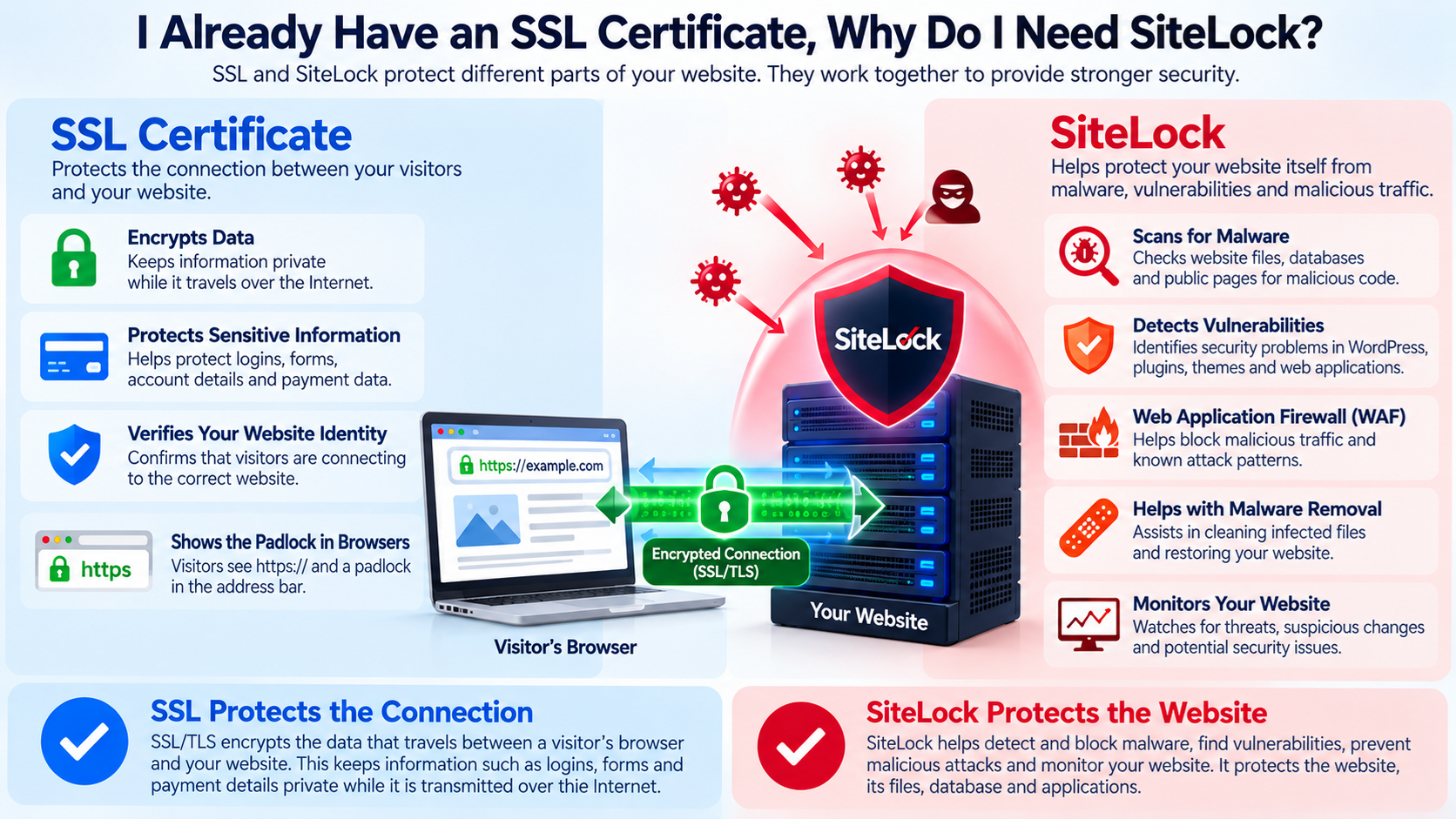
If your website already has an SSL certificate, you may wonder why you would need another website security service such as SiteLock.
This is a reasonable question because both SSL and SiteLock are associated with website security.
However, they protect different parts of your website.
An SSL certificate helps protect information while it travels between a visitor’s browser and your website.
SiteLock is designed to help detect, prevent, and remove security threats affecting the website itself.
The simplest way to understand the difference is:
SSL protects the connection.
SiteLock helps protect the website.
For stronger website security, these technologies can work together rather than replace each other.
What Does an SSL Certificate Do?
An SSL certificate enables encrypted HTTPS connections between a website and a visitor’s browser.
Today, modern websites actually use TLS, which stands for Transport Layer Security, although people still commonly use the term SSL certificate.
When someone visits:
the browser and web server establish an encrypted connection.
This means information traveling between the browser and the server is much more difficult for someone else on the network to read or modify.
SSL/TLS can help protect information such as:
Login credentials
Contact form submissions
Account information
Customer information
Cookies
Payment-related information transmitted between systems
Other sensitive data sent through the website
This protection is extremely important.
However, encryption alone does not protect every part of a website.
What SSL Does Not Do
An SSL certificate does not scan your website files for malware.
It does not automatically remove malicious PHP code.
It does not patch a vulnerable WordPress plugin.
It does not stop every SQL injection attempt.
It does not detect every malicious file uploaded to your hosting account.
It does not prevent an attacker from stealing your WordPress administrator password.
It does not repair a compromised database.
It does not automatically block all malicious bots.
It does not guarantee that your website itself is safe.
An infected website can still have a perfectly valid SSL certificate.
Visitors may see the HTTPS padlock while the website contains malicious code.
This is one of the most important security concepts for website owners to understand.
HTTPS Does Not Mean the Website Is Completely Safe
Many people assume that the padlock shown in the browser means the website has been verified as completely safe.
That is not what the padlock means.
The padlock primarily indicates that the connection between the browser and the website is encrypted and that the certificate is valid for the connection being established.
A compromised website can still use HTTPS.
For example, imagine that an attacker finds a vulnerability in an outdated WordPress plugin and uploads malicious code.
The website may continue using its SSL certificate normally.
Visitors will still see:
The connection is encrypted, but the server may now be delivering malicious content over that encrypted connection.
SSL successfully protected the connection.
It did not prevent the website from being compromised.
What Is SiteLock?
SiteLock is a website security service designed to help identify and address threats affecting websites.
Depending on the SiteLock plan and configuration, its services may include malware scanning, malware removal, vulnerability detection, website monitoring, Web Application Firewall protection, and other security features.
SiteLock can inspect website files, databases, and publicly visible pages for suspicious or malicious content.
Some SiteLock services can also place a Web Application Firewall, commonly called a WAF, in front of the website to help block malicious traffic before it reaches the server.
The exact features available depend on the SiteLock plan you use.
SSL Protects Data in Transit
To understand why both services can be useful, consider what happens when a visitor logs in to your website.
The visitor enters a username and password.
With HTTPS enabled, SSL/TLS encrypts that information while it travels across the network.
This makes it much harder for someone monitoring the network connection to intercept the credentials.
That is the job of SSL/TLS.
However, suppose the website itself has already been infected with malicious code.
That malicious code might capture the password after it reaches the server or while the visitor interacts with the website.
The network connection was secure, but the application was compromised.
That is why connection security and website security are separate issues.
SiteLock Helps Protect the Website Itself
SiteLock focuses more directly on the website and application layer.
Depending on the service level, SiteLock can look for problems such as:
Malware
Malicious scripts
Backdoors
Website defacement
Suspicious file changes
Database malware
Known vulnerabilities
Malicious traffic
Automated attacks
Application security problems
These are different threats from network interception.
What Is Malware?
Malware means malicious software or malicious code.
Website malware can take many forms.
For example, malicious code might:
Redirect visitors to another website
Create spam pages
Insert unwanted advertisements
Steal information
Create hidden administrator access
Send spam email
Download additional malicious files
Modify search engine content
Attack other systems
An SSL certificate does not normally search your website files for this type of code.
Malware scanning services are designed for this purpose.
What Is a Website Backdoor?
A backdoor is a hidden method that allows an attacker to regain access to a website.
For example, an attacker who compromises a WordPress website may upload a small PHP file containing commands that can be activated remotely.
Even if the website owner changes the WordPress administrator password, the attacker may still be able to access the website through that hidden file.
A security scanner may help identify suspicious files and backdoors.
SSL does not perform this type of scanning.
SiteLock Malware Scanning
SiteLock currently offers website scanning that can examine website files, databases, and public pages for malicious or suspicious content.
Its file-level scanning can connect to a hosting environment using FTP, FTPS, or SFTP, depending on the configuration.
This allows the service to inspect files that may not be visible simply by visiting the website in a browser.
SiteLock also provides database and public-page scanning in supported plans.
This is fundamentally different from SSL encryption.
What Is a Web Application Firewall?
A Web Application Firewall, or WAF, protects web applications by examining incoming web requests.
Instead of allowing every request to reach the website directly, traffic can be checked for suspicious patterns.
A WAF may help block attacks such as:
SQL injection
Cross-site scripting
Command injection
Malicious bots
Known exploit attempts
Certain denial-of-service traffic
Suspicious requests
SiteLock offers WAF protection with some of its plans.
SSL does not perform this job.
SSL encrypts the request.
A WAF analyzes the request.
These are two different security functions.
SSL Can Encrypt an Attack Too
This is an important point.
HTTPS does not distinguish between a good visitor and an attacker.
If an attacker sends a malicious request through HTTPS, SSL/TLS encrypts that request just like any other connection.
For example, an attacker might attempt a SQL injection attack using:
The connection can be fully encrypted.
The request can still be malicious.
This is where application security controls such as a WAF become useful.
What Is SQL Injection?
SQL injection is a type of attack against applications that interact with databases.
If an application handles user input incorrectly, an attacker may attempt to modify the database command sent by the application.
A successful attack could potentially expose, change, or delete data.
Developers should protect applications using secure programming techniques such as parameterized queries and prepared statements.
A Web Application Firewall may provide another layer of protection by identifying suspicious requests.
SSL does not prevent SQL injection because SQL injection attacks target the application logic rather than the network encryption.
What Is Cross-Site Scripting?
Cross-site scripting, commonly called XSS, is another web application attack.
It occurs when an application allows malicious script content to appear in pages viewed by other users.
For example, an attacker might attempt to inject JavaScript through a form or other input.
If the application does not safely handle the input, the script could run in another visitor’s browser.
HTTPS can encrypt the delivery of that malicious page.
It does not automatically remove the malicious script.
Application security and secure coding practices are still required.
Vulnerability Detection
Web applications constantly change.
WordPress, themes, plugins, content management systems, and other applications receive updates that may include security fixes.
A vulnerability is a weakness that could potentially be exploited by an attacker.
Website security services can help identify outdated or vulnerable software so that website owners know what needs attention.
SiteLock includes vulnerability-related scanning and monitoring features depending on the service plan.
An SSL certificate does not inspect your WordPress plugins or application code for known vulnerabilities.
Why WordPress Websites Need More Than SSL
WordPress websites are built from several components.
A typical WordPress website may contain:
WordPress core
Theme files
Plugins
PHP code
A database
Uploaded files
Administrator accounts
Hosting configuration
Any of these components can potentially become part of a security problem.
For example, an old plugin might contain a publicly known vulnerability.
Installing SSL does not update that plugin.
The website still needs software updates, strong authentication, backups, monitoring, and appropriate security controls.
SSL and SiteLock Solve Different Problems
Consider a physical building.
An SSL certificate is somewhat like using a secure armored tunnel to move information between two locations.
The information is protected while traveling through the tunnel.
But that does not tell you whether someone has already broken into the building.
Website malware scanning is more like checking inside the building for an intruder.
A Web Application Firewall is more like security at the entrance checking who is trying to enter.
These protections address different risks.
Do I Need SSL If I Have SiteLock?
Yes, you should still use HTTPS.
SiteLock does not replace SSL/TLS encryption.
Visitors need an encrypted connection when communicating with your website.
SSL/TLS helps protect information while it travels across the Internet.
Website security services protect other parts of the system.
The two technologies complement each other.
Do I Need SiteLock If I Have SSL?
Not every website necessarily needs SiteLock specifically.
However, every website needs security beyond SSL.
You may use SiteLock, another website security service, a hosting provider’s security platform, security plugins, server-level security tools, or a combination of these approaches.
The important point is that SSL alone is not a complete website security system.
If you use SiteLock, it can provide additional layers such as malware scanning, vulnerability detection, malware removal, monitoring, and WAF protection depending on your plan.
What About a WordPress Security Plugin?
WordPress security plugins can provide valuable protection.
Depending on the plugin, they may offer:
Login protection
Malware scanning
Firewall functions
File monitoring
Two-factor authentication
Brute-force protection
Security alerts
Some of these features overlap with services offered by SiteLock.
The appropriate solution depends on your website, hosting environment, technical experience, and security requirements.
You do not necessarily need every security product available.
The goal is to make sure the important security layers are actually covered.
SiteLock and Server Security
SiteLock does not eliminate the need for secure hosting.
The web server still needs proper maintenance.
A hosting provider should maintain important infrastructure such as:
Operating systems
Web servers
Network security
Server software
Firewalls
Hardware
Virtualization systems
The website owner is usually responsible for other areas such as the application, WordPress plugins, themes, user accounts, and website content.
Security works best when the hosting provider, website owner, and security tools each protect their appropriate layers.
Backups Are Still Necessary
Even if you use both SSL and SiteLock, you should still maintain reliable backups.
No security product can guarantee that a website will never experience a problem.
A website could be damaged by:
Malware
Software failure
Human error
Database corruption
A failed update
Account compromise
Server problems
Accidental deletion
Backups provide a recovery path.
Keep backups regularly and, whenever practical, maintain a copy separate from the website itself.
Strong Passwords Are Still Necessary
Security services cannot compensate for extremely weak passwords.
Use strong, unique passwords for:
WordPress
cPanel
WHM
FTP or SFTP
SSH
Domain registrar accounts
DNS providers
Cloud services
Avoid reusing the same password across multiple services.
If one account is compromised, password reuse can allow attackers to access other systems.
Multi-Factor Authentication Is Still Important
Enable multi-factor authentication wherever it is available.
Multi-factor authentication adds another verification step in addition to the password.
This is particularly important for administrative accounts.
Important accounts may include:
WordPress administrators
Hosting control panels
Domain registrar accounts
Email accounts
Cloudflare accounts
Server administration accounts
Protecting these accounts can prevent many common compromises.
Keep Software Updated
SiteLock does not eliminate the need for normal website maintenance.
Keep your software updated.
This includes:
WordPress core
Plugins
Themes
PHP
Applications
Server software
Control panels
Security patches
Updates are one of the most important defenses against known vulnerabilities.
Some SiteLock plans include vulnerability-related protection or patching capabilities, but you should still maintain your website and applications properly.
A Simple Security Model
A useful way to think about website security is to divide it into several layers.
SSL/TLS protects communication.
Strong authentication protects accounts.
Software updates reduce known vulnerabilities.
A Web Application Firewall helps filter malicious traffic.
Malware scanning helps detect infections.
Malware removal helps clean compromised files.
Backups help you recover.
Monitoring helps you discover problems.
No single layer does everything.
Together, they provide defense in depth.
What Is Defense in Depth?
Defense in depth is a security strategy that uses multiple layers of protection.
If one security control fails, another may still stop or limit the attack.
For example, suppose an attacker finds a new vulnerability in a website plugin.
The plugin update may not yet be installed.
A Web Application Firewall might block the attack.
If something still gets through, malware scanning might detect malicious files.
If the website is damaged, a clean backup may allow recovery.
This layered approach is much stronger than relying on a single product.
SSL vs. SiteLock in Simple Terms
The easiest way to remember the difference is:
SSL protects information moving between your visitors and your website.
SiteLock helps protect the website, its files, database, applications, and incoming web traffic through security features available in its different plans.
They do different jobs.
Having SSL does not make SiteLock unnecessary.
Having SiteLock does not make SSL unnecessary.
Do All Websites Need the Same Security?
No.
A small informational website does not necessarily require exactly the same security system as a large online store.
Your security requirements depend on factors such as:
The type of website
The information you store
Whether users can log in
Whether you accept payments
The software you use
How frequently the website changes
Your technical experience
The importance of website availability
Your regulatory requirements
Your tolerance for risk
A simple website may need fewer security services than a large business application.
However, every website should still follow basic security practices.
Who Might Benefit From SiteLock?
SiteLock may be useful for website owners who want automated security monitoring and additional protection without manually performing every security task.
It may be particularly useful for:
Small businesses
WordPress website owners
E-commerce websites
Organizations without dedicated security staff
Website owners who want malware monitoring
Businesses that want WAF protection
Website owners who want additional vulnerability monitoring
The appropriate SiteLock plan depends on which features are required.
Check the Features of Your Plan
SiteLock offers different plans, and not every feature is included in every plan.
Before purchasing or recommending a security service, check the current plan description.
Features such as:
Malware scanning
Malware removal
Web Application Firewall
CDN
Vulnerability protection
Database scanning
Other advanced services
may depend on the particular subscription.
Do not assume that simply purchasing a product called “website security” automatically includes every possible security feature.
Final Thoughts
An SSL certificate is essential for a modern website, but SSL solves a specific security problem.
It encrypts communication between the visitor and the website.
It does not automatically protect your WordPress installation, website files, plugins, database, administrator accounts, or server from every attack.
SiteLock provides additional website security functions such as malware scanning, vulnerability detection, malware remediation, and, with appropriate plans, Web Application Firewall protection.
Think of them as different layers.
SSL protects the connection.
SiteLock helps protect the website.
Strong passwords protect accounts.
Updates help close vulnerabilities.
Backups provide recovery.
Monitoring helps detect problems.
Website security is strongest when these layers work together.