
Every device that communicates over an IP network needs an address that helps identify where network traffic should be sent. This address is called an IP address.
IP stands for Internet Protocol.
An IP address is one of the most important building blocks of the Internet.
When you open a website, send an email, connect to a server, or use an online application, IP addresses help network devices determine where the data should go.
For website owners, two terms are especially common:
IP address
Dedicated IP address
They are related, but they are not the same thing.
Understanding the difference is useful when choosing web hosting, configuring DNS, troubleshooting websites, or managing servers.
What Is an IP Address?
An IP address is a numerical address assigned to a device or network interface that communicates using the Internet Protocol.
You can think of it as a network address that allows computers and other devices to find one another.
For example, a server connected to the Internet might have an IPv4 address such as:
192.0.2.10
A modern server might also have an IPv6 address such as:
2001:db8::10
When another computer wants to communicate with that server, network devices use the destination IP address to route packets toward the correct network.
The IP address does not describe the website itself. It identifies a network destination.
Why Do We Need IP Addresses?
Computers do not communicate using domain names alone.
A website might use a domain name such as:
example.com
However, the network ultimately needs an IP address in order to deliver packets to the server.
This is where the Domain Name System, commonly called DNS, becomes important.
DNS translates domain names into IP addresses.
For example:
example.com → 192.0.2.10
Your browser can then connect to the server using that address.
Without IP addresses, routers would not know where Internet traffic should be sent.
Domain Names and IP Addresses Are Different
A domain name and an IP address are not the same thing.
A domain name is a human-friendly name such as:
hostsdepot.com
An IP address is a numerical network address used by computers and routers.
People prefer domain names because they are easier to remember.
Computers use IP addresses because networks need numerical addressing for packet delivery.
DNS connects these two systems.
A simple way to think about it is:
Domain name = name people remember
IP address = network address computers use
DNS = system that connects the two
What Is IPv4?
IPv4 stands for Internet Protocol version 4.
An IPv4 address contains 32 bits and is normally written as four decimal numbers separated by periods.
For example:
203.0.113.25
Each part represents eight bits and can contain a value from 0 to 255.
IPv4 has been used for decades and remains extremely common today.
However, the number of available IPv4 addresses is limited.
Because the Internet has grown enormously, technologies such as Network Address Translation, shared hosting, and IPv6 have helped reduce the pressure on the IPv4 address space.
What Is IPv6?
IPv6 stands for Internet Protocol version 6.
IPv6 was developed partly because the Internet needed a much larger address space.
An IPv6 address uses 128 bits instead of the 32 bits used by IPv4.
An IPv6 address might look like this:
2001:db8:1234:5678::10
IPv6 provides an enormous number of possible addresses.
Many hosting providers, Internet service providers, cloud platforms, and modern networks now support both IPv4 and IPv6.
When a system supports both protocols, it is commonly described as dual stack.
What Is a Public IP Address?
A public IP address is an address that can be routed across the public Internet.
Web servers normally need public Internet connectivity so users around the world can reach them.
For example, when a website’s DNS record points to a public server address, visitors can connect to that address through the Internet.
Public IP addresses are different from private addresses used inside local networks.
What Is a Private IP Address?
Private IP addresses are used inside private networks and are not normally routed directly across the public Internet.
Common IPv4 private address ranges include:
10.0.0.0/8
172.16.0.0/12
192.168.0.0/16
For example, a computer inside your home network might have an address such as:
192.168.1.50
Your router may have a public IP address facing the Internet while computers inside your home use private addresses.
The router can use Network Address Translation, commonly called NAT, to allow multiple private devices to share Internet access.
What Is a Shared IP Address?
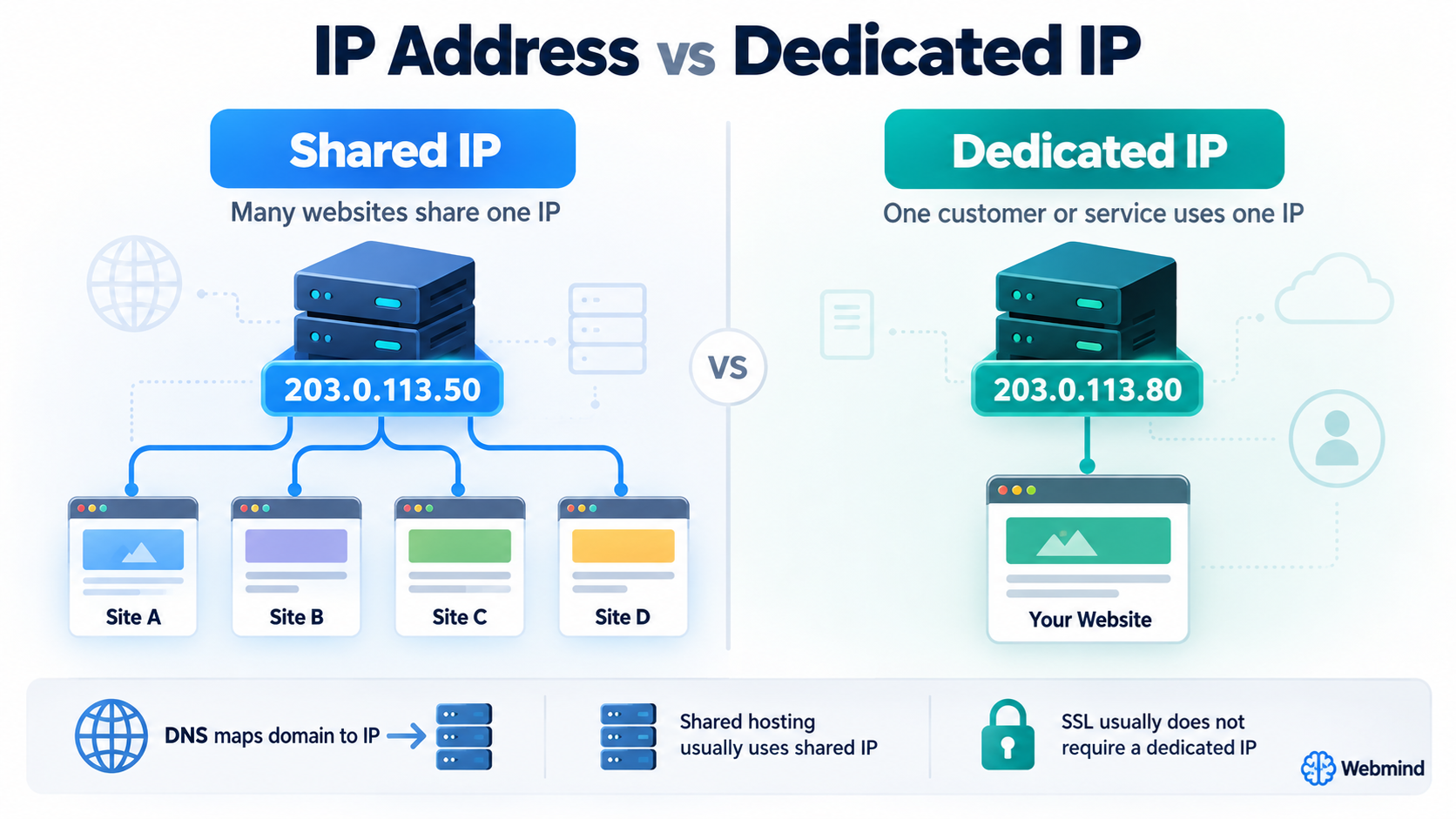
In web hosting, a shared IP address usually means that multiple websites use the same server IP address.
For example, suppose one hosting server has the address:
203.0.113.50
That same IP address might host:
website-one.com
website-two.com
website-three.com
website-four.com
All of these websites can use the same IP address.
This is extremely common in shared web hosting.
Modern web servers can determine which website a visitor requested by examining information in the HTTP request, especially the Host header.
For HTTPS websites, technologies such as Server Name Indication, commonly called SNI, also allow many secure websites to share the same IP address.
Because of these technologies, most websites do not require their own dedicated IP address.
What Is a Dedicated IP Address?
A dedicated IP address is an IP address assigned for the exclusive use of a particular hosting account, server, service, or customer, depending on how the hosting provider structures its network.
For example, suppose your website uses:
203.0.113.80
If that address is dedicated to your hosting service and is not shared with unrelated hosting customers, it can be described as a dedicated IP address.
In traditional web hosting, dedicated IPs were often used to give an individual website or hosting account its own address.
Today, the exact meaning can vary between providers.
A dedicated IP may belong to:
A dedicated server
A virtual private server
A hosting account
A website
A mail server
An application
A VPN service
Because providers use the term differently, always check exactly what is included when purchasing a dedicated IP.
Shared IP vs. Dedicated IP
The main difference is exclusivity.
With a shared IP address, multiple websites or customers may use the same public IP address.
With a dedicated IP address, the address is reserved for a particular customer, server, account, or service.
This does not automatically mean that a dedicated IP provides better website performance.
Website speed depends on many other factors, including:
Server hardware
CPU resources
Memory
Storage performance
Web server configuration
Application performance
Caching
Network quality
Content delivery networks
Website optimization
A dedicated IP by itself does not make a website faster.
Do You Need a Dedicated IP for SSL?
In the past, dedicated IP addresses were commonly associated with SSL certificates.
Older systems often required each HTTPS website to have its own IP address because the server needed to select the correct SSL certificate before it knew which hostname the visitor wanted.
Modern servers normally use Server Name Indication, or SNI.
SNI allows multiple HTTPS websites with different SSL certificates to share the same IP address.
As a result, most modern websites do not need a dedicated IP just to use HTTPS.
A normal shared hosting account can usually use an SSL certificate perfectly well on a shared IP address.
Does a Dedicated IP Improve SEO?
A dedicated IP address does not automatically improve search engine rankings.
Search engines evaluate many factors related to content quality, website usefulness, technical accessibility, performance, security, links, and user experience.
Simply changing from a shared IP to a dedicated IP does not create an SEO advantage by itself.
A properly configured website can rank well while using a shared IP address.
Many large hosting platforms place thousands of legitimate websites on shared infrastructure.
Can Other Websites on a Shared IP Affect My Website?
Usually, sharing an IP address is not a problem.
Modern hosting platforms are designed to host many unrelated websites on the same infrastructure.
However, certain services can be affected by the reputation of an IP address.
Email delivery is one important example.
If many users send email through the same outgoing mail IP address and one user sends large amounts of spam, the reputation of that mail IP could be affected.
This is one reason hosting providers carefully monitor outgoing email.
However, website hosting and outgoing email do not always use the same IP address.
A website’s web IP reputation and a mail server’s sending reputation should not be treated as exactly the same issue.
Dedicated IP and Email
Some businesses use dedicated IP addresses for outgoing email.
This can provide greater control over sending reputation because the IP address is not shared with other senders.
However, a dedicated email IP is not automatically better.
A new dedicated IP may have little or no sending reputation.
Large email senders may need to gradually build the reputation of a new IP, a process often called IP warming.
For a small website that sends only a limited number of messages, a professionally managed shared mail infrastructure may actually be easier to operate.
Therefore, dedicated IP email hosting is usually more relevant to higher-volume or specialized email systems.
Dedicated IP and Server Access
A dedicated IP can sometimes make server administration easier.
For example, if you operate a VPS or dedicated server, you may connect directly to its IP address using services such as SSH.
An administrator might connect using a command similar to:
ssh username@203.0.113.80
The IP address can remain useful even if a domain name has not yet been configured.
A dedicated IP can also be useful during testing, migrations, DNS changes, and server troubleshooting.
Can You Visit a Website by IP Address?
Sometimes you can, but it is not always reliable.
If a server hosts only one website, entering its IP address into a browser may display that site.
However, on shared hosting, many domains may use the same IP address.
If you visit only the IP address, the server may not know which website you intended to open.
It may show:
A default server page
A hosting provider page
Another configured default website
An error message
This is normal.
Websites are usually designed to be accessed through their domain names, not directly through their IP addresses.
Why Can Many Websites Use One IP Address?
Modern web servers use name-based virtual hosting.
When your browser requests a website, it includes the hostname it wants.
For example, the browser might send a request for:
website-one.com
The server sees the requested hostname and sends the files belonging to that website.
Another visitor might connect to the same IP address but request:
website-two.com
The server then sends the files for website-two.com.
This allows hundreds or even thousands of websites to share one IP address.
How DNS Connects a Domain to an IP Address
For IPv4, DNS commonly uses an A record.
For example:
example.com → 203.0.113.25
For IPv6, DNS normally uses an AAAA record.
For example:
example.com → 2001:db8::25
When someone enters example.com into a browser, DNS helps the browser discover the server address.
The browser can then connect to the server.
This is why DNS configuration is one of the first things to check when moving a website to a new hosting server.
What Happens When a Website Changes IP Address?
If you move a website from one server to another, its IP address may change.
For example, the old server might use:
203.0.113.20
The new server might use:
203.0.113.90
You would then update the domain’s DNS records so they point to the new address.
Some users may continue reaching the old server temporarily because DNS information can remain cached.
This is why website migrations often keep the old server online for a period while DNS changes spread through resolvers.
Static IP and Dynamic IP
Another pair of terms you may encounter is static IP and dynamic IP.
A static IP address is intended to remain assigned to the same system for an extended period.
A dynamic IP address can change periodically.
Home Internet connections often use dynamic public IP addresses.
Hosting servers usually need more stable addressing because DNS records must consistently direct visitors to the server.
However, the exact addressing method depends on the hosting or cloud provider.
Is a Dedicated IP the Same as a Static IP?
Not necessarily.
These terms describe different things.
Dedicated means the address is reserved for a particular customer, account, server, or service.
Static means the address normally does not change.
An IP address can be both dedicated and static, which is common with servers.
But the two words should not automatically be treated as identical.
Does a Dedicated Server Have a Dedicated IP?
A dedicated server normally has one or more IP addresses assigned to it.
Because the physical server is dedicated to one customer, its addresses are generally associated with that server’s environment.
However, the number of addresses included depends on the hosting provider.
Additional IPv4 addresses may cost extra because IPv4 addresses are limited resources.
IPv6 addresses are generally much more plentiful.
Does a VPS Have a Dedicated IP?
A VPS, or Virtual Private Server, commonly receives its own public IP address.
This allows the VPS to run independent network services such as:
Web hosting
SSH
VPN services
Mail services
Databases
Control panels
Applications
Although multiple VPS systems may share the same physical server, each VPS can have its own network addressing.
Does Shared Hosting Need a Dedicated IP?
For most normal websites, no.
A standard shared hosting account can usually operate perfectly well using a shared IP address.
Modern technologies support:
Multiple domains
HTTPS
SSL certificates
WordPress
Databases
Web applications
all without requiring every website to have a unique IPv4 address.
A dedicated IP should normally be purchased because you have a specific technical reason for needing one, not simply because it sounds more powerful.
When Might a Dedicated IP Be Useful?
A dedicated IP may be useful when you operate a VPS or dedicated server, need direct server access, run specialized network applications, need specific firewall rules, operate certain mail systems, or use software that requires a fixed address.
It can also simplify some server migration, testing, remote-access, or allow-listing configurations.
For example, another company might allow connections only from a specific trusted IP address.
In that situation, having a stable dedicated IP can be valuable.
IP Allow-Listing
Some business systems restrict access based on source IP addresses.
For example, a database or administration system might permit connections only from:
203.0.113.100
If your outgoing IP address frequently changes, this configuration becomes difficult to maintain.
A stable dedicated IP can make IP allow-listing easier.
This is commonly used with:
Remote administration
Corporate VPN systems
Database access
API security
Firewalls
Partner networks
However, IP allow-listing should normally be combined with proper authentication rather than being treated as the only security mechanism.
Does a Dedicated IP Make a Website More Secure?
Not automatically.
A dedicated IP does not replace important security measures such as:
Strong passwords
Software updates
Firewalls
Malware protection
Backups
SSL/TLS
Secure authentication
Access controls
Monitoring
A poorly secured server with a dedicated IP can still be compromised.
Likewise, a properly managed website on shared hosting can be very secure.
Security depends on the overall system configuration, not simply on whether an IP address is shared.
Dedicated IPs and IPv4 Shortage
IPv4 addresses are limited.
There are approximately 4.3 billion possible IPv4 addresses, and many of those addresses are reserved or already allocated.
Because of this shortage, hosting providers generally try to use IPv4 addresses efficiently.
Shared hosting allows many websites to use one IPv4 address.
IPv6 greatly expands the available address space, but IPv4 remains important because it is still widely used across the Internet.
For this reason, some hosting companies charge separately for additional IPv4 addresses or require a technical justification for them.
Which One Should You Choose?
For a normal website, shared hosting with a shared IP address is usually sufficient.
You generally do not need a dedicated IP simply because you use WordPress, HTTPS, SSL, or a business website.
Consider a dedicated IP when you have a specific requirement such as:
Running your own server
Remote server administration
IP allow-listing
Specialized applications
Certain mail server configurations
Network services requiring a fixed address
Custom firewall policies
A hosting provider can help determine whether your particular configuration actually needs one.
Final Thoughts
An IP address is the numerical network address that helps computers send data to the correct destination.
DNS allows users to reach servers using easy-to-remember domain names instead of typing numerical addresses.
In shared hosting, many websites can use the same IP address because modern web servers identify which domain the visitor requested.
A dedicated IP is an address reserved for a particular customer, server, hosting account, or service.
For most ordinary websites, a dedicated IP is not required for SSL, HTTPS, WordPress, or normal web hosting.
The important question is not whether a dedicated IP sounds better. The important question is whether your website or application has a technical reason to need one.
If there is no specific requirement, a properly configured shared IP is usually perfectly suitable for hosting a modern website.