
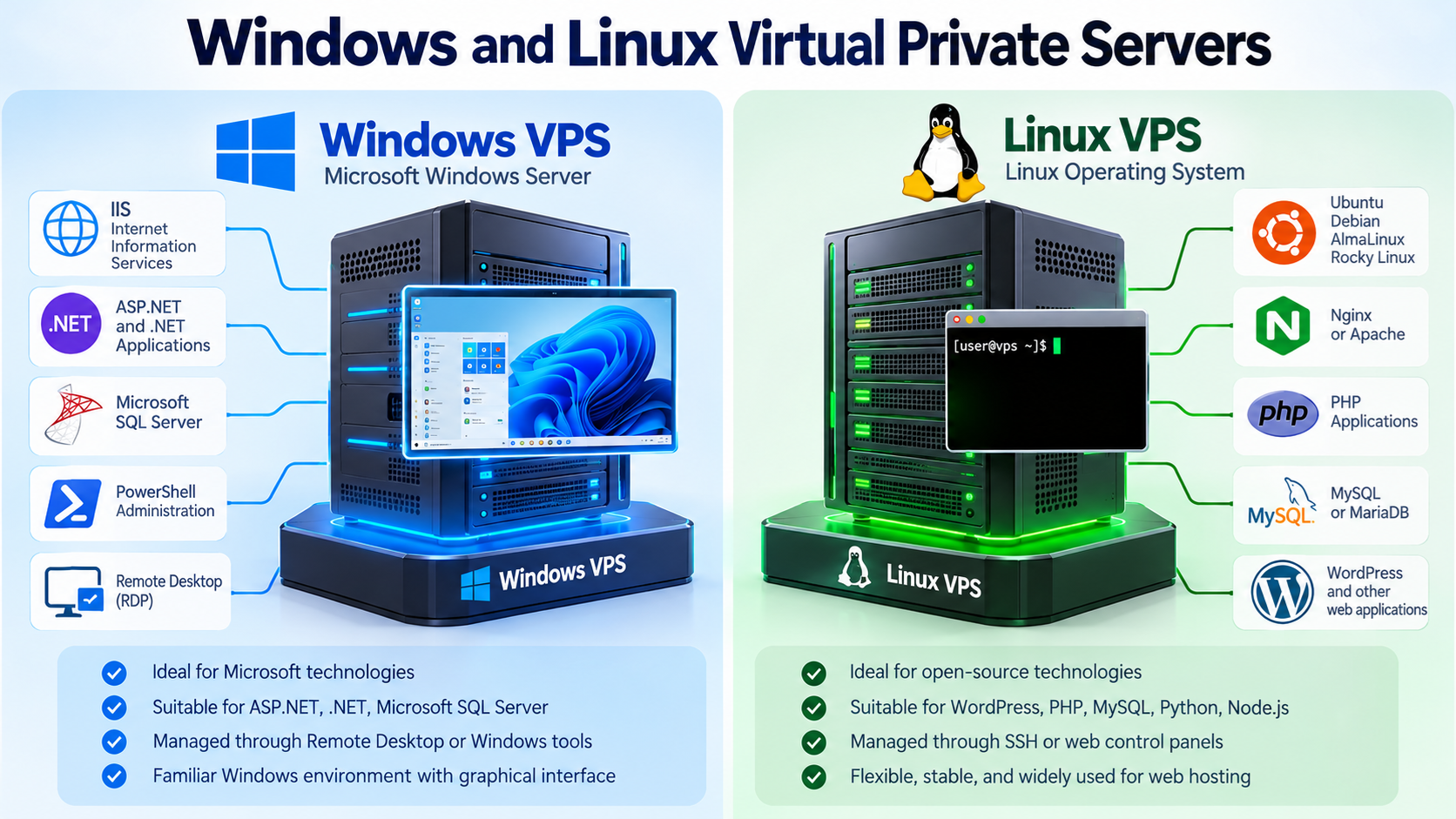
A Virtual Private Server, commonly called a VPS, gives you much more control than traditional shared hosting without requiring you to rent an entire physical server.
With a VPS, you receive your own virtual server environment with dedicated resources, an operating system, administrative access, and the ability to install and configure software according to your needs.
Two of the most common choices are Linux VPS hosting and Windows VPS hosting.
Both can run websites, applications, databases, and other network services, but they are designed for different software environments and administration styles.
Understanding the differences can help you choose the right VPS for your project.
What Is a Virtual Private Server?
A Virtual Private Server is a virtual machine running on a physical server.
The physical server uses virtualization software to divide its hardware resources among multiple virtual servers.
Each VPS behaves much like an independent server.
It can have its own:
Operating system
CPU allocation
Memory
Storage
IP address
User accounts
Applications
Security settings
Web server
Database software
Network configuration
Although several VPS instances may share the same physical hardware, each one is isolated from the others by the virtualization platform.
This gives VPS hosting more flexibility and control than ordinary shared hosting.
VPS Hosting vs. Shared Hosting
In shared hosting, many customers use the same operating system and hosting environment.
The hosting provider controls most of the server configuration.
Customers usually manage their websites through a control panel such as cPanel.
This is simple and convenient, but the customer has limited control over the underlying server.
A VPS is different.
With a VPS, you normally receive administrative access to your own virtual server.
On Linux, this often means root access.
On Windows, this normally means Administrator access.
This allows you to install software, change server settings, configure firewalls, run custom services, and manage the operating system itself.
A VPS therefore sits between shared hosting and a dedicated server.
What Is a Linux VPS?
A Linux VPS is a Virtual Private Server running a Linux operating system.
Common Linux server distributions include:
Ubuntu
Debian
AlmaLinux
Rocky Linux
CloudLinux
Oracle Linux
Other Linux distributions may also be available depending on the hosting provider.
Linux has been widely used for web hosting, cloud servers, databases, software development, and Internet infrastructure for many years.
It is especially common for websites using PHP, MySQL, MariaDB, Apache, Nginx, WordPress, and similar technologies.
What Is a Windows VPS?
A Windows VPS is a Virtual Private Server running Microsoft Windows Server.
Instead of administering the server mainly through a Linux command line, Windows VPS users can often use Remote Desktop Protocol, commonly called RDP.
RDP provides a graphical desktop environment that looks similar to a normal Windows computer.
A Windows VPS may be a good choice when your software depends on Microsoft technologies or when you prefer Windows-based administration.
Common Windows server applications may include:
Microsoft IIS
ASP.NET
.NET applications
Microsoft SQL Server
PowerShell
Remote Desktop services
Windows-specific business software
Linux VPS Administration
Linux servers are often managed through SSH.
SSH stands for Secure Shell.
It allows an administrator to securely connect to a remote server using a command-line interface.
A Linux administrator might connect to a server with a command such as:
ssh username@server-ip-address
After logging in, the administrator can install software, edit configuration files, restart services, inspect log files, manage users, configure security settings, and perform other system administration tasks.
For experienced Linux administrators, this provides a very efficient way to manage a server.
Windows VPS Administration
Windows VPS systems are commonly managed through Remote Desktop.
Remote Desktop allows you to log in to the VPS and see a graphical Windows desktop.
You can then use familiar Windows tools such as:
Server Manager
File Explorer
PowerShell
Windows Firewall
Task Manager
IIS Manager
Control Panel
Administrative Tools
This can make Windows VPS hosting easier for users who are more comfortable with Windows than Linux.
However, Windows servers can also be managed extensively through PowerShell and other command-line tools.
Linux VPS for Website Hosting
Linux is extremely common for website hosting.
A typical Linux web server might use:
Linux
Apache or Nginx
MySQL or MariaDB
PHP
This combination is often associated with the traditional LAMP stack.
LAMP stands for:
Linux
Apache
MySQL
PHP
Modern Linux servers may use different combinations, such as Nginx instead of Apache or MariaDB instead of MySQL.
Linux VPS hosting is commonly used for:
WordPress
Drupal
Joomla
PHP applications
Python applications
Node.js applications
Web APIs
Databases
Development environments
Custom web applications
For many general-purpose web hosting projects, Linux is a natural choice.
Windows VPS for Website Hosting
Windows VPS hosting is commonly used when a website or application depends on Microsoft technologies.
Windows Server includes Internet Information Services, commonly called IIS.
IIS is Microsoft’s web server platform.
A Windows VPS may be appropriate for applications built with technologies such as:
ASP.NET
.NET Framework
.NET
Microsoft SQL Server
IIS
PowerShell
Windows authentication
Other Microsoft server technologies
If your application was developed specifically for a Windows environment, choosing a Windows VPS can simplify deployment and compatibility.
Linux Does Not Mean Command Line Only
Some beginners assume that Linux servers can only be managed through a command line.
That is not always true.
Linux VPS systems can also use web-based control panels.
Depending on the server and hosting provider, you may be able to install or use management tools such as:
cPanel and WHM
Plesk
Webmin
DirectAdmin
Other hosting control panels
These tools provide graphical interfaces for managing websites, domains, databases, email accounts, DNS, and other server functions.
However, command-line administration remains an important skill when managing a Linux VPS.
Windows Does Not Mean Graphical Interface Only
Windows Server provides a graphical environment, but serious Windows administration also involves command-line tools.
PowerShell is one of the most important administration tools on Windows Server.
Administrators can use PowerShell to automate tasks, configure services, manage users, inspect system information, and control many Windows components.
For large or complex server environments, automation is often much more efficient than manually clicking through graphical menus.
Root Access on Linux
The root account is the most powerful administrative account on a Linux system.
A user with root privileges can modify almost every part of the server.
This includes:
Installing software
Deleting files
Changing network settings
Creating users
Modifying permissions
Changing firewall rules
Starting and stopping services
Changing operating system configuration
Because root access is extremely powerful, it must be protected carefully.
A mistake made as root can damage the entire server.
Attackers who obtain root access can potentially take complete control of the system.
Administrator Access on Windows
Windows Server uses administrative accounts that have elevated permissions.
An Administrator account can install software, modify system settings, manage users, configure IIS, change firewall settings, and perform other important tasks.
Just like root access on Linux, Administrator access should be protected carefully.
Strong passwords, secure remote access, system updates, firewall rules, and good account management are essential.
Software Compatibility
Software compatibility is one of the most important factors when choosing between Linux and Windows VPS hosting.
If your application requires Microsoft-specific technologies, Windows may be the better choice.
If your application is based primarily on open-source web technologies, Linux may be simpler and more common.
For example, a WordPress website normally runs very well on Linux.
A legacy ASP.NET application designed for Microsoft IIS may be better suited to Windows Server.
The operating system should match the software you actually plan to run.
WordPress on Linux VPS
WordPress is commonly hosted on Linux servers.
A Linux VPS can run a complete WordPress environment including:
Web server
PHP
Database server
SSL certificates
Caching software
Backup tools
Firewall software
Monitoring tools
You can also install a hosting control panel to simplify WordPress management.
For users who want more control than shared WordPress hosting provides, a Linux VPS can be a flexible option.
Can WordPress Run on Windows VPS?
Yes.
WordPress can run on Windows Server.
However, WordPress is more commonly deployed on Linux-based hosting environments.
Many WordPress tutorials, hosting tools, plugins, server configurations, and optimization guides are written with Linux hosting in mind.
Unless you have a specific reason to use Windows, Linux is often the more common choice for WordPress hosting.
Databases on Linux VPS
Linux supports many popular database systems.
Examples include:
MySQL
MariaDB
PostgreSQL
MongoDB
Redis
SQLite
Other database platforms can also run on Linux depending on their requirements.
Linux is widely used for database servers because of its stability, flexibility, automation tools, and broad software ecosystem.
Databases on Windows VPS
Windows Server can also run many database systems.
One of the most important is Microsoft SQL Server.
SQL Server is widely used in business applications built around Microsoft technologies.
Windows VPS systems can also run databases such as:
MySQL
MariaDB
PostgreSQL
MongoDB
Other supported database platforms
The best database choice depends on the application rather than simply the operating system.
Linux VPS and cPanel
cPanel and WHM are widely used hosting control panels for Linux-based servers.
WHM is used by server administrators and hosting providers.
cPanel is used by individual hosting account owners.
With a Linux VPS running cPanel and WHM, you can create separate hosting accounts, manage domains, configure websites, create email accounts, manage databases, install SSL certificates, and perform many other hosting tasks.
This makes Linux VPS hosting popular among hosting companies, developers, and businesses managing multiple websites.
Windows VPS and Plesk
Plesk is a popular web hosting control panel that supports Windows Server as well as Linux.
On a Windows VPS, Plesk can provide a web-based interface for managing:
Domains
Websites
Databases
SSL certificates
DNS
Applications
User accounts
Server settings
This can make Windows web hosting easier to manage without relying entirely on Windows Server tools.
Remote Desktop on Windows VPS
One of the biggest differences between Windows and Linux VPS hosting is the common use of Remote Desktop.
With RDP, you can connect to the Windows VPS and interact with it almost as if you were sitting in front of a Windows computer.
You can open applications, move files, configure software, use browser-based tools, and manage the server through a graphical interface.
This is especially useful for applications that require a Windows desktop environment.
However, a VPS should still be treated as a server rather than as an ordinary personal computer.
SSH on Linux VPS
Linux VPS systems commonly use SSH for remote administration.
SSH provides a secure encrypted connection between your computer and the server.
You can use SSH to manage almost every part of a Linux VPS.
For example, you can:
Install packages
Edit configuration files
Manage users
Configure services
Check disk usage
Monitor processes
Restart services
View system logs
Manage permissions
Run scripts
For system administrators, SSH is one of the most important tools for managing Linux servers.
VPS Security
A VPS gives you more control than shared hosting, but that also means you have more responsibility.
You should keep the operating system and installed software updated.
You should also configure appropriate security measures.
Common VPS security practices include:
Using strong passwords
Using SSH keys when appropriate
Keeping software updated
Configuring a firewall
Disabling unnecessary services
Restricting administrative access
Using SSL/TLS
Monitoring logs
Backing up important data
Protecting databases
Using secure file permissions
A VPS should never be installed and then ignored.
Servers require ongoing maintenance.
Windows VPS Security
Windows VPS systems should receive regular Windows updates and security patches.
Remote Desktop should also be protected carefully.
If RDP is directly exposed to the Internet with weak credentials, attackers may attempt automated login attacks.
Security measures may include:
Strong passwords
Firewall restrictions
Multi-factor authentication where supported
VPN access
Restricted RDP access
Account lockout policies
Regular patching
Security monitoring
Backup systems
The exact configuration depends on how the server is used.
Linux VPS Security
Linux VPS systems also require careful administration.
SSH is frequently targeted by automated attacks.
Administrators may improve security by using SSH keys, limiting login access, configuring firewalls, disabling unnecessary services, and monitoring authentication logs.
Linux packages and applications should also be updated regularly.
A secure Linux server is not secure simply because it uses Linux.
Security depends on configuration and maintenance.
Managed VPS vs. Unmanaged VPS
Another important distinction is between managed and unmanaged VPS hosting.
With an unmanaged VPS, the customer is responsible for most server administration.
This may include:
Operating system updates
Software installation
Security configuration
Web server configuration
Database administration
Backups
Monitoring
Troubleshooting
With a managed VPS, the hosting provider performs some or many of these tasks.
The exact meaning of managed hosting varies by provider.
Always check what services are actually included.
Who Should Choose an Unmanaged VPS?
An unmanaged VPS may be suitable for experienced system administrators, developers, and technical users who want full control.
It can be especially useful when you need a custom server environment.
However, beginners may find an unmanaged VPS difficult because server administration requires knowledge of operating systems, networking, security, web servers, databases, and troubleshooting.
Having root or Administrator access also means you can accidentally break the server configuration.
Who Should Choose a Managed VPS?
Managed VPS hosting may be better for businesses that need more resources and control than shared hosting but do not want to manage the operating system themselves.
A managed service may help with server maintenance, updates, security, backups, or troubleshooting.
However, there is no universal definition of managed VPS hosting.
Always read the provider’s service description carefully.
Performance
Both Linux and Windows VPS hosting can provide strong performance.
Performance depends on many factors, including:
CPU allocation
Memory
Storage speed
Network connection
Virtualization technology
Server load
Web server configuration
Database performance
Application design
Caching
Website optimization
The operating system is only one part of the overall system.
A poorly configured Linux server can be slower than a properly configured Windows server, and the opposite can also be true.
Memory Requirements
Operating system memory usage can vary depending on configuration and installed services.
A minimal Linux server can often run with relatively low memory usage.
Windows Server normally includes a larger operating system environment and graphical administration tools, which may require more resources.
However, the actual amount of memory needed depends primarily on the applications and services running on the server.
A database-heavy website may require much more memory than a simple static website regardless of operating system.
Licensing Costs
Many Linux distributions are open source and do not require a separate operating system license fee.
Windows Server is commercial software and normally involves Microsoft licensing.
For this reason, Windows VPS hosting can sometimes cost more than a comparable Linux VPS.
Control panels and other commercial software may also have separate license costs.
Always compare the total hosting cost rather than looking only at the base VPS price.
Linux VPS Advantages
Linux VPS hosting is widely used because it provides flexibility, stability, broad software support, powerful command-line tools, and strong automation capabilities.
It is especially suitable for:
WordPress
PHP websites
Web development
Open-source software
Linux applications
Apache
Nginx
MySQL
MariaDB
Python
Node.js
Docker
Custom server environments
Linux is also extremely common in cloud computing and Internet infrastructure.
Windows VPS Advantages
Windows VPS hosting provides a familiar environment for users and organizations that depend on Microsoft technologies.
It is especially suitable for:
ASP.NET applications
.NET applications
Microsoft IIS
Microsoft SQL Server
Remote Desktop applications
PowerShell administration
Windows-specific software
Microsoft-based business systems
For applications built around Windows technologies, a Windows VPS may be the simplest and most compatible solution.
Which VPS Should You Choose?
Choose Linux VPS hosting when your software is designed for Linux, your website uses common open-source technologies, or you are comfortable managing Linux systems.
Linux is especially common for WordPress, PHP, MySQL, Apache, Nginx, Python, and Node.js hosting.
Choose Windows VPS hosting when your application requires Microsoft technologies or Windows-specific software.
Windows may be a better choice for IIS, ASP.NET, Microsoft SQL Server, Remote Desktop applications, and certain enterprise software.
The best operating system is the one that matches your software requirements.
Do Not Choose Based Only on Familiarity
A common mistake is choosing Windows simply because your personal computer runs Windows.
Your desktop operating system does not need to match your web server.
You can manage a Linux server from a Windows computer using SSH, a web browser, a hosting control panel, or other remote tools.
Likewise, you can manage a Windows VPS from many different client devices.
Choose the server operating system based primarily on what the server needs to run.
Can You Change from Linux to Windows Later?
Changing the operating system of a VPS usually requires reinstalling or replacing the server environment.
You generally cannot simply switch a running Linux server into Windows or a Windows server into Linux while keeping everything unchanged.
Websites, databases, applications, email, configuration files, and user data may need to be migrated.
For this reason, it is helpful to choose the appropriate operating system before deploying important applications.
Backups Are Essential
Whether you use Linux or Windows, regular backups are essential.
A VPS gives you more control, but it also means mistakes can affect the entire server.
Software problems, configuration errors, security incidents, hardware failures, or accidental deletion can cause data loss.
Important websites and server data should be backed up to a location separate from the VPS whenever possible.
You should also understand how to restore those backups.
A backup that has never been tested may not protect you when you actually need it.
VPS vs. Dedicated Server
A VPS runs as a virtual machine on a larger physical server.
A dedicated server gives one customer control over an entire physical server.
Dedicated servers can provide greater hardware isolation and may offer more resources, but they usually cost more.
A VPS is often a good choice when you need more control than shared hosting provides but do not need an entire physical server.
Modern VPS platforms can support many demanding websites and applications.
Final Thoughts
Linux VPS and Windows VPS hosting both provide much more control than traditional shared hosting.
A Linux VPS is commonly used for WordPress, PHP, MySQL, Apache, Nginx, Python, Node.js, and many other open-source technologies.
A Windows VPS is commonly used for IIS, ASP.NET, .NET applications, Microsoft SQL Server, Remote Desktop, and Windows-specific software.
Neither operating system is automatically better for every project.
The right choice depends on the applications you need to run, your administration experience, your software compatibility requirements, and how much server management you want to handle yourself.
If you are running a typical WordPress or open-source web application, Linux is usually the more common choice.
If your application specifically requires Microsoft technologies or Windows software, Windows VPS may be the better solution.
The most important step is to identify your software requirements first, then choose the VPS operating system that supports those requirements most naturally.