
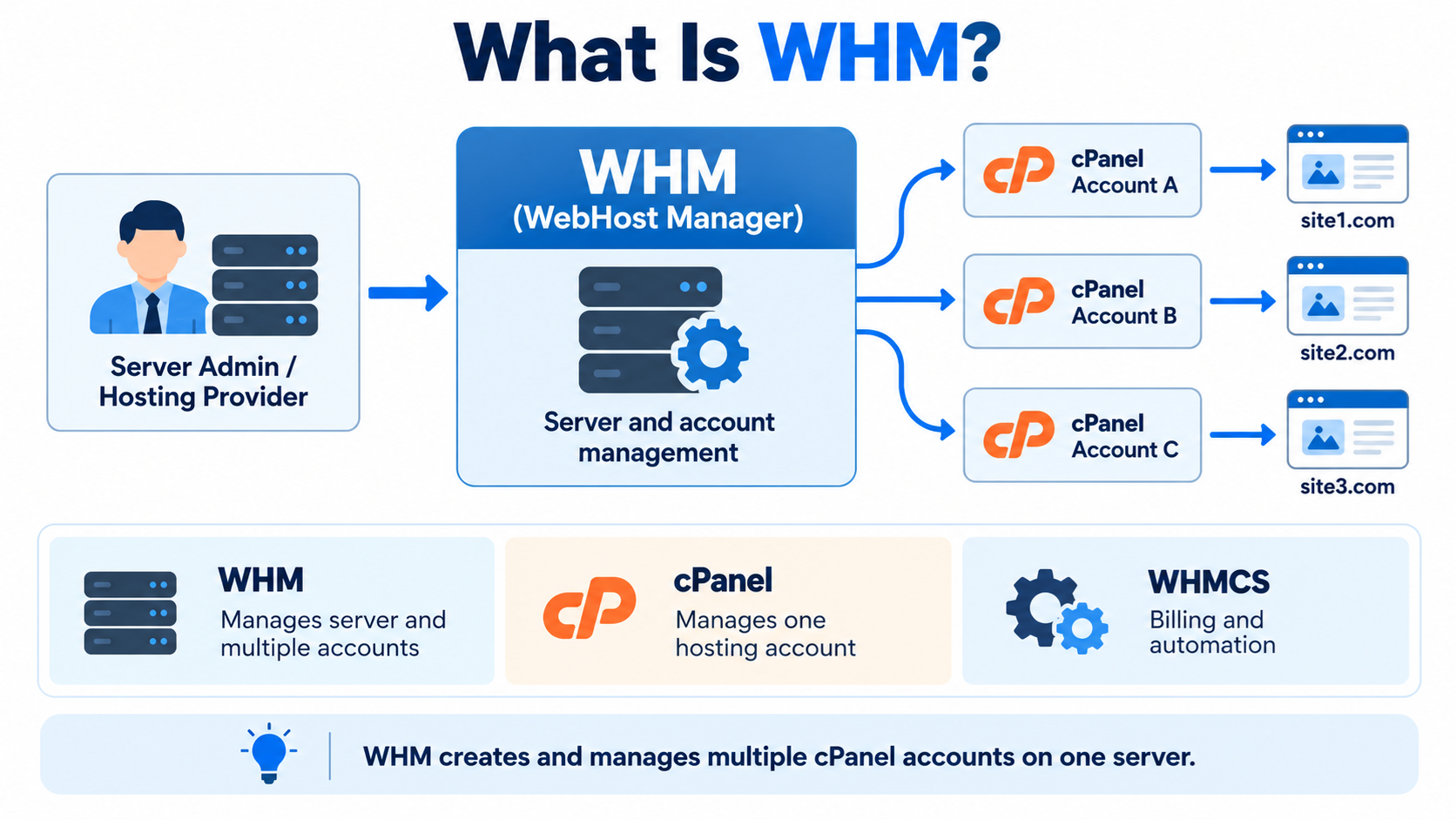
WebHost Manager, commonly called WHM, is a web-based server administration interface used mainly with cPanel-based hosting servers.
It allows hosting providers, server administrators, and resellers to manage multiple hosting accounts from one central control panel.
If cPanel is the control panel used by an individual website owner, WHM is the higher-level control panel used to manage the server and the cPanel accounts hosted on it.
In simple terms, cPanel is for managing one hosting account, while WHM is for managing many hosting accounts and broader server settings.
What Does WHM Do?
WHM provides administrative tools for creating, managing, suspending, and deleting hosting accounts.
A server administrator can use WHM to create a separate cPanel account for each website or customer.
Each account can have its own domain names, files, email accounts, databases, disk space limits, and other hosting resources.
WHM can also control many server-wide settings that ordinary cPanel users cannot access.
This makes WHM especially useful for web hosting companies, web designers, agencies, developers, and anyone who manages multiple websites on the same server.
WHM and cPanel Are Not the Same Thing
WHM and cPanel are closely related, but they serve different purposes.
cPanel is designed for the owner or administrator of an individual hosting account.
It provides tools for managing website files, email accounts, databases, domains, backups, and other account-level features.
WHM operates at a higher level.
It allows the server owner, hosting provider, or reseller to create and manage the cPanel accounts themselves.
A hosting company might use WHM to create 100 separate cPanel accounts.
Each customer can then log in to their own cPanel account without gaining access to the accounts of other customers.
A Simple Example
Imagine that you operate a hosting server with 20 customers.
Each customer has a separate website.
Instead of placing all 20 websites inside one account, you can use WHM to create 20 separate cPanel accounts.
Customer A can manage customerA.com through cPanel.
Customer B can manage customerB.com through a different cPanel account.
You, as the server administrator, can see and manage all of these accounts through WHM.
This separation makes administration easier and can also improve organization and security.
Who Uses WHM?
WHM is commonly used by several types of users.
Web hosting companies use WHM to create and manage customer hosting accounts.
Resellers use WHM to manage hosting accounts that they sell to their own customers.
Web development agencies may use WHM to keep client websites separated into individual accounts.
Businesses with dedicated or virtual private servers may also use WHM to administer multiple websites.
Individual website owners usually do not need WHM if they manage only one ordinary shared hosting account.
What Is a WHM Account?
There are different levels of WHM access.
A server owner or root administrator may have full WHM access.
Root access generally provides control over almost every configurable part of the cPanel and WHM server.
A reseller may receive a more limited WHM account.
A reseller can usually create and manage hosting accounts within limits established by the server owner, but the reseller normally cannot control every server-wide setting.
The exact permissions depend on how the WHM account is configured.
What Is Root WHM?
Root WHM is the highest level of WHM access on a typical cPanel and WHM server.
A root administrator can manage hosting accounts, services, software configuration, security settings, networking, DNS, backups, and many other server functions.
Because root WHM provides extensive control, access should be protected carefully.
A compromised root account could potentially affect every website hosted on the server.
Use a strong password, enable multi-factor authentication when available, and restrict administrative access whenever possible.
What Is Reseller WHM?
Reseller WHM provides a limited version of WHM for hosting resellers.
A reseller may be allowed to create cPanel accounts for customers, assign hosting packages, suspend accounts, modify account settings, and manage certain DNS or account-level features.
However, the reseller normally does not receive complete root control of the server.
For example, a reseller may not be allowed to restart system services, change low-level server configuration, install server software, or modify settings belonging to other resellers.
This allows a hosting provider to give customers administrative flexibility without giving them control of the entire server.
Creating cPanel Accounts with WHM
One of the most common uses of WHM is creating new hosting accounts.
When creating an account, the administrator normally enters information such as the primary domain name, username, password, hosting package, and other account settings.
WHM then creates the cPanel account and allocates the appropriate server resources.
The customer can usually log in to cPanel afterward and manage the website without needing WHM access.
This separation between WHM and cPanel is one of the fundamental concepts of cPanel-based hosting.
What Are Hosting Packages in WHM?
A hosting package is a predefined set of account limits and features.
For example, a hosting provider might create a Basic package, Business package, and Premium package.
Each package may define limits such as disk space, bandwidth, email accounts, databases, FTP accounts, subdomains, or other resources.
When creating a new cPanel account, the administrator can assign one of these packages.
Using packages can make hosting management much easier because the administrator does not need to configure every account manually.
Account Management in WHM
WHM provides tools for viewing and managing the hosting accounts on the server.
Administrators can normally list accounts, change passwords, modify account properties, change hosting packages, suspend accounts, unsuspend accounts, and terminate accounts.
For a hosting company, these tools are essential because customer accounts may need to be upgraded, restricted, disabled, or removed.
Always be careful when terminating an account because termination may permanently remove website files, email, databases, and other account data.
Backups should be considered before deleting important accounts.
Suspending a Hosting Account
WHM can suspend a hosting account without immediately deleting it.
Suspension is commonly used when a customer has not paid an invoice, when an account is causing problems, or when suspicious activity needs to be investigated.
A suspended account usually remains on the server, but access to its hosted services may be restricted.
Later, the administrator can unsuspend the account if the issue is resolved.
Suspension is generally safer than immediately deleting an account because the account data remains available.
WHM and DNS
WHM can manage DNS zones for domains hosted on the server.
DNS stands for Domain Name System.
DNS records tell the internet where websites, email servers, and other services associated with a domain are located.
Depending on the server configuration, WHM administrators may be able to add, modify, or delete DNS zones and individual DNS records.
This can include A records, AAAA records, CNAME records, MX records, TXT records, and other DNS information.
Because incorrect DNS changes can make websites or email unavailable, DNS settings should be modified carefully.
WHM and Email
WHM can control server-level settings that affect email services.
Individual customers normally create email accounts inside cPanel, but WHM administrators can manage broader mail server configuration.
This may include mail routing, spam-related settings, delivery configuration, service monitoring, and other administrative functions.
The exact options depend on the cPanel and WHM version and how the server has been configured.
WHM and SSL Certificates
WHM includes tools related to SSL certificates and secure connections.
SSL certificates are used to enable HTTPS and encrypt communication between visitors and websites.
WHM administrators may be able to manage server certificates, configure AutoSSL, review certificate status, and control SSL-related settings for hosted accounts.
Individual website owners may also manage parts of SSL configuration through cPanel.
WHM and Backups
WHM provides server-level backup configuration tools.
A server administrator can configure backup schedules, choose what data should be backed up, and specify where backups should be stored.
Backups may include account files, databases, email, DNS information, and other hosting data.
A good backup strategy should not rely only on backups stored on the same physical server.
If possible, important backups should also be stored in a separate location so that they remain available if the server experiences hardware failure, corruption, or another major problem.
WHM and Server Security
WHM includes many tools that can affect server security.
Administrators may manage account permissions, authentication settings, SSL certificates, service configuration, IP access controls, and other security-related features.
However, WHM itself does not automatically make a server secure.
Server security still depends on proper configuration, software updates, strong passwords, restricted administrative access, firewall settings, malware protection, backups, monitoring, and good operational practices.
Because WHM provides powerful administrative access, protecting the WHM login is especially important.
WHM and Software Updates
WHM can help administrators manage updates for cPanel and WHM software.
Server software must be kept current because updates may contain bug fixes, compatibility improvements, and security patches.
Some update behavior can be configured automatically.
However, server administrators should still monitor important changes because major updates can sometimes affect applications, modules, or custom configurations.
WHM and Server Services
A root-level WHM administrator may be able to manage important server services.
These can include web server services, DNS services, mail services, database services, FTP services, and other components.
WHM may allow an administrator to check whether services are running and, in some cases, restart them.
This is one reason WHM is much more powerful than cPanel.
A normal cPanel user manages a hosting account, while a root WHM administrator can manage parts of the server infrastructure itself.
WHM and Apache
Many cPanel servers use Apache as a web server, although modern configurations may include other technologies as well.
WHM provides tools that can affect web server configuration.
Depending on the server setup, administrators may be able to manage Apache settings, PHP versions, modules, and other web hosting components.
These settings can affect every website on the server, so changes should be tested carefully.
WHM and PHP
Different websites may require different PHP versions.
WHM provides tools that can allow administrators to manage available PHP versions and PHP-related settings.
With appropriate configuration, different cPanel accounts or domains may be able to use different PHP versions.
This can be useful when older applications require one PHP version while newer applications require another.
However, unsupported PHP versions can create security risks, so outdated software should be upgraded whenever practical.
WHM and Databases
Website owners normally create and manage databases through cPanel, but WHM controls broader database server settings.
A root administrator may be able to manage services such as MySQL or MariaDB and configure server-level database options.
Because many websites depend heavily on databases, database administration should be approached carefully.
A database failure can affect many websites at the same time.
WHM and Resource Management
Hosting servers have limited resources such as CPU, memory, storage, and network capacity.
WHM helps administrators manage accounts and may provide information about resource usage.
Depending on the server environment and installed software, additional tools may provide more detailed resource limits or monitoring.
This is especially important on servers that host many websites.
One poorly configured or compromised website can sometimes consume excessive resources and affect other customers on the same server.
WHM and Dedicated Servers
WHM is commonly installed on dedicated servers.
A dedicated server is a physical server assigned to one customer or organization.
When WHM is installed on a dedicated server with root access, the administrator can control the entire cPanel hosting environment.
This setup is often used by hosting providers, agencies, and businesses that need to manage many independent hosting accounts.
However, operating a dedicated server also requires more technical responsibility than using ordinary shared hosting.
WHM and VPS Hosting
WHM is also commonly used on virtual private servers, or VPS systems.
A VPS provides an isolated virtual server environment with allocated computing resources.
A VPS running cPanel and WHM can function much like a smaller dedicated hosting server.
The administrator can create multiple cPanel accounts and manage them through WHM.
For many small hosting businesses and agencies, a VPS with WHM can provide a practical starting point before moving to larger infrastructure.
WHM Is Not WHMCS
WHM is sometimes confused with WHMCS, but they are completely different products.
WHM is primarily a server and hosting account management interface.
WHMCS is a billing, customer management, and hosting automation platform.
A hosting company may use WHM to create and manage actual hosting accounts while using WHMCS to handle customers, invoices, orders, support tickets, and automated provisioning.
The names are similar, but the functions are very different.
How WHM and WHMCS Can Work Together
Suppose a customer purchases a hosting plan from an online hosting company.
WHMCS can accept the order, create the customer account, generate the invoice, and process the hosting workflow.
If WHMCS is connected to a cPanel and WHM server, it may then instruct the server to create a new cPanel account automatically.
WHM handles the hosting account on the server.
WHMCS handles the business relationship with the customer.
This combination is commonly used by hosting companies that want to automate account provisioning.
WHM vs cPanel vs WHMCS
A simple way to remember the difference is this:
WHM manages the hosting server and multiple cPanel accounts.
cPanel allows an individual hosting customer to manage one hosting account.
WHMCS manages customers, orders, billing, support, and hosting automation.
A hosting business may use all three systems together, but each has a different role.
Do You Need WHM?
If you have a normal shared hosting account for one website, you probably do not need WHM.
Your hosting provider will usually manage the server through WHM while giving you access to cPanel.
If you operate a VPS or dedicated server and want to host multiple independent websites, WHM may be very useful.
If you operate a hosting business or reseller hosting service, WHM can provide the account management tools needed to create and control customer hosting accounts.
Is WHM Difficult to Use?
Basic WHM tasks such as creating accounts, modifying packages, or suspending accounts are relatively straightforward once you understand the interface.
However, WHM also exposes advanced server settings.
Changing an unfamiliar server-level option without understanding its purpose can affect many websites at once.
For this reason, beginners should distinguish between routine account-management tasks and advanced server-administration tasks.
If you are unsure about a server-level setting, research it before changing it.
Is WHM Web Hosting Software?
WHM is part of a hosting management platform, but it is not the web server itself.
The actual hosting environment includes many underlying services such as the operating system, web server, database server, DNS server, mail server, and networking software.
WHM provides a graphical administrative interface that helps you manage many of these components.
This makes server administration easier than manually configuring every service from the Linux command line, but understanding the underlying system remains useful.
Is WHM Only for Linux?
cPanel and WHM are designed for supported Linux-based server environments.
They are not general-purpose Windows hosting control panels.
If you operate Windows hosting, you would normally use a different hosting management system designed for Windows servers.
This is important when choosing server software because the operating system and control panel need to be compatible.
Why Hosting Companies Use WHM
Hosting companies need a way to keep customers separated while still managing them from one central system.
WHM provides that structure.
Each customer can receive an independent cPanel account while the hosting company maintains overall administrative control.
The provider can create accounts, apply packages, monitor services, manage DNS, configure backups, maintain SSL functionality, and perform many other administrative tasks through one interface.
Without a centralized management system, operating hundreds of individual hosting accounts would be much more difficult.
WHM in Simple Terms
The easiest way to understand WHM is to imagine an apartment building.
The server is the entire building.
Each cPanel account is a separate apartment.
The individual customer controls what happens inside their own apartment through cPanel.
WHM is the building manager’s control system.
The WHM administrator can create apartments, assign them to customers, set limits, suspend access, perform maintenance, and manage systems that affect the entire building.
This analogy is not technically exact, but it provides a useful way to understand the relationship between WHM and cPanel.
Conclusion
WebHost Manager, or WHM, is a powerful web-based administration interface used to manage cPanel hosting servers and multiple hosting accounts.
It allows server owners, hosting providers, and resellers to create cPanel accounts, configure hosting packages, manage DNS, control account status, configure backups, administer SSL, monitor services, and perform many other hosting-management tasks.
WHM operates above cPanel. cPanel is mainly for managing an individual hosting account, while WHM is for managing many accounts and, with root access, major parts of the server itself.
For someone running a single website on shared hosting, WHM may never be necessary.
For someone managing a VPS, dedicated server, reseller hosting business, or multiple customer websites, WHM can become one of the most important tools in the hosting environment.