
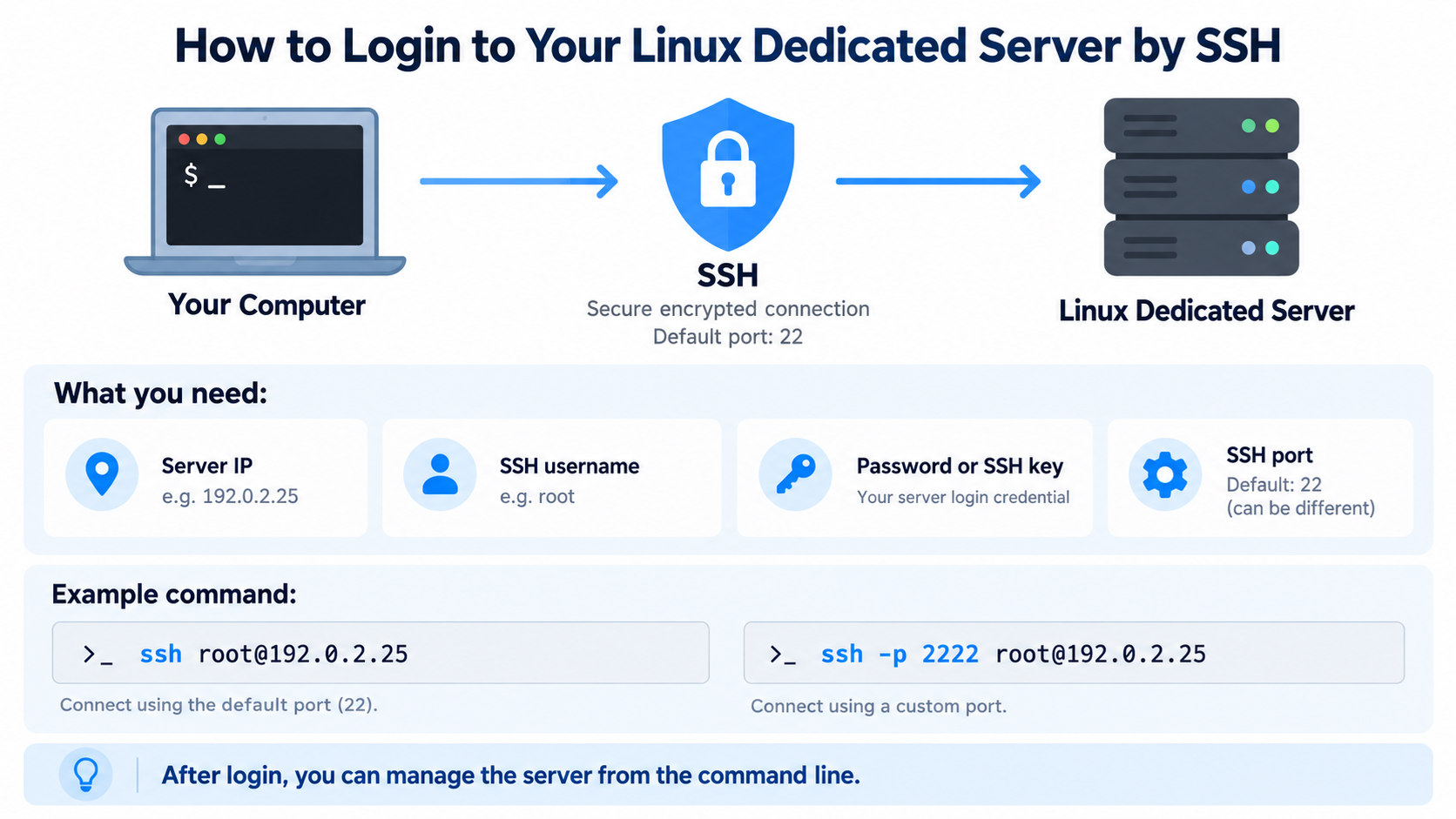
SSH is one of the most common ways to remotely manage a Linux dedicated server.
It allows you to open a secure command-line session from your own computer and control the server as if you were sitting in front of it.
SSH stands for Secure Shell. It encrypts the connection between your computer and the remote Linux server, helping protect usernames, passwords, commands, and other transmitted data.
If you have purchased a Linux dedicated server, SSH access is one of the first things you should learn because many important server administration tasks are performed from the command line.
What You Need Before Connecting
Before you can log in to your Linux dedicated server by SSH, you normally need several pieces of information from your hosting provider.
You need the server’s IP address.
You need the SSH username. On many dedicated servers, this may be root, although some providers create another administrative user instead.
You need either the account password or an SSH private key, depending on how the server is configured.
You also need to know the SSH port. The default SSH port is 22, although some hosting providers or administrators may change it.
Your hosting provider normally sends this information after the server is provisioned.
What Is the Server IP Address?
The server IP address identifies your dedicated server on the network.
An IPv4 address might look similar to this:
192.0.2.25
This is only an example address.
When connecting by SSH, you can use the IP address directly. You do not need to wait for a domain name to point to the server before using SSH.
Later, if DNS is configured correctly, you may also be able to connect using a hostname such as server.example.com.
What Is the SSH Username?
The SSH username identifies the account you want to use on the Linux server.
On many dedicated servers, the main administrative account is called root.
The root account has very powerful privileges and can modify almost every part of the server.
Some hosting providers disable direct root login and instead provide a normal user account with sudo privileges.
For example, you might log in as admin, ubuntu, centos, or another username depending on the operating system and hosting provider.
Always use the username provided with your server.
What Is the SSH Port?
SSH normally listens on TCP port 22.
If your server uses the default configuration, you usually do not need to specify the port manually.
However, some servers use a different SSH port for administrative or security reasons.
If your hosting provider gives you a custom SSH port, you must include that port when connecting.
For example, if your SSH service is running on port 2222, the command must specify port 2222 instead of relying on the default port 22.
How to Connect from Windows
Modern versions of Windows include an SSH client that you can use directly from Command Prompt, PowerShell, or Windows Terminal.
Open Windows Terminal, PowerShell, or Command Prompt.
Then type:
ssh root@192.0.2.25
Replace root with your actual SSH username and replace 192.0.2.25 with your server’s real IP address.
Press Enter.
If SSH is running on the default port 22, the client will attempt to connect immediately.
Example SSH Command
Suppose your server information is:
Username: root
Server IP: 192.0.2.25
SSH port: 22
You would enter:
ssh root@192.0.2.25
If the server uses port 2222 instead, you would enter:
ssh -p 2222 root@192.0.2.25
The -p option tells the SSH client which port to use.
The First Connection Warning
The first time you connect to a server, SSH may display a message similar to this:
The authenticity of host cannot be established.
It may also display a host key fingerprint and ask:
Are you sure you want to continue connecting?
This is normal when connecting to a server for the first time.
The SSH client has never seen this server’s host key before, so it asks whether you trust it.
Ideally, compare the displayed fingerprint with the fingerprint provided by your hosting provider or server administrator.
If you are confident that you are connecting to the correct server, type:
yes
Then press Enter.
The server’s host key will normally be saved in your local known_hosts file so that SSH can recognize the server during future connections.
Entering Your Password
If the server uses password authentication, SSH will prompt you for the password.
You may see something similar to:
root@192.0.2.25’s password:
Type the password supplied by your hosting provider and press Enter.
When typing a password in an SSH terminal, nothing may appear on the screen.
You normally will not see letters, dots, or asterisks.
This is intentional and does not mean your keyboard is not working.
Type the password carefully and press Enter.
Successful Login
If the username and password are correct, you should receive a Linux command prompt.
It may look similar to this:
root@server:~#
Or:
[root@server ~]#
The exact appearance depends on your Linux distribution and shell configuration.
At this point, you are logged into the dedicated server and can begin entering Linux commands.
How to Check Which User You Are Logged In As
After logging in, you can run:
whoami
The system will display the username of the current account.
For example:
root
This is useful when you are not sure whether you are logged in as root or as a normal user.
How to Check the Server Hostname
You can check the server’s hostname with:
hostname
The server may return something such as:
server.example.com
You can also use:
hostnamectl
On systems that support it, this command displays additional information about the hostname and operating system.
How to Check the Linux Version
After logging in, you may want to confirm which Linux distribution is installed.
Run:
cat /etc/os-release
You may see information identifying Ubuntu, AlmaLinux, Rocky Linux, Debian, or another Linux distribution.
This is useful because package management and some system administration commands differ between distributions.
Using SSH from Linux
If your local computer also runs Linux, open a terminal and use the same SSH command.
For example:
ssh root@192.0.2.25
Linux normally includes an OpenSSH client by default.
If your server uses a custom SSH port, use:
ssh -p 2222 root@192.0.2.25
Using SSH from macOS
macOS also includes an SSH client.
Open the Terminal application and enter:
ssh root@192.0.2.25
The connection process is very similar to Linux.
If a custom port is required, use:
ssh -p 2222 root@192.0.2.25
Using PuTTY on Windows
Some users prefer PuTTY, especially if they have used Windows servers or Linux administration for many years.
PuTTY is a graphical SSH client for Windows.
Open PuTTY and enter your server’s IP address in the Host Name field.
Make sure the connection type is SSH.
The default SSH port is 22.
If your server uses another port, change the Port field accordingly.
Click Open to begin the connection.
A terminal window will appear and ask for your username and password.
Password Authentication vs SSH Keys
SSH supports several authentication methods.
Password authentication is simple to understand. You enter a username and password each time you connect.
SSH key authentication uses cryptographic keys instead.
With key authentication, you normally have a private key stored on your computer and a matching public key stored on the server.
The server verifies that your private key corresponds to the authorized public key.
SSH keys can provide stronger security than ordinary passwords when configured and protected correctly.
What Is an SSH Key?
An SSH key pair contains two related keys.
The public key can be stored on the server.
The private key remains on your computer.
You should never casually share your private key.
When you connect, the SSH client uses the private key to prove that you possess the correct credential without sending the private key itself to the server.
This allows secure authentication without typing the server password every time.
Creating an SSH Key on Windows, Linux, or macOS
Modern Windows, Linux, and macOS systems can usually generate SSH keys with:
ssh-keygen
You will be asked where to save the key.
The default location is often acceptable.
You may also be asked to enter a passphrase.
Using a passphrase provides additional protection if someone obtains a copy of your private key.
Common SSH Key Files
A modern SSH key pair may include files such as:
id_ed25519
and:
id_ed25519.pub
The file ending in .pub is the public key.
The file without .pub is the private key.
The private key should remain protected on your local computer.
The public key can be copied to the server.
Connecting with a Private Key
If your private key is stored in a non-default location, you can specify it with the -i option.
For example:
ssh -i /path/to/private_key root@192.0.2.25
On Windows, you might use a path similar to:
ssh -i C:\Users\YourName.ssh\myserver root@192.0.2.25
The exact path depends on where your private key is stored.
Using sudo Instead of root
Some servers do not allow direct SSH login as root.
Instead, you log in as a normal administrative user.
For example:
ssh admin@192.0.2.25
After logging in, you can run commands with elevated privileges using sudo.
For example:
sudo apt update
or:
sudo systemctl restart ssh
The server may ask for your user password before executing the command.
Why Some Servers Disable Root SSH Login
The root account has complete administrative control.
Allowing direct root login means attackers already know the username they need to target.
Some administrators therefore disable direct root SSH access and require users to log in with individual accounts.
Administrative commands can then be performed with sudo.
This approach can improve accountability and reduce some security risks.
What If SSH Says Connection Refused?
If you receive a message such as:
Connection refused
the SSH client reached the server but could not establish a connection to the requested SSH service.
Possible causes include the SSH service not running, the wrong port being used, or a firewall rejecting the connection.
Check the SSH port provided by your hosting provider.
If you have access to a hosting control panel or remote console, you may also need to confirm that the SSH service is running.
What If SSH Times Out?
If the connection eventually displays a timeout message, the network connection to the SSH service may be blocked or unavailable.
Possible causes include an incorrect IP address, firewall rules, network problems, server downtime, or an SSH port that is not reachable.
A timeout is different from a password failure.
With a timeout, the SSH connection itself is not being established.
What If the Password Is Rejected?
If you see:
Permission denied
your credentials may be incorrect, or the server may not allow the authentication method you are using.
Check the username carefully.
Make sure the password is correct.
Remember that Linux usernames and passwords are case-sensitive.
Also confirm whether the server requires SSH key authentication instead of password authentication.
What Does Permission Denied Publickey Mean?
You may see a message such as:
Permission denied (publickey)
This often means the server expects SSH key authentication but your SSH client did not provide an accepted key.
Make sure you are using the correct private key.
If necessary, specify the key manually with:
ssh -i /path/to/private_key username@server-ip
Also confirm that the matching public key is installed on the server for the account you are trying to use.
Host Key Has Changed Warning
Sometimes SSH may display a warning saying that the remote host identification has changed.
Do not automatically ignore this warning.
It may occur legitimately if the server was reinstalled, rebuilt, or assigned to a different machine.
However, a changed host key can also indicate that you are connecting to a different system than expected.
Verify the change with your hosting provider before removing the old host key and reconnecting.
How to Disconnect from SSH
When you are finished working on the server, type:
exit
Then press Enter.
Your SSH session will close and you will return to your local computer’s command prompt.
You can also sometimes close the session with:
Ctrl+D
Using exit is usually clearer for beginners.
Basic Commands to Try After Login
Once you are connected, you can try several harmless commands to become familiar with the server.
To display the current user:
whoami
To display the current directory:
pwd
To list files:
ls
To display disk usage:
df -h
To display memory information:
free -h
To display system uptime:
uptime
These commands can help you confirm that you are connected to the expected server and see basic system information.
Be Careful When Logged In as root
The root account can modify or delete almost anything on the Linux server.
A command entered incorrectly as root can damage the operating system, delete website files, break services, or make the server inaccessible.
Do not copy and paste unfamiliar commands from random websites without understanding what they do.
Before changing important configuration files, create a backup.
When possible, test major changes before applying them to a production server.
Secure Your SSH Access
Once you have confirmed that SSH works, consider improving security.
Use strong passwords.
Prefer SSH key authentication for administrative access when practical.
Protect private keys with appropriate file permissions and, where suitable, a passphrase.
Enable multi-factor authentication if your environment supports it.
Use a firewall to restrict unnecessary access.
Keep the operating system and SSH software updated.
Review authentication logs for suspicious login attempts.
Security should be treated as an ongoing process rather than a one-time configuration task.
Should You Change the Default SSH Port?
Some administrators change SSH from port 22 to another port.
This can reduce automated scanning noise because many basic bots target port 22.
However, changing the SSH port is not a replacement for strong authentication, firewalls, updates, and good server security practices.
A determined attacker can still discover an SSH service running on another port.
Changing the port can be useful as one small operational measure, but it should not be your primary security strategy.
Use a Firewall Carefully
A firewall can restrict access to the SSH service.
For example, you may allow SSH only from trusted IP addresses.
This can significantly reduce exposure to automated attacks.
However, firewall changes should be made carefully.
If you accidentally block your own IP address before confirming another access method, you may lock yourself out of the server.
When changing firewall rules remotely, keep an existing SSH session open until you verify that a new SSH connection still works.
Keep Another Recovery Method Available
Dedicated server providers often provide a browser-based console, KVM console, rescue mode, or another out-of-band management method.
These tools can be extremely useful if SSH stops working.
For example, if you accidentally break the SSH configuration or firewall rules, a remote console may allow you to log in and repair the system.
Before making major SSH or firewall changes, learn how your hosting provider’s recovery system works.
SSH in Simple Terms
The easiest way to understand SSH is to think of it as a secure remote keyboard and terminal for your Linux server.
Your computer runs the SSH client.
The dedicated server runs the SSH server.
You enter the server IP address, username, and authentication credentials.
SSH establishes an encrypted connection.
After authentication succeeds, you receive a command prompt and can manage the Linux server remotely.
Quick Example
For a server using the default SSH port:
ssh root@192.0.2.25
For a server using port 2222:
ssh -p 2222 root@192.0.2.25
For a server using a specific private key:
ssh -i /path/to/private_key root@192.0.2.25
Replace the example IP address, username, port, and key path with the actual information for your server.
Conclusion
Logging in to a Linux dedicated server by SSH is one of the most fundamental server administration skills.
You normally need four things: the server IP address, SSH username, authentication credential, and SSH port.
On Windows, Linux, and macOS, you can usually connect from a terminal using a command such as:
ssh root@server-ip
After authentication succeeds, you can manage the server from the Linux command line.
Because SSH provides powerful administrative access, especially when using the root account, always protect your credentials, verify unfamiliar host-key warnings, maintain backups, and make server-level changes carefully.
Once you are comfortable with SSH, you will be able to perform many Linux administration tasks quickly and efficiently without relying entirely on a graphical control panel.