
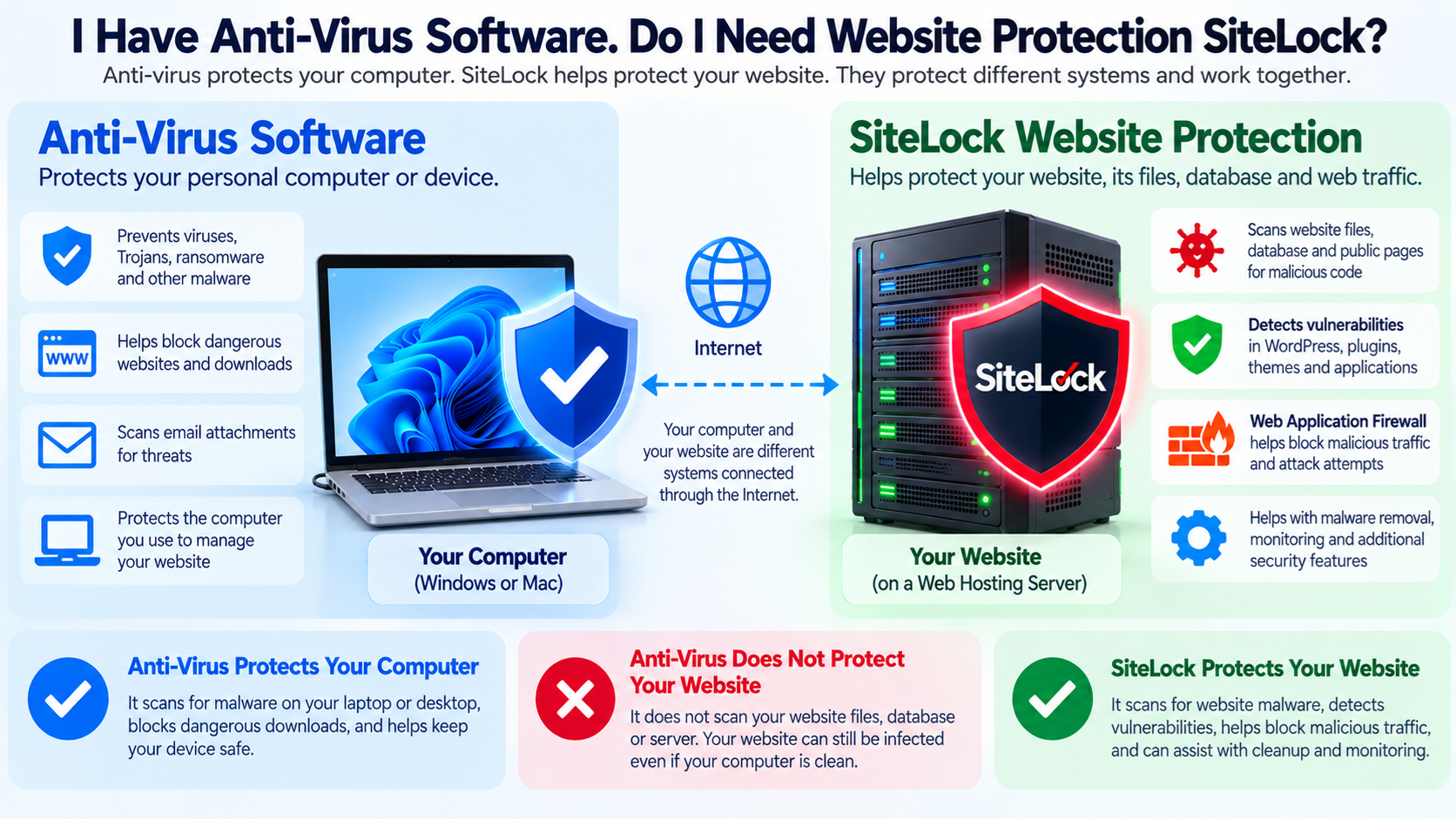
If you already have anti-virus software installed on your computer, you may wonder why you would need a website security service such as SiteLock.
After all, both products are designed to protect against malware and other security threats.
However, they protect different systems.
Anti-virus software normally protects your personal computer, laptop, or workstation.
SiteLock is designed to help protect your website, its files, database, applications, and incoming web traffic.
The simplest way to understand the difference is:
Anti-virus protects your computer.
SiteLock helps protect your website.
Having anti-virus software on your computer does not mean that your website is automatically protected.
Your Computer and Your Website Are Usually Different Systems
When you manage a website, your computer and your website are usually running in completely different locations.
Your computer might be sitting in your home or office.
Your website may be running on a web hosting server located in a data center hundreds or thousands of miles away.
For example:
Your laptop runs Windows.
Your website runs WordPress on a Linux hosting server.
Your anti-virus software scans your Windows laptop.
It normally does not continuously scan the WordPress files located on the remote hosting server.
This is the most important difference.
What Does Anti-Virus Software Protect?
Traditional anti-virus software is designed mainly to protect computers and devices from malicious software.
Depending on the product, it may detect threats such as:
Viruses
Trojans
Ransomware
Spyware
Malicious downloads
Suspicious programs
Malicious attachments
Dangerous websites
Potentially unwanted applications
Some security suites may also provide a firewall, browser protection, phishing protection, password management, or other features.
These tools can be very important for protecting the computer you use to manage your website.
However, they generally do not replace website security services.
What Does SiteLock Protect?
SiteLock focuses on websites rather than personal computers.
Current SiteLock services can scan website files, databases, and public webpages for malicious or suspicious content.
Depending on the SiteLock plan, the service may also provide vulnerability detection, malware removal, website monitoring, vulnerability patching, and Web Application Firewall protection.
This means SiteLock is looking at the system where your website actually runs.
That is different from scanning the computer you use to access the website.
A Simple Example
Suppose you have a Windows computer with excellent anti-virus protection.
You use that computer to log in to your WordPress website.
The WordPress website is hosted on a Linux server.
Now imagine that one of your WordPress plugins contains a security vulnerability.
An attacker on the Internet discovers the vulnerability and uploads malicious PHP code directly to the hosting server.
Your personal computer was never involved in the attack.
Your anti-virus software may continue reporting that your computer is completely clean.
Meanwhile, your website may already be infected.
This is why computer security and website security need to be treated separately.
Website Malware Is Different From PC Malware
When people hear the word malware, they often think about viruses infecting a desktop computer.
Website malware can look very different.
Malicious website code may be written in:
PHP
JavaScript
HTML
SQL
Shell scripts
Other scripting languages
It may be hidden inside legitimate website files or stored inside a database.
Website malware might:
Redirect visitors
Create spam pages
Steal information
Insert advertisements
Modify search engine results
Create hidden administrator accounts
Send spam
Install backdoors
Attack other systems
Capture customer information
A desktop anti-virus program usually is not continuously inspecting every PHP file and database record on your remote hosting account.
What Is a Website Backdoor?
A backdoor is a hidden method an attacker can use to return to a compromised website.
For example, an attacker might upload a small PHP file into your hosting account.
The file may appear harmless or use a name similar to a legitimate WordPress file.
However, when the attacker sends a special request to that file, it might allow remote commands to be executed.
Changing your WordPress password may not remove the backdoor.
Your computer’s anti-virus software may not see it because the file exists on the hosting server rather than your computer.
Website-level scanning is designed to look for these types of problems.
How Can a Website Become Infected?
A website can become compromised in many ways.
Common causes include:
Outdated WordPress plugins
Outdated themes
Vulnerable applications
Weak administrator passwords
Stolen credentials
Insecure file permissions
Compromised FTP accounts
Compromised hosting accounts
Malicious uploaded files
Poorly written application code
Exposed administrative interfaces
Known software vulnerabilities
An attacker does not need to infect your personal computer first.
They may attack the website directly over the Internet.
Automated Website Attacks Are Common
Many website attacks are automated.
Attackers use automated tools to scan large numbers of websites looking for known vulnerabilities.
They may search for specific versions of:
WordPress
Plugins
Themes
Content management systems
Web applications
Server software
Once a vulnerable system is discovered, the attack may begin automatically.
This means even a small website with very few visitors can receive attack attempts.
The attacker does not need to know who you are.
Why Your Anti-Virus Cannot See Everything on Your Hosting Account
Your anti-virus software normally monitors files and activity on the device where it is installed.
If it is installed on your PC, it monitors your PC.
Your website may be stored on another server operated by your hosting provider.
Those website files are not necessarily downloaded to your computer.
Therefore, your desktop anti-virus software may have no opportunity to inspect them.
Website security services solve a different problem by connecting to or monitoring the website environment itself.
SiteLock Malware Scanning
SiteLock currently provides automated website scanning that can inspect files, databases, and publicly accessible pages.
Its file-level scanning can connect to supported hosting environments through technologies such as FTP, FTPS, or SFTP.
This allows the scanner to inspect website files on the hosting server rather than only looking at the website from a visitor’s browser.
SiteLock also provides database scanning on supported services.
This is important because malicious content can sometimes be inserted into a database rather than into a normal website file.
Why Database Scanning Matters
Modern websites often depend heavily on databases.
WordPress, for example, stores much of its content and configuration in a database.
This can include:
Posts
Pages
Users
Settings
Plugin information
Website options
Other application data
An attacker may inject malicious code or spam into database records.
A desktop anti-virus application normally does not continuously inspect your remote MySQL or MariaDB database.
A website security service can provide scanning specifically designed for this environment.
What Is Vulnerability Scanning?
Malware scanning asks:
Has malicious code already appeared?
Vulnerability scanning asks:
Is there a weakness that could potentially allow an attacker to get in?
These are different questions.
For example, a WordPress plugin may contain a known security vulnerability.
The website may not yet be infected.
A vulnerability scanner can help identify the problem so the website owner can update, remove, or otherwise secure the vulnerable software.
SiteLock currently includes vulnerability scanning capabilities, with additional protection varying by plan.
What Is a Web Application Firewall?
A Web Application Firewall, commonly called a WAF, examines incoming requests before they reach the website application.
It can help identify and block malicious traffic.
A WAF may help defend against attacks such as:
SQL injection
Cross-site scripting
Malicious bots
Known exploit attempts
Suspicious requests
Certain denial-of-service traffic
SiteLock includes WAF protection with some of its plans.
Your desktop anti-virus software normally cannot perform this function because the malicious request is going directly from the attacker to the hosting server.
It may never pass through your computer.
The Attack May Never Touch Your Computer
This is another important concept.
Imagine this path:
Attacker → Internet → Your Website Server
Your computer is not part of that connection.
The attacker can attempt to exploit your website while your computer is completely turned off.
This clearly shows why anti-virus software on your computer cannot replace server-side or website-level security.
Anti-Virus Still Matters
This does not mean computer anti-virus software is unnecessary.
Your computer is one of the tools you use to administer your website.
If your computer becomes infected, an attacker might steal:
WordPress passwords
cPanel passwords
FTP credentials
SSH keys
Email passwords
Domain registrar credentials
Browser cookies
Saved passwords
Other sensitive information
An infected administrator computer can become the starting point for a website compromise.
Therefore, protecting your computer remains very important.
Website Security and Computer Security Work Together
A strong security strategy protects both sides.
Your computer needs endpoint security.
Your website needs website security.
Your hosting server needs server security.
Your accounts need strong authentication.
Your domain registration needs protection.
Your data needs reliable backups.
These protections work together.
Removing any one layer may increase your risk.
What About Windows Defender?
Modern Windows systems include Microsoft Defender Antivirus.
For many users, it provides important protection against malware and other threats on the Windows computer.
However, Microsoft Defender running on your PC does not automatically become a security scanner for your remote WordPress hosting account.
The same principle applies to other desktop security products.
Whether you use Microsoft Defender, Norton, McAfee, Bitdefender, ESET, Avast, or another security product, it primarily protects the device and environments it is configured to monitor.
That does not eliminate the need to secure the website itself.
What If My Hosting Provider Already Scans for Malware?
Many hosting companies provide some server-level security.
A hosting provider may use:
Firewalls
Malware scanning
Intrusion detection
Web Application Firewalls
Server monitoring
Account isolation
Network filtering
DDoS protection
Other security systems
This can significantly improve website security.
However, the exact protection varies between hosting plans and providers.
You should determine what your hosting plan already includes before purchasing additional services.
If your hosting provider already provides comprehensive malware scanning, cleanup, WAF protection, vulnerability monitoring, and backups, some SiteLock features may overlap.
Do I Absolutely Need SiteLock?
Not every website necessarily needs SiteLock specifically.
What every website needs is appropriate website security.
SiteLock is one option.
Other options may include:
Hosting-provider security systems
WordPress security plugins
Cloud-based Web Application Firewalls
Server security software
Malware scanners
Managed website security services
A combination of these tools
The important question is not simply:
Do I need SiteLock?
A better question is:
What security protections does my website currently have, and what protections are missing?
Avoid Paying Twice for the Same Protection
Before purchasing any website security product, check what your hosting package already provides.
For example, your hosting account might already include:
SSL
Daily backups
Malware scanning
Firewall protection
WordPress updates
Security monitoring
If another product provides exactly the same functions, purchasing both may be unnecessary.
However, do not assume two products are duplicates simply because both use the word security.
Check the actual features.
SiteLock Can Add Website-Level Protection
If your hosting environment does not already provide equivalent protection, SiteLock may add useful security layers.
Depending on the plan, these may include:
Website malware scanning
Database scanning
Vulnerability detection
Malware removal
Website monitoring
Web Application Firewall protection
Vulnerability patching
Other website security features
The exact features depend on the SiteLock plan.
You should always review the current plan details before purchasing.
What About WordPress Security Plugins?
WordPress security plugins can also provide useful website protection.
Depending on the plugin, features may include:
Login protection
Two-factor authentication
Brute-force protection
Malware scanning
File-change monitoring
Firewall protection
Security alerts
Vulnerability detection
Some of these capabilities overlap with SiteLock.
The best solution depends on your hosting environment and how much security management you want to perform yourself.
Security Plugins Run Inside WordPress
A WordPress security plugin usually runs inside your WordPress installation.
This can be convenient because the controls appear directly in the WordPress dashboard.
However, an external or server-level security service may be able to inspect parts of the hosting environment beyond the WordPress application itself.
Different security tools operate at different layers.
This is another reason website security should be evaluated as a complete system rather than simply by counting the number of security products installed.
SiteLock and WordPress
SiteLock currently offers WordPress-focused security services and a WordPress plugin.
Its services can include malware scanning, vulnerability scanning, malware removal, patching, login security, and other website protection features depending on the selected plan and configuration.
This can be useful for website owners who prefer automated monitoring rather than manually reviewing server files and security logs.
Strong Passwords Are Still Required
Neither anti-virus software nor SiteLock replaces good password security.
Use strong, unique passwords for:
WordPress
cPanel
WHM
FTP or SFTP
SSH
Domain registrar accounts
DNS accounts
Cloud services
Do not use the same password for all of these systems.
If one service is compromised, password reuse may allow the attacker to access other services.
Use Multi-Factor Authentication
Multi-factor authentication adds another layer of security beyond the password.
It is particularly valuable for important administrative accounts.
Enable it whenever available for:
WordPress administration
Hosting control panels
Domain registrars
Email accounts
Cloud services
DNS providers
Other critical systems
Even if an attacker steals your password, multi-factor authentication can make account takeover much more difficult.
Keep WordPress Updated
Website security services do not eliminate the need to maintain your software.
Keep WordPress core, plugins, and themes updated.
Remove plugins and themes that you no longer use.
If a plugin has been abandoned by its developer and no longer receives security updates, consider replacing it.
Every unnecessary or outdated component increases the attack surface of your website.
What Is an Attack Surface?
The attack surface is everything an attacker might potentially target.
On a website, this can include:
Login pages
Plugins
Themes
Forms
APIs
Server software
FTP
SSH
Databases
Control panels
Email accounts
DNS accounts
The fewer unnecessary services and components you expose, the easier the website is to protect.
Backups Are Still Essential
Neither anti-virus software nor SiteLock eliminates the need for backups.
Security systems reduce risk.
Backups provide recovery.
A website can still experience problems because of:
Human error
Software failure
Database corruption
A failed update
Malware
Account compromise
Accidental deletion
Server failure
Maintain regular backups of important website files and databases.
Whenever practical, keep at least one backup copy in a location separate from the website itself.
A Simple Security Example
Imagine you run a WordPress website.
Your home computer has anti-virus software.
That protects the computer you use to manage WordPress.
Your website uses HTTPS.
That protects information traveling between visitors and the website.
Your website security service scans website files and databases.
That helps detect malware.
A Web Application Firewall filters suspicious traffic.
That helps block malicious requests.
WordPress updates fix known vulnerabilities.
Strong passwords and multi-factor authentication protect administrator accounts.
Backups provide a way to recover if something still goes wrong.
This is called layered security.
What Is Layered Security?
Layered security means that different security controls protect different parts of the system.
If one layer fails, another layer may still stop or limit the attack.
For example:
Anti-virus protects the administrator computer.
SSL/TLS protects communication.
A WAF filters incoming web attacks.
Malware scanning checks the website.
Software updates fix vulnerabilities.
Strong authentication protects accounts.
Backups provide recovery.
Monitoring helps identify problems.
No single product performs all of these functions perfectly.
Anti-Virus vs. SiteLock in Simple Terms
The easiest way to remember the difference is:
Anti-virus protects the device you are using.
SiteLock helps protect the website you are managing.
If malware attacks your PC, anti-virus software may detect it.
If malicious PHP code appears inside your website on a hosting server, website malware scanning may detect it.
If someone attempts to exploit your website directly from another country while your PC is turned off, your desktop anti-virus has very little involvement in that attack.
That is why the two types of security are not interchangeable.
Do You Need Both?
You should protect both your computer and your website.
That does not necessarily mean that every website owner must purchase a specific commercial SiteLock plan.
Your hosting provider or other security tools may already provide some of the same protection.
Check whether your website currently has:
Malware scanning
Vulnerability monitoring
A Web Application Firewall
Software updates
Strong authentication
Backups
Security monitoring
If important layers are missing, consider adding appropriate website security protection.
SiteLock is one service that can provide several of these website-focused security features.
Final Thoughts
Anti-virus software is important, but it mainly protects your computer or device.
Your website usually lives on a completely different computer: the web server.
Attackers can target that server directly without ever touching your personal computer.
That is why a clean computer does not guarantee a clean website.
SiteLock and similar website security services are designed to protect the website environment through features such as malware scanning, vulnerability detection, monitoring, malware removal, and, with appropriate plans, Web Application Firewall protection.
Think of the security layers this way:
Anti-virus protects your computer.
SSL protects the connection.
SiteLock helps protect your website.
A firewall helps block attacks.
Updates help close vulnerabilities.
Strong authentication protects accounts.
Backups help you recover.
The strongest security comes from protecting each part of the system rather than expecting one product to protect everything.