
Click to WordPress Web Hositng from $7.47 per month
Website security is not only about protecting passwords, installing SSL certificates, or keeping applications updated.
It also involves controlling the requests that reach your web server.
Some malicious requests contain unusual characters, encoded control characters, or suspicious URL patterns designed to exploit weaknesses in web applications.
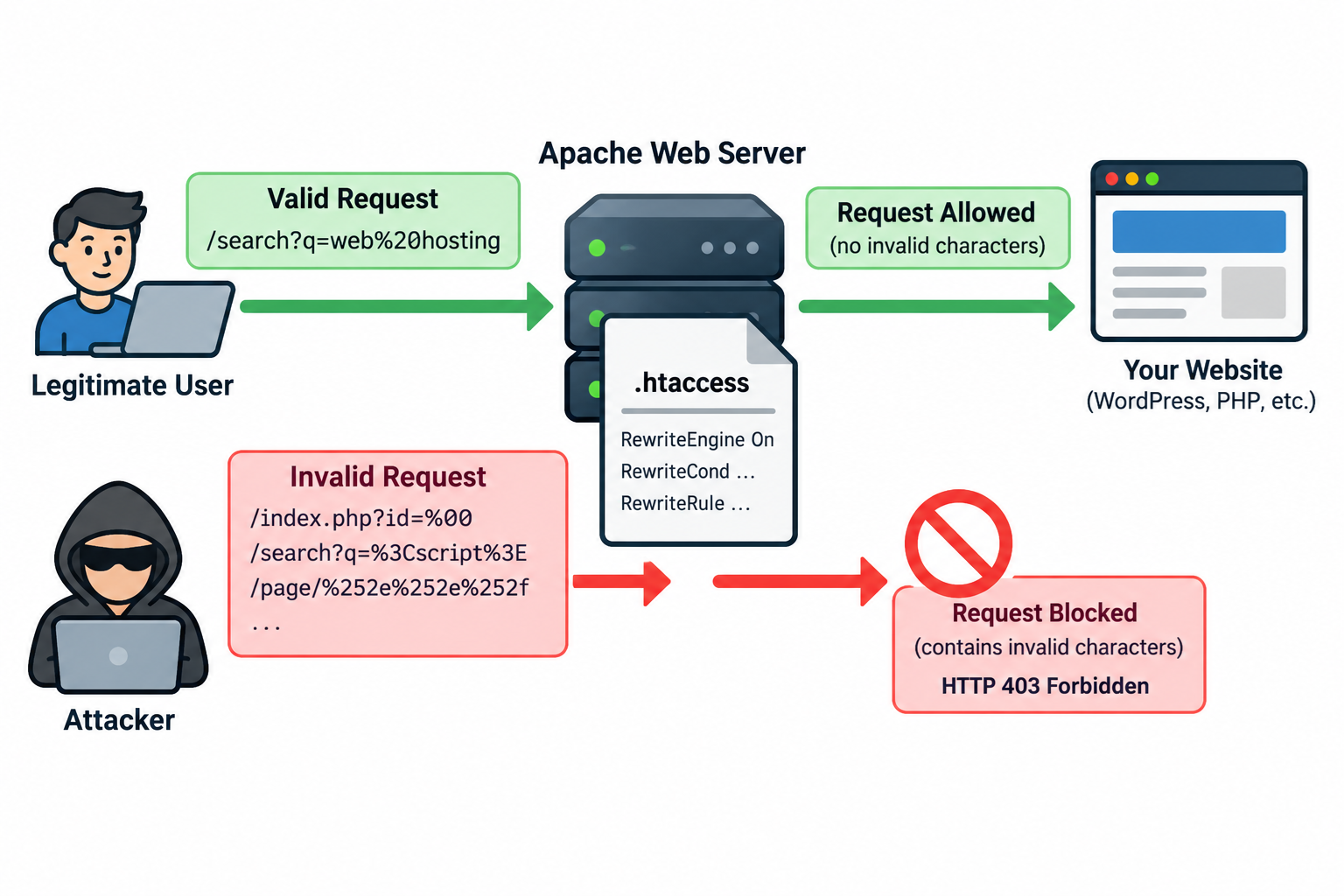
Apache provides a way to inspect and block certain requests through the .htaccess file.
By using Apache’s mod_rewrite module, website administrators can identify unwanted character sequences and reject requests before they reach PHP applications or other website components.
We will explain what invalid characters are, how they appear in HTTP requests, and how to use .htaccess rules to block selected suspicious patterns without unnecessarily interfering with legitimate visitors.
1. What Are Invalid Characters in HTTP Requests?
When a visitor opens a website, the browser sends an HTTP request containing a request target, headers, and sometimes a message body.
The request target normally identifies the requested URL path and may include a query string.
For example, a normal request might look like this:
GET /products.php?id=123 HTTP/1.1
Another valid request may include URL-encoded characters:
GET /search.php?q=web%20hosting HTTP/1.1
In this example, %20 represents a space character. It is a normal part of URL encoding and should not automatically be considered malicious.
However, some requests contain characters or encoded sequences that are unnecessary for the application and may indicate attempts to manipulate request processing.
Examples include:
%00 — A URL-encoded null byte.
%0A — A URL-encoded line feed character.
%0D — A URL-encoded carriage return character.
%7F — A URL-encoded delete control character.
%3C — A URL-encoded less-than sign.
%3E — A URL-encoded greater-than sign.
These characters have different meanings and legitimate uses depending on the application.
A properly encoded less-than sign, for example, is not inherently an invalid URL character.
The purpose of request filtering is therefore not to reject every special character.
It is to block specific input patterns that your application does not need or that present an unacceptable security risk.
2. Why Should Website Owners Filter Suspicious Characters?
Attackers sometimes use unusual or encoded characters to test how web servers and applications interpret incoming requests.
Different parts of a system may process the same input differently. Apache, PHP, a reverse proxy, and a web application can each perform their own decoding, normalization, or validation.
If these components interpret input inconsistently, security problems may arise.
For example, a malicious request might attempt to insert control characters into improperly constructed HTTP headers, manipulate file paths, or bypass weak application validation.
Filtering certain sequences at the web server level can reduce the number of suspicious requests that reach an application.
However, .htaccess rules should be considered an additional security layer rather than a complete defense against SQL injection, cross-site scripting, path traversal, or other attacks.
Applications must still validate their own input and handle output safely.
3. Requirements Before Editing .htaccess
Before adding request-filtering rules, confirm that your hosting environment supports Apache .htaccess configuration and the mod_rewrite module.
You should have access to your website’s document root through cPanel File Manager, FTP, SFTP, or SSH.
For many Apache hosting accounts, the main .htaccess file is located in the public_html directory.
Before modifying the file, create a backup. A simple syntax mistake in .htaccess may result in an HTTP 500 Internal Server Error.
If you use WordPress, be especially careful not to remove or overwrite its existing rewrite rules.
The following examples are intended for Apache HTTP Server 2.4 with mod_rewrite enabled.
4. Block URL-Encoded Control Characters
One practical approach is to block selected URL-encoded control characters that your website does not expect to receive.
Add the following directives to your .htaccess file:
RewriteEngine On
RewriteCond %{THE_REQUEST} “%(00|0A|0D|7F)” [NC]
RewriteRule ^ – [F,L]
This rule examines the original HTTP request line and checks whether it contains selected percent-encoded control characters.
The first directive enables the Apache rewrite engine.
The RewriteCond directive checks the THE_REQUEST variable, which contains the original request line as received by Apache.
The regular expression identifies four encoded characters: %00, %0A, %0D, and %7F.
The NC flag makes the comparison case-insensitive, allowing the rule to match sequences such as %0A and %0a.
The RewriteRule directive tells Apache what action to take when the condition matches.
The dash means that Apache should not substitute a different URL.
The F flag returns an HTTP 403 Forbidden response, while the L flag stops processing additional rewrite rules in the current rewrite pass.
As a result, requests containing these specific encoded control characters can be rejected before normal application handling.
This is a targeted filtering rule. It does not detect every invalid character or every malicious request.
Apache may also reject certain malformed requests during its own request parsing, before .htaccess rules are evaluated.
5. Block Selected HTML-Related Characters in Query Strings
Some administrators may also want to reject less-than and greater-than signs in query strings.
These characters sometimes appear in cross-site scripting probes. However, they can also occur in legitimate search expressions, text input, and encoded application data.
If your application never needs these characters in URL query parameters, you can consider the following optional rule:
RewriteEngine On
RewriteCond %{QUERY_STRING} “(<|>|%3C|%3E)” [NC]
RewriteRule ^ – [F,L]
The QUERY_STRING variable contains the portion of the URL after the question mark.
For example:
https://example.com/search.php?q=%3Ctest%3E
The rule checks for literal less-than or greater-than signs and their corresponding percent-encoded representations.
If a matching sequence is found, Apache returns HTTP 403 Forbidden.
This rule should not be applied indiscriminately. Many websites accept user-generated search terms, mathematical expressions, or other data containing these characters.
Furthermore, blocking angle brackets does not provide complete protection against cross-site scripting.
Proper contextual output encoding and secure application design remain necessary.
For most WordPress websites, application-level validation and a properly configured web application firewall are preferable to broad character-blocking rules.
6. Protect Against Double-Encoding Problems
URL encoding is the process of representing certain characters as percent signs followed by hexadecimal values.
For example, a forward slash can be represented as %2F.
The percent sign itself can be encoded as %25.
This creates the possibility of double encoding.
Consider the following sequence:
%252e%252e%252f
If decoded once, it becomes:
%2e%2e%2f
If decoded again, it becomes:
../
The final sequence is commonly associated with directory traversal attempts.
Double encoding is not automatically malicious, but it can become dangerous when different components decode the same request multiple times.
A server or application that validates a URL before a later decoding step may make an incorrect security decision.
If your application does not need double-encoded traversal sequences, you can use a targeted rule to reject this particular pattern:
RewriteEngine On
RewriteCond %{THE_REQUEST} “%252e%252e%252f” [NC]
RewriteRule ^ – [F,L]
This example blocks the specified sequence in the original request line.
It is not a comprehensive path traversal filter. Attackers can use other encodings, separators, and path representations.
The application must still normalize and validate paths safely, enforce access permissions, and avoid constructing filesystem paths directly from untrusted input.
7. Combine the Rules in One .htaccess Configuration
For a website that does not require the encoded patterns described above, the following configuration combines two targeted filters.
RewriteEngine On
Block selected encoded control characters
RewriteCond %{THE_REQUEST} “%(00|0A|0D|7F)” [NC]
RewriteRule ^ – [F,L]
Block one double-encoded traversal pattern
RewriteCond %{THE_REQUEST} “%252e%252e%252f” [NC]
RewriteRule ^ – [F,L]
The rules are evaluated against incoming requests.
If either condition matches, Apache can return a 403 Forbidden response.
Notice that the optional angle-bracket filtering rule is not included in this configuration.
It is more likely to interfere with legitimate search and application functionality.
The combined configuration deliberately uses narrow patterns rather than an extensive blacklist of punctuation characters.
A smaller, carefully tested rule set is generally easier to maintain and troubleshoot.
8. Where Should You Place These Rules in WordPress?
WordPress normally uses its own .htaccess rewrite configuration to support readable URLs and route requests through index.php.
A typical WordPress installation may contain directives similar to these:
BEGIN WordPress
<IfModule mod_rewrite.c>
RewriteEngine On
RewriteRule ^index.php$ – [L]
RewriteCond %{REQUEST_FILENAME} !-f
RewriteCond %{REQUEST_FILENAME} !-d
RewriteRule . /index.php [L]
</IfModule>
END WordPress
Custom security rules should generally be placed above the WordPress-managed section, after they have been tested.
Do not insert your own rules between the BEGIN WordPress and END WordPress markers because WordPress or its management tools may regenerate that section.
You should also avoid duplicating existing rules that are already enforced by a hosting provider, reverse proxy, or web application firewall.
If you are using managed WordPress hosting, confirm whether custom .htaccess directives are supported.
Web servers such as Nginx do not use Apache .htaccess files. Security rules for those environments must be configured through the appropriate server or application controls.
9. Test Your .htaccess Rules
After saving the configuration, test your website before considering the changes complete.
Start by visiting several normal pages, including the homepage, WordPress posts, login page, and any pages containing query parameters.
Confirm that legitimate navigation continues to work.
You can also use curl from a terminal to test specific requests.
For example:
curl -i “https://example.com/test?value=%00”
Depending on Apache’s request parsing and the hosting configuration, the request may return HTTP 403, HTTP 400, or another error response.
The important point is that the suspicious request is rejected rather than unexpectedly processed by the application.
To verify that ordinary encoded spaces still work, test:
curl -i “https://example.com/search?q=web%20hosting”
This request should not be blocked by the control-character rule merely because it contains %20.
The final HTTP response still depends on the requested page and the application’s normal behavior.
When troubleshooting, check Apache error logs and any applicable web application firewall logs.
If the site stops working after editing .htaccess, restore the previous file and review the added directives.
10. Understand the Limitations of Character Filtering
Although .htaccess filtering can be useful, character-based blocking has several important limitations.
First, attackers can express malicious input in many different ways.
A blacklist that detects a few suspicious strings cannot cover every encoding or attack variation.
Second, some special characters are essential for legitimate web applications.
Aggressive filtering may prevent visitors from using search forms, APIs, or other website features.
Third, .htaccess rewrite conditions generally operate on selected request variables.
They do not provide comprehensive inspection of HTTP request bodies, uploaded files, or every header.
Fourth, reverse proxies, CDN services, and application frameworks may normalize or decode requests at different stages.
Filtering at one layer does not guarantee that another layer will interpret the request identically.
Finally, these rules do not correct insecure PHP code, SQL queries, filesystem operations, or output handling.
For these reasons, request filtering should be implemented alongside other security controls rather than used as a replacement for them.
11. Additional Security Measures for Apache Websites
To strengthen website security, administrators should combine targeted request filtering with several additional protections.
Keep Apache, PHP, WordPress, plugins, and themes updated to supported versions.
Use a web application firewall such as ModSecurity with an actively maintained rule set, where supported by the hosting provider.
Validate user input according to the application’s expected data types, formats, and permitted values.
Use parameterized SQL queries instead of combining untrusted strings directly into SQL statements.
Apply appropriate output encoding when displaying user-controlled content in HTML, JavaScript, or other contexts.
Restrict filesystem access and avoid passing untrusted paths directly to sensitive file operations.
Monitor access and error logs for repeated suspicious requests, unusual response codes, and abnormal request patterns.
If your website uses Cloudflare or another CDN, review the available WAF and request-filtering controls at the edge.
Security is most effective when protective measures are implemented at multiple layers.
12. Should You Block Every Special Character?
No. Blocking every special character is usually unnecessary and can cause significant compatibility problems.
Modern websites routinely use URL encoding for spaces, international characters, search parameters, and application data.
For example, the following request contains a valid encoded space:
/search?q=linux%20server
A URL may also contain encoded UTF-8 characters representing words in languages other than English.
Rejecting these characters merely because they are percent-encoded would interfere with normal website functionality.
A better approach is to identify which characters and patterns your application actually considers unacceptable.
For request paths, validate the expected path structure.
For query parameters, validate each parameter according to its intended meaning.
At the application layer, use allowlists when appropriate.
For example, a numeric product ID should contain only values that can be parsed as valid product identifiers.
This type of validation is usually more reliable than attempting to identify malicious requests by checking for particular punctuation characters.
13. When Should You Use .htaccess Filtering?
Targeted .htaccess rules are useful when you manage an Apache website and want to reject a clearly identified class of unwanted requests.
They can be particularly helpful when logs show repeated requests containing encoded control characters or specific suspicious sequences that your application never legitimately uses.
However, avoid adding rules simply because a character appears unusual.
Investigate the request, understand how the application processes it, and determine whether blocking it could affect legitimate visitors.
Whenever possible, test new rules in a staging environment before applying them to a production website.
For sites receiving substantial traffic, administrators may prefer server-level configuration or a dedicated web application firewall because these can provide more centralized management.
Remember that .htaccess files are evaluated within Apache’s request-processing workflow, and extensive regular-expression rules can add unnecessary maintenance and processing overhead.
Conclusion
Preventing requests with unwanted characters is one way to improve the security of an Apache website.
By using mod_rewrite directives in .htaccess, administrators can inspect request information and reject selected encoded control characters or suspicious URL patterns.
The most important principle is to distinguish truly unwanted input from legitimate URL encoding.
Avoid broad filtering rules that block ordinary punctuation, international characters, or valid application parameters.
Use narrowly defined rules, test them carefully, and combine them with secure application development, regular updates, access controls, and a properly configured web application firewall.
A carefully designed .htaccess configuration can provide an additional layer of protection without disrupting normal website traffic.