
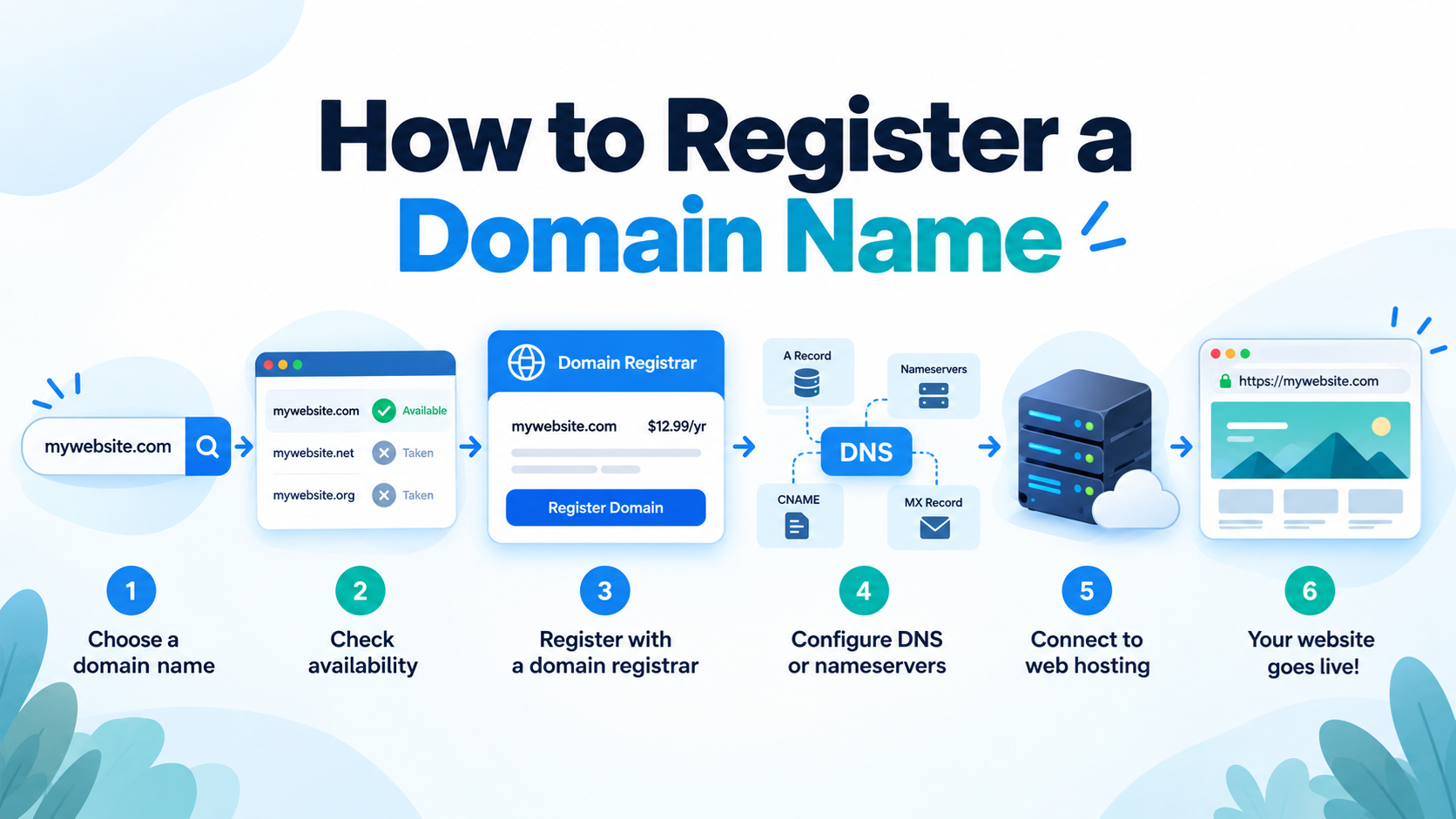
Registering a domain name is one of the first steps in building a website.
A domain name is the address people type into a web browser to visit your site, such as example.com.
Instead of asking visitors to remember a complicated server address, a domain name gives your website a simple and recognizable identity.
Whether you are creating a personal blog, a business website, an online store, or a technology project, choosing and registering the right domain name is an important part of establishing your presence on the Internet.
What Is a Domain Name?
A domain name is a human-readable address that points visitors to a website or Internet service.
For example, when someone enters example.com into a browser, the Domain Name System, commonly called DNS, helps direct that request to the server where the website is hosted.
A domain name normally contains a name and a domain extension. In example.com, “example” is the selected name and “.com” is the extension.
You can think of a domain name as the address of your website.
Your web hosting server stores the actual website files, while the domain name gives visitors an easy way to reach that server.
Step 1: Choose a Good Domain Name
The first step is deciding what domain name you want to register.
A good domain should usually be easy to remember, easy to spell, and closely related to your business, brand, website, or project.
Shorter names are often easier for visitors to remember and type correctly.
Try to avoid unnecessary numbers, unusual spellings, or long combinations of words unless they are an important part of your brand.
For example, a company called North Star Hosting might consider a domain such as northstarhosting.com.
A personal technology website might use a name based on the author’s name or the subject of the website.
Before choosing a name, it is also a good idea to think about how the domain will look when written without spaces.
Some combinations of words can become confusing when joined together.
Step 2: Choose a Domain Extension
The ending of a domain name is called a top-level domain, or TLD. The most familiar example is .com, but thousands of other domain extensions are now available.
The .com extension is widely recognized and is commonly used by businesses, personal websites, online stores, and many other types of websites.
Other popular extensions include .net, .org, .ca, .co, .io, .ai, and .tech.
Some extensions are associated with particular countries or regions.
For example, .ca is the country-code domain for Canada. Country-code domains may have eligibility or registration requirements that differ from those of general domain extensions.
Newer extensions such as .ai, .cloud, .shop, .tech, and .online can also be useful when they match the purpose of a website.
When possible, choose an extension that visitors will easily recognize and remember.
Step 3: Check Whether the Domain Is Available
After choosing a domain name, you need to check whether someone else has already registered it.
A domain registrar normally provides a domain search tool.
Enter the domain name you want, and the system will tell you whether it is currently available for registration.
If the domain is available, you can usually add it to your shopping cart and continue with the registration process.
If the domain has already been registered, you have several options.
You can choose a different domain extension, slightly change the name, or search for another domain that fits your website.
Sometimes a registered domain is listed for sale by its current owner.
However, purchasing an existing domain from another owner can be significantly more expensive than registering a new available domain.
Step 4: Choose a Domain Registrar
A domain registrar is a company that provides domain registration services.
The registrar manages your domain registration and allows you to control important settings such as contact information, DNS records, nameservers, renewal options, and domain transfers.
When comparing registrars, do not look only at the first-year registration price. Some registrars offer a very low introductory price but charge a much higher renewal fee later.
It is also useful to compare renewal prices, DNS management tools, privacy options, customer support, transfer policies, and account security features.
Many web-hosting companies also provide domain registration, which allows customers to manage both their hosting account and domain name from the same provider.
However, your domain registrar and web-hosting provider do not have to be the same company.
Step 5: Provide Your Registration Information
During the registration process, you may need to provide contact information associated with the domain.
This information may include your name, organization, email address, telephone number, and mailing address.
It is important to provide accurate information, especially your email address.
Important messages about your domain registration, verification, renewal, transfers, or account security may be sent to this address.
If you later change your email address or other contact information, remember to update your domain account as well.
Step 6: Consider Domain Privacy
Domain registration has traditionally involved contact information that can be associated with public domain registration records.
Many registrars now provide privacy or proxy services that can reduce the amount of personal contact information displayed publicly.
The exact privacy options depend on the registrar and the type of domain being registered.
Some domain extensions have different rules regarding registration information and privacy.
If privacy protection is available, it may be worth enabling, particularly when registering a personal domain.
Step 7: Select the Registration Period
A domain name is not normally purchased permanently. Instead, it is registered for a specific period of time.
Many domains can be registered initially for one year, although longer registration periods may also be available.
As long as you continue renewing the domain, you can normally continue using it.
If you allow the registration to expire and do not renew it within the applicable renewal periods, the domain may eventually become available for someone else to register.
For an important business website, forgetting to renew a domain can create serious problems.
Your website may stop working, business email may stop working, and another person could eventually acquire the domain.
Step 8: Review Your Order Carefully
Before completing the registration, review everything in your shopping cart.
Domain registrars often offer additional services such as web hosting, email accounts, website builders, SSL certificates, security products, or additional domain extensions.
Some of these services may be useful, but you do not necessarily need all of them.
Make sure you understand exactly what you are purchasing, how much the first year costs, and what the renewal price will be in future years.
Step 9: Complete the Registration
After confirming the domain name, registration period, contact information, and price, you can complete the payment.
Once the registration is processed, the domain should appear in your registrar account.
At this point, you control the domain through the registrar’s management interface and can begin configuring it for your website, email, or other Internet services.
Step 10: Verify Your Email Address
In some situations, you may receive an email asking you to confirm or verify the contact information associated with your domain.
Do not ignore important verification messages from your registrar.
If verification is required and is not completed, the domain may not function normally or may eventually be suspended until the required information is verified.
For this reason, always use an email account that you regularly check and expect to keep for a long time.
Step 11: Connect the Domain to Your Web Hosting
Registering a domain name does not automatically create a website.
You still need somewhere to store your website files. This service is called web hosting.
After purchasing hosting, your hosting company will normally provide information that allows you to connect the domain to the hosting server.
One common method is changing the domain’s nameservers.
For example, your hosting provider may give you two nameservers that look similar to ns1.examplehost.com and ns2.examplehost.com.
You would enter these nameservers in the domain management area of your registrar account.
Another method is to keep the registrar’s nameservers and change individual DNS records, such as the A record, AAAA record, CNAME record, or MX record.
For beginners, following the instructions provided by the hosting company is usually the easiest approach.
What Are Nameservers?
Nameservers are part of the Domain Name System. They tell the Internet where the DNS information for your domain can be found.
When someone visits your website, DNS helps determine which server should receive the request.
If your domain is registered with one company and your website is hosted with another company, you may need to update your nameservers so that the domain uses the DNS service provided by your hosting company.
Nameserver changes are common when moving a website from one hosting provider to another.
Can You Register a Domain with One Company and Host It with Another?
Yes.
Your domain registrar and web-hosting provider can be completely different companies.
For example, you might register your domain with Company A and host your website with Company B.
DNS connects the domain to the hosting server, so there is no requirement that both services come from the same company.
Some website owners prefer keeping domain registration and hosting separate because it gives them more flexibility.
Others prefer keeping everything with one provider because it can be easier to manage.
Either approach can work.
Should You Enable Auto-Renewal?
For an important domain, enabling automatic renewal is usually worth considering.
Auto-renewal allows the registrar to attempt to renew the domain automatically before it expires.
However, auto-renewal is not a substitute for monitoring your account.
If your credit card expires, your payment method fails, or you no longer have access to your email account, the renewal could still fail.
Keep your payment information and contact email address current, and occasionally check the expiration date of important domains.
Should You Register More Than One Domain Extension?
Some businesses register several versions of the same domain name, such as example.com, example.net, and example.ca.
This can help protect a brand or prevent someone else from registering closely related domain names.
However, most small websites do not need to register every possible extension.
Start with the domain that is most important to your website.
Additional extensions can be added later if there is a business reason to protect the name.
How Long Does Domain Registration Take?
Registering an available domain is usually a relatively quick process. After registration is completed, the domain may appear in your account very soon.
However, DNS changes can take additional time to be recognized across different Internet networks and DNS caches.
This delay is often called DNS propagation.
In many cases, changes begin working quickly, but some DNS information may remain cached for a period of time.
Therefore, do not assume something is wrong simply because a newly configured domain does not work everywhere immediately.
What Happens After You Register a Domain?
Once your domain is registered, you can use it for much more than a website.
You can connect it to web hosting, create professional email addresses such as contact@example.com, create subdomains such as blog.example.com, point different DNS records to different Internet services, or redirect the domain to another website.
The domain becomes the central Internet identity that connects visitors with the services you choose to operate.
Common Domain Registration Mistakes
One common mistake is registering a name without checking the spelling carefully.
Once a domain is registered, you normally cannot simply correct a spelling error by editing the name. A misspelled domain is usually a completely different domain.
Another mistake is focusing only on the promotional registration price while ignoring the future renewal price.
Website owners sometimes also forget which company registered their domain.
Years later, when they need to modify DNS settings or renew the domain, they may have difficulty finding the correct account.
For important domains, keep a secure record of the registrar, account email address, renewal date, and DNS configuration.
Domain Registration and Web Hosting Are Different Services
Beginners sometimes confuse domain registration with web hosting.
A domain name is the address of your website. Web hosting is the server space where your website files, databases, images, and applications are stored.
You need the domain to give visitors an easy way to find the website, and you need hosting to actually store and serve the website.
A simple way to understand the relationship is:
Domain name → DNS → Hosting server → Website
When all of these components are configured correctly, someone can type your domain name into a browser and reach your website.
Final Thoughts
Registering a domain name is not difficult once you understand the basic process.
Choose a memorable name, select an appropriate domain extension, check whether the domain is available, register it through a domain registrar, provide accurate contact information, and keep track of the renewal date.
After registration, connect the domain to your hosting service using nameservers or DNS records.
The most important thing is to treat your domain name as an important digital asset.
Keep your registrar account secure, maintain access to the registered email address, use a strong password, consider two-factor authentication when available, and make sure important domains are renewed before they expire.
In simple terms, the process is:
Choose a domain name → Check availability → Register the domain → Configure DNS → Connect it to your hosting → Build your website.
Once those steps are complete, your domain becomes the permanent address visitors can use to find your website on the Internet.