
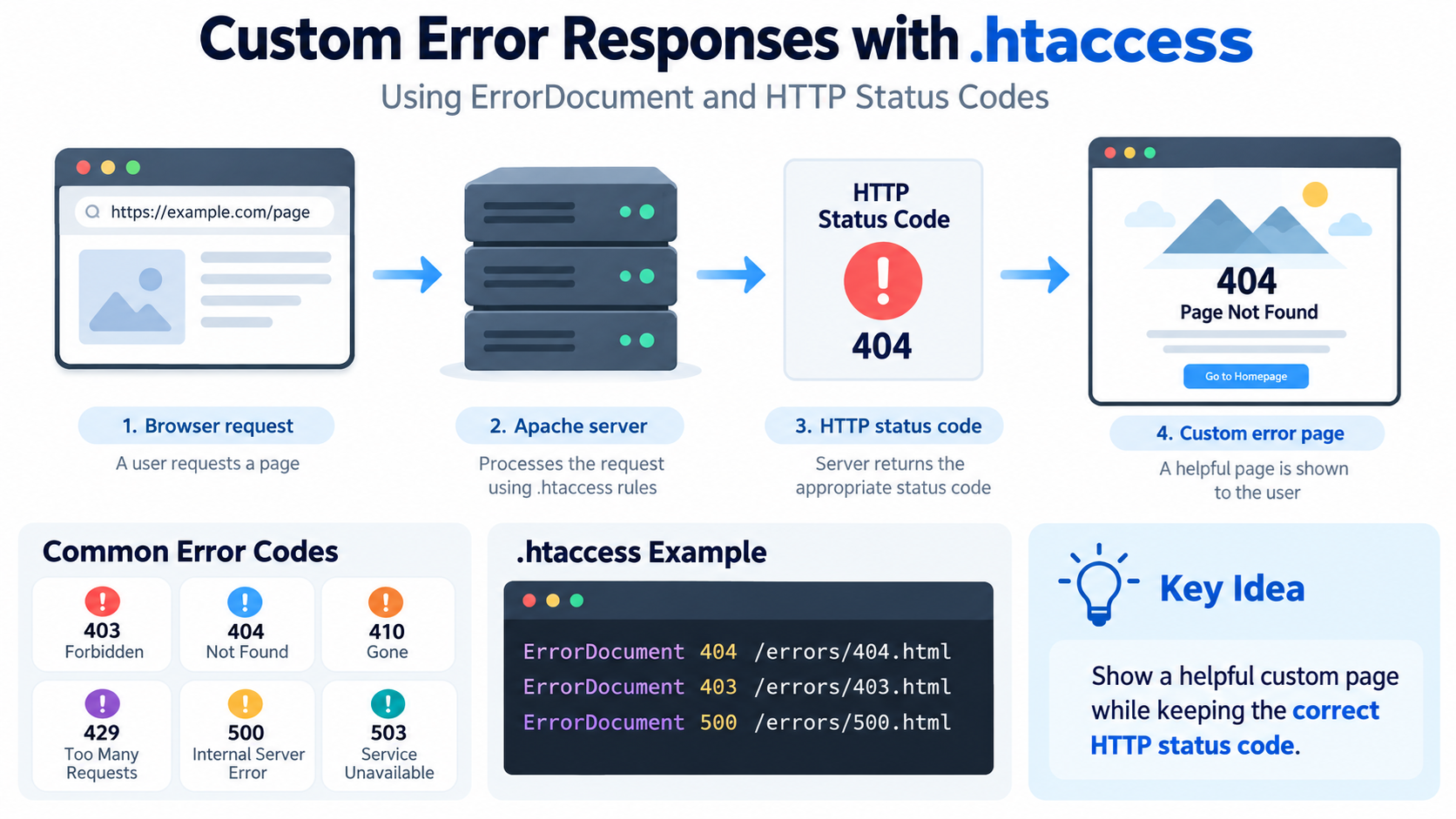
When a web server cannot complete a request normally, it returns an HTTP response status code.
For example, if a visitor requests a page that does not exist, the server may return:
404 Not Found
If access is denied, the server may return:
403 Forbidden
If the server encounters an internal problem, it may return:
500 Internal Server Error
Apache allows website owners to customize what visitors see when these errors occur.
One common way to do this is with the ErrorDocument directive in the .htaccess file.
Instead of showing a plain default server error page, you can display a branded page with helpful navigation, contact information, or instructions.
What Is ErrorDocument?
ErrorDocument is an Apache directive that defines a custom response for a particular HTTP error status.
For example:
ErrorDocument 404 /404.html
This tells Apache:
When a request results in a 404 error, display /404.html.
The browser still receives the 404 status code if the configuration is correct, but the visitor sees your custom page instead of the default Apache error message.
This is useful because you can provide a much better experience.
What Is an HTTP Response Status Code?
HTTP status codes are three-digit numbers sent by a web server in response to a request.
They help browsers, search engines, applications, and administrators understand what happened.
The first digit identifies the general category.
1xx = Informational
2xx = Successful
3xx = Redirection
4xx = Client-related error
5xx = Server-related error
Custom ErrorDocument rules are mainly used with 4xx and 5xx responses.
Why Customize Error Pages?
Default server error pages are usually very plain.
They may display only a short message such as:
Not Found
Forbidden
Internal Server Error
A custom page can provide:
Your website logo
A clear explanation
A link to the homepage
Navigation
A search box
Contact information
Helpful troubleshooting steps
Links to popular pages
This makes the error less frustrating for visitors.
Where Is .htaccess?
On many Apache-based hosting accounts, .htaccess is located inside the website’s document root.
On a typical cPanel account, this may be:
public_html/.htaccess
For an additional domain, the file may be located inside that domain’s own document root.
Because the filename begins with a period, it may be hidden.
In cPanel File Manager, enable:
Show Hidden Files
or:
Show Dotfiles
if you cannot see it.
Back Up .htaccess Before Editing
Always create a backup before modifying .htaccess.
A mistake can cause:
500 Internal Server Error
Broken redirects
Broken WordPress permalinks
Access problems
Unexpected error behavior
Download a copy of the existing file before editing it.
If something goes wrong, restore the backup immediately.
Basic ErrorDocument Syntax
The basic syntax is:
ErrorDocument status-code response
For example:
ErrorDocument 404 /404.html
The status code is:
404
The response is:
/404.html
This tells Apache to use that page when a 404 error occurs.
Custom 404 Not Found Page
A 404 error occurs when the requested resource cannot be found.
A simple rule is:
ErrorDocument 404 /404.html
Then create:
404.html
inside the website’s document root.
For example:
public_html/404.html
A visitor requesting a missing page will see the custom 404 page.
Keep the 404 Status Code
This is important.
A custom 404 page should still return:
404 Not Found
Do not simply redirect every missing page to the homepage.
If the page visually says:
Page Not Found
but the server returns:
200 OK
search engines may treat it as a soft 404.
A proper custom ErrorDocument usually preserves the original error status when configured correctly.
Custom 403 Forbidden Page
A 403 error means the server understood the request but refuses access.
You can create:
ErrorDocument 403 /403.html
The custom page could explain:
You do not have permission to access this resource.
Provide a link back to the homepage or another safe location.
Custom 401 Unauthorized Page
A 401 response means authentication is required or has failed.
You can use:
ErrorDocument 401 /401.html
However, 401 responses can interact with HTTP authentication.
Be careful not to replace useful authentication behavior with a confusing page.
The server may still send authentication-related headers.
Custom 400 Bad Request Page
A 400 response means the server considers the request invalid.
You can use:
ErrorDocument 400 /400.html
A custom page might explain that the request could not be understood.
For normal website visitors, 400 errors are less common than 404 errors.
Custom 405 Method Not Allowed Page
A 405 response means the HTTP method is not allowed for the requested resource.
For example, a resource may accept GET but reject POST.
You can use:
ErrorDocument 405 /405.html
This is more common in APIs and web applications than in ordinary static websites.
Custom 408 Request Timeout Page
A 408 response means the server timed out waiting for the request.
You may use:
ErrorDocument 408 /408.html
However, timeout behavior can depend on the server and connection state.
A custom page may not always be delivered if the connection itself has already failed.
Custom 410 Gone Page
A 410 response means a resource has been intentionally removed and is not expected to return.
You can configure:
ErrorDocument 410 /410.html
This is different from 404.
404 means the resource cannot be found.
410 means the resource is deliberately gone.
Custom 413 Content Too Large Page
A 413 response means the request body is too large.
For example, a user may try to upload a file larger than the server allows.
You can use:
ErrorDocument 413 /413.html
The custom page might explain the maximum upload size and suggest trying a smaller file.
Custom 414 URI Too Long Page
A 414 response means the requested URL is too long.
You can configure:
ErrorDocument 414 /414.html
This is relatively uncommon for normal users but can occur with malformed requests or applications that generate excessively long URLs.
Custom 429 Too Many Requests Page
A 429 response means the client has sent too many requests in a given period.
This is commonly associated with rate limiting.
You can use:
ErrorDocument 429 /429.html
A useful message might say:
Too many requests. Please try again later.
However, the system generating the 429 response must still allow Apache to serve the custom document.
Custom 500 Internal Server Error Page
A 500 error means the server encountered an unexpected condition.
You can use:
ErrorDocument 500 /500.html
However, there is an important limitation.
If .htaccess itself contains a syntax error, Apache may generate a 500 error before it can successfully process your custom ErrorDocument rule.
In that situation, the custom 500 page may not appear.
This is why .htaccess syntax must be tested carefully.
Custom 502 Bad Gateway Page
A 502 response usually appears when a gateway or proxy receives an invalid response from an upstream server.
If Apache is handling the response, you may configure:
ErrorDocument 502 /502.html
However, if the 502 is generated by another component such as Nginx, a CDN, reverse proxy, or load balancer, Apache’s .htaccess may never be involved.
Custom 503 Service Unavailable Page
A 503 response means the server or application is temporarily unavailable.
You can use:
ErrorDocument 503 /503.html
This can be useful during maintenance.
However, if the whole Apache service is down, Apache cannot serve the custom page.
A CDN or load balancer may be better for displaying maintenance pages during complete server outages.
Custom 504 Gateway Timeout Page
A 504 response occurs when a gateway or proxy times out waiting for an upstream server.
You may use:
ErrorDocument 504 /504.html
Again, this only works if Apache is the component handling the error.
If Cloudflare, Nginx, or another proxy generates the 504, configure the error page there instead.
Common ErrorDocument Examples
A practical .htaccess section might look like:
ErrorDocument 400 /errors/400.html
ErrorDocument 401 /errors/401.html
ErrorDocument 403 /errors/403.html
ErrorDocument 404 /errors/404.html
ErrorDocument 410 /errors/410.html
ErrorDocument 429 /errors/429.html
ErrorDocument 500 /errors/500.html
ErrorDocument 503 /errors/503.html
Then create those files inside:
public_html/errors/
This keeps your error pages organized.
Use Root-Relative Paths
For local custom error pages, a root-relative path is usually convenient.
For example:
ErrorDocument 404 /errors/404.html
The leading slash means the path begins from the website’s document root.
This is different from a filesystem path.
Do not write:
ErrorDocument 404 /home/username/public_html/errors/404.html
unless your server specifically expects a filesystem path in that context.
For ordinary .htaccess use, a URL-path style response is usually preferable.
Avoid Full External URLs Unless You Intend a Redirect
You can technically use an external URL with ErrorDocument.
For example:
ErrorDocument 404 https://example.com/errors/404.html
But this causes an external redirect rather than directly serving the error document.
That can change the HTTP behavior.
For a normal custom 404 page, use:
ErrorDocument 404 /errors/404.html
instead.
Plain Text Error Responses
ErrorDocument does not have to point to a file.
You can return a short custom message.
For example:
ErrorDocument 403 “Access denied.”
The quotation mark indicates that Apache should return literal text.
This can be useful for simple APIs or restricted areas.
However, branded HTML pages are usually more helpful for regular websites.
Use a PHP Error Page
You can also use a dynamic script.
For example:
ErrorDocument 404 /errors/404.php
This allows the page to generate dynamic content.
For example, you could show:
Suggested pages
A search form
The requested URL
Recent articles
However, keep error pages simple.
If the website application itself is broken, a complicated PHP error page might fail too.
Static Error Pages Are More Reliable
For 500-level errors, static HTML pages are often safer.
For example:
/errors/500.html
A static page does not depend on:
WordPress
PHP
Database connections
Plugins
Themes
Application frameworks
If those systems are causing the error, the static file may still load.
This is especially useful for 500 and 503 pages.
Custom 404 Page for WordPress
WordPress usually handles 404 pages through the active theme.
If a nonexistent WordPress URL reaches WordPress correctly, WordPress can display its own 404 template.
That is different from Apache’s ErrorDocument.
Apache-level 404 handling is more relevant for requests that never reach WordPress properly, such as missing static files or server-level paths.
Do not automatically replace WordPress 404 handling unless you have a reason.
WordPress 404 vs. Apache 404
Suppose someone requests:
example.com/nonexistent-post
WordPress may receive the request and display the theme’s 404 page.
But if someone requests:
example.com/images/missing.jpg
Apache may directly return a 404 for the missing file.
These are different layers.
A website can use both WordPress 404 templates and Apache ErrorDocument rules.
Do Not Create an Error Loop
Your custom error page must actually exist and be accessible.
Suppose you configure:
ErrorDocument 404 /404.html
but /404.html does not exist.
Apache tries to serve the missing error page.
That also generates 404.
This can lead to confusing fallback behavior.
Always test each custom error page directly.
Do Not Protect the Error Page Accidentally
Suppose you configure:
ErrorDocument 403 /403.html
but /403.html is inside a directory that is also forbidden.
Apache cannot access the custom page.
The visitor may see the default Apache error instead.
Place custom error pages somewhere that Apache can serve without triggering the same error again.
Use Simple URLs for Error Pages
Good examples include:
/404.html
/errors/404.html
/error/403.html
Avoid complicated URL rewriting for error documents.
Simple paths are easier to troubleshoot and more reliable.
Keep Error Pages Lightweight
An error page should load quickly.
Avoid requiring large scripts, complex frameworks, or many third-party resources.
A useful error page may contain:
Logo
Short message
Home button
Search
Navigation
Contact link
Keep the page simple enough to work even when the rest of the site is having problems.
A Good 404 Page
A useful 404 page should tell the visitor:
The page could not be found.
Then provide useful next steps.
For example:
Return to Homepage
Search the Website
Browse Popular Articles
Contact Support
Avoid technical language unless the site is intended for technical users.
A Good 403 Page
A useful 403 page might say:
Access to this page is restricted.
Then provide:
Homepage link
Login link if appropriate
Contact support
Do not reveal sensitive information about why the visitor was blocked.
A Good 500 Page
A useful 500 page might say:
Something went wrong on our server.
Please try again later.
Then provide:
Homepage link
Support contact
Status page link if available
Do not display:
PHP stack traces
Database passwords
Server paths
Application secrets
Detailed error messages
Those belong in logs, not on public pages.
Protect Sensitive Error Information
Production websites should avoid exposing internal technical details.
An error page should not reveal:
Filesystem paths
Database queries
Passwords
API keys
Software secrets
Stack traces
Internal IP addresses
Debug information
Detailed logs
Attackers can use such information.
Keep public messages simple.
Use Logs for Technical Details
Visitors need a friendly message.
Administrators need technical details.
Those details should go into:
Apache error logs
PHP logs
Application logs
WordPress debug logs
Monitoring systems
Hosting control panel logs
This separates user experience from troubleshooting information.
Custom Error Pages and SEO
A custom 404 page can improve user experience, but it should still return the correct 404 status.
Search engines need the status code to understand that the URL does not exist.
Do not return:
200 OK
for every missing page.
That creates soft 404 problems.
Likewise, do not redirect every missing URL to the homepage.
Test the HTTP Status Code
Do not judge an error page only by what it looks like.
Check the actual HTTP status.
For example, use:
curl -I https://example.com/this-page-does-not-exist
You should see something like:
HTTP/2 404
If you see:
HTTP/2 200
your custom page may be returning the wrong status.
Test With Browser Developer Tools
You can also use browser developer tools.
Open the Network panel.
Request the error URL.
Check the response status.
For example:
404
403
500
This helps confirm that the custom page is working correctly.
ErrorDocument and Redirect Directive Are Different
Do not confuse:
ErrorDocument
with:
Redirect
ErrorDocument controls what is displayed when an error occurs.
Redirect sends the client to another URL.
For example:
ErrorDocument 404 /404.html
means:
Display this page when a 404 occurs.
But:
Redirect 301 /old-page /new-page
means:
The old page permanently moved.
These solve different problems.
Use Redirects When Content Moved
If a page has moved permanently, use a 301 redirect.
Do not show a 404 error if you know exactly where the content moved.
For example:
/old-contact
should redirect to:
/contact
A custom 404 page is for genuinely missing content.
Use 410 When Content Is Intentionally Gone
If a page has been deliberately removed and will not return, you may choose:
410 Gone
For example, you can configure a removed path using rewrite or redirect logic and then provide:
ErrorDocument 410 /errors/410.html
A 410 can communicate more explicitly that the resource is permanently gone.
ErrorDocument for Directory Access Denied
Suppose directory listing is disabled and a visitor tries to access a restricted directory.
Apache may return 403.
Your custom:
ErrorDocument 403 /errors/403.html
can provide a consistent branded response.
ErrorDocument for IP Blocking
If you deny an IP address using Apache authorization rules, the blocked visitor usually receives:
403 Forbidden
You can combine this with:
ErrorDocument 403 /errors/403.html
Then blocked users see your custom forbidden page instead of the default Apache message.
Example With IP Blocking
For Apache 2.4:
<RequireAll> Require all granted Require not ip 192.0.2.25 </RequireAll>
ErrorDocument 403 /errors/403.html
Requests from the blocked address will normally receive a 403 response and your custom 403 page.
ErrorDocument With Basic Authentication
A protected directory may use HTTP Basic Authentication.
Failed authentication can return 401.
You can define:
ErrorDocument 401 /errors/401.html
However, browser authentication prompts and WWW-Authenticate headers still play an important role.
Test carefully so you do not interfere with the login process.
ErrorDocument With Maintenance Mode
You can use a 503 page during maintenance.
For example, a rewrite rule may return 503:
RewriteEngine On
RewriteCond %{REQUEST_URI} !^/maintenance.html$
RewriteRule ^ – [R=503,L]
ErrorDocument 503 /maintenance.html
This can show a maintenance page while returning the proper 503 status.
However, maintenance configurations should be tested carefully to avoid loops.
Add Retry-After for 503 Responses
For planned maintenance, a 503 response can optionally include a Retry-After header.
This tells clients when they may try again.
Header configuration requires additional Apache modules and server permissions.
On shared hosting, your provider may restrict this capability.
Apache Must Allow .htaccess Overrides
.htaccess only works if the Apache server configuration allows it.
The server uses directives such as:
AllowOverride
to control which .htaccess features are permitted.
On shared hosting, your provider usually manages this.
If ErrorDocument does not work, the host may have disabled the relevant override or Apache may not be the final server handling the error.
Nginx Does Not Use .htaccess
.htaccess is an Apache feature.
Nginx does not read .htaccess.
If your server uses Nginx directly, custom error pages must be configured in Nginx configuration.
For example, Nginx uses directives such as:
error_page
Do not expect Apache .htaccess rules to work on a pure Nginx server.
LiteSpeed and .htaccess
LiteSpeed Web Server supports many Apache-compatible .htaccess directives.
This includes many common ErrorDocument configurations.
However, exact behavior can depend on the hosting environment.
If a rule does not work, ask your provider whether LiteSpeed is processing the request and whether the directive is supported.
CDNs Can Generate Their Own Error Pages
If your website uses a CDN or reverse proxy, some errors may occur before the request reaches Apache.
For example:
Cloudflare may generate a 502 or 504.
A load balancer may generate a 503.
A proxy may return a 403.
In those cases, .htaccess cannot customize the response because Apache never generated the error.
Configure the error page at the system that actually creates the response.
Custom 404 Example
In .htaccess:
ErrorDocument 404 /errors/404.html
Create:
public_html/errors/404.html
A basic page could include:
Page Not Found
The page you requested could not be found.
Return to Homepage
Search Our Website
Contact Us
Keep it simple and helpful.
Custom 403 Example
In .htaccess:
ErrorDocument 403 /errors/403.html
Create:
public_html/errors/403.html
A useful message might say:
Access Forbidden
You do not have permission to access this resource.
Return to Homepage
Custom 500 Example
In .htaccess:
ErrorDocument 500 /errors/500.html
Create:
public_html/errors/500.html
The page might say:
Something Went Wrong
The server encountered an unexpected problem.
Please try again later.
Because 500 errors can involve application failures, use a simple static HTML page.
Organize All Error Pages in One Directory
A clean structure might be:
public_html/errors/400.html
public_html/errors/401.html
public_html/errors/403.html
public_html/errors/404.html
public_html/errors/410.html
public_html/errors/429.html
public_html/errors/500.html
public_html/errors/503.html
Then your .htaccess can contain:
ErrorDocument 400 /errors/400.html
ErrorDocument 401 /errors/401.html
ErrorDocument 403 /errors/403.html
ErrorDocument 404 /errors/404.html
ErrorDocument 410 /errors/410.html
ErrorDocument 429 /errors/429.html
ErrorDocument 500 /errors/500.html
ErrorDocument 503 /errors/503.html
This makes maintenance easier.
HTTP Status Codes Commonly Used With Custom Error Pages
Here are some of the most useful status codes to understand.
400 Bad Request means the server cannot process the request because it considers it invalid.
401 Unauthorized means authentication is required or failed.
403 Forbidden means the server refuses access.
404 Not Found means the requested resource cannot be found.
405 Method Not Allowed means the HTTP method is not permitted.
408 Request Timeout means the server timed out waiting for the request.
410 Gone means the resource was intentionally removed.
413 Content Too Large means the request body is larger than allowed.
414 URI Too Long means the request URL is too long.
429 Too Many Requests means the client has sent too many requests.
500 Internal Server Error means the server encountered an unexpected error.
501 Not Implemented means the server does not support the requested functionality.
502 Bad Gateway means a gateway received an invalid upstream response.
503 Service Unavailable means the server or application is temporarily unavailable.
504 Gateway Timeout means a gateway timed out waiting for an upstream server.
Not Every Error Needs a Custom Page
You do not need a separate page for every possible HTTP status code.
For most ordinary websites, the most useful custom pages are:
403
404
500
503
A 404 page is especially important because visitors commonly encounter broken or old URLs.
A 403 page can help explain access restrictions.
A 500 page provides a cleaner response during server problems.
A 503 page is useful for maintenance.
Keep Branding Consistent
Custom error pages should look like part of your website.
Use:
Your logo
Your typography
Your navigation
Your brand style
But keep them lightweight.
A visitor should immediately understand that they are still on your website.
Do Not Make the Error Page Too Clever
Funny 404 pages can be memorable, but clarity is more important.
The visitor needs to know:
What happened.
What they can do next.
A simple, helpful message is better than a creative page that gives no useful navigation.
Provide Search on a 404 Page
A search box can help visitors recover from a broken URL.
For example:
Search our website
This is especially useful for large websites with many articles or products.
Link to Popular Content
You can include links to:
Homepage
Popular articles
Products
Support
Contact
Documentation
This turns an error page into a useful navigation point.
Avoid Automatic Homepage Redirects
A missing page should not automatically redirect to the homepage unless there is a very specific reason.
A real 404 with a good custom page is more accurate.
Users understand that the page is gone, and search engines receive the correct signal.
Test Every Error Page
After configuring ErrorDocument, test each relevant status.
For example:
Request a URL that does not exist to test 404.
Request a protected directory to test 403.
Use a controlled server-side test to confirm 500 if appropriate.
Do not intentionally break a production website just to test a 500 page.
Use a staging environment when possible.
Watch Your Server Logs
If custom error pages are frequently triggered, investigate why.
Repeated 404 errors may indicate:
Broken links
Old backlinks
Bots
Website migration problems
Missing files
Repeated 403 errors may indicate:
Attack attempts
Access-control mistakes
Blocked users
Repeated 500 errors may indicate:
Application bugs
PHP failures
Database issues
Server configuration problems
The custom page improves user experience, but logs help you fix the underlying problem.
Do Not Hide Serious Server Problems
A beautiful 500 page is useful, but it does not fix the error.
If visitors frequently see 500 or 503 responses, investigate immediately.
Error pages should communicate failure gracefully.
They should not become a substitute for fixing the server.
A Simple .htaccess Example
A clean error section may look like this:
Custom error pages
ErrorDocument 403 /errors/403.html
ErrorDocument 404 /errors/404.html
ErrorDocument 410 /errors/410.html
ErrorDocument 429 /errors/429.html
ErrorDocument 500 /errors/500.html
ErrorDocument 503 /errors/503.html
Keep comments in the file so future administrators understand the purpose of the rules.
Final Thoughts
Apache’s ErrorDocument directive allows you to replace default server error messages with useful custom responses.
For example:
ErrorDocument 404 /errors/404.html
lets you display a branded page when a resource cannot be found while preserving the correct 404 response.
You can create custom responses for many HTTP status codes, including:
400 Bad Request
401 Unauthorized
403 Forbidden
404 Not Found
410 Gone
429 Too Many Requests
500 Internal Server Error
503 Service Unavailable
The most important rule is to keep the HTTP status accurate.
A missing page should still return 404.
A forbidden resource should still return 403.
A temporary server outage should return 503.
Custom error pages improve the visitor experience, but the status code tells browsers and search engines what actually happened.
Use simple, reliable pages.
Keep technical details out of public responses.
Check logs for the real cause.
And always back up .htaccess before making changes.