
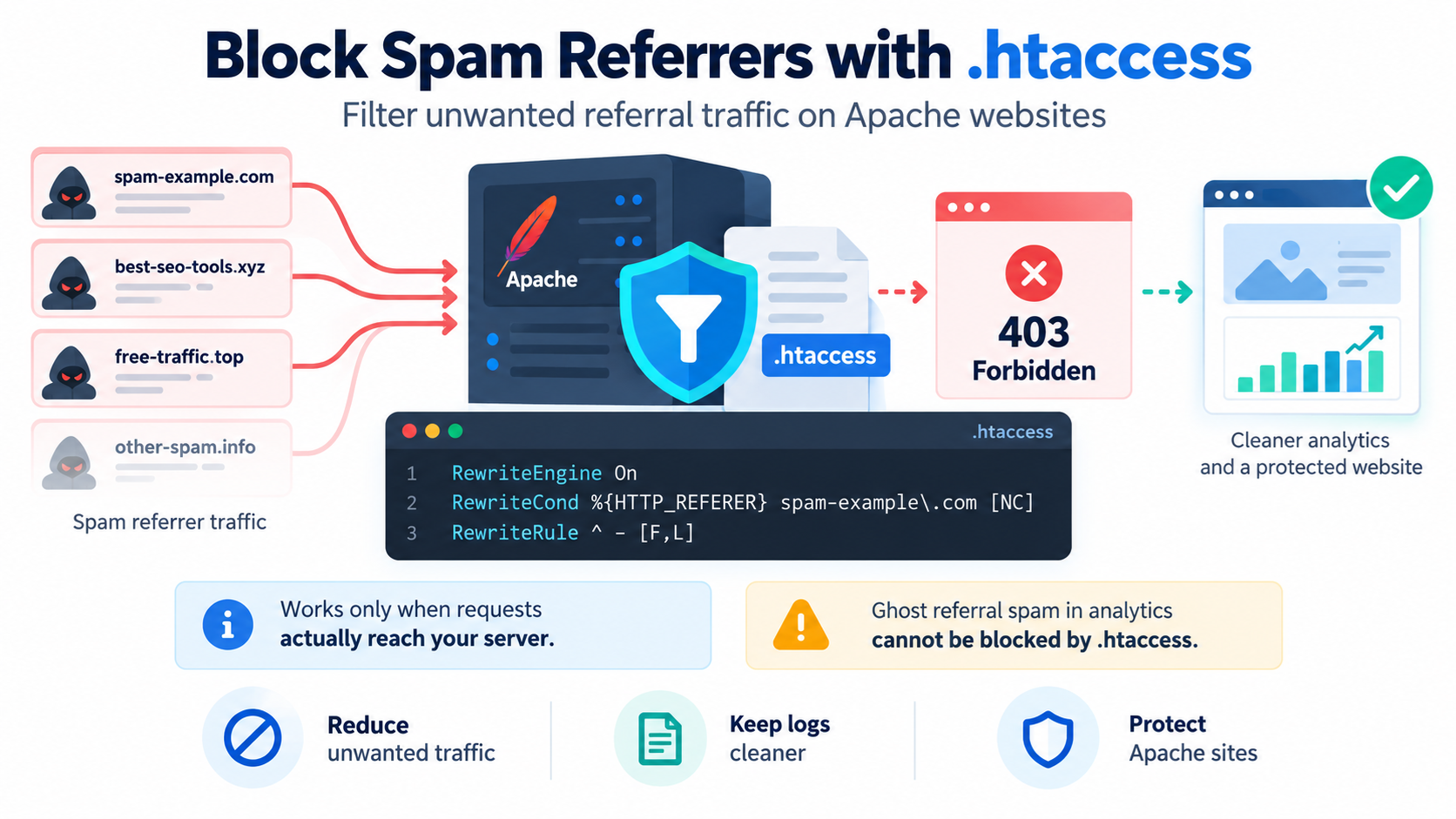
Spam referrers can create confusing traffic in website analytics and sometimes send unwanted visitors, bots, or automated requests to your site.
A referrer, sometimes called a referer in HTTP headers, is information that can tell a website which page or website a visitor came from.
For example, if someone clicks a link on another website and arrives at your site, the browser may send a Referer header showing the previous page.
Unfortunately, some bots send fake or manipulated referrer information.
This is commonly called:
Referral spam
Referrer spam
Referer spam
Fake referral traffic
Ghost referral traffic
In some cases, you may want to block requests associated with known spam referrers.
On Apache-based hosting, one way to do this is with rules in the .htaccess file.
However, referrer blocking has important limitations, so it should be used carefully.
What Is a Referrer?
When a visitor follows a link from one page to another, the browser may send an HTTP header called:
Referer
Yes, the HTTP header is historically misspelled as Referer rather than Referrer.
A request might contain something conceptually like:
Referer: https://example-source.com/page
Your web server can inspect this value.
Analytics tools may also use it to classify traffic sources.
What Is Spam Referrer Traffic?
Spam referrer traffic occurs when automated systems send fake or unwanted referral information.
The goal may be to:
Get the website owner to notice a domain
Pollute analytics reports
Promote another website
Generate fake traffic
Probe websites
Create unwanted server requests
Some spam systems make it appear that visitors came from a particular domain even when no real person clicked a link there.
What Is Ghost Referral Spam?
Ghost referral spam is especially important to understand.
Ghost spam may appear in analytics without actually visiting your web server.
In that situation, the spammer sends fake data directly to an analytics system.
If the request never reaches Apache, .htaccess cannot block it.
This means:
.htaccess can block requests that actually reach your server.
.htaccess cannot block fake analytics events that never touch your server.
This distinction is critical.
When Can .htaccess Help?
.htaccess can help when the unwanted request actually reaches your Apache web server and includes a recognizable Referer header.
For example, if server logs show repeated requests with:
as the referrer, you may be able to deny those requests.
The server can inspect the HTTP_REFERER value and return a forbidden response.
When .htaccess Will Not Help
.htaccess will not solve every referral-spam problem.
It may not help if:
The spam exists only inside analytics.
The attacker does not send a Referer header.
The attacker changes the referrer constantly.
The attacker sends a forged legitimate referrer.
The website uses Nginx without Apache.
A CDN handles the request before Apache.
The spam request never reaches the origin server.
In these situations, another approach may be more appropriate.
Find the .htaccess File
On many cPanel hosting accounts, the main .htaccess file is located in:
public_html
For example:
/home/username/public_html/.htaccess
Additional domains may use a different document root.
If you cannot see .htaccess, enable hidden files in cPanel File Manager.
Look for:
Show Hidden Files
or:
Show Dotfiles
Back Up .htaccess Before Editing
Always create a backup before changing .htaccess.
A syntax mistake can cause:
500 Internal Server Error
Broken WordPress permalinks
Redirect loops
Access problems
Website downtime
Download the existing file before making changes.
If something goes wrong, restore the backup.
Blocking a Single Spam Referrer
Suppose your server logs show unwanted requests with this referrer:
spam-example.com
You can use Apache mod_rewrite rules such as:
RewriteEngine On
RewriteCond %{HTTP_REFERER} spam-example.com [NC]
RewriteRule ^ – [F,L]
This means:
If the HTTP Referer contains spam-example.com, deny the request.
The visitor will normally receive:
403 Forbidden
What Does HTTP_REFERER Mean?
Apache makes the referrer available through:
%{HTTP_REFERER}
This represents the value of the incoming Referer header.
The rule can test that value before Apache serves the requested page.
What Does NC Mean?
The flag:
[NC]
means:
No Case
It makes the match case-insensitive.
For example:
spam-example.com
SPAM-EXAMPLE.COM
Spam-Example.com
can all match the same condition.
What Does F Mean?
The flag:
[F]
means:
Forbidden
Apache returns a 403 Forbidden response.
It does not redirect the visitor somewhere else.
It simply denies access.
What Does L Mean?
The flag:
[L]
means:
Last
Apache stops processing additional rewrite rules for that request in the current rewrite pass after the rule matches.
Block Multiple Spam Referrers
You can block multiple domains.
For example:
RewriteEngine On
RewriteCond %{HTTP_REFERER} spam-one.example [NC,OR]
RewriteCond %{HTTP_REFERER} spam-two.example [NC,OR]
RewriteCond %{HTTP_REFERER} spam-three.example [NC]
RewriteRule ^ – [F,L]
The [OR] flag means:
Match this condition OR the next condition.
If any of the listed referrers match, Apache returns 403.
Another Way to Organize Multiple Referrers
You can also use separate rule blocks.
For example:
RewriteEngine On
RewriteCond %{HTTP_REFERER} spam-one.example [NC]
RewriteRule ^ – [F,L]
RewriteCond %{HTTP_REFERER} spam-two.example [NC]
RewriteRule ^ – [F,L]
RewriteCond %{HTTP_REFERER} spam-three.example [NC]
RewriteRule ^ – [F,L]
This is longer, but sometimes easier to read.
Escape the Dot in Domain Names
In regular expressions, a dot means:
Any character
Therefore, when matching a real period in a domain name, escape it with a backslash.
Correct:
spam-example.com
Less precise:
spam-example.com
The escaped form is safer because it matches the actual domain structure.
Block a Full Referrer Pattern
You may want a more precise match.
For example:
RewriteCond %{HTTP_REFERER} ^https?://([^.]+.)?spam-example.com/ [NC]
RewriteRule ^ – [F,L]
This can match:
and some subdomains.
More precise regular expressions reduce accidental matches.
Be Careful With Broad Matches
Suppose you block:
example
This might unintentionally match:
goodexample.com
example.org
my-example-site.net
A broad condition can block legitimate traffic.
Whenever possible, match the real domain carefully.
Block Requests With an Empty Referer?
Some administrators are tempted to block requests that do not contain a Referer header.
This is usually a bad idea.
Many legitimate requests may have no referrer.
Examples include:
Typing the URL directly
Bookmarks
Privacy-focused browsers
Mobile apps
Email links
Some security software
Some HTTPS-to-HTTP transitions
Bots
API clients
Do not block empty referrers unless you have a very specific reason and understand the consequences.
Referer Headers Can Be Forged
A referrer is not a strong security identity.
A bot can send:
Referer: https://google.com/
even if the request did not come from Google.
This means referrer blocking should not be treated as authentication or serious access control.
Use it mainly as a filtering technique.
Do Not Trust Referer for Security Decisions
Do not use referrer checks to protect sensitive areas such as:
Admin panels
Private files
Payment pages
APIs
Confidential data
Use stronger controls such as:
Authentication
Authorization
IP restrictions
Tokens
Sessions
Firewall rules
Multi-factor authentication
A referrer header is easy to manipulate.
Use Server Logs to Confirm the Referrer
Before blocking a domain, confirm that requests actually reach your server.
Check:
Apache access logs
cPanel Raw Access logs
Security logs
CDN logs
WAF logs
If the spam appears only in analytics and not in server logs, .htaccess will not help.
cPanel Raw Access Logs
In some cPanel environments, you can inspect traffic through:
cPanel → Metrics → Raw Access
These logs may show:
Visitor IP
Requested URL
Time
HTTP status
User agent
Referrer
Look for repeated requests associated with the suspicious domain.
Apache Combined Log Format
Many Apache logs use a format that includes referrer information.
A log line may conceptually contain:
IP address
Timestamp
Requested page
Status code
Bytes sent
Referrer
User agent
This makes it possible to verify whether the unwanted referrer actually reached Apache.
Referral Spam vs. Real Referral Traffic
Do not block a domain simply because you do not recognize it.
It may be a legitimate source of traffic.
Before blocking it, ask:
Does the website actually link to me?
Are the visitors real?
Do they browse multiple pages?
Do they stay on the site?
Does the traffic convert?
Does the domain appear suspicious?
Is the referrer repeatedly hitting unusual URLs?
Real referral traffic can be valuable.
Analytics Can Mislead You
Referral reports can include:
Real users
Bots
Campaign traffic
Redirects
Payment processors
Search tools
Spam
Do not assume every unusual referrer is malicious.
Investigate first.
Ghost Spam Cannot Be Blocked by .htaccess
If the spammer sends fake analytics data directly to your analytics property, the request does not touch:
Apache
PHP
WordPress
Your server
Therefore, .htaccess cannot see it.
This is commonly called ghost referral spam.
For this type of spam, use analytics-side filtering or configuration rather than server blocking.
Modern Analytics Systems May Already Filter Some Spam
Analytics platforms increasingly use automated filtering and bot-detection systems.
Before creating complicated server rules, check whether the suspicious traffic is actually affecting your reports meaningfully.
Small amounts of noisy referral traffic may not justify server-side blocking.
Block a Spam Referrer in WordPress Hosting
If your WordPress site runs on Apache or Apache-compatible LiteSpeed, you can add referrer rules before the main WordPress rewrite block.
For example:
RewriteEngine On
RewriteCond %{HTTP_REFERER} spam-example.com [NC]
RewriteRule ^ – [F,L]
WordPress rules below
Custom rules should generally be placed before WordPress’s main permalink rules.
Do Not Put Custom Rules Inside Managed WordPress Markers
WordPress often places markers such as:
BEGIN WordPress
and:
END WordPress
Rules inside that section may be regenerated when permalink settings change.
Place custom rules outside the managed block unless you specifically know otherwise.
Example WordPress .htaccess Structure
A simplified file might look like:
RewriteEngine On
Block spam referrer
RewriteCond %{HTTP_REFERER} spam-example.com [NC]
RewriteRule ^ – [F,L]
BEGIN WordPress
…
END WordPress
This keeps your custom rule separate from WordPress-managed configuration.
Use a Custom 403 Page
If you want blocked requests to see a custom message, you can use:
ErrorDocument 403 /errors/403.html
Then create:
/errors/403.html
The blocked request still receives:
403 Forbidden
but sees a branded error page.
Example With Custom 403 Response
You could use:
RewriteEngine On
RewriteCond %{HTTP_REFERER} spam-example.com [NC]
RewriteRule ^ – [F,L]
ErrorDocument 403 /errors/403.html
This denies the request and displays your custom 403 page.
Should You Redirect Spam Referrers Somewhere Else?
Usually, no.
Do not redirect unwanted traffic to:
Another website
The spammer’s own site
A competitor
A random page
A 403 response is clearer and simpler.
Redirecting abusive traffic can create unexpected problems.
Do Not Redirect Spam Traffic Back to the Spammer
Old tutorials sometimes suggest redirecting spam referrers back to themselves.
That is generally unnecessary.
It may create loops or confusing behavior.
Simply deny the request.
Block by User Agent as Well?
Some spam bots use recognizable user-agent strings.
Apache can also inspect:
%{HTTP_USER_AGENT}
For example:
RewriteCond %{HTTP_USER_AGENT} BadBot [NC]
RewriteRule ^ – [F,L]
However, user agents are also easy to fake.
Do not assume a user-agent block is strong security.
Combine Referrer and User-Agent Conditions Carefully
You could require both conditions.
For example:
RewriteCond %{HTTP_REFERER} spam-example.com [NC]
RewriteCond %{HTTP_USER_AGENT} BadBot [NC]
RewriteRule ^ – [F,L]
This blocks only when both match.
But complex rules can become difficult to maintain.
Use the simplest rule that solves the problem.
Blocking by IP May Be More Reliable
If the same spammer repeatedly uses a stable IP address, blocking by IP can be more direct.
For Apache 2.4:
<RequireAll> Require all granted Require not ip 192.0.2.25 </RequireAll>
However, attackers may change IP addresses.
Referrer and IP blocking both have limitations.
A Web Application Firewall May Be Better
For repeated abusive traffic, a WAF is often more effective than maintaining .htaccess manually.
A WAF can help block:
Known malicious IPs
Bots
Attack patterns
Rate abuse
Suspicious requests
SQL injection attempts
Cross-site scripting attempts
Referrer spam
depending on the service and configuration.
Cloudflare Users Should Consider Cloudflare Rules
If your website uses Cloudflare, you may be able to filter traffic at the edge before it reaches the origin server.
This can reduce server load.
Cloudflare rules can often inspect:
IP addresses
Countries
URI paths
Headers
Request characteristics
Depending on the plan and available features, filtering there may be easier than .htaccess.
Why Blocking Earlier Is Better
A request blocked by .htaccess has already reached Apache.
The server has already accepted the connection.
If you block at:
CDN
Reverse proxy
Network firewall
WAF
the request may be stopped earlier.
This can be more efficient during high-volume abuse.
Large Referrer Blocklists Are Hard to Maintain
You can technically block dozens or hundreds of spam domains in .htaccess.
But large lists can become:
Difficult to read
Difficult to test
Easy to break
Outdated
Inefficient
If the problem is large-scale, use a more appropriate filtering system.
Referral Spam Often Changes Domains
Spam campaigns may rotate through many domains.
You may block:
spam-one.example
today, only to see:
spam-two.example
tomorrow.
This creates a never-ending blocklist.
At some point, server-side referrer blocking may not be worth maintaining.
Focus on the Real Impact
Ask whether the spam is actually causing harm.
Possible impacts include:
Server load
Form abuse
Fake signups
Analytics pollution
Bandwidth use
Repeated login attacks
If the only effect is a few strange rows in an analytics report, an analytics filter may be enough.
Spam Referrers and SEO
Referral spam generally does not directly improve or damage your SEO simply because the referrer appears in analytics.
Search engines do not rank your website based on your Google Analytics referral report.
Do not panic because you see suspicious referral domains.
Focus on actual search performance and website security.
Spam Referrers Are Not the Same as Bad Backlinks
A referrer and a backlink are related concepts but not identical.
A backlink is a link on another website that points to your site.
A referrer is information sent with a request indicating a previous page.
A spammer can send a fake referrer without creating a real backlink.
Likewise, a real backlink may exist even if the browser does not send a referrer.
Do not confuse referral spam with backlink spam.
Verify Whether a Backlink Actually Exists
If a suspicious domain appears in analytics, do not automatically assume it links to your site.
Check the page.
Use backlink tools if necessary.
The referrer may be fabricated.
HTTPS Can Affect Referrer Information
Browsers apply referrer policies that can limit what information is sent.
For privacy reasons, a browser may send:
Only the origin
No referrer
A reduced referrer
depending on the situation.
This means referrer data is not always complete.
Referrer-Policy Header
Websites can control some outbound referrer behavior using the Referrer-Policy HTTP header.
Examples include:
no-referrer
strict-origin-when-cross-origin
same-origin
This affects what your site sends when visitors leave or navigate.
It does not directly stop incoming spam referrers.
Do Not Confuse Referrer-Policy With Blocking Referrers
Referrer-Policy controls outgoing browser behavior.
.htaccess referrer blocking examines incoming requests.
They solve different problems.
Nginx Does Not Use .htaccess
.htaccess is an Apache feature.
If your server runs Nginx directly, .htaccess rules will not work.
Nginx uses its own configuration syntax.
If you use managed hosting, check which web server is actually handling your site.
LiteSpeed Usually Supports Apache-Style Rules
LiteSpeed Web Server commonly supports Apache-compatible .htaccess directives, including many mod_rewrite rules.
This is why many cPanel environments using LiteSpeed can still use familiar .htaccess syntax.
However, exact behavior can depend on the server configuration.
Test Every Rule Carefully
After adding a spam-referrer rule, test:
Homepage
Important pages
WordPress admin
Forms
Images
Downloads
API endpoints
Do not assume the site works because the homepage loads.
A broad rule can accidentally block legitimate requests.
Test With curl
If you are comfortable with the command line, you can simulate a referrer using curl.
For example:
curl -I -e “https://spam-example.com/” https://example.com/
If the rule works, you may see:
HTTP/1.1 403 Forbidden
This is a useful way to test without relying on real spam traffic.
What Does curl -e Do?
The -e option sets a Referer header.
For example:
curl -e “https://spam-example.com/” https://example.com/
This lets you test whether Apache matches your referrer condition.
Test a Normal Request Too
After testing the blocked referrer, test a normal request.
For example:
curl -I https://example.com/
You should still receive:
200 OK
or the normal expected response.
Always test both blocked and allowed traffic.
Use Temporary Comments While Testing
You can add comments in .htaccess.
For example:
Block known referral spam
RewriteCond %{HTTP_REFERER} spam-example.com [NC]
RewriteRule ^ – [F,L]
Comments help you remember why the rule exists.
Remove Old Rules Periodically
A domain that was used for spam years ago may no longer matter.
Review the blocklist periodically.
Remove rules that are no longer necessary.
Keeping .htaccess clean makes troubleshooting easier.
Do Not Block Major Platforms by Mistake
Be careful not to block legitimate referrers such as:
Bing
YouTube
Payment processors
Partner websites
If a suspicious URL contains a trusted domain name as part of another string, a sloppy regular expression might match it accidentally.
Use precise domain matching.
Example of a Safer Domain Match
Instead of:
RewriteCond %{HTTP_REFERER} example.com [NC]
you may prefer:
RewriteCond %{HTTP_REFERER} ^https?://([^.]+.)?example.com(/|$) [NC]
This tries to match the actual domain or subdomains more precisely.
Regular expressions can still be tricky, so test carefully.
Avoid Overengineering
If you only need to block one obvious spam domain, use a simple rule.
Do not create fifty lines of complicated regular expressions unnecessarily.
Complex .htaccess files are harder to maintain and easier to break.
A Simple Single-Domain Example
Use:
RewriteEngine On
RewriteCond %{HTTP_REFERER} spam-example.com [NC]
RewriteRule ^ – [F,L]
This is enough for many simple cases.
A Simple Multiple-Domain Example
Use:
RewriteEngine On
RewriteCond %{HTTP_REFERER} spam-one.example [NC,OR]
RewriteCond %{HTTP_REFERER} spam-two.example [NC,OR]
RewriteCond %{HTTP_REFERER} spam-three.example [NC]
RewriteRule ^ – [F,L]
Add comments so you know why each domain was included.
A More Precise Multiple-Domain Example
You could use:
RewriteEngine On
RewriteCond %{HTTP_REFERER} ^https?://([^.]+.)?(spam-one.example|spam-two.example|spam-three.example)(/|$) [NC]
RewriteRule ^ – [F,L]
This combines multiple spam domains into one regular expression.
It is more compact but may be harder for beginners to edit.
When Should You Use Referrer Blocking?
It can be useful when:
The requests actually reach your server.
You have confirmed the spam domain in server logs.
The traffic is causing real problems.
The spammer uses a consistent referrer.
You are on Apache or an Apache-compatible server.
You only need a small, manageable list.
When Should You Avoid It?
Avoid relying on .htaccess referrer blocking when:
The spam exists only in analytics.
The campaign constantly changes domains.
The attacker does not send a referrer.
You need strong security.
You need to handle thousands of abusive requests.
You use a CDN or WAF that can block earlier.
A server-level or analytics-level solution may be better.
Better Ways to Reduce Form Spam
If the real problem is contact-form abuse, do not focus only on the referrer.
Consider:
CAPTCHA
Rate limiting
Anti-spam services
Honeypots
Form validation
WAF rules
Email filtering
These controls address the actual abuse rather than just one header.
Better Ways to Reduce Login Attacks
If the spam traffic is attacking WordPress login pages, use:
Strong passwords
Multi-factor authentication
Login rate limiting
WAF protection
Security plugins
IP reputation
Monitoring
Blocking a referrer does little against an attacker who can simply change the header.
Better Ways to Handle Analytics Spam
If the unwanted traffic exists only in analytics, manage it there.
Depending on the analytics platform, options may include:
Bot filtering
Traffic filters
Internal traffic rules
Data quality controls
Custom reporting
Excluding known spam patterns
Do not expect .htaccess to fix data that never came from your server.
Final Thoughts
You can use .htaccess on Apache-based hosting to block requests that contain known spam referrers.
A simple rule looks like:
RewriteEngine On
RewriteCond %{HTTP_REFERER} spam-example.com [NC]
RewriteRule ^ – [F,L]
When the condition matches, Apache normally returns:
403 Forbidden
This can be useful for small-scale referral spam that actually reaches your server.
However, remember the limitations.
Referrer headers can be forged.
Legitimate requests may have no referrer.
Spam campaigns can rotate domains.
Ghost referral spam may never reach your server at all.
For that reason, .htaccess referrer blocking should be used as a targeted filter, not as a complete security solution.
Use server logs to verify the traffic first.
Keep rules precise.
Test carefully.
And for large-scale abuse, consider stronger tools such as a Web Application Firewall, CDN firewall, rate limiting, form protection, or analytics-side filtering.