
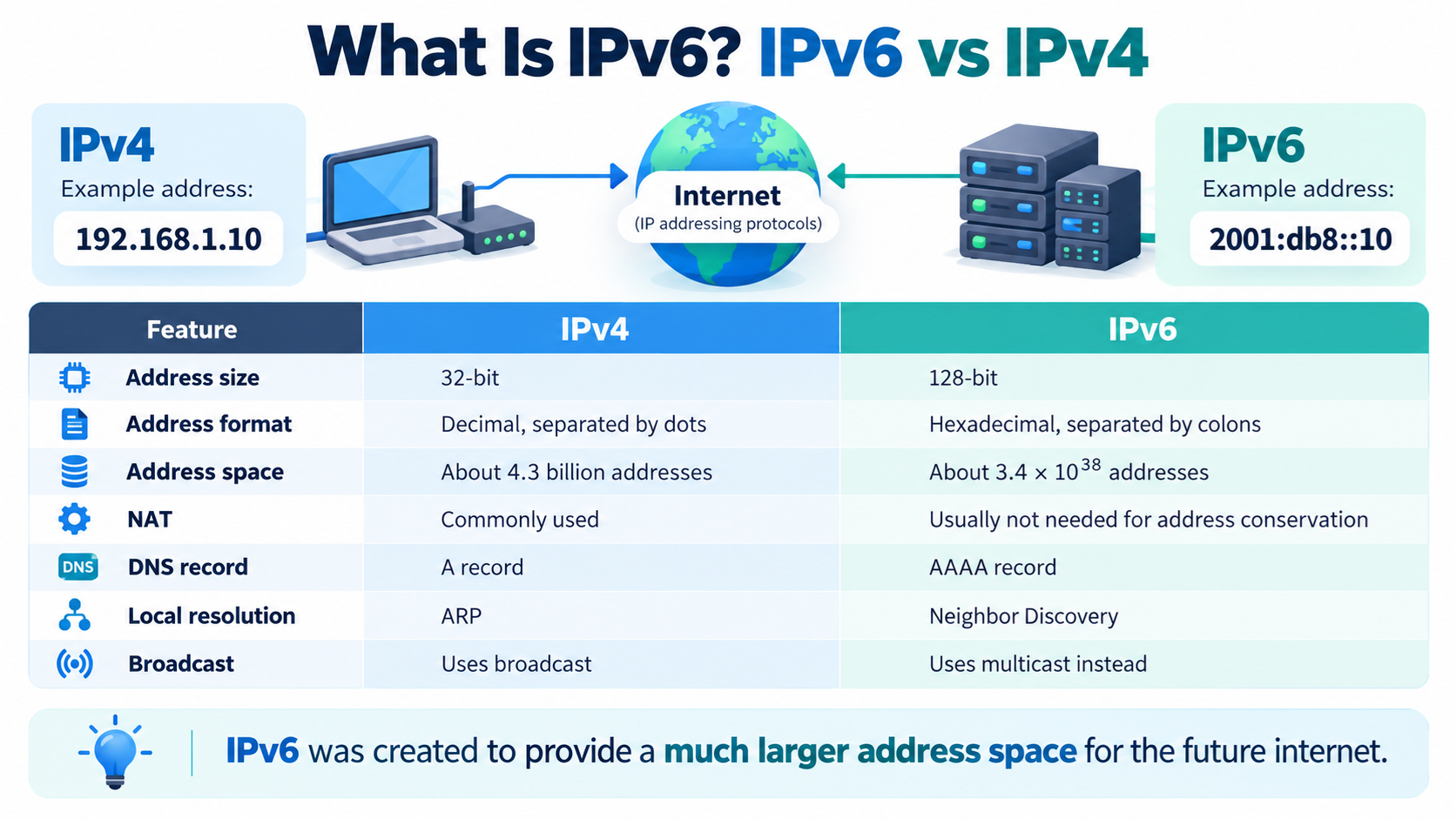
IPv6, or Internet Protocol version 6, is the newer version of the Internet Protocol used to identify devices and route data across networks.
It was developed mainly because the older IPv4 system does not provide enough unique IP addresses for the enormous number of computers, phones, servers, smart devices, and other systems connected to the internet today.
IPv4 is still widely used, and IPv6 has not completely replaced it. In practice, the modern internet often runs both protocols at the same time.
Understanding the difference between IPv4 and IPv6 is useful for website owners, server administrators, hosting customers, and anyone learning how internet networking works.
What Is an IP Address?
An IP address is a numerical address used to identify a device or network interface on an IP network.
When your computer communicates with a website server, IP addresses help network devices determine where packets should be sent.
A domain name such as example.com is easier for people to remember, but computers ultimately need network addressing information to reach the correct server.
DNS, or Domain Name System, helps connect domain names with IP addresses.
What Is IPv4?
IPv4 stands for Internet Protocol version 4.
It has been used for decades and remains one of the most important protocols on the internet.
A typical IPv4 address looks like this:
192.0.2.25
An IPv4 address contains 32 bits.
These 32 bits are usually written as four decimal numbers separated by periods.
Each section can represent a value from 0 through 255.
For example:
192.168.1.10
is an IPv4 address.
How Many IPv4 Addresses Exist?
Because IPv4 uses 32-bit addresses, it provides about 4.3 billion possible address values.
When IPv4 was designed, this seemed like an enormous number.
But the internet grew far beyond what early designers expected.
Today there are billions of computers, mobile phones, servers, routers, cameras, sensors, smart televisions, industrial devices, and other systems that may need network connectivity.
As the internet expanded, the limited IPv4 address space became a serious problem.
Why Was IPv6 Created?
IPv6 was created primarily to provide a vastly larger address space.
IPv6 uses 128-bit addresses instead of 32-bit addresses.
That creates an enormous number of possible addresses.
The theoretical IPv6 address space contains approximately 3.4 × 10^38 addresses.
That number is so large that IPv6 address exhaustion is not considered a practical concern for the foreseeable future.
The larger address space allows networks to assign globally unique addresses much more easily than with IPv4.
What Does an IPv6 Address Look Like?
A typical IPv6 address might look like this:
2001:db8:1234:5678:abcd:ef01:2345:6789
Unlike IPv4, which normally uses decimal numbers separated by periods, IPv6 addresses are written in hexadecimal and separated by colons.
Hexadecimal uses the digits 0 through 9 and the letters A through F.
IPv6 addresses can look intimidating at first, but they follow a logical structure.
IPv6 Address Compression
IPv6 addresses can often be shortened.
For example:
2001:0db8:0000:0000:0000:0000:0000:0001
can be written more compactly as:
2001:db8::1
Leading zeros inside each section can be omitted, and one continuous sequence of zero sections can be replaced by two colons.
This makes long IPv6 addresses easier to read and type.
The Biggest Difference: 32 Bits vs. 128 Bits
The most important difference between IPv4 and IPv6 is address size.
IPv4 uses 32-bit addresses.
IPv6 uses 128-bit addresses.
This difference creates a dramatically larger address space.
IPv4:
32 bits
Approximately 4.3 billion possible addresses
IPv6:
128 bits
Approximately 3.4 × 10^38 possible addresses
IPv6 was designed so that the internet could continue growing without depending on an extremely limited pool of public addresses.
IPv4 Address Example
An IPv4 address might look like:
203.0.113.20
It consists of four decimal sections separated by periods.
This format is relatively short and familiar.
Many website owners and server administrators still encounter IPv4 addresses every day.
IPv6 Address Example
An IPv6 address might look like:
2001:db8:85a3::8a2e:370:7334
It uses hexadecimal numbers separated by colons.
The double colon represents one or more groups of zeros that have been compressed.
Even though IPv6 addresses look longer, their large size is what makes the much larger address space possible.
Why Did IPv4 Addresses Run Out?
IPv4 was created when the number of computers connected to networks was far smaller than it is today.
As internet adoption increased, public IPv4 addresses became increasingly scarce.
Internet service providers, hosting companies, enterprises, cloud platforms, and mobile networks all needed addresses.
At the same time, billions of personal and embedded devices connected to the internet.
The limited IPv4 address pool could no longer provide a unique public address for every device.
What Is NAT?
One technology that helped extend the life of IPv4 is Network Address Translation, commonly called NAT.
NAT allows many devices on a private network to share one public IPv4 address.
For example, your home may contain a laptop, phone, television, tablet, and game console.
Inside your network, these devices can use private IPv4 addresses such as:
192.168.1.10
192.168.1.11
192.168.1.12
Your router can then translate traffic from all of these private addresses through one public IPv4 address.
This greatly reduced the number of public IPv4 addresses required.
Does IPv6 Need NAT?
IPv6 was designed with enough address space to allow globally unique addresses to be assigned much more easily.
Because of this, IPv6 networks generally do not need NAT simply to conserve public addresses.
However, this does not mean every IPv6 device must always be directly reachable from the public internet.
Firewalls can still control which incoming connections are allowed.
Addressing and security are separate issues.
IPv4 vs. IPv6 Address Format
IPv4 uses decimal notation.
Example:
192.0.2.25
IPv6 uses hexadecimal notation.
Example:
2001:db8::25
IPv4 addresses are shorter and easier for humans to recognize.
IPv6 addresses are longer, but they provide a vastly larger address space.
IPv4 vs. IPv6 Header Design
IPv4 and IPv6 do more than simply use different address lengths.
Their packet headers are also designed differently.
IPv6 simplifies several parts of the main IP header compared with IPv4.
Some optional information is handled through extension headers rather than being placed directly inside the base IPv6 header.
This design was intended to make packet processing more efficient and make the protocol easier to extend.
Does IPv6 Make the Internet Faster?
IPv6 is not automatically faster than IPv4 in every situation.
Performance depends on many factors, including your internet service provider, routing path, server location, network equipment, congestion, and operating system configuration.
On some networks, IPv6 may provide a more direct route or avoid certain NAT operations.
On other networks, IPv4 may perform similarly or even better.
The main purpose of IPv6 is not simply to increase speed. Its primary advantage is its enormous address space and modernized protocol design.
IPv6 and Automatic Configuration
IPv6 includes mechanisms that can make network configuration easier.
One important feature is Stateless Address Autoconfiguration, commonly called SLAAC.
SLAAC allows a device to create an IPv6 address using information advertised by a router without requiring the same type of address assignment process traditionally associated with IPv4 DHCP.
IPv6 can also use DHCPv6 when networks require additional configuration or centralized control.
What Is DHCP?
DHCP stands for Dynamic Host Configuration Protocol.
On IPv4 networks, DHCP commonly provides devices with information such as their IP address, subnet mask, default gateway, and DNS server addresses.
IPv6 can also use DHCPv6, but it additionally supports other configuration methods such as SLAAC.
This gives network administrators multiple ways to configure IPv6 devices.
IPv6 and Broadcast Traffic
IPv4 uses broadcast communication for some network operations.
Broadcast sends traffic to every device in a particular broadcast domain.
IPv6 removes traditional IP broadcast.
Instead, IPv6 relies heavily on multicast.
Multicast allows packets to be delivered to a specific group of interested devices instead of every device on the local network.
This is one of several architectural differences between IPv4 and IPv6.
What Is Multicast?
Multicast means sending one packet to a defined group of receivers.
It is different from unicast, where one sender communicates with one receiver.
It is also different from broadcast, where traffic is sent to all devices in a network segment.
IPv6 uses multicast for several important network functions.
IPv4 Uses ARP, IPv6 Uses Neighbor Discovery
IPv4 commonly uses ARP, or Address Resolution Protocol, to determine the MAC address associated with a local IPv4 address.
IPv6 does not use ARP.
Instead, IPv6 uses Neighbor Discovery Protocol, or NDP.
NDP performs several functions, including discovering neighboring devices, identifying routers, resolving link-layer addresses, and supporting automatic configuration.
NDP uses ICMPv6 messages.
What Is ICMPv6?
ICMPv6 stands for Internet Control Message Protocol for IPv6.
It performs important networking functions such as error reporting, diagnostics, and neighbor discovery.
ICMPv6 is more deeply integrated into IPv6 operation than ICMP is in many typical IPv4 environments.
Blocking all ICMPv6 traffic can therefore cause serious IPv6 connectivity problems.
Firewall rules should be designed with this in mind.
IPv6 and Security
People sometimes say IPv6 is automatically more secure than IPv4.
That statement is too simple.
IPv6 supports modern security technologies and was designed with IPsec support in mind, but simply using IPv6 does not automatically make a network secure.
A poorly configured IPv6 server can still be attacked.
Firewalls, software updates, secure authentication, monitoring, access control, and good system administration remain essential.
IPv6 changes addressing and networking behavior, but normal security practices are still required.
IPv6 and Privacy Addresses
Because IPv6 addresses can remain relatively stable, privacy can become a concern on client devices.
Modern operating systems may use temporary IPv6 addresses, sometimes called privacy addresses, for outbound connections.
These temporary addresses can change periodically, making it more difficult to use one stable IPv6 address to track a client device over long periods.
Servers normally require more stable addressing, so server address management differs from typical client behavior.
What Is Dual Stack?
Because IPv4 and IPv6 are different protocols, many networks run both at the same time.
This is called dual stack.
A dual-stack server has both an IPv4 address and an IPv6 address.
For example, a website may have:
IPv4: 192.0.2.25
IPv6: 2001:db8::25
A visitor using IPv6 can connect over IPv6.
A visitor using only IPv4 can connect over IPv4.
Dual stack has been one of the most common approaches to the transition from IPv4 to IPv6.
Can IPv4 Talk Directly to IPv6?
Not normally.
IPv4 and IPv6 are separate protocols.
An IPv4-only system cannot simply send normal IPv4 packets directly to an IPv6-only destination without some type of translation, proxy, tunneling, or other compatibility mechanism.
This is one reason the transition to IPv6 has taken so long.
The internet cannot switch every device from IPv4 to IPv6 at the same moment.
Why Is IPv4 Still Used?
IPv6 has existed for many years, but IPv4 remains deeply embedded in internet infrastructure.
Many older devices, applications, networks, firewalls, and business systems were originally designed around IPv4.
Replacing or upgrading infrastructure takes time and money.
IPv4 also continues to work well when combined with technologies such as NAT.
For these reasons, the transition has been gradual rather than immediate.
IPv4 and IPv6 Can Work Together
Most modern operating systems, browsers, routers, hosting platforms, and internet providers support both protocols.
If both IPv4 and IPv6 are available, the operating system and application can determine which path to use.
Modern browsers may try connections intelligently so that a poorly functioning IPv6 path does not create a long delay before trying IPv4.
This allows users to benefit from IPv6 while retaining compatibility with IPv4.
IPv6 and DNS
DNS supports both IPv4 and IPv6.
An A record normally points a hostname to an IPv4 address.
For example:
example.com → 192.0.2.25
An AAAA record points a hostname to an IPv6 address.
For example:
example.com → 2001:db8::25
A website that supports both protocols may have both A and AAAA records.
Why Is It Called an AAAA Record?
IPv4 addresses use an A record.
IPv6 addresses use an AAAA record, commonly pronounced “quad-A.”
The name reflects the fact that an IPv6 address is four times as large as an IPv4 address in terms of bits.
IPv4 uses 32 bits.
IPv6 uses 128 bits.
Therefore, the IPv6 DNS address record was named AAAA.
IPv6 for Web Hosting
Modern web hosting servers can support IPv6 in addition to IPv4.
A hosting provider may assign a dedicated or shared IPv6 address to your server.
If your website server is configured for IPv6, you can add the corresponding AAAA record to DNS.
Visitors with working IPv6 connectivity may then access your website over IPv6.
However, adding an AAAA record before your web server is correctly configured for IPv6 can cause connectivity problems for some visitors.
Always verify the server configuration first.
IPv6 for Dedicated Servers
A dedicated server may receive one IPv4 address and one or more IPv6 addresses or even an IPv6 subnet.
The server administrator can configure these addresses on network interfaces and use them for websites, applications, DNS services, mail servers, and other purposes.
Because IPv6 provides an enormous address space, hosting providers can often assign many IPv6 addresses without the scarcity associated with IPv4.
The exact allocation depends on the provider.
IPv6 for Email Servers
Email servers can also communicate over IPv6.
If you configure an email server to use IPv6, make sure DNS, reverse DNS, firewall rules, mail server configuration, and email authentication are all correctly configured.
Some email providers pay close attention to the reputation and reverse DNS configuration of sending addresses.
Do not enable outbound email over IPv6 simply because an address exists. Make sure the entire mail configuration is ready.
What Is Reverse DNS?
Normal DNS translates a hostname into an IP address.
Reverse DNS works in the opposite direction and can associate an IP address with a hostname.
IPv4 reverse DNS normally uses the in-addr.arpa DNS namespace.
IPv6 reverse DNS uses ip6.arpa.
Reverse DNS can be important for servers, especially email systems.
Hosting providers often control reverse DNS because they own or manage the IP address range.
Private IPv4 Addresses vs. IPv6 Addresses
IPv4 reserves several address ranges for private networks.
Common examples include:
10.0.0.0/8
172.16.0.0/12
192.168.0.0/16
These addresses are not normally routed directly across the public internet.
IPv6 does not use these same private IPv4 ranges.
IPv6 has other address categories, including link-local and unique local addresses.
What Is an IPv6 Link-Local Address?
IPv6 devices normally create a link-local address automatically.
These addresses commonly begin with:
fe80::
A link-local address is designed for communication within the local network link.
Routers do not normally forward link-local traffic to other networks.
These addresses are important for many internal IPv6 functions, including Neighbor Discovery.
What Are IPv6 Unique Local Addresses?
IPv6 also provides Unique Local Addresses, commonly called ULAs.
These addresses are intended for private internal communication.
They are roughly comparable in purpose to private IPv4 addressing, although the design is different.
ULA addresses normally come from the fc00::/7 range, with locally assigned addresses typically using fd00::/8.
They are not intended to be globally routed across the public internet.
Subnetting in IPv6
IPv6 uses prefix lengths rather than the traditional dotted-decimal subnet masks commonly seen with IPv4.
For example:
2001:db8:1234:5678::/64
The /64 indicates that the first 64 bits represent the network prefix.
A /64 is extremely common for normal IPv6 LAN segments.
IPv6 subnetting may initially look unusual, but the enormous address space often makes network planning cleaner than the tight address conservation required with IPv4.
IPv4 Subnet Example
An IPv4 network might use:
192.168.1.0/24
A /24 network contains 256 IPv4 address values, although not all of them are normally available for host assignment in traditional IPv4 subnetting.
Because IPv4 address space is limited, administrators often pay close attention to conserving addresses.
IPv6 Subnet Example
An IPv6 network might use:
2001:db8:1000:1::/64
A /64 leaves 64 bits available for interface addressing.
That represents an extraordinarily large number of possible interface identifiers within one subnet.
IPv6 therefore changes the way administrators think about address conservation.
IPv4 vs. IPv6 at a Glance
IPv4 uses 32-bit addresses, while IPv6 uses 128-bit addresses.
IPv4 addresses are normally written in decimal notation separated by periods, while IPv6 addresses use hexadecimal notation separated by colons.
IPv4 provides about 4.3 billion possible addresses, while IPv6 provides approximately 3.4 × 10^38.
IPv4 networks commonly rely heavily on NAT because public addresses are scarce.
IPv6 generally does not require NAT for address conservation.
IPv4 uses ARP for local address resolution, while IPv6 uses Neighbor Discovery.
IPv4 supports broadcast, while IPv6 relies on multicast rather than traditional IP broadcast.
Both protocols can provide reliable internet communication, and both remain widely used today.
Is IPv6 Better Than IPv4?
IPv6 is more appropriate for the long-term growth of the internet because it provides an enormous address space and includes several architectural improvements.
However, saying that IPv6 is simply “better” in every situation is misleading.
IPv4 has enormous compatibility, mature operational knowledge, and decades of deployment.
IPv6 provides scalability and a more modern addressing architecture.
For many organizations, the practical solution today is not choosing one and completely rejecting the other.
It is supporting both where appropriate.
Should My Website Support IPv6?
If your hosting provider supports IPv6 correctly, enabling IPv6 for a website can be beneficial.
It allows IPv6-capable visitors to reach the website directly over IPv6 while IPv4 remains available for other visitors.
However, you should not simply create an AAAA record without confirming that your server is actually listening and reachable over IPv6.
Test the configuration carefully.
A broken IPv6 configuration can create connection problems even if IPv4 works perfectly.
How Can I Check Whether My Server Has IPv6?
On a Linux server, you can view network addresses with:
ip addr
Look for entries containing inet6.
You may see addresses beginning with fe80::, which are link-local addresses.
A server configured for public IPv6 may also have a globally routable IPv6 address.
You can also check the configuration information supplied by your hosting provider.
How Can I Check IPv6 Connectivity?
On many systems, you can test IPv6 connectivity with ping.
For example:
ping -6 example.com
Some systems may use:
ping6 example.com
You can also connect directly to IPv6-capable services using tools such as curl, depending on the operating system and installed software.
Remember that a successful local IPv6 address does not automatically mean the server has working public IPv6 connectivity.
Should You Disable IPv6?
In most modern environments, disabling IPv6 without a specific reason is generally unnecessary.
Some administrators disable IPv6 when troubleshooting legacy applications or poorly configured networks, but modern operating systems and applications increasingly expect IPv6 support.
Disabling it can sometimes create unexpected problems.
A better approach is usually to configure IPv6 correctly and secure it just as carefully as IPv4.
Do Firewalls Need IPv6 Rules?
Yes.
This is extremely important.
IPv4 and IPv6 firewall policies may be handled separately.
A server that is carefully protected over IPv4 could still be exposed through IPv6 if the administrator forgets to configure IPv6 firewall rules.
When enabling IPv6, review all listening services and verify that your firewall protects both protocols.
Never assume that your IPv4 firewall rules automatically protect IPv6 traffic.
Why Server Administrators Need to Learn IPv6
For many years, administrators could operate servers while paying little attention to IPv6.
That is becoming less practical.
Cloud providers, hosting companies, mobile networks, ISPs, and operating systems increasingly support IPv6.
Understanding IPv6 helps administrators configure DNS correctly, troubleshoot network problems, secure servers, manage firewalls, and prepare infrastructure for future internet growth.
IPv4 knowledge remains essential, but IPv6 is now an important part of modern networking.
IPv6 in Simple Terms
The easiest way to understand IPv6 is to think of it as a much larger addressing system for the internet.
IPv4 has a relatively small pool of approximately 4.3 billion addresses.
IPv6 increases the address size from 32 bits to 128 bits, creating an enormous pool of possible addresses.
The fundamental purpose remains similar: identify network endpoints and help packets reach the correct destination.
IPv6 simply provides the address space and protocol design needed for a much larger internet.
Conclusion
IPv6 is the newer Internet Protocol designed to address one of IPv4’s biggest limitations: the shortage of available IP addresses.
IPv4 uses 32-bit addresses and provides about 4.3 billion possible address values.
IPv6 uses 128-bit addresses and provides approximately 3.4 × 10^38 possible addresses.
IPv6 also introduces changes such as Neighbor Discovery, improved automatic configuration mechanisms, simplified base headers, extensive multicast use, and a network design that does not require NAT simply to conserve addresses.
IPv4 is not disappearing immediately. It remains widely used throughout the internet.
For the foreseeable future, IPv4 and IPv6 will continue to operate together through dual-stack networks and other transition technologies.
For website owners and server administrators, the important lesson is simple: understand both protocols. IPv4 remains essential today, while IPv6 is increasingly important for the internet’s future.