
Website redirection is a common task in web development and server administration.
When you move a webpage to a new location, change a domain name, reorganize your website, or require visitors to log in before accessing certain content, you may need to redirect users automatically.
PHP provides a simple and flexible way to handle website redirects.
Unlike an HTML link that requires visitors to click manually, a PHP redirect instructs the browser to request another URL.
PHP redirects are particularly useful when the destination depends on application logic, such as whether a user is logged in, whether a form was submitted successfully, or which page a visitor requested.
We will explain how PHP redirects work, how to implement permanent and temporary redirects, and how to avoid common mistakes that can cause redirect failures or security problems.
1. What Is a PHP Redirect?
A PHP redirect is a server-side instruction that tells a web browser to navigate to another URL.
For example, suppose a visitor opens:
https://example.com/old-page.php
You want the browser to open:
https://example.com/new-page.php
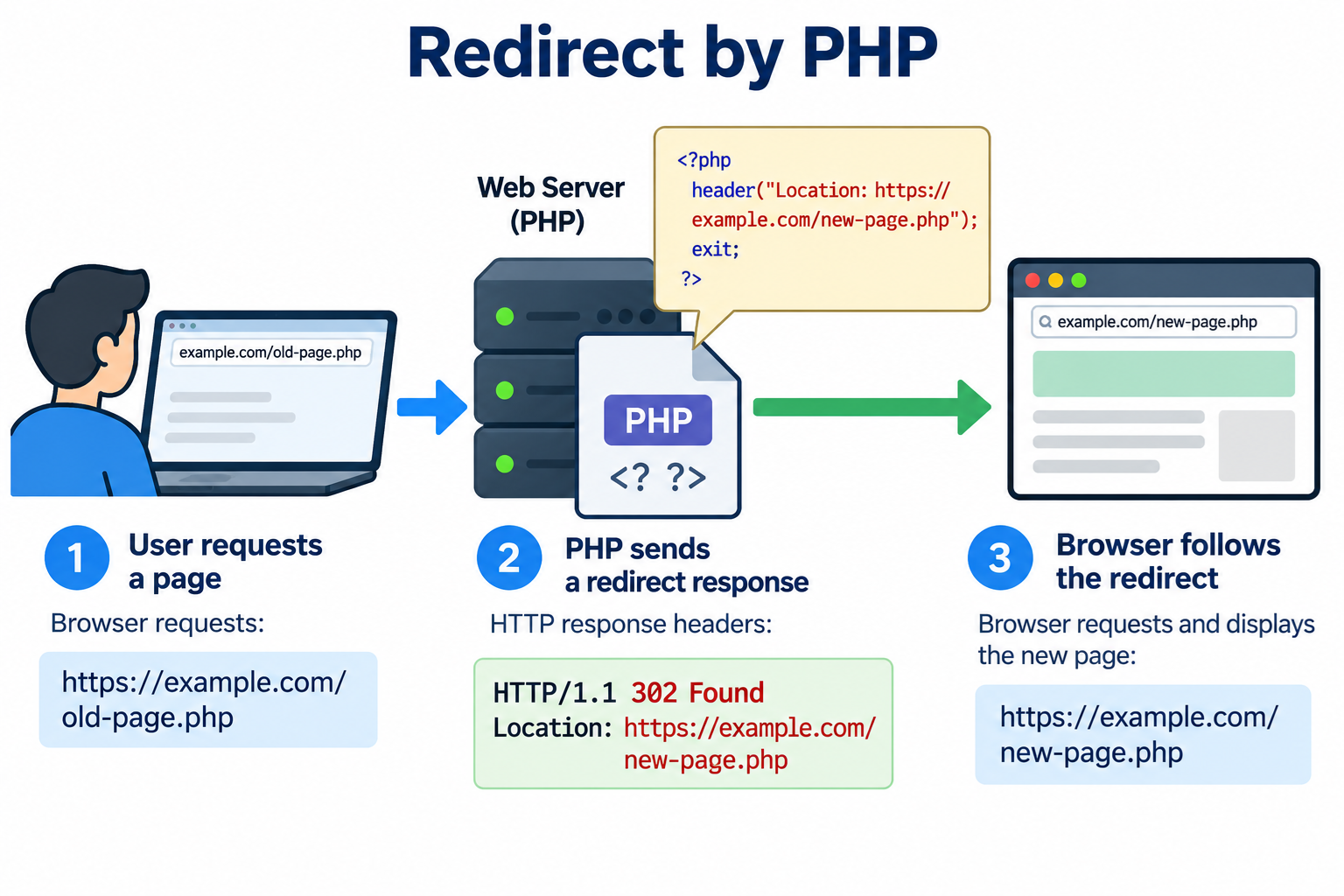
Instead of displaying the original page, PHP can send an HTTP response containing a Location header.
The browser receives this response and requests the new address.
A typical redirect involves three steps.
First, the visitor requests the original webpage.
Second, PHP sends an HTTP redirection response containing the destination URL.
Third, the browser follows the redirect and requests the destination page.
The important point is that PHP does not directly move the browser to another page.
PHP sends instructions through HTTP response headers, and the browser performs the subsequent request.
2. The Simplest PHP Redirect
The easiest way to redirect visitors using PHP is with the header() function.
Create a PHP file containing:
<?php
header(“Location: https://example.com/new-page.php“);
exit;
When someone visits this PHP file, the browser receives a redirect instruction pointing to the new URL.
The header() function sends an HTTP response header.
The Location header identifies the destination URL.
The exit statement immediately stops further PHP execution.
The exit statement is important because sending a redirect header does not automatically stop the remaining PHP code from running.
Without exit, the script could continue processing information, modifying files, or executing database operations after issuing the redirect.
When no other response status has been explicitly set, PHP normally uses HTTP 302 Found for a Location redirect.
This makes the basic example a temporary redirect.
3. Understanding HTTP 301 and 302 Redirects
Two of the most common redirect status codes are 301 and 302.
A 301 redirect means that the requested resource has permanently moved to a new address.
A 302 redirect means that the requested resource is temporarily available at another address.
These codes communicate different intentions to browsers and search engines.
A permanent redirect is commonly used when changing website URLs, replacing outdated pages, or moving a website to a different domain.
A temporary redirect is useful when directing users to another page for a short period without indicating that the original URL has been permanently replaced.
Choosing the correct HTTP status code is important because browsers and search engines may handle permanent and temporary redirects differently.
4. How to Create a Permanent 301 Redirect Using PHP
Suppose you have moved an article permanently from:
https://example.com/old-article.php
To:
https://example.com/new-article.php
You can use the following PHP code:
<?php
header(“Location: https://example.com/new-article.php“, true, 301);
exit;
The third argument, 301, sets the HTTP response status to Moved Permanently.
The second argument, true, tells PHP to replace a previous header with the same name if one has already been set.
This redirect informs browsers and search engines that the original resource has permanently moved.
Search engines generally treat permanent redirects as a signal to use the destination URL instead of the old URL.
However, search engine indexing changes may take time, and a 301 redirect does not guarantee any particular search ranking outcome.
Permanent redirects can also be cached by browsers, so test your destination carefully before deploying one.
5. How to Create a Temporary 302 Redirect Using PHP
If you only want to redirect visitors temporarily, use HTTP 302 Found.
For example:
<?php
header(“Location: https://example.com/temporary-page.php“, true, 302);
exit;
This tells the browser that the resource is temporarily available at another URL.
A temporary redirect may be appropriate when a webpage is undergoing maintenance, a campaign has a temporary destination, or an application needs to direct visitors to another location for a limited period.
For permanent website restructuring, a 301 redirect is usually more appropriate.
For temporary application navigation, 302 may be sufficient.
6. Redirect to Another Page on the Same Website
You do not always need to specify a complete URL.
PHP can send a relative or root-relative Location value.
For example:
<?php
header(“Location: /contact.php”, true, 302);
exit;
This redirects visitors to the contact.php page at the root of the same website.
If your domain is example.com, the destination will normally be:
https://example.com/contact.php
You can also redirect to a directory:
<?php
header(“Location: /support/”, true, 302);
exit;
Using root-relative paths can be convenient because you do not need to repeat the website’s domain name.
It also allows the same redirect logic to work across different environments, such as a development server and a production server, provided their URL structures are compatible.
7. Redirect Visitors to Another Domain
PHP can redirect visitors from one website to another.
Suppose your business has moved from an old domain to a new domain.
You can create the following PHP redirect:
<?php
header(“Location: https://www.newdomain.com/“, true, 301);
exit;
Visitors opening the PHP page on the old domain will receive a permanent redirect to the new website.
This approach is useful for individual PHP pages or application-controlled requests.
However, if you need to redirect an entire domain containing many static and dynamic resources, server-level redirects are often more efficient.
Apache .htaccess rules, Nginx configuration, or CDN redirect rules can handle requests before PHP needs to execute.
The best choice depends on the number of redirects and whether the destination requires PHP application logic.
8. Redirect Users After Submitting a Form
One of the most useful applications of PHP redirects is form processing.
Suppose a visitor submits a contact form. After the server processes the submitted information, you want the browser to display a confirmation page.
A common approach is to redirect after a successful POST request.
For example:
<?php
if ($_SERVER[“REQUEST_METHOD”] === “POST”) {
// Validate and process the submitted form data.

// After successful processing, redirect.

header("Location: /thank-you.php", true, 303);

exit;
}
In this example, HTTP 303 See Other is used.
The 303 status code instructs the browser to retrieve the destination using GET rather than repeating the original POST request.
This is useful because it helps prevent visitors from accidentally resubmitting a form when refreshing the confirmation page.
This technique is commonly known as the Post/Redirect/Get pattern.
It is widely used for contact forms, registration forms, database updates, and other web application operations.
The redirect should occur only after the server has successfully validated and processed the submitted data.
9. Redirect Visitors Based on Login Status
PHP redirects can also be used to control navigation within applications that require authentication.
For example, suppose a user must log in before viewing a dashboard.
You can check whether the user’s session contains valid authentication information.
A simplified example is:
<?php
session_start();
if (empty($_SESSION[“user_id”])) {
header("Location: /login.php", true, 302);

exit;
}
// Continue displaying the protected page.
This example starts a PHP session and checks for a user identifier.
If the identifier is missing, the visitor is redirected to the login page.
If the session is valid, PHP continues processing the dashboard.
This demonstrates a common pattern, but production applications must also verify session integrity, manage session expiration, protect against session fixation, and enforce authorization on every protected request.
Redirecting an unauthenticated visitor is not, by itself, a complete access-control system.
10. Redirect Visitors Based on Conditions
One major advantage of PHP redirects is that you can make decisions dynamically.
For example, you may want to send visitors to different pages depending on a value supplied in a query parameter.
Consider the following example:
<?php
$page = $_GET[“page”] ?? “”;
if ($page === “support”) {
header("Location: /support.php", true, 302);

exit;
} elseif ($page === “products”) {
header("Location: /products.php", true, 302);

exit;
} else {
header("Location: /", true, 302);

exit;
}
If the visitor requests:
https://example.com/redirect.php?page=support
The browser is redirected to the support page.
If the visitor requests:
https://example.com/redirect.php?page=products
The browser is redirected to the products page.
This example uses predefined destinations rather than allowing arbitrary URLs supplied by visitors.
That is an important security practice because unrestricted redirect destinations can create open redirect vulnerabilities.
11. Redirect While Preserving Query Parameters
Sometimes you want to redirect visitors without losing certain query parameters.
For example, suppose the original request contains a product identifier.
You may want to redirect the visitor to another page while preserving that identifier.
Consider the following PHP code:
<?php
$productId = filter_input(
INPUT_GET,
“id”,
FILTER_VALIDATE_INT
);
if ($productId === false || $productId === null || $productId < 1) {
http_response_code(400);

exit("Invalid product ID.");
}
$destination = “/products/view.php?” . http_build_query([
“id” => $productId
]);
header(“Location: ” . $destination, true, 302);
exit;
If the original request is:
https://example.com/old-product.php?id=123
The destination will be:
https://example.com/products/view.php?id=123
The example validates the product identifier before using it in the destination URL.
The http_build_query() function safely constructs the query string from the supplied parameter values.
This is preferable to blindly copying untrusted query strings into redirect destinations.
For applications dealing with sensitive information, avoid placing passwords, authentication tokens, or private personal data in redirect URLs.
12. How to Redirect Using HTTP 307 and 308
In addition to HTTP 301 and 302, modern HTTP supports status codes 307 and 308.
HTTP 307 means Temporary Redirect.
HTTP 308 means Permanent Redirect.
The important difference is that 307 and 308 preserve the original HTTP request method and request body.
For example, if a client sends a POST request and receives an HTTP 307 redirect, it should send another POST request to the destination, preserving the original request body.
To create a 307 redirect:
<?php
header(“Location: https://example.com/new-endpoint“, true, 307);
exit;
To create a 308 redirect:
<?php
header(“Location: https://example.com/new-endpoint“, true, 308);
exit;
These status codes are useful when redirecting API requests or moving endpoints that accept methods other than GET.
However, be careful when redirecting requests containing sensitive information or when moving requests between different domains.
The destination must be trusted and capable of safely handling the forwarded request.
For ordinary form submissions where you want the browser to display a confirmation page using GET, HTTP 303 is generally a better choice.
13. Why PHP Redirects Must Be Sent Before Output
One of the most common PHP redirect errors occurs when the script sends output before calling header().
PHP must send HTTP headers before the response body is transmitted.
For example, the following code is incorrect:
<?php
echo “Welcome to our website!”;
header(“Location: /home.php”);
exit;
The echo statement may cause PHP to send output before the redirect header.
Depending on PHP output buffering and server configuration, this may produce a warning similar to:
Warning: Cannot modify header information – headers already sent
The proper approach is to send the redirect first:
<?php
header(“Location: /home.php”, true, 302);
exit;
Any HTML output intended for the current page should come after the application has decided that no redirect is needed.
Even whitespace before the opening PHP tag may cause problems in some configurations.
When using PHP-only files, it is also common practice to omit the closing PHP tag to reduce the risk of accidental trailing output.
14. What Is an Open Redirect Vulnerability?
An open redirect occurs when a website allows visitors to control a redirect destination without sufficient validation.
Consider this unsafe example:
<?php
header(“Location: ” . $_GET[“url”]);
exit;
An attacker could create a URL such as:
https://example.com/redirect.php?url=https://malicious.example/
A visitor who trusts your website’s domain might follow the link and then be redirected to an attacker-controlled website.
Open redirects can be used in phishing attacks because the initial URL appears to belong to a legitimate website.
To avoid this problem, never blindly accept a complete redirect URL from user input.
A safer approach is to use an allowlist of approved destinations.
For example:
<?php
$destinations = [
“home” => “/”,
“contact” => “/contact.php”,
“support” => “/support.php”
];
$page = $_GET[“page”] ?? “home”;
if (!is_string($page) || !array_key_exists($page, $destinations)) {
$page = “home”;
}
header(“Location: ” . $destinations[$page], true, 302);
exit;
This code only allows redirects to destinations explicitly defined by the application.
Even if a visitor changes the query parameter, the application will not redirect to an arbitrary external website.
For most simple PHP redirect applications, predefined destinations are easier to audit and maintain than unrestricted URL redirection.
15. How to Test PHP Redirects
After implementing a PHP redirect, test it in a web browser to confirm that it reaches the correct destination.
You can also inspect the HTTP response using curl.
For example:
curl -I https://example.com/old-page.php
If the page uses a permanent redirect, you should see a response similar to:
HTTP/1.1 301 Moved Permanently
Location: https://example.com/new-page.php
For a temporary redirect, you may see:
HTTP/1.1 302 Found
Location: https://example.com/temporary-page.php
The exact HTTP version and additional headers depend on the server.
To follow redirects automatically, use:
curl -L -I https://example.com/old-page.php
The -L option tells curl to follow redirects.
The -I option requests headers using the HEAD method, so this test is appropriate for endpoints that handle HEAD correctly.
If you want to test the full redirected response using GET, use:
curl -L -o /dev/null -w “%{http_code}\n” https://example.com/old-page.php
On Linux or WSL, this command follows redirects, discards the response body, and prints the final HTTP status code.
You can also inspect redirects using your browser’s Developer Tools under the Network tab.
16. PHP Redirect vs. .htaccess Redirect
Both PHP and Apache .htaccess can perform HTTP redirects, but they operate at different stages of request processing.
PHP redirects are executed by PHP scripts. They are useful when the destination depends on application conditions, user sessions, submitted forms, or database information.
Apache .htaccess redirects are handled by the web server. They are generally useful for static URL changes, domain redirects, and straightforward redirection rules.
For example, a permanent redirect in Apache .htaccess may look like this:
Redirect 301 /old-page.html https://example.com/new-page.html
This directive requires Apache’s mod_alias module and appropriate configuration permissions.
For a permanent redirect of a simple static URL, using Apache configuration can avoid starting a PHP application solely to send a redirect response.
For more complex business logic, PHP is often the better choice.
If your website uses Nginx rather than Apache, you can implement server-level redirects through Nginx configuration instead of .htaccess.
For websites behind a CDN, some redirects can also be handled at the CDN edge.
17. Common PHP Redirect Problems
Redirect Not Working
Check whether output has already been sent before header() is called.
Make sure the Location URL is valid and points to the intended destination.
Also confirm that the PHP script is actually being executed by the web server.
Too Many Redirects
This error usually indicates a redirect loop.
For example, page A redirects to page B, while page B redirects back to page A.
A redirect loop can also occur when PHP redirects HTTP requests to HTTPS while a reverse proxy or hosting configuration incorrectly reports the original protocol.
Review your PHP redirects, web server rules, CDN configuration, and proxy settings to identify conflicting behavior.
Redirect Works but PHP Code Continues Running
Always use exit after a redirect when the script should stop processing.
Calling header() sends a response header but does not terminate execution automatically.
Browser Continues Using an Old Redirect
Browsers may cache permanent redirects.
If you change a 301 destination and continue seeing the previous URL, test with curl or a fresh browser session and inspect any CDN cache.
Avoid using permanent redirects while experimenting with unverified destination URLs.
Redirecting to HTTPS Creates a Loop
This can happen when a website operates behind a load balancer or reverse proxy that terminates HTTPS before forwarding requests to the application.
The PHP application may incorrectly believe every request uses HTTP.
Configure trusted proxy handling correctly instead of blindly relying on untrusted request headers.
For enforcing HTTPS on an entire website, server-level or CDN-level HTTPS redirects are often preferable to implementing the same check in every PHP script.
18. Best Practices for PHP Redirection
PHP redirects are straightforward, but a few practices make them more reliable and secure.
Always use an appropriate HTTP status code. Use 301 or 308 for permanent moves, 302 or 307 for temporary moves, and 303 when redirecting to a GET confirmation page after a form submission.
Call header() before sending output to the browser.
Use exit immediately after issuing a redirect when no further PHP processing should occur.
Validate redirect destinations and avoid using arbitrary URLs taken directly from query parameters.
Use HTTPS destinations whenever possible, particularly for login pages and other sensitive application operations.
Keep redirect chains short. Redirecting from page A to page B and then to page C creates unnecessary requests and delays.
Avoid redirect loops by coordinating PHP application logic with web server and CDN rules.
Use server-level redirects for simple site-wide URL changes when appropriate, and reserve PHP redirects for situations requiring application logic.
Finally, test redirects after making changes to domain names, website paths, authentication logic, or reverse proxy configuration.
Conclusion
PHP provides an easy and flexible method for redirecting website visitors from one URL to another.
The header() function allows developers to send the HTTP Location header and specify whether a redirect is permanent, temporary, or related to application workflow.
A simple PHP redirect requires only two essential operations: sending the appropriate Location header and stopping further execution when necessary.
More advanced redirects can depend on login status, form submissions, query parameters, or other application conditions.
For ordinary static redirects, Apache .htaccess or server-level configuration may be more efficient. For dynamic application-driven navigation, PHP offers greater flexibility.
By choosing the correct HTTP status codes, validating redirect destinations, and testing your configuration carefully, you can implement reliable redirects while avoiding common security and compatibility problems.