
Backlinks are links from other websites that point to your website.
Good backlinks can help people discover your content and may contribute to your website’s reputation and visibility in search engines.
However, not every backlink is useful.
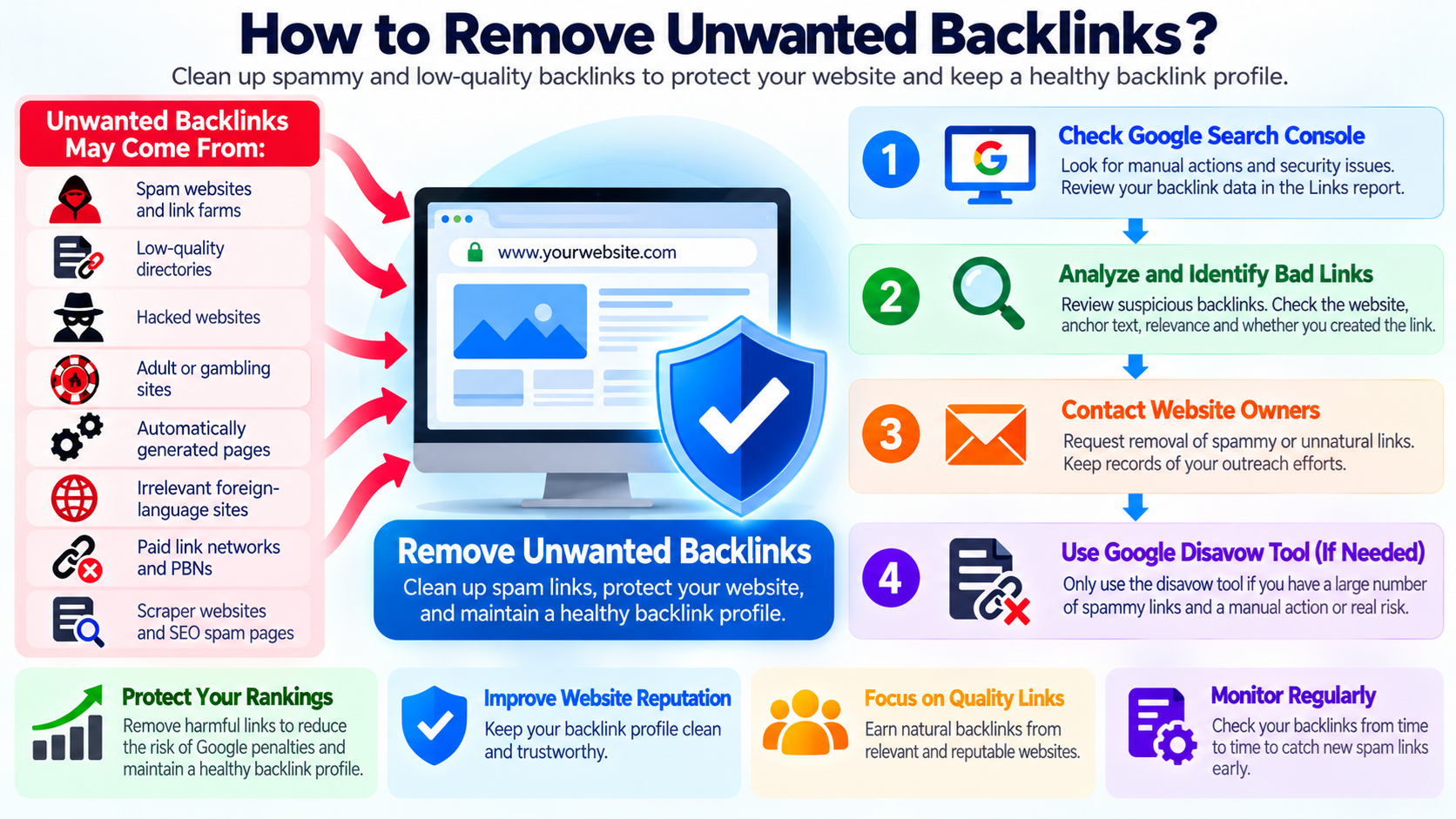
Sometimes a website may receive links from:
Spam websites
Low-quality directories
Link farms
Hacked websites
Adult or gambling sites
Automatically generated pages
Irrelevant foreign-language sites
Paid-link networks
Private blog networks
Scraper websites
SEO spam pages
These links are often called unwanted backlinks, toxic backlinks, spammy backlinks, or unnatural links.
If you discover them, you may wonder whether they should be removed.
The answer depends on how the backlinks were created and whether they are actually causing a problem.
What Is a Backlink?
A backlink is simply a hyperlink from another website to your website.
For example, if another website publishes:
Visit example.com for more information.
and links that text to your website, that is a backlink.
Backlinks can be completely natural.
A blogger might mention your article.
A newspaper might link to your company.
A customer might recommend your website.
A business directory might list your company.
These are normal parts of the web.
The problem begins when backlinks are created primarily to manipulate search rankings or come from spam systems designed to create large numbers of artificial links.
Are All Low-Quality Backlinks Dangerous?
No.
This is one of the most important things to understand.
Most websites eventually collect strange or low-quality backlinks.
You may see links from:
Unknown domains
Scraper sites
Automatically generated pages
Spam directories
Foreign-language sites
Old abandoned websites
Random subdomains
This does not automatically mean your website has been harmed.
Google has become much better at identifying and ignoring many spammy links.
For most websites, discovering a few bad-looking links is not a reason to panic.
Do You Need to Remove Every Bad Backlink?
Usually, no.
Trying to remove every suspicious backlink on the Internet can become an endless job.
You do not control other websites.
New spam links may appear every day.
Some automated websites create links without asking you.
Google’s current guidance is that most websites do not need to use the Disavow Links tool because Google can usually determine which links should be trusted and which should be ignored.
The main exception is when a website has a serious pattern of unnatural links that may violate Google’s spam policies.
Why Do Bad Backlinks Exist?
Unwanted backlinks can appear for many reasons.
Some are completely outside your control.
For example:
A scraper copies your content.
A spam website automatically links to thousands of domains.
A bot creates fake profile pages.
An old directory imports website data.
A malicious person creates spam links.
A previous SEO company purchased links.
A website owner participated in link exchanges.
Someone submitted the website to thousands of directories.
A hacked website begins linking to random domains.
The source of the backlinks matters.
Backlinks You Created Are More Important
You should be especially concerned if you or someone working for you intentionally created artificial links.
Examples include:
Buying backlinks
Paying for PageRank-passing links
Using automated link-building software
Participating in large-scale link exchanges
Creating private blog networks
Submitting thousands of keyword-rich directory links
Creating fake websites only to link to your main website
Paying an SEO company that used manipulative link-building techniques
These links may violate Google’s spam policies.
If you created or purchased them, cleaning them up becomes much more important.
Check Google Search Console First
Before taking action, log in to Google Search Console.
Check the Manual Actions section.
A manual action means that a Google reviewer has determined that part of your website violates Google’s spam policies.
If you see no manual action, that is an important piece of information.
You should also check the Security Issues section to make sure your own website has not been compromised.
A strange backlink profile does not automatically mean you have a manual action.
What Is an Unnatural Links Manual Action?
Google may issue a manual action if it detects a pattern of artificial or manipulative links intended to influence search rankings.
For example, a manual action might be related to unnatural links pointing to your website.
This is much more serious than simply seeing a few strange domains in an SEO tool.
If you receive a manual action, Google normally expects you to make a genuine effort to clean up the problem.
That may include contacting websites to remove artificial links and disavowing links that cannot be removed.
Find Your Backlinks
You can find backlink information from several sources.
Google Search Console provides a Links report.
Third-party SEO platforms may also show additional backlinks.
Examples of commonly used SEO tools include:
Ahrefs
Semrush
Moz
Majestic
Other backlink analysis platforms
These tools may discover different sets of links.
Do not expect every tool to show exactly the same backlinks.
Do Not Assume a High Spam Score Means You Are Penalized
Some SEO tools assign metrics such as:
Spam Score
Toxic Score
Domain Rating
Domain Authority
Trust Flow
These are third-party metrics.
They are not Google penalties.
A backlink marked “toxic” by an SEO tool does not automatically mean Google considers it harmful.
Use these metrics as investigation tools, not as absolute truth.
Review Suspicious Links Manually
Before trying to remove a backlink, examine it.
Ask:
Is the website legitimate?
Is the page relevant?
Was the link naturally earned?
Did you create or purchase it?
Is the site obviously spam?
Does the page exist only to publish links?
Is the anchor text unnaturally optimized?
Does the website link to thousands of unrelated sites?
Is the domain part of a known link network?
Context matters.
A strange-looking site is not automatically dangerous.
Look at the Anchor Text
Anchor text is the clickable text used in a link.
Natural backlinks often use a variety of anchor text, such as:
Company name
Website URL
Article title
Click here
Read more
Generic phrases
Artificial link-building campaigns may use the same commercial keyword repeatedly.
For example, if hundreds of unrelated websites all link to your site using exactly:
best cheap web hosting
that may look less natural than normal editorial links.
A repeated keyword pattern can be one clue that links were intentionally created for SEO manipulation.
Create a Backlink Audit
If you have a serious backlink problem, organize the links before taking action.
Record information such as:
Source domain
Source URL
Target page
Anchor text
Whether you created the link
Whether the link appears artificial
Whether you contacted the site owner
Whether the link was removed
Whether the domain may need to be disavowed
Keeping records is especially important if you need to submit a reconsideration request after a manual action.
Contact the Website Owner
If an unwanted backlink was intentionally created or clearly violates search guidelines, the first step is normally to try to have it removed.
Look for contact information on the linking website.
This may appear on:
Contact page
About page
Privacy policy
Website footer
Domain contact information
Social media
You can politely request removal of the backlink.
Keep the request short and specific.
Include:
The page containing the backlink
The URL of your website being linked
A clear request to remove the link
Avoid threatening or aggressive language.
Do Not Pay for Link Removal
Some low-quality websites may demand payment before removing a backlink.
Be cautious.
You are not required to pay every spam website on the Internet to remove links.
If the link genuinely needs to be addressed and the website owner refuses to remove it without payment, disavow may be a more appropriate option in situations where Google’s criteria for using the tool are met.
Do not turn backlink removal into an endless payment scheme.
Keep Evidence of Removal Attempts
If you are dealing with a Google manual action, document your cleanup efforts.
Keep records such as:
Emails sent
Contact forms submitted
Responses received
Links successfully removed
Sites that did not respond
Sites that demanded payment
URLs that no longer exist
Google specifically recommends making a good-faith effort to remove artificial links before relying entirely on disavow.
This documentation can also help if you later submit a reconsideration request.
What Is Google’s Disavow Links Tool?
The Disavow Links tool allows you to tell Google that you do not want certain backlinks considered when Google evaluates your website.
It is an advanced tool.
It does not physically delete the backlink from the other website.
The link may still exist.
People may still click it.
Other search engines may still see it.
The disavow request only affects how Google treats those links for ranking purposes.
Important: Disavow Does Not Remove the Link
This is commonly misunderstood.
If you disavow:
spamwebsite.example → yoursite.com
the link does not disappear from spamwebsite.example.
You are essentially asking Google not to associate that link with your website for ranking evaluation.
If you want the link physically removed, the owner of the linking website must remove it.
When Should You Use the Disavow Tool?
Google recommends using the Disavow Links tool only in limited situations.
You should generally consider it when both of these conditions apply:
You have a considerable number of spammy, artificial, or low-quality links pointing to your website.
And those links have caused a manual action or are likely to cause one.
For most normal websites, the tool is unnecessary.
Do Not Disavow Just Because an SEO Tool Says “Toxic”
This is extremely important.
Do not automatically export every backlink marked toxic by a third-party SEO tool and upload the list to Google.
You may accidentally disavow legitimate links.
A good backlink may come from a site with low authority.
A new website may have very few backlinks.
A small blog may still provide a genuine editorial link.
The appearance of a website alone does not determine whether the link is harmful.
Disavowing Good Links Can Hurt You
The Disavow Links tool should be used carefully.
If you disavow high-quality backlinks that Google would otherwise value, you may remove positive ranking signals.
This could reduce search performance.
That is why Google warns that incorrect use of the tool can potentially harm your website’s search results.
Do not treat disavow as a routine SEO maintenance tool.
How to Create a Disavow File
Google requires a plain text file.
Each URL or domain should appear on a separate line.
For example, to disavow a specific page you could use:
https://spam.example/bad-page.html
To disavow all links from a domain, use:
domain.example
If the entire domain is clearly part of a spam or manipulative network, disavowing the domain is often simpler than listing hundreds of individual URLs.
Do not disavow a whole domain unless you are confident that you do not want links from that domain counted.
Domain-Level vs. URL-Level Disavow
Suppose one legitimate website contains one unwanted link.
You may prefer to disavow only the specific page.
However, suppose a spam domain contains thousands of automatically generated pages linking to you.
In that situation, a domain-level entry may make more sense.
For example:
domain.com
This asks Google to ignore links from that entire domain.
Use this carefully.
Comments in a Disavow File
The disavow file can contain comments.
Comment lines begin with the # symbol.
For example:
Links created by previous SEO agency
domain.com
Comments are for your own documentation.
Google ignores them when processing the links.
Keeping notes can make the file easier to manage later.
Upload the File Carefully
The Disavow Links tool is associated with Google Search Console.
Google currently warns that it is an advanced feature.
One important limitation is that the tool does not work directly with Search Console Domain properties.
If necessary, you may need a URL-prefix property for the relevant version of your site.
Always follow Google’s current documentation when using the tool.
Do Not Upload a New File Without Checking the Old One
A newly uploaded disavow file replaces the previously uploaded file.
It does not simply add new entries.
Therefore, if you already have a disavow file, download or review it before uploading a replacement.
Make sure the new file includes any previous entries you still want to keep.
Otherwise, previously disavowed links may no longer be included.
How Long Does Disavow Take?
Disavow is not instant.
Google needs to crawl the relevant pages again and process the updated information.
This can take time.
Do not expect rankings or backlink reports to change immediately after uploading the file.
The backlinks may also continue to appear in third-party SEO tools because the links physically still exist.
Disavowed Links May Still Appear in Reports
Do not assume the disavow failed simply because you still see the backlink.
A disavowed backlink can remain visible in:
Google Search Console
Ahrefs
Semrush
Moz
Other backlink databases
The link still exists on the web.
Disavow changes how Google may treat the link, not whether the link is displayed by backlink reporting tools.
What Is a Reconsideration Request?
If your website received a manual action, cleaning the backlinks is only part of the process.
After removing or disavowing the unnatural links, you may need to submit a reconsideration request through Google Search Console.
In the request, explain:
What caused the problem
What steps you took
Which links were removed
Which links could not be removed
What changes you made to prevent the problem from happening again
Be clear and truthful.
Do Not Hide Past SEO Work
If a previous SEO company created the links, explain that.
If you purchased links in the past, explain that.
The purpose of a reconsideration request is to demonstrate that the problem has been corrected.
Trying to hide what happened is less useful than clearly showing the cleanup work.
What About Negative SEO?
Negative SEO refers to attempts by another party to harm a website’s rankings.
One claimed technique involves creating large numbers of spam backlinks pointing to a competitor.
This idea causes many website owners unnecessary anxiety.
Modern search engines are generally designed to recognize and ignore many obviously manipulative third-party links.
If you suddenly receive hundreds of random spam links that you did not create and you have no manual action, you usually do not need to immediately disavow everything.
Monitor the situation and focus on actual evidence of a problem.
Sudden Spam Backlinks Are Common
You may open an SEO tool one day and discover hundreds or thousands of strange new backlinks.
This can happen because:
A scraper network discovered your website.
An SEO database discovered old links that already existed.
A spam network created automatically generated pages.
A compromised website started publishing random links.
A backlink tool updated its crawler.
The increase itself does not prove that your website has been penalized.
Look at Search Console, Not Only Third-Party Tools
Third-party SEO tools are valuable, but Google Search Console should be an important part of your investigation.
Check:
Manual Actions
Security Issues
Search performance
Indexing
Links
If rankings are stable, traffic is normal, and there is no manual action, a handful of spam backlinks may require no action.
Do Not Obsess Over Every Backlink
Backlink monitoring can become counterproductive.
The Internet is messy.
Your website will eventually receive links that make no sense.
You cannot control every website that mentions you.
Spend more time creating:
Useful content
Helpful tutorials
Good products
Strong documentation
Original research
Useful tools
Good customer experiences
These activities can naturally attract better links.
Remove Links You Control
Some unwanted backlinks may actually be under your control.
For example:
Old profile pages
Old websites you own
Expired marketing websites
Forum accounts
Directory submissions
Old guest posts
Partner websites
If you created manipulative links and can remove them yourself, remove them.
This is much easier than asking Google to ignore them later.
Be Careful With SEO Agencies
Before hiring an SEO company, ask how it builds backlinks.
Warning signs include promises such as:
1,000 backlinks in 24 hours
Guaranteed first-page ranking
High-DA links for $10
Automatic backlink packages
Private blog network packages
Unlimited dofollow backlinks
Search engines generally prefer links that exist because another website genuinely wants to reference useful content.
Artificial link packages can create long-term problems.
Avoid Buying Links for Ranking
Paid advertising is normal.
Paying another website to display an advertisement can also be legitimate.
The problem occurs when payment is used specifically to create links intended to manipulate search rankings.
Sponsored or advertising links should be marked appropriately according to search-engine guidelines.
Buying large numbers of ranking-focused links is a risky strategy.
Avoid Large-Scale Link Exchanges
A normal business partner may naturally link to your website.
That is not automatically a problem.
However, large-scale arrangements such as:
You link to 500 websites and all 500 link back to you.
can look artificial.
Link exchanges should not exist primarily to manipulate rankings.
Avoid Automated Link Building
Software can create thousands of backlinks quickly.
It may post links in:
Blog comments
Forums
Profiles
Guestbooks
Directories
Wiki pages
Spam pages
This type of automated link building can create a very unnatural backlink profile.
More links does not necessarily mean better SEO.
Quality and relevance matter much more.
Build Better Backlinks Instead
The best long-term strategy is not constantly removing bad links.
It is earning better links.
Useful backlinks can come from:
Original tutorials
Industry research
Technical documentation
Useful calculators or tools
Case studies
Educational resources
News coverage
Partnerships
Professional organizations
High-quality guest contributions
Good products and services
When people genuinely find your content useful, links can appear naturally.
Can You Prevent Bad Backlinks?
Not completely.
Anyone can link to a public website.
There is no setting that allows you to approve every backlink before it appears.
You can protect your own website, but you cannot control every other website on the Internet.
This is why search engines must evaluate backlinks intelligently instead of assuming every link was created by the website owner.
Do Not Block Referrer Traffic Just to Remove a Backlink
Blocking a domain in your firewall or analytics system does not remove its backlink.
These are different things.
A backlink exists on the other website.
Your server cannot delete it remotely.
You can:
Ask the owner to remove it.
Or, in appropriate cases, disavow it for Google.
Blocking the site’s traffic does not remove the link itself.
Do Not Delete Your Own Page Just Because It Has Spam Links
If a valuable page receives spam backlinks, you normally should not delete the page simply to remove those links.
The page may also have legitimate visitors and useful backlinks.
Investigate the links instead.
Deleting useful content can cause more damage than the spam backlinks themselves.
Watch for Hacked Backlinks
Sometimes backlinks come from hacked websites.
You may find your domain inserted into pages that have nothing to do with your business.
You usually cannot repair the other website yourself.
You can notify the owner if contact information is available.
However, if the site owner never responds, there may be little you can do to physically remove the link.
What If Someone Keeps Creating Spam Links?
If new spam backlinks keep appearing, do not assume you must update a disavow file every day.
First determine whether the links are actually affecting you.
If there is no manual action and you did not create the links, continuous disavow maintenance may provide little benefit.
Monitor the overall pattern instead of reacting to every new domain.
A Practical Backlink Cleanup Process
A sensible cleanup process usually looks like this:
First, check Google Search Console for manual actions.
Second, identify whether the suspicious links were created by you, your company, or an SEO provider.
Third, review the questionable links manually.
Fourth, remove artificial links you control.
Fifth, contact website owners where removal is practical.
Sixth, document your removal attempts.
Seventh, use the Disavow Links tool only when Google’s criteria justify it.
Finally, if you have a manual action, submit a reconsideration request after the cleanup is complete.
When You Probably Do Not Need to Do Anything
You probably do not need a major backlink cleanup if:
You have no manual action.
You did not purchase or create artificial backlinks.
Only a small number of spam links exist.
Search performance is normal.
The links are clearly automated spam.
A third-party SEO tool is the only thing warning you.
In this situation, monitoring may be enough.
When You Should Investigate More Seriously
You should investigate more carefully if:
You previously purchased backlinks.
A previous SEO company created large numbers of links.
You participated in link schemes.
You have thousands of keyword-rich artificial links.
You received a Google manual action.
You knowingly used private blog networks.
You used automated link-building software.
You have a large, obviously manipulated backlink profile.
These situations deserve a more structured cleanup.
Final Thoughts
Unwanted backlinks are common.
Seeing strange links does not automatically mean your website is under attack or has been penalized.
Modern search engines can ignore many low-quality and spammy backlinks.
For most website owners, the first step should not be to disavow every suspicious link.
Start by checking Google Search Console.
Determine whether you have a manual action.
Find out whether the suspicious links were intentionally created by you or someone working for you.
Remove clearly artificial links when you reasonably can.
Document the cleanup if the problem is serious.
Use Google’s Disavow Links tool only when there is a substantial pattern of artificial or low-quality links and there is a real risk of a manual action.
Most importantly, focus on building a healthy website rather than trying to control every link on the Internet.
Create useful content.
Earn genuine mentions.
Avoid artificial link schemes.
Monitor your backlink profile without becoming obsessed with it.
The goal is not to have a perfectly clean backlink profile.
The goal is to have a website that search engines and real users can trust.